ແນະນຳ
The Shark TurboBlade Fan is a bladeless tower fan designed for ultra-customizable air circulation. It features 180° oscillation, pivoting and twisting capabilities, and 10 noise levels with 10 speeds. Its design incorporates DustDefense technology for easy cleaning and optimized performance. This manual provides essential information for the safe and efficient operation of your TurboBlade Fan.
ຂໍ້ມູນຄວາມປອດໄພທີ່ສໍາຄັນ
Please read all instructions carefully before using your Shark TurboBlade Fan. Failure to follow these instructions may result in electric shock, fire, or serious injury.
- ຖອດພັດລົມອອກຈາກປລັກສຽບໄຟທຸກເທື່ອກ່ອນທີ່ຈະທຳຄວາມສະອາດ ຫຼື ບຳລຸງຮັກສາ.
- ຫ້າມໃຊ້ພັດລົມທີ່ມີສາຍໄຟ ຫຼືປລັກສຽບເສຍຫາຍ. ຖິ້ມພັດລົມ ຫຼືກັບຄືນໄປຫາສະຖານທີ່ບໍລິການທີ່ໄດ້ຮັບອະນຸຍາດເພື່ອກວດ ແລະ/ຫຼືສ້ອມແປງ.
- ຢ່າແລ່ນສາຍໄຟພາຍໃຕ້ຜ້າພົມ. ຫ້າມປົກສາຍດ້ວຍຜ້າປູບ່ອນຖິ້ມ, ເຄື່ອງແລ່ນ, ຫຼືຜ້າປົກທີ່ຄ້າຍຄືກັນ. ຈັດວາງສາຍໄຟໃຫ້ຫ່າງຈາກພື້ນທີ່ຈະລາຈອນ ແລະບ່ອນທີ່ມັນຈະບໍ່ຖືກຂ້າມໄປ.
- ຫ້າມໃສ່ ຫຼືປ່ອຍໃຫ້ສິ່ງຕ່າງປະເທດເຂົ້າໄປໃນທໍ່ລະບາຍອາກາດ ຫຼືທໍ່ລະບາຍອາກາດ ເພາະອາດຈະເຮັດໃຫ້ເກີດໄຟຟ້າ ຫຼືໄຟໄໝ້ ຫຼືເຮັດໃຫ້ພັດລົມເສຍຫາຍ.
- ຢ່າໃຊ້ນອກ. ພັດລົມນີ້ມີຈຸດປະສົງເພື່ອໃຊ້ພາຍໃນເຮືອນເທົ່ານັ້ນ.
- ຫ້າມໃຊ້ພັດລົມໃນບ່ອນປຽກ ຫຼື ງamp ສະຖານທີ່ເຊັ່ນ: ຫ້ອງນ້ໍາຫຼືພື້ນທີ່ຊັກ.
- ຮັກສາພັດລົມໃຫ້ໄກຈາກເດັກນ້ອຍ ແລະສັດລ້ຽງ.
ມີຫຍັງແດ່
- Shark TurboBlade Fan (Model TF202SWH)
- ການຄວບຄຸມໄລຍະໄກ (ຕ້ອງການ 2 ຫມໍ້ໄຟ AAA, ລວມ)
ຕັ້ງຄ່າ
The Shark TurboBlade Fan is designed for quick and easy assembly with minimal parts and no tools required.
- Unpack ອົງປະກອບ: Carefully remove all parts from the packaging. Ensure all components listed in the "What's Included" section are present.
- ພື້ນຖານການປະກອບ: Connect the fan tower to the base. Align the components and twist or click into place as indicated by the markings.
- ຕຳແໜ່ງພັດລົມ: Place the assembled fan on a firm, level surface. Ensure there is adequate space around the fan for optimal airflow and oscillation.
- ໃສ່ຫມໍ້ໄຟໄລຍະໄກ: Open the battery compartment on the remote control and insert the two AAA batteries, observing polarity.
- ເຊື່ອມຕໍ່ພະລັງງານ: ສຽບສາຍໄຟເຂົ້າໄປໃນປ່ຽງໄຟຟ້າມາດຕະຖານ.

Image: The Shark TurboBlade Fan configured in horizontal mode, demonstrating its ability to cool two distinct levels simultaneously. This setup is ideal for tiered coverage in rooms.
ຄໍາແນະນໍາການດໍາເນີນງານ
Your Shark TurboBlade Fan offers versatile cooling options. Use the controls on the fan unit or the magnetic remote control to adjust settings.
ເປີດ/ປິດ
- Press the Power button on the fan unit or remote control to turn the fan on or off.
Speed and Noise Levels
- The fan features 10 speed settings, which correspond to 10 noise levels.
- Use the '+' and '-' buttons on the control panel or remote to increase or decrease the fan speed.
- Lower speeds (1-3) provide quiet, gentle cooling, while higher speeds (6-10) offer powerful airflow.
Pivoting and Twisting Airflow
The TurboBlade Fan allows for extensive customization of airflow direction.
- Vertical to Horizontal Pivot: The fan head can pivot from a vertical (Tower Mode) to a horizontal (Air Blanket Mode) orientation. Gently adjust the fan head to your desired angle.
- Twist Vents: The dual vents can be twisted independently to direct airflow in multiple directions, allowing for multi-zone cooling.
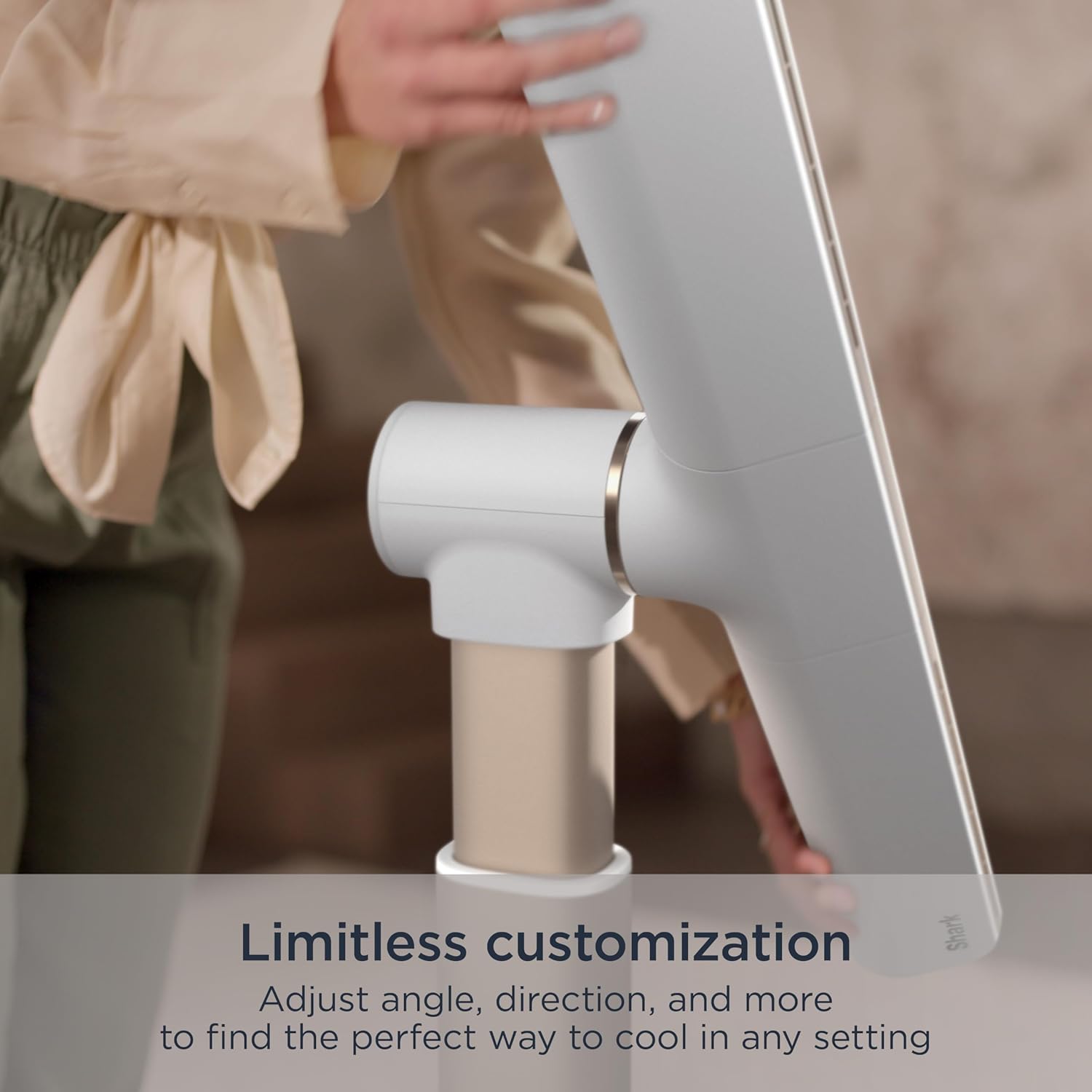
Image: A hand adjusting the fan head, illustrating the fan's limitless customization options for angle and direction.
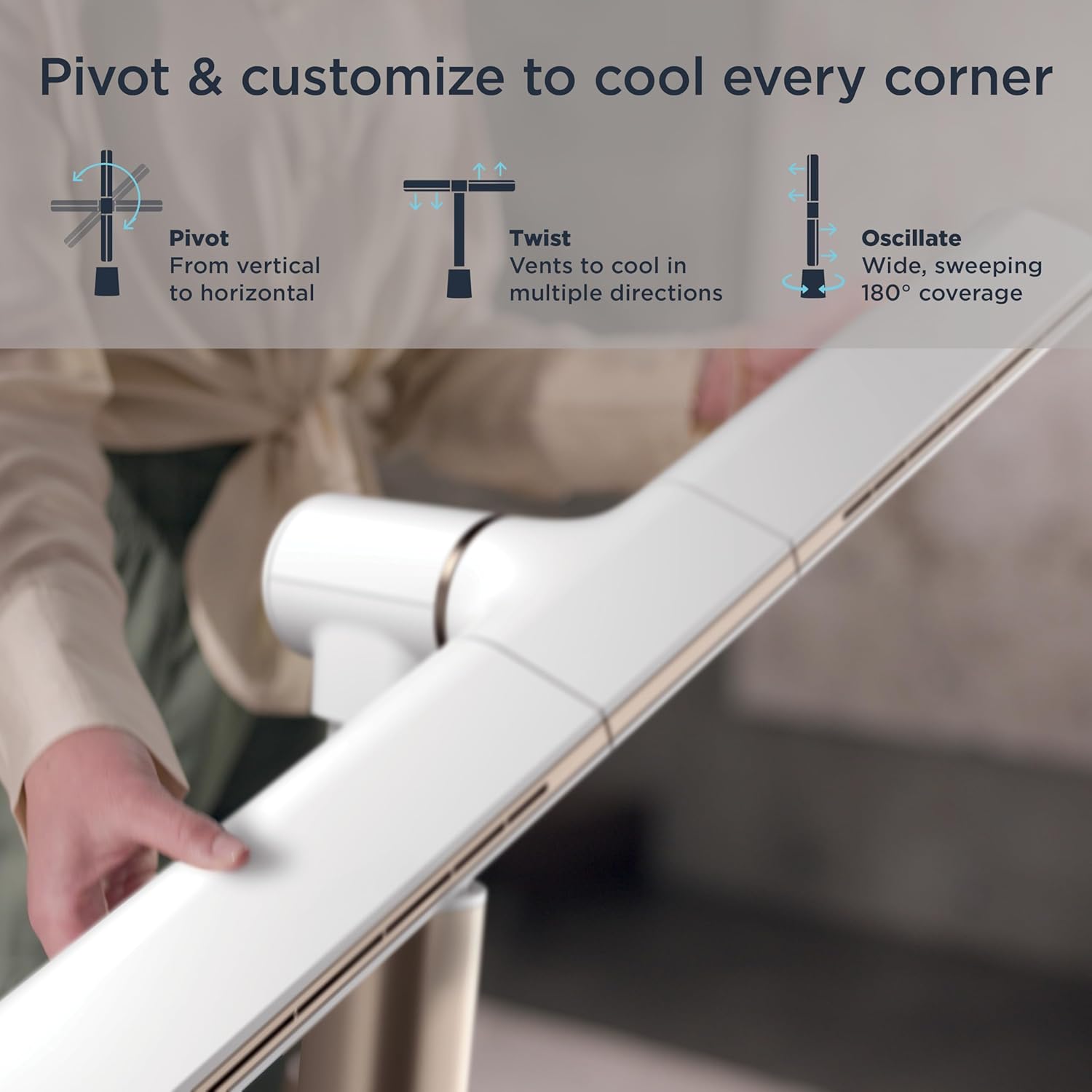
Image: Visual representation of the fan's pivot, twist, and oscillate capabilities, highlighting its ability to cool every corner.
ການສັ່ນສະເທືອນ
- Press the Oscillation button on the remote or fan unit to activate the 180° wide, sweeping oscillation feature.
- Press again to stop oscillation at the desired position.
ໂໝດ
- Air Blanket™ Mode: When the fan is in horizontal orientation, this mode provides widespread, soothing airflow, ideal for sleeping or covering a larger area.
- ໂໝດສາຍລົມທຳມະຊາດ: This mode simulates natural wind by varying the fan speed, creating a gentle, fluctuating breeze indoors.
- Cool Tower Mode: When the fan is in vertical orientation, this mode provides powerful, sweeping coverage with a compact footprint.

Image: The fan operating in Air Blanket™ Mode, positioned horizontally to deliver widespread, soothing airflow in a bedroom setting.
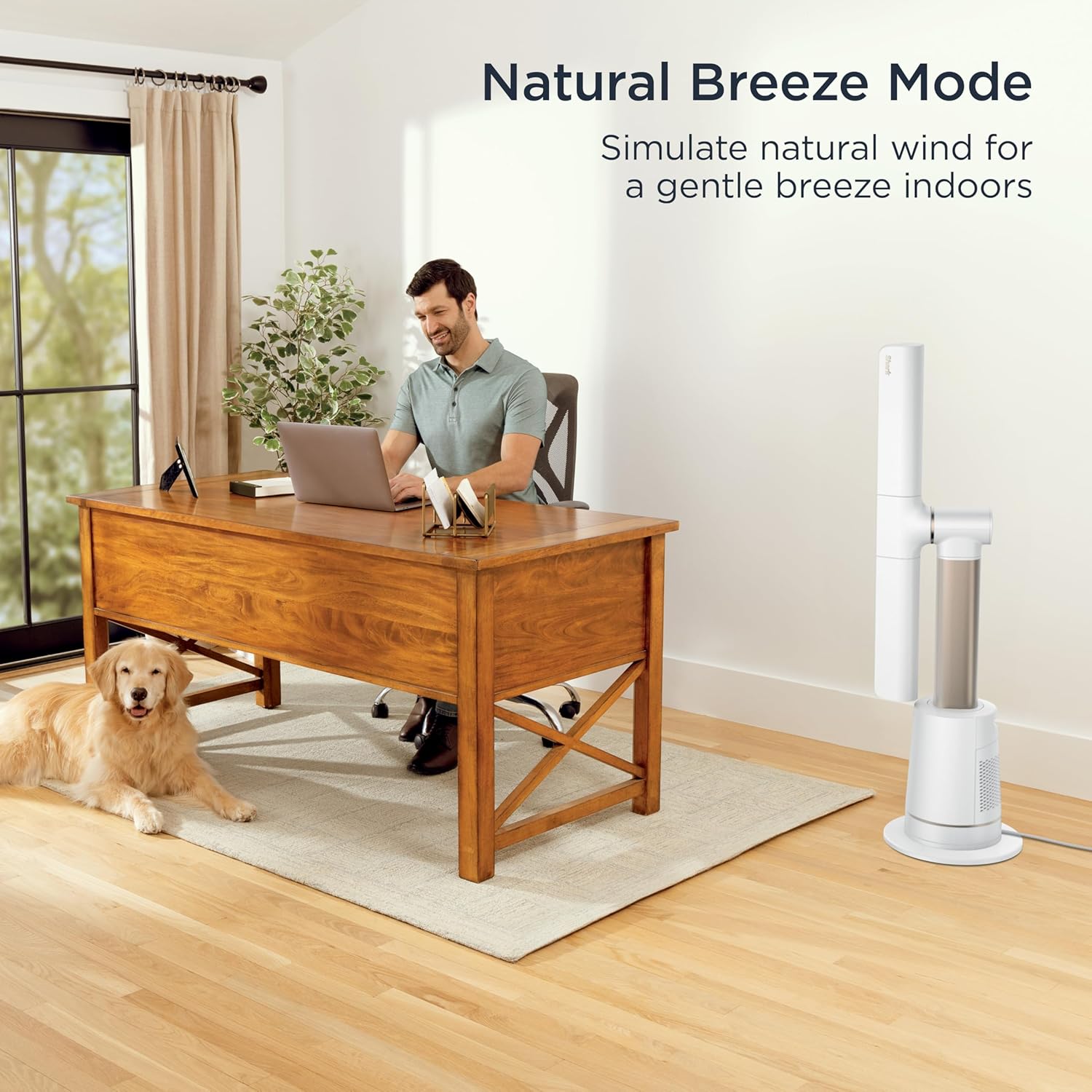
Image: The fan in Natural Breeze Mode, simulating a gentle, natural wind indoors, shown in a home office environment.

Image: The fan in Cool Tower Mode, standing vertically to provide powerful, sweeping coverage with a compact footprint.
ການຄວບຄຸມໄລຍະໄກ
- ການຄວບຄຸມຫ່າງໄກສອກຫຼີກທີ່ລວມໄວ້ອະນຸຍາດໃຫ້ສໍາລັບການດໍາເນີນງານສະດວກຈາກໄລຍະໄກ.
- It features a magnetic parking spot on the fan for easy storage.

Image: A hand holding the remote control, demonstrating its use for controlling the fan from a distance. The remote can be magnetically attached to the fan for storage.
ບໍາລຸງຮັກສາ
Regular maintenance ensures optimal performance and longevity of your Shark TurboBlade Fan.
ທໍາຄວາມສະອາດພາຍນອກ
- ຖອດພັດລົມອອກສະເໝີກ່ອນທຳຄວາມສະອາດ.
- ເຊັດພື້ນຜິວພາຍນອກຂອງພັດລົມໃຫ້ອ່ອນໆ, ງamp ຜ້າ. ຢ່າໃຊ້ເຄື່ອງເຮັດຄວາມສະອາດຂັດຫຼືສານລະລາຍ.
- The bladeless design makes the fan easy to wipe clean, preventing dust buildup common with traditional fans.
DustDefense™ Filter Cleaning
The fan is equipped with DustDefense™ technology to capture particles and optimize performance. Regular cleaning of the filter is recommended.
- ການກັ່ນຕອງການເຂົ້າເຖິງ: Locate the DustDefense™ filter compartment, typically on the side or back of the base unit.
- ເອົາການກັ່ນຕອງອອກ: Gently open the compartment and remove the filter.
- ການກັ່ນຕອງສະອາດ: Tap the filter to dislodge loose dust. For more thorough cleaning, rinse the filter under cool water. Ensure the filter is completely dry before reinserting.
- ຕິດຕັ້ງຕົວກອງຄືນໃໝ່: Place the clean, dry filter back into its compartment and close securely.

Image: A hand demonstrating the removal of the DustDefense™ filter from the fan's base, highlighting the easy cleaning process for optimized performance.
ການແກ້ໄຂບັນຫາ
If you encounter issues with your Shark TurboBlade Fan, refer to the following common solutions:
| ບັນຫາ | ສາເຫດທີ່ເປັນໄປໄດ້ | ການແກ້ໄຂ |
|---|---|---|
| ພັດລົມບໍ່ເປີດ. | No power, loose plug, remote batteries dead. | Ensure the fan is securely plugged into a working outlet. Check circuit breaker. Replace remote batteries. |
| ກະແສລົມອ່ອນແອ. | Low speed setting, blocked air intake/outlet, dirty DustDefense™ filter. | Increase fan speed. Ensure no obstructions. Clean the DustDefense™ filter as per maintenance instructions. |
| ພັດລົມມີສຽງດັງ. | High speed setting, fan not on a level surface, internal obstruction. | Reduce fan speed. Place fan on a stable, level surface. Check for any foreign objects. |
| ການຄວບຄຸມໄລຍະໄກບໍ່ເຮັດວຽກ. | Dead batteries, obstruction between remote and fan, remote out of range. | Replace remote batteries. Ensure clear line of sight to the fan's receiver. Move closer to the fan. |
If the problem persists after trying these solutions, please contact Shark Customer Support.
ຂໍ້ມູນຈໍາເພາະ
| ຄຸນສົມບັດ | ລາຍລະອຽດ |
|---|---|
| ຍີ່ຫໍ້ | ປາສະຫຼາມ |
| ຊື່ຕົວແບບ | Shark TurboBlade Fan |
| ໝາຍເລກຕົວແບບ | TF202SWH |
| ສີ | ນົກເຂົາ |
| ການອອກແບບພັດລົມໄຟຟ້າ | ພັດລົມຊັ້ນ |
| ແຫຼ່ງພະລັງງານ | AC/DC |
| ຂະໜາດສິນຄ້າ | 11.77"D x 31.57"W x 44.84"H |
| ນ້ໍາຫນັກລາຍການ | 14.99 ປອນ |
| ຄຸນນະສົມບັດພິເສດ | Adjustable Height, Oscillating, Quiet Operation, Tower Base |
| ການນໍາໃຊ້ທີ່ແນະນໍາ | Air Circulation, Cooling, Drying, Exhausting, Ventilating |
| ລະດັບສຽງ | 40 Decibels |
| ວັດtage | 192 ວັດ |
| ສະບັບtage | 120.0 ວ |
| ການຕັ້ງຄ່າຄວາມໄວ | 10 |
| ປະເພດມໍເຕີ | ບໍ່ມີແປງ |
| ວິທີການຄວບຄຸມ | ໄລຍະໄກ |
| ການນຳໃຊ້ພາຍໃນ/ນອກ | ພາຍໃນ |
| ຕ້ອງໃຊ້ແບັດເຕີຣີ | ແມ່ນແລ້ວ (2 AAA, ລວມຢູ່ໃນຣີໂໝດ) |
ການຮັບປະກັນແລະການສະຫນັບສະຫນູນ
ສຳລັບຂໍ້ມູນການຮັບປະກັນ, ກະລຸນາອ້າງອີງບັດຮັບປະກັນທີ່ມາພ້ອມກັບຜະລິດຕະພັນຂອງທ່ານ ຫຼື ເຂົ້າເບິ່ງເວັບໄຊທ໌ທາງການຂອງ Shark website. If you require assistance with setup, operation, maintenance, or troubleshooting that is not covered in this manual, please contact Shark Customer Support.
ການຊ່ວຍເຫຼືອລູກຄ້າ Shark:
- Webເວັບໄຊ: www.sharkclean.com
- Phone: Refer to your product registration or packaging for regional contact numbers.