ແນະນຳ
ຂອບໃຈສໍາລັບການຊື້asing the Memorex MX-SBDA220 32-inch Bluetooth Dolby Atmos Soundbar. This soundbar is designed to enhance your home audio experience with immersive Dolby Atmos sound, delivering powerful and clear audio for movies, music, and gaming. This manual provides essential information for setting up, operating, and maintaining your new soundbar. Please read it thoroughly before use and retain it for future reference.
ຄໍາແນະນໍາຄວາມປອດໄພທີ່ສໍາຄັນ
- Read all instructions before operating the soundbar.
- ຮັກສາຄູ່ມືນີ້ໄວ້ສໍາລັບການອ້າງອີງໃນອະນາຄົດ.
- ຢ່າໃຊ້ອຸປະກອນນີ້ຢູ່ໃກ້ກັບນ້ໍາ.
- ເຮັດຄວາມສະອາດດ້ວຍຜ້າແຫ້ງເທົ່ານັ້ນ.
- ຫ້າມປິດຊ່ອງລະບາຍອາກາດໃດໆ. ຕິດຕັ້ງຕາມຄໍາແນະນໍາຂອງຜູ້ຜະລິດ.
- ຫ້າມຕິດຕັ້ງໃກ້ກັບແຫຼ່ງຄວາມຮ້ອນເຊັ່ນລັງສີ, ເຄື່ອງບັນທຶກຄວາມຮ້ອນ, ເຕົາຫຼືອຸປະກອນອື່ນໆ (ລວມທັງ. amplifiers) ທີ່ຜະລິດຄວາມຮ້ອນ.
- ປົກປ້ອງສາຍໄຟຈາກການຖືກສຽບ ຫຼື ສຽບ, ໂດຍສະເພາະຢູ່ປລັກສຽບ, ກ່ອງຮັບສະດວກ, ແລະຈຸດທີ່ພວກມັນອອກຈາກອຸປະກອນ.
- ໃຊ້ໄຟລ໌ແນບ/ອຸປະກອນເສີມທີ່ຜູ້ຜະລິດລະບຸໄວ້ເທົ່ານັ້ນ.
- ຖອດອຸປະກອນນີ້ອອກໃນລະຫວ່າງການມີພາຍຸຟ້າຜ່າ ຫຼືເມື່ອບໍ່ໄດ້ໃຊ້ເປັນເວລາດົນນານ.
- ອ້າງອີງການບໍລິການທັງໝົດໃຫ້ກັບພະນັກງານບໍລິການທີ່ມີຄຸນວຸດທິ. ການບໍລິການແມ່ນຕ້ອງການເມື່ອອຸປະກອນໄດ້ຮັບຄວາມເສຍຫາຍໃນທາງໃດກໍ່ຕາມເຊັ່ນ: ສາຍໄຟຫຼືປລັກສຽບຖືກເສຍຫາຍ, ແຫຼວຮົ່ວໄຫຼຫຼືສິ່ງຂອງຕົກເຂົ້າໄປໃນອຸປະກອນ, ອຸປະກອນຖືກຝົນຫຼືຄວາມຊຸ່ມຊື່ນ, ບໍ່ເຮັດວຽກຕາມປົກກະຕິ. , ຫຼືໄດ້ຖືກຫຼຸດລົງ.
ແມ່ນຫຍັງຢູ່ໃນກ່ອງ
ຖອດແຖບສຽງຂອງເຈົ້າຢ່າງລະມັດລະວັງ ແລະຮັບປະກັນວ່າລາຍການທັງໝົດມີຢູ່:
- Memorex MX-SBDA220 Soundbar
- ການຄວບຄຸມໄລຍະໄກ
- ສາຍໄຟ
- ຄູ່ມືເລີ່ມຕົ້ນດ່ວນ

Image: The Memorex MX-SBDA220 soundbar displayed with various connection cables including Optical, HDMI, and USB, alongside the Bluetooth logo, illustrating the multiple connectivity options.
ສິນຄ້າເກີນview
ດ້ານໜ້າ View
ຮູບພາບ: ດ້ານຫນ້າໂດຍກົງ view of the Memorex MX-SBDA220 soundbar, highlighting its sleek design, front speaker grille, and the two circular top-firing speakers for Dolby Atmos effects.
ການຄວບຄຸມກະດານຂ້າງ

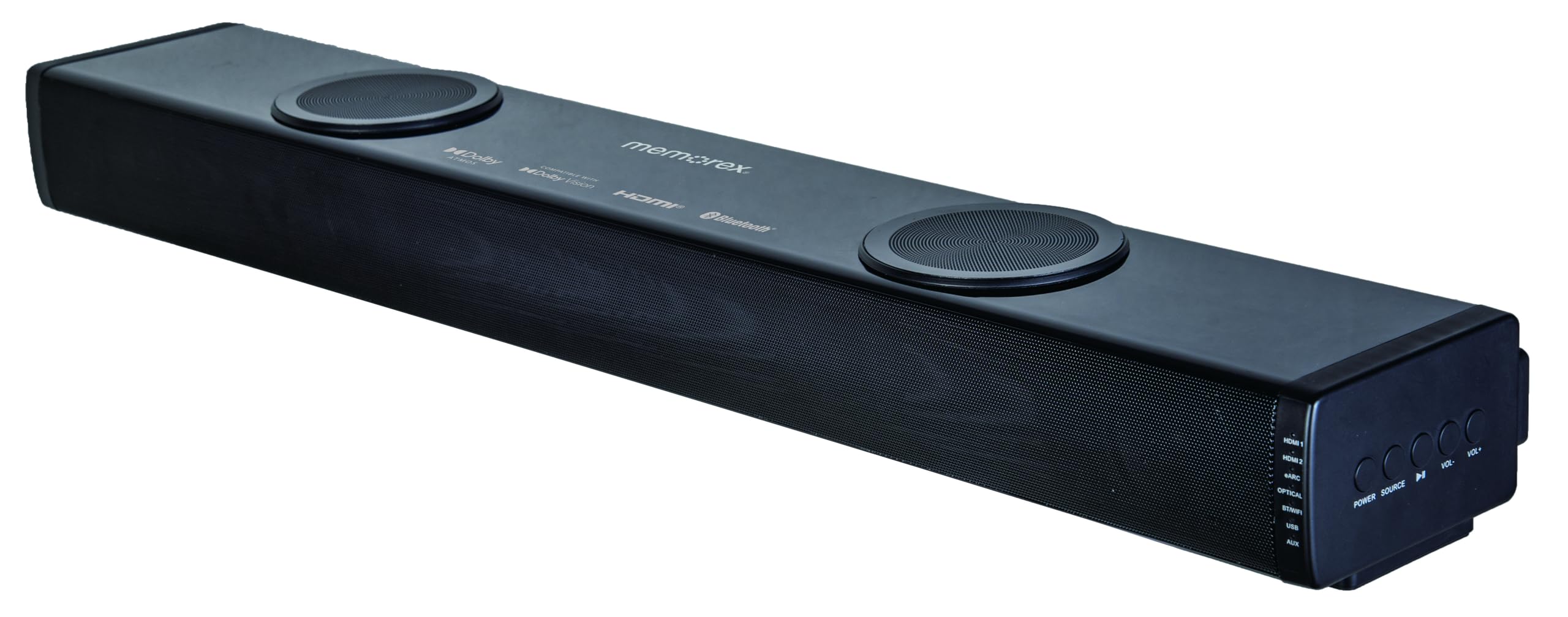
ຮູບພາບ: ເປັນມຸມ view of the Memorex MX-SBDA220 soundbar, revealing the control panel on the right side. Buttons for Power, Source selection, Play/Pause, Volume Down, and Volume Up are visible, along with input indicators.
ການຄວບຄຸມໄລຍະໄກ

Image: The Memorex MX-SBDA220 soundbar shown with its full-function remote control positioned above it. The remote features buttons for power, input selection, sound modes, volume, bass, and treble adjustments.
ຄູ່ມືການຕິດຕັ້ງ
1. ການຈັດວາງທາງດ້ານຮ່າງກາຍ
Place the soundbar on a stable, flat surface directly in front of your television. Ensure there are no obstructions blocking the front or top-firing speakers for optimal sound delivery, especially for Dolby Atmos effects.
2. Connecting to Your TV/Devices
The MX-SBDA220 offers multiple connectivity options:
- HDMI ARC (ຊ່ອງການກັບຄືນສຽງ): For the best audio quality and control, connect an HDMI cable from the soundbar's HDMI ARC output to your TV's HDMI ARC input. This allows your TV remote to control the soundbar's volume.
- Optical Input: Connect an optical cable from the soundbar's OPTICAL input to your TV's optical digital audio output.
- HDMI IN (x2): Connect external devices like Blu-ray players or gaming consoles to the soundbar's HDMI IN ports. Then, connect the soundbar's HDMI ARC output to your TV's HDMI ARC input.
- Bluetooth: For wireless audio streaming from smartphones or tablets, select the Bluetooth input on the soundbar and pair your device.
- ເຄື່ອງຫຼິ້ນ USB: ໃສ່ແຜ່ນ USB ທີ່ມີສຽງ files ເຂົ້າໄປໃນພອດ USB ສໍາລັບການຫຼິ້ນໂດຍກົງ.
- AUX Input: Use a 3.5mm audio cable to connect devices with an analog audio output to the soundbar's AUX input.
3. ການເຊື່ອມຕໍ່ພະລັງງານ
Connect the provided power cable to the soundbar's power input and then plug it into a wall outlet. The soundbar will enter standby mode.
ຄໍາແນະນໍາການດໍາເນີນງານ
ເປີດ/ປິດ
ກົດ ພະລັງງານ ປຸ່ມເທິງແຖບສຽງ ຫຼືການຄວບຄຸມໄລຍະໄກເພື່ອເປີດ ຫຼືປິດເຄື່ອງ.
ການຄັດເລືອກການປ້ອນຂໍ້ມູນ
ກົດ ແຫຼ່ງຂໍ້ມູນ button on the soundbar or the corresponding input button (HDMI1, HDMI2, eARC, OPT, BT, USB, AUX) on the remote control to switch between audio sources. The LED display will indicate the active input.
ການຄວບຄຸມປະລິມານ
ກົດ VOL+ or VOL- buttons on the soundbar or remote control to adjust the master volume.
ໂໝດສຽງ
The soundbar features 5 optimized sound modes. Press the corresponding button on the remote control to select:
- ຮູບເງົາ: ປັບປຸງສຽງ cinematic ກັບໄລຍະໄດນາມິກ.
- ດົນຕີ: ປັບແຕ່ງສຽງສຳລັບການຫຼິ້ນເພງ.
- ກາງຄືນ: ຫຼຸດລະດັບໄດນາມິກລົງເພື່ອການຟັງທີ່ງຽບກວ່າ, ເໝາະສຳລັບການຟັງໃນຕອນກາງຄືນ viewing.
- ສຽງ: Enhances vocal clarity for dialogue-heavy content.
- ເກມ: Provides an immersive audio experience for gaming.
ການປັບສຽງເບດ ແລະສຽງດັງ
ໃຊ້ BASS+ / BASS- ແລະ TREBLE+ / TREBLE- buttons on the remote control to fine-tune the low and high frequencies to your preference.
ການຈັບຄູ່ Bluetooth
- ເລືອກ BT input on the soundbar. The LED display will flash, indicating pairing mode.
- On your mobile device, enable Bluetooth and search for "MX-SBDA220".
- Select the soundbar to pair. Once connected, the LED display will stop flashing.
ການຫຼິ້ນ USB
Insert a USB flash drive into the USB port. The soundbar will automatically switch to USB input and begin playing compatible audio fileດ. ໃຊ້ການຄວບຄຸມໄລຍະໄກເພື່ອຟັງຊັນການຫຼິ້ນ (ຫຼິ້ນ/ຢຸດຊົ່ວຄາວ, ຂ້າມການຕິດຕາມ).
ການດູແລແລະບໍາລຸງຮັກສາ
- ທໍາຄວາມສະອາດ: ໃຊ້ຜ້າປຽກແຫ້ງເພື່ອເຮັດຄວາມສະອາດພື້ນຜິວຂອງແຖບສຽງ. ຢ່າໃຊ້ນໍ້າສະອາດ ຫຼືສີດ aerosol.
- ການລະບາຍອາກາດ: ໃຫ້ແນ່ໃຈວ່າບໍ່ປິດຊ່ອງລະບາຍອາກາດເພື່ອປ້ອງກັນຄວາມຮ້ອນເກີນໄປ.
- ການເກັບຮັກສາ: ຖ້າເກັບຮັກສາ soundbar ເປັນເວລາດົນນານ, ໃຫ້ຖອດປລັກອອກຈາກປລັກໄຟຟ້າ ແລະ ເກັບຮັກສາໄວ້ໃນບ່ອນທີ່ເຢັນ ແລະ ແຫ້ງ.
- ຫຼີກເວັ້ນຄວາມຊຸ່ມ: Keep the soundbar away from water, rain, and excessive humidity.
ຄູ່ມືແກ້ໄຂບັນຫາ
| ບັນຫາ | ການແກ້ໄຂທີ່ເປັນໄປໄດ້ |
|---|---|
| ບໍ່ມີພະລັງງານ |
|
| ບໍ່ມີສຽງ |
|
| ການຄວບຄຸມໄລຍະໄກບໍ່ເຮັດວຽກ |
|
| ບັນຫາການຈັບຄູ່ Bluetooth |
|
ຂໍ້ມູນຈໍາເພາະ
| ຄຸນສົມບັດ | ຂໍ້ມູນຈໍາເພາະ |
|---|---|
| ໝາຍເລກຕົວແບບ | MX-SBDA220 |
| ປະເພດລຳໂພງ | Atmospheric (Dolby Atmos 2.0.2CH) |
| ພະລັງງານຜົນຜະລິດທັງຫມົດ | 100 Watts (20W x 2 front + 30W x 2 top) |
| ເຕັກໂນໂລຊີການເຊື່ອມຕໍ່ | Bluetooth 5.0, HDMI (ARC x1, IN x2), Optical, USB, AUX |
| ຊ່ວງ Bluetooth | ສູງເຖິງ 10 ແມັດ (33 ຟຸດ) |
| ຂະໜາດສິນຄ້າ (ກວ້າງ x ຍາວ x ສູງ) | 5.93" x 8.1" x 37.57" (ໂດຍປະມານ) |
| ນ້ໍາຫນັກລາຍການ | 2.2 ປອນ |
| ອົງປະກອບລວມ | Soundbar, Remote Control, Power Cable, Quick Start Guide |
| UPC | 838689000208 |
ຂໍ້ມູນການຮັບປະກັນ
Memorex products are manufactured to the highest quality standards. For specific warranty details, including coverage period and terms, please refer to the warranty card included with your product or visit the official Memorex webເວັບໄຊ. ຮັກສາໃບຮັບເງິນການຊື້ຂອງທ່ານໄວ້ເປັນຫຼັກຖານການຊື້ສໍາລັບການຮຽກຮ້ອງການຮັບປະກັນໃດໆ.
ການຊ່ວຍເຫຼືອລູກຄ້າ
If you encounter any issues or have questions regarding your Memorex MX-SBDA220 Soundbar that are not covered in this manual, please contact Memorex customer support. Contact information can typically be found on the official Memorex webເວັບໄຊ ຫຼືໃນຄູ່ມືການເລີ່ມຕົ້ນດ່ວນທີ່ສະໜອງໃຫ້ກັບຜະລິດຕະພັນຂອງເຈົ້າ.


