ແນະນຳ
This manual provides detailed instructions for the setup, operation, and maintenance of your GOBOULT Rover Pro Smartwatch. Please read this manual thoroughly before using your device to ensure proper functionality and to maximize your user experience.

Image: GOBOULT Rover Pro Smartwatch, showcasing its sleek design and digital time display.
ເນື້ອໃນຊຸດ
Upon opening your GOBOULT Rover Pro Smartwatch package, verify that all items listed below are present:
- GOBOULT Rover Pro Smartwatch
- ສາຍສາກ
- ຄູ່ມືຜູ້ໃຊ້ (ເອກະສານນີ້)
ຕັ້ງຄ່າ
1. ການສາກ Smartwatch
Before initial use, fully charge your GOBOULT Rover Pro Smartwatch. Connect the provided charging cable to the charging port on the back of the smartwatch and to a standard USB power adapter (not included). A full charge typically takes approximately 150 minutes (2.5 hours).

Image: Illustration of the smartwatch charging, highlighting battery life and charging duration.
2. ເປີດ / ປິດພະລັງງານ
- ເປີດ: ກົດປຸ່ມຂ້າງຄ້າງໄວ້ຈົນກວ່າໜ້າຈໍຈະສະຫວ່າງ.
- ປິດພະລັງງານ: ກົດປຸ່ມດ້ານຂ້າງຄ້າງໄວ້, ຈາກນັ້ນເລືອກ "ປິດເຄື່ອງ" ໃນໜ້າຈໍ.
3. ການຕິດຕັ້ງແອັບ ແລະ ການຈັບຄູ່
To unlock the full potential of your smartwatch, download and install the companion application on your smartphone. The application can typically be found by scanning a QR code in the watch's settings or by searching for "GloryFit" in your smartphone's app store. Once installed:
- ເປີດໃຊ້ Bluetooth ໃນໂທລະສັບສະຫຼາດຂອງທ່ານ.
- ເປີດແອັບຊ່ວຍເຫຼືອ ແລະ ປະຕິບັດຕາມຄຳແນະນຳໃນໜ້າຈໍເພື່ອເພີ່ມອຸປະກອນຂອງທ່ານ.
- Select "GOBOULT Rover Pro" from the list of available devices to pair.
- ຢືນຢັນຄຳຮ້ອງຂໍການຈັບຄູ່ທັງໃນໂທລະສັບສະຫຼາດ ແລະ ໂມງອັດສະລິຍະຂອງທ່ານ.
ສຳລັບການດາວໂຫຼດແອັບ, ເຂົ້າເບິ່ງທີ່: GloryFit App Download
ປະຕິບັດການ Smartwatch
ການສະແດງແລະການນໍາທາງ
The GOBOULT Rover Pro features a 1.43-inch AMOLED display with 1000 nits brightness, ensuring clear visibility even in direct sunlight. The display supports an Always-on mode for continuous time display.

ຮູບພາບ: ລາຍລະອຽດ view of the smartwatch's 1.43-inch round AMOLED curved display.

Image: Visual comparison highlighting the superior brightness and clarity of the Rover Pro's AMOLED display.
- ປັດຂຶ້ນ/ລົງ/ຊ້າຍ/ຂວາ: ນຳທາງຜ່ານເມນູ, ການແຈ້ງເຕືອນ ແລະ ການຕັ້ງຄ່າດ່ວນ.
- ແຕະ: ເລືອກລາຍການ ຫຼືເປີດແອັບພລິເຄຊັນ.
- ປຸ່ມຂ້າງ: Press to return to the home screen or access the app list.
ການຕິດຕາມສຸຂະພາບ
The GOBOULT Rover Pro Smartwatch offers comprehensive health tracking features to help you monitor your well-being:
- ການຕິດຕາມອັດຕາການເຕັ້ນຫົວໃຈ 24/7: ຕິດຕາມອັດຕາການເຕັ້ນຫົວໃຈຂອງທ່ານຢ່າງຕໍ່ເນື່ອງຕະຫຼອດມື້.
- SpO2 Blood Oxygen Saturation: ວັດແທກລະດັບອົກຊີເຈນໃນເລືອດຂອງທ່ານ.
- ການຕິດຕາມການນອນ: ວິເຄາະຮູບແບບການນອນຂອງທ່ານ, ລວມທັງການນອນຫລັບເລິກ, ການນອນຫຼັບເບົາ, ແລະເວລາຕື່ນ.
- ການຕິດຕາມຮອບວຽນປະຈຳເດືອນຂອງຜູ້ຍິງ: ໃຫ້ຂໍ້ມູນເຊີງເລິກ ແລະ ການຄາດຄະເນສຳລັບຮອບວຽນປະຈຳເດືອນ.
- ຕົວຕິດຕາມການເຄື່ອນໄຫວ: ບັນທຶກຂັ້ນຕອນ, ໄລຍະທາງ ແລະແຄລໍຣີທີ່ເຜົາຜານ.
- ການແຈ້ງເຕືອນ: Includes reminders to drink water and stay active.
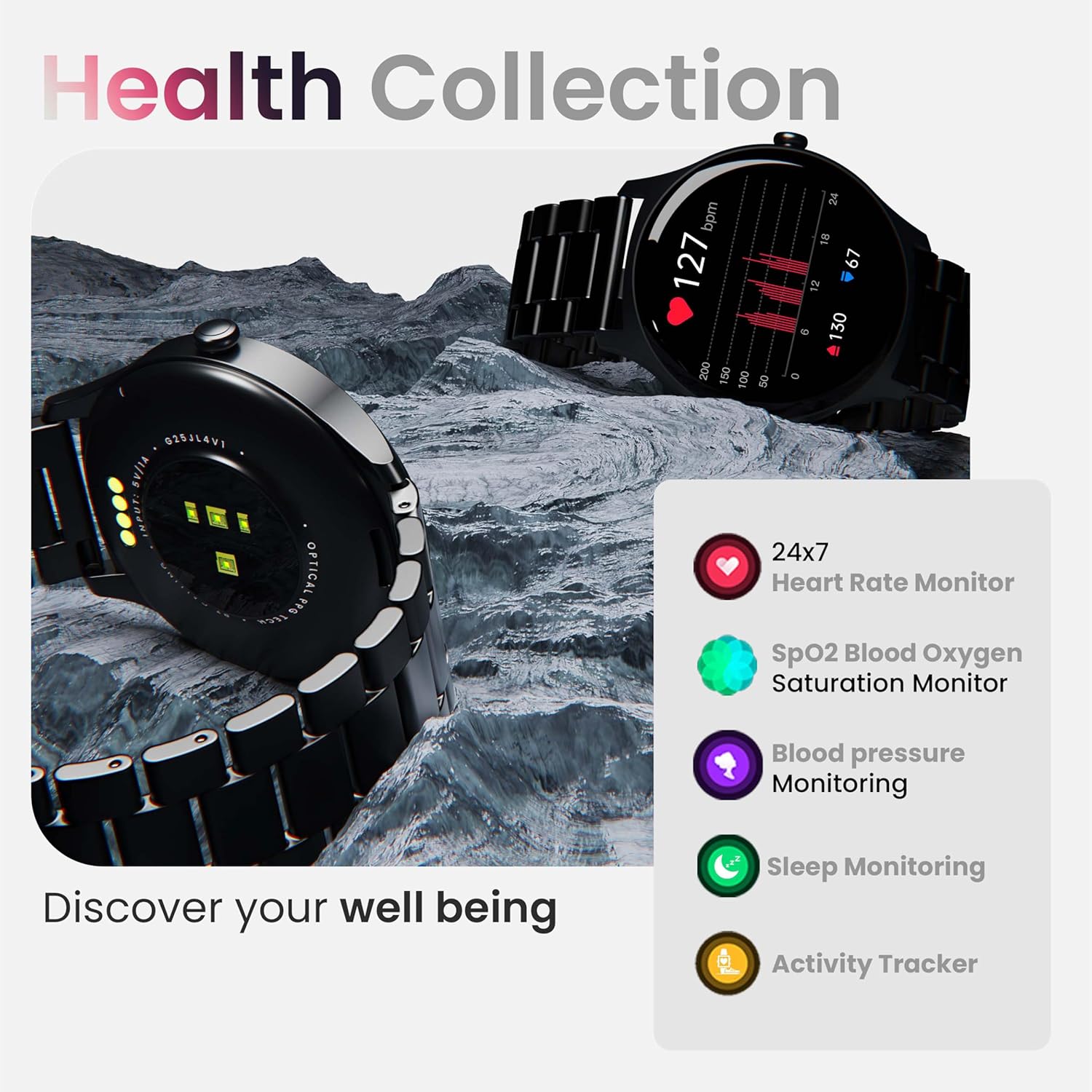
ຮູບພາບ: ຫຼາຍກວ່າview of the smartwatch's health monitoring capabilities.
ໝາຍເຫດ: This device is not a medical instrument. Health data is for reference only and should not be used for medical diagnosis or treatment.
ໂໝດກິລາ
With over 120 sports modes, the GOBOULT Rover Pro Smartwatch is designed to track a wide range of physical activities. Select your desired sport from the watch's menu to record specific metrics such as duration, calories burned, and heart rate during your workout.

Image: Display of various sports modes available on the smartwatch.
ການປັບແຕ່ງ
ເບິ່ງໜ້າ
Personalize your smartwatch with over 150 cloud-based watch faces available through the companion app. You can also create custom watch faces using your own photos.

ຮູບພາບ: Examples of various watch faces and customization options.
ການໂທຜ່ານ Bluetooth
The GOBOULT Rover Pro Smartwatch features Bluetooth 5.2 single-chip technology, enabling direct calls from your wrist. It includes a dedicated speaker and microphone for clear communication.
- ໂທອອກ: Access the dial pad or contact list on your watch to initiate calls.
- ຮັບ/ປະຕິເສດສາຍ: Swipe on the screen to answer or reject incoming calls.
- ການຊິ້ງລາຍຊື່ຜູ້ຕິດຕໍ່: Sync your phone's contacts to the smartwatch via the companion app.

Image: Visual representation of the smartwatch's Bluetooth calling interface and features.
AI Voice Assistant
Interact with your smartwatch hands-free using the built-in AI voice assistant. Simply activate the assistant and speak your commands to perform various functions, such as setting alarms, checking weather, or initiating calls. Supports popular voice assistants like Siri and Google Assistant when connected to a compatible smartphone.
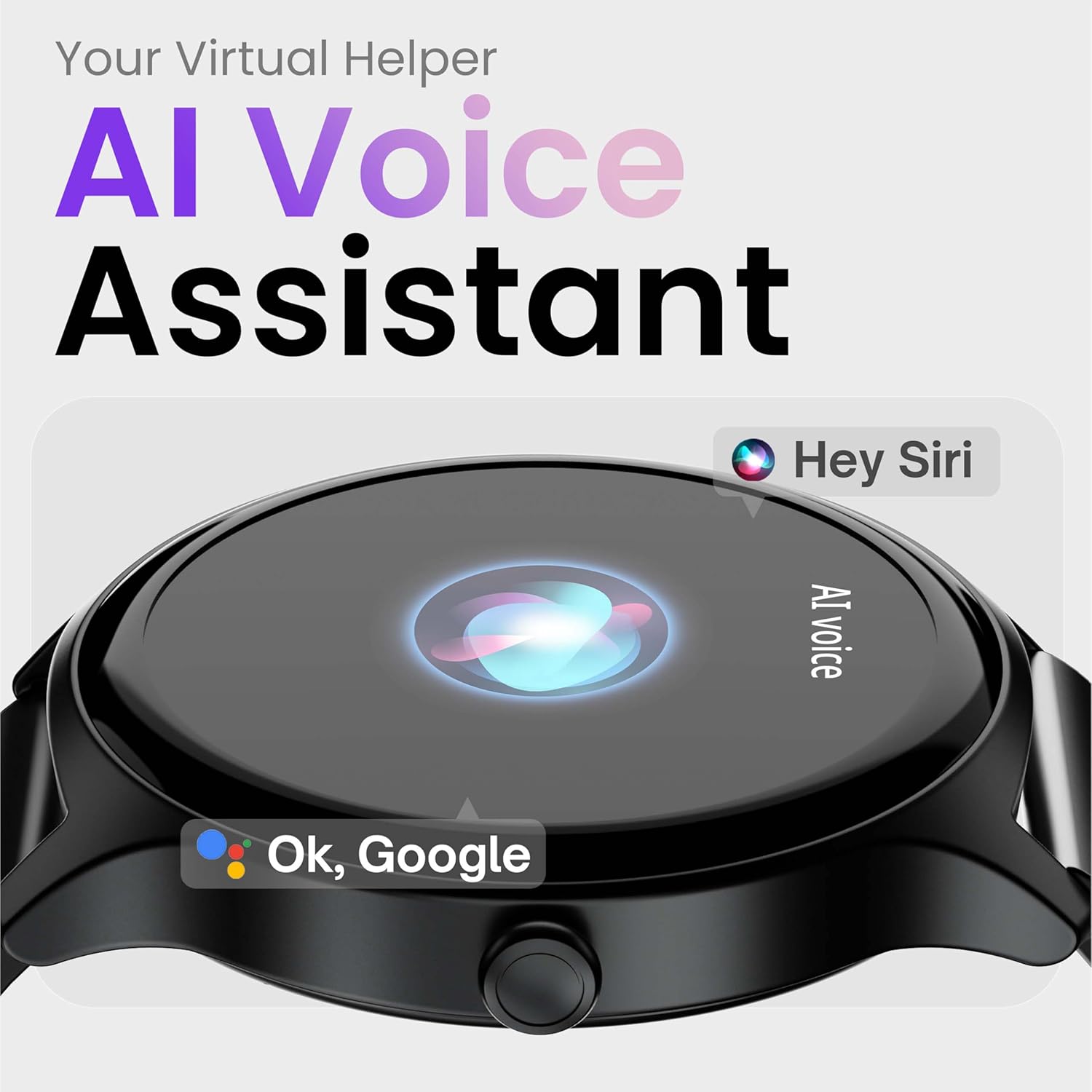
Image: Depiction of the AI Voice Assistant functionality on the smartwatch.
Smart Notifications & Safety Features
ການແຈ້ງເຕືອນອັດສະລິຍະ
Receive SMS, call, and app notifications directly on your wrist. Manage which notifications appear through the companion app settings.

Image: Smartwatch screen showing notification alerts and the 'Find my phone' function.
ຄຸນນະສົມບັດຄວາມປອດໄພ
- 4-Digit PIN: Secure your smartwatch with a PIN for enhanced privacy.
- One-Tap SOS Alert: In an emergency, activate the SOS feature to notify pre-set emergency contacts.
- Secure Sign-in Methods: Utilize easy and secure methods for accessing your device.
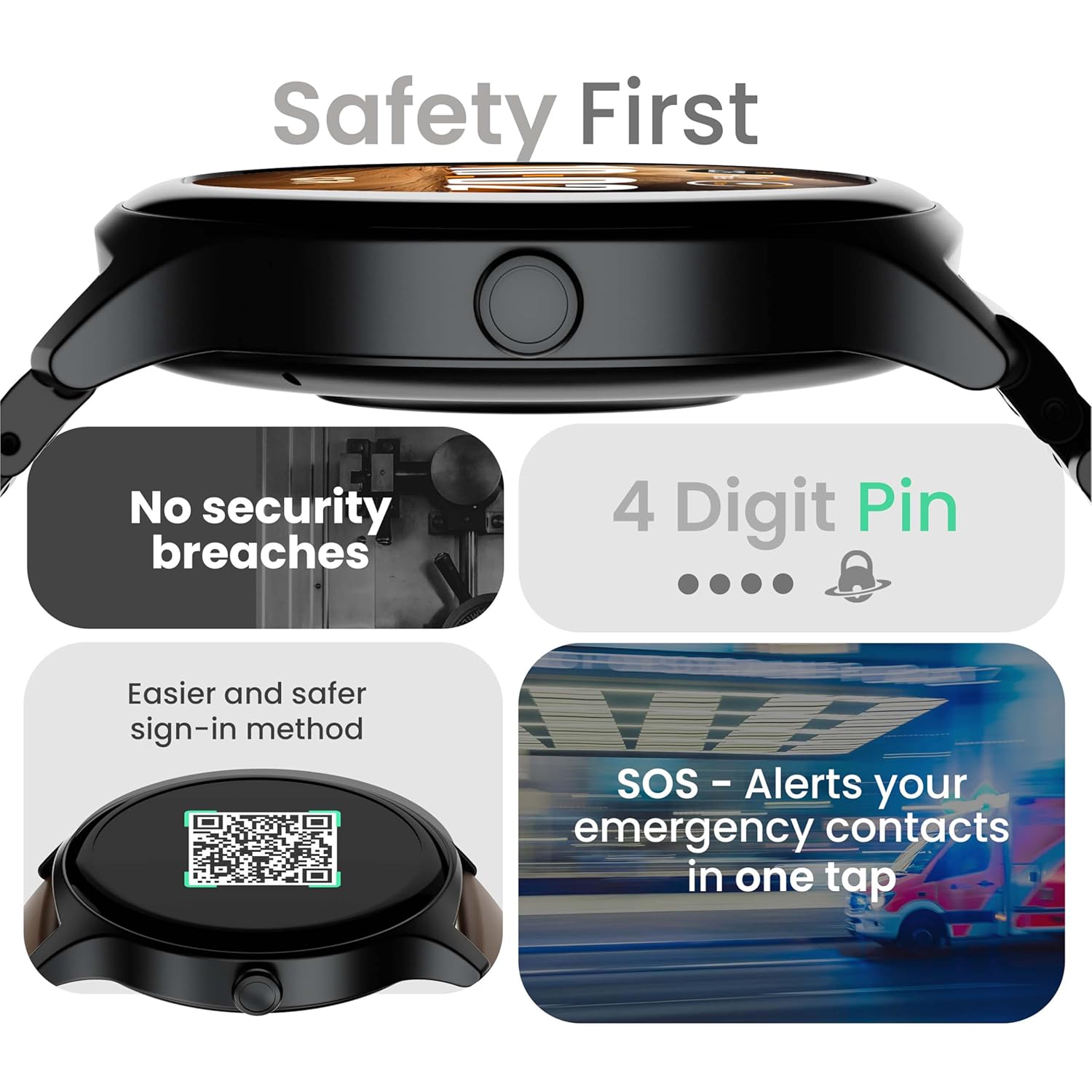
Image: Visuals illustrating the smartwatch's security and emergency features.
ອາຍຸແບັດເຕີຣີ & ການສາກໄຟ
The GOBOULT Rover Pro Smartwatch is equipped with a battery designed for extended use:
- ການນໍາໃຊ້ປົກກະຕິ: ແບດເຕີລີ່ໄດ້ເຖິງ 7 ວັນ.
- ເວລາສະແຕນບາຍ: ເຖິງ 20 ວັນ.
- ການສາກໄວ: Approximately 10 minutes of charging provides up to 2 days of battery life.
- ເວລາສາກເຕັມ: Approximately 90 minutes for a complete charge.
Use only the provided charging cable to ensure optimal charging performance and to prevent damage to the device.
ກັນນ້ຳ (IP68)
The GOBOULT Rover Pro Smartwatch has an IP68 rating, meaning it is dustproof and water-resistant. It can withstand immersion in water up to 1.5 meters deep for up to 30 minutes. This makes it suitable for daily use and various outdoor activities, but it is not recommended for diving or high-pressure water activities.

Image: Illustration of the smartwatch's IP68 water and dust resistance.
ບໍາລຸງຮັກສາ
ເພື່ອຮັບປະກັນອາຍຸການໃຊ້ງານທີ່ຍາວນານ ແລະ ປະສິດທິພາບທີ່ດີທີ່ສຸດຂອງໂມງອັດສະລິຍະຂອງທ່ານ, ໃຫ້ປະຕິບັດຕາມຄຳແນະນຳການບຳລຸງຮັກສາເຫຼົ່ານີ້:
- ທໍາຄວາມສະອາດ: ເຊັດໜ້າຈໍໂມງ ແລະ ສາຍເປັນປະຈຳດ້ວຍຜ້າອ່ອນໆແຫ້ງ. ຖ້າຈຳເປັນ, ໃຫ້ໃຊ້ຜ້າເຊັດໜ້າໂມງທີ່ແຫ້ງເລັກນ້ອຍ.amp ຜ້າສຳລັບສາຍຮັດ, ຈາກນັ້ນເຊັດໃຫ້ແຫ້ງດີ.
- ຫຼີກເວັ້ນສານເຄມີ: ຢ່າໃຊ້ສານເຄມີທີ່ຮຸນແຮງ, ສານລະລາຍເຮັດຄວາມສະອາດ, ຫຼື ຜົງຊັກຟອກທີ່ແຮງ, ເພາະວ່າສິ່ງເຫຼົ່ານີ້ສາມາດທຳລາຍຜິວໜ້າ ແລະ ປະທັບຕາຂອງໂມງໄດ້.
- ຊ່ອງສາກໄຟ: ຮັກສາການສາກໄຟໃຫ້ສະອາດ ແລະແຫ້ງ.
- ການເກັບຮັກສາ: ເກັບຮັກສາ smartwatch ໃນບ່ອນທີ່ເຢັນ, ແຫ້ງໃນເວລາທີ່ບໍ່ໄດ້ໃຊ້.
- ຫຼີກລ້ຽງການອຸນຫະພູມທີ່ຮ້າຍແຮງ: ຢ່າເອົາໂມງໄປວາງໄວ້ໃນອຸນຫະພູມຮ້ອນ ຫຼື ເຢັນສຸດໆເປັນເວລາດົນ.
ການແກ້ໄຂບັນຫາ
If you encounter issues with your GOBOULT Rover Pro Smartwatch, refer to the following common solutions:
| ບັນຫາ | ການແກ້ໄຂ |
|---|---|
| ໂມງອັດສະລິຍະບໍ່ເປີດ. | ກວດໃຫ້ແນ່ໃຈວ່າໂມງຖືກສາກເຕັມແລ້ວ. ເຊື່ອມຕໍ່ມັນກັບເຄື່ອງສາກຢ່າງໜ້ອຍ 30 ນາທີ. |
| ບໍ່ສາມາດຈັບຄູ່ກັບສະມາດໂຟນໄດ້. |
|
| ຂໍ້ມູນສຸຂະພາບບໍ່ຖືກຕ້ອງ. |
|
| ບໍ່ໄດ້ຮັບການແຈ້ງເຕືອນ. |
|
| ອາຍຸແບັດເຕີຣີສັ້ນ. |
|
ຂໍ້ມູນຈໍາເພາະ
| ຄຸນສົມບັດ | ລາຍລະອຽດ |
|---|---|
| ຍີ່ຫໍ້ | GOBOLT |
| ຊຸດຕົວແບບ | Rover Pro |
| ຂະຫນາດຈໍສະແດງຜົນ | 1.43 ນິ້ວ |
| ປະເພດການສະແດງ | AMOLED |
| ຄວາມສະຫວ່າງ | 1000 ນິດ |
| ການເຊື່ອມຕໍ່ | Bluetooth 5.2 |
| ລະບົບປະຕິບັດການ | Android (ເຂົ້າກັນໄດ້) |
| ການຕໍ່ຕ້ານນ້ໍາ | IP68 |
| ອາຍຸແບັດເຕີຣີ (ປົກກະຕິ) | ສູງສຸດ 7 ມື້ |
| ເວລາສາກແບັດເຕີຣີ | Approx. 150 Minutes (Full Charge) |
| ນ້ໍາຫນັກລາຍການ | 43 g |
| ອົງປະກອບລວມ | ສາຍສາກ, ຄູ່ມືຜູ້ໃຊ້ |
ການຮັບປະກັນແລະການສະຫນັບສະຫນູນ
ຂໍ້ມູນການຮັບປະກັນ
Your GOBOULT Rover Pro Smartwatch comes with a ຮັບປະກັນ 1 ປີ ນັບຈາກວັນທີ່ຊື້. ການຮັບປະກັນນີ້ກວມເອົາຂໍ້ບົກພ່ອງຈາກການຜະລິດ ແລະ ການເຮັດວຽກຜິດປົກກະຕິພາຍໃຕ້ການນຳໃຊ້ປົກກະຕິ. ມັນບໍ່ກວມເອົາຄວາມເສຍຫາຍທີ່ເກີດຈາກການໃຊ້ຜິດວິທີ, ອຸບັດຕິເຫດ, ການດັດແປງທີ່ບໍ່ໄດ້ຮັບອະນຸຍາດ, ຫຼື ການສວມໃສ່ ແລະ ການຈີກຂາດຕາມປົກກະຕິ.
ການຊ່ວຍເຫຼືອລູກຄ້າ
For technical assistance, warranty claims, or any other inquiries, please contact GOBOULT customer support through their official website or the contact information provided with your purchase documentation. Please have your product model and purchase details ready when contacting support.


