ສິນຄ້າເກີນview
The IMIKI XPLORER SCOUT D2 is a versatile smartwatch designed for both men and women, featuring a vibrant 1.43-inch AMOLED display. It offers seamless Bluetooth connectivity for calls and smart assistant integration, comprehensive health monitoring capabilities including blood oxygen and heart rate tracking, and support for over 100 sports modes. Its robust design is IP68 waterproof, making it suitable for various activities, and it boasts exceptional battery life with fast charging.
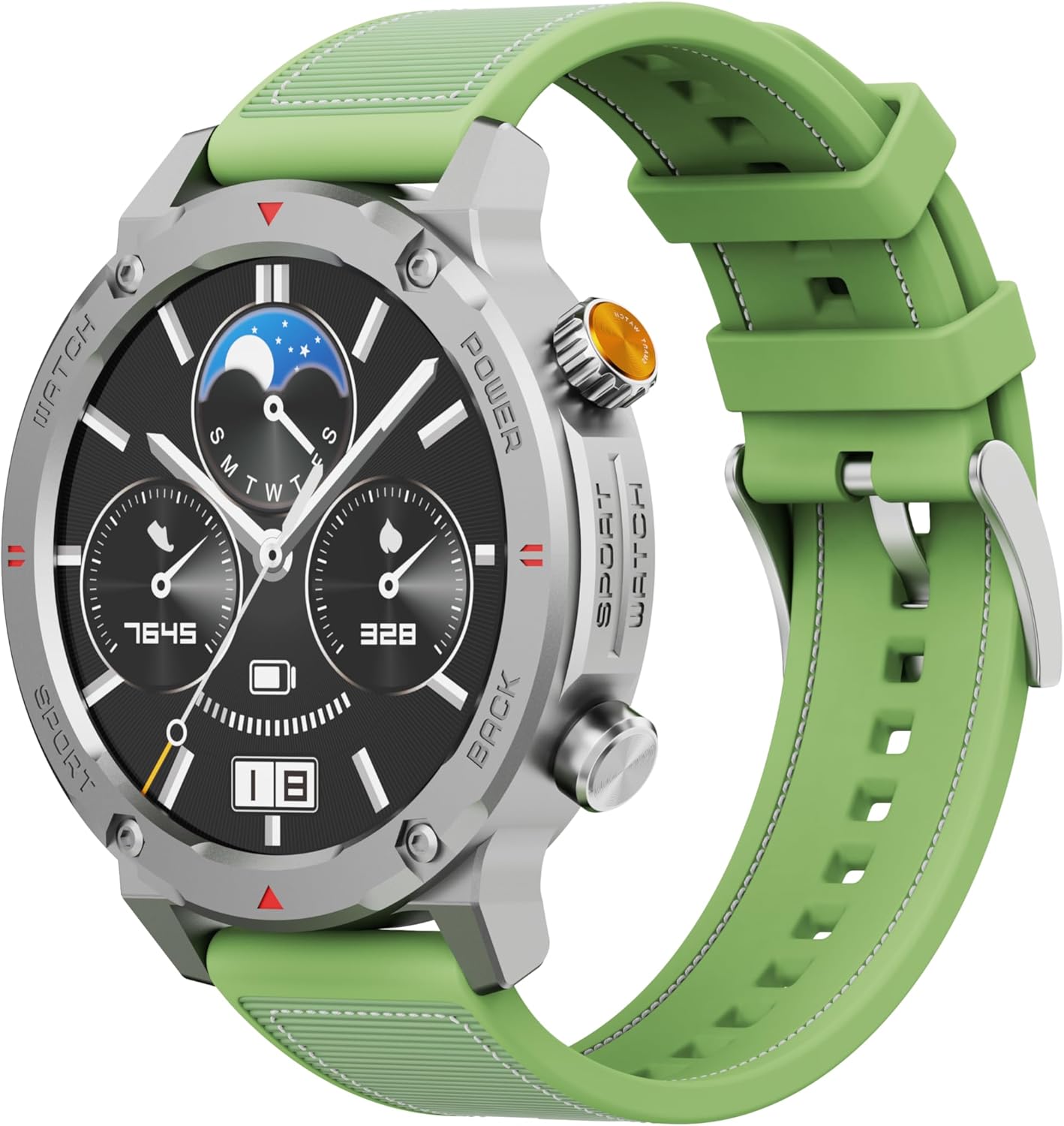
ຮູບ 1: ດ້ານຫນ້າ view of the IMIKI XPLORER SCOUT D2 Smartwatch with its green strap.
ຄູ່ມືການຕິດຕັ້ງ
1. ສິ່ງທີ່ຢູ່ໃນກ່ອງ
Upon unboxing your IMIKI XPLORER SCOUT D2 Smartwatch, ensure all components are present:
- IMIKI XPLORER SCOUT D2 Smartwatch
- ສາຍສາກ

Figure 2: The IMIKI XPLORER SCOUT D2 Smartwatch module separated from its bezel and strap, illustrating its modular design.
2. ການສາກ Smartwatch
Before first use, fully charge your smartwatch. The 400 mAh battery provides up to 30 days of autonomy on a single charge, and it supports fast charging for quick power-ups.
- ເຊື່ອມຕໍ່ສາຍສາກໄຟເຂົ້າກັບພອດສາກໄຟຢູ່ດ້ານຫຼັງຂອງໂມງອັດສະລິຍະ.
- ສຽບປາຍອີກດ້ານໜຶ່ງຂອງສາຍເຂົ້າກັບອະແດບເຕີໄຟ USB (ບໍ່ລວມຢູ່) ຫຼື ພອດ USB ຂອງຄອມພິວເຕີ.
- ໜ້າຈໍໂມງຈະສະແດງສະຖານະການສາກໄຟ. ໃຫ້ເວລາພຽງພໍສຳລັບການສາກໄຟໃຫ້ເຕັມ.

ຮູບ 3: ດ້ານຫລັງ view of the IMIKI XPLORER SCOUT D2 Smartwatch, highlighting the charging contacts and health sensors.
3. ການຕິດຕັ້ງແລະການຈັບຄູ່ເບື້ອງຕົ້ນ
To unlock the full potential of your smartwatch, pair it with your smartphone via Bluetooth.
- ດາວໂຫລດ App ໄດ້: ຊອກຫາ the official IMIKI companion app on the Apple App Store (for iOS) or Google Play Store (for Android) and install it on your smartphone.
- ເປີດໃຊ້ Bluetooth: ໃຫ້ແນ່ໃຈວ່າ Bluetooth ຖືກເປີດໃຊ້ຢູ່ໃນໂທລະສັບສະຫຼາດຂອງທ່ານ.
- Power On Watch: Press and hold the power button on the smartwatch to turn it on.
- ເປີດແອັບ: Launch the IMIKI app on your smartphone and follow the on-screen instructions to add a new device.
- ການຈັບຄູ່: Select "IMIKI XPLORER SCOUT D2" from the list of available devices in the app. Confirm the pairing request on both your phone and the smartwatch if prompted.
ເມື່ອຈັບຄູ່ແລ້ວ, ທ່ານສາມາດປັບແຕ່ງການຕັ້ງຄ່າໄດ້, view health data, and receive notifications directly on your smartwatch.
ຄໍາແນະນໍາການດໍາເນີນງານ
1. ການສະແດງແລະການນໍາທາງ
The IMIKI XPLORER SCOUT D2 features a 1.43-inch AMOLED display with a high resolution of 466x466 pixels, protected by tempered glass. Navigate the watch interface using touch gestures and the physical buttons.
- ປັດຂຶ້ນ/ລົງ: ເລື່ອນຜ່ານເມນູແລະການແຈ້ງເຕືອນ.
- ປັດຊ້າຍ/ຂວາ: ເຂົ້າເຖິງວິດເຈັດດ່ວນ ຫຼື ໜ້າປັດໂມງທີ່ແຕກຕ່າງກັນ.
- ແຕະ: ເລືອກລາຍການ ຫຼືເປີດແອັບພລິເຄຊັນ.
- ປຸ່ມທາງດ້ານຮ່າງກາຍ: Use the side buttons for power on/off, returning to the home screen, or quick access to sports modes.

Figure 4: Close-up of the smartwatch display, illustrating the clear AMOLED screen and various data points.
2. ການຕິດຕາມສຸຂະພາບ
The smartwatch is equipped with an optical sensor to monitor key health metrics:
- ອັດຕາການເຕັ້ນຫົວໃຈ (HR): ຕິດຕາມອັດຕາການເຕັ້ນຫົວໃຈຂອງທ່ານຢ່າງຕໍ່ເນື່ອງຕະຫຼອດມື້.
- ອົກຊີໃນເລືອດ (SpO2): ວັດແທກລະດັບຄວາມອີ່ມຕົວຂອງອົກຊີໃນເລືອດຂອງທ່ານ.
- ຄຸນນະພາບການນອນ: Monitors your sleep patterns and provides insights into sleep quality.
Access detailed health reports and historical data through the companion app.
3. ຮູບແບບການອອກກຳລັງກາຍ
With over 100 integrated sports modes, the XPLORER SCOUT D2 accurately records your exercise statistics. Select your desired activity from the watch's sports menu to begin tracking.

Figure 5: Visual representation of the smartwatch's diverse functionalities, including health tracking and sports modes.
4. Bluetooth Calling and Voice Assistant
The single-chipset Bluetooth 5.3 ensures stable and high-quality connectivity, allowing you to answer calls directly from your wrist. The integrated voice assistant enables hands-free control of your device with simple voice commands.
5. ການແຈ້ງເຕືອນ
Receive real-time notifications for calls, SMS messages, and app alerts directly on your smartwatch. Manage notification settings through the companion app.
6. ກັນນ້ຳ (IP68)
The IMIKI XPLORER SCOUT D2 is IP68 rated, meaning it is resistant to dust and water. This allows it to withstand splashes, rain, and brief immersion in shallow water. ໝາຍເຫດ: While IP68 rated, it is not recommended for swimming, diving, or high-pressure water activities.

Figure 6: Illustration of the smartwatch's IP68 water resistance and exceptional battery autonomy.
ບໍາລຸງຮັກສາ
Proper care and maintenance will extend the lifespan of your IMIKI XPLORER SCOUT D2 Smartwatch.
- ທໍາຄວາມສະອາດ: Regularly wipe the watch and strap with a soft, dry, lint-free cloth. For stubborn dirt, slightly dampen ຜ້າທີ່ມີນ້ໍາ. ຫຼີກເວັ້ນການນໍາໃຊ້ສານເຄມີທີ່ຮຸນແຮງຫຼືວັດສະດຸຂັດ.
- ການດູແລເຊັນເຊີ: Keep the optical sensors on the back of the watch clean for accurate health monitoring.
- ການເກັບຮັກສາ: Store the smartwatch in a cool, dry place away from direct sunlight and extreme temperatures.
- ຄວາມທົນທານຂອງແບັດເຕີຣີ: To maximize battery life, avoid fully discharging the battery frequently. Charge it before it completely runs out.
- ສ່ວນປະກອບທີ່ສາມາດແລກປ່ຽນກັນໄດ້: The watch features a removable central case and interchangeable straps (Oyster, Active, Scout styles). Handle these components with care when changing them.

Figure 7: The IMIKI XPLORER series showcasing interchangeable straps and case styles.
ການແກ້ໄຂບັນຫາ
If you encounter issues with your IMIKI XPLORER SCOUT D2 Smartwatch, try the following solutions:
| ບັນຫາ | ການແກ້ໄຂທີ່ເປັນໄປໄດ້ |
|---|---|
| ໂມງບໍ່ເປີດ. | ກວດໃຫ້ແນ່ໃຈວ່າໂມງຖືກສາກເຕັມແລ້ວ. ເຊື່ອມຕໍ່ມັນກັບສາຍສາກ ແລະລໍຖ້າສອງສາມນາທີກ່ອນທີ່ຈະພະຍາຍາມເປີດມັນອີກຄັ້ງ. |
| ບໍ່ສາມາດຈັບຄູ່ກັບສະມາດໂຟນໄດ້. |
|
| ການອ່ານສຸຂະພາບບໍ່ຖືກຕ້ອງ. |
|
| ບໍ່ໄດ້ຮັບການແຈ້ງເຕືອນ. |
|
ຂໍ້ມູນຈໍາເພາະ
| ຄຸນສົມບັດ | ລາຍລະອຽດ |
|---|---|
| ຍີ່ຫໍ້ | IMIKI |
| ຊື່ຕົວແບບ | IMIKI SMART WATCH XPLORER SCOUT D2 GREEN |
| ໝາຍເລກຕົວແບບ | D2 GREEN |
| ຂະໜາດໜ້າຈໍ | 1.43 ນິ້ວ |
| ປະເພດການສະແດງ | AMOLED |
| ເຕັກໂນໂລຊີການເຊື່ອມຕໍ່ | Bluetooth 5.3 |
| ຄວາມອາດສາມາດຫມໍ້ໄຟ | 400 mAh |
| ອາຍຸຫມໍ້ໄຟສະເລ່ຍ | ສູງສຸດ 30 ມື້ |
| ການຕໍ່ຕ້ານນ້ໍາ | IP68 |
| ການຕິດຕາມສຸຂະພາບ | Heart Rate, Blood Oxygen (SpO2), Sleep Quality |
| ໂໝດອອກກຳລັງກາຍ | Over 100+ integrated modes |
| ຄຸນນະສົມບັດພິເສດ | Bluetooth Calling, Voice Assistant, Fast Charging, Removable Central Case, Tempered Glass Screen |
| ອຸປະກອນທີ່ເຂົ້າກັນໄດ້ | Smartphones (Android and iOS) |
| ນ້ໍາຫນັກລາຍການ | 68 ກຣາມ |
| ຂະໜາດແພັກເກັດ | 10.5 x 10.5 x 6 cm |
ການຮັບປະກັນແລະການສະຫນັບສະຫນູນ
For warranty information and customer support, please refer to the documentation included with your purchase or visit the official IMIKI webເວັບໄຊ. ຮັກສາຫຼັກຖານການຊື້ຂອງທ່ານສໍາລັບການຮຽກຮ້ອງການຮັບປະກັນໃດໆ.
For further assistance, you may also contact the seller or Amazon customer service if purchased through Amazon.


