1. ບົດແນະນຳ
This manual provides comprehensive instructions for the safe and effective use of your Saker Cordless Electric Scissor SM-5001. Please read this manual thoroughly before operating the device and retain it for future reference. This tool is designed for cutting various materials such as fabric, leather, carpet, cardboard, and plastic.
2. ຂໍ້ມູນຄວາມປອດໄພ
Always prioritize safety when operating power tools.
- Safety Start Mechanism: The Saker Cordless Electric Scissor is equipped with a safety switch. To start the device, you must press and hold the safety button while simultaneously toggling the on/off switch. This ensures controlled activation.
- Blade Guard: The cutting blade is enclosed within a metal shroud, leaving only a small opening for cutting. This design minimizes the risk of accidental injury during operation.
- ການປົກປ້ອງຕາ: Always wear appropriate eye protection when operating the electric scissor to prevent injury from flying debris.
- ຮັກສາຄວາມຊັດເຈນ: Ensure hands, hair, and loose clothing are kept away from the cutting blade during operation.
- ຄວາມເໝາະສົມຂອງວັດສະດຸ: Only cut materials specified for this tool. Attempting to cut unsuitable materials may damage the tool or cause injury.
- ການເກັບຮັກສາ: ເກັບຮັກສາເຄື່ອງມືໄວ້ໃນບ່ອນແຫ້ງ, ປອດໄພ, ໃຫ້ໄກຈາກເດັກນ້ອຍ ແລະ ສັດລ້ຽງ.
3. ຜະລິດຕະພັນເກີນview
The Saker Cordless Electric Scissor SM-5001 is a lightweight and ergonomically designed cutting tool. It features a powerful motor, a self-sharpening blade, and an integrated LED light for improved visibility.

ຮູບທີ 3.1: Saker Cordless Electric Scissor SM-5001, showing the main unit, packaging, USB charging cable, and user manual.
ອົງປະກອບ:
- ໃບຕັດ: Durable 1/4-inch (0.24 inches) self-sharpening rotary blade.
- ປຸ່ມລັອກຄວາມປອດໄພ: Must be pressed to activate the tool.
- ປຸ່ມເປີດ/ປິດ: Activates the motor when the safety lock is engaged.
- ມືຈັບ Ergonomic: Designed for comfortable grip and reduced hand fatigue.
- ໄຟ LED: Illuminates the cutting area for enhanced visibility.
- ຕົວຊີ້ວັດຫມໍ້ໄຟ: ສະແດງລະດັບການສາກແບັດເຕີຣີປັດຈຸບັນ.
- ພອດສາກໄຟ USB: For recharging the internal lithium-ion battery.
4. ຕັ້ງຄ່າ
ການສາກໄຟເບື້ອງຕົ້ນ:
Before first use, fully charge the Saker Cordless Electric Scissor. The device comes with a pre-installed lithium-ion battery.
- ຊອກຫາພອດສາກໄຟ USB ໃນອຸປະກອນ.
- Connect the provided USB charging cable to the device and to a compatible USB power source (e.g., wall adapter, computer USB port).
- The battery indicator lights will show the charging status. Allow the device to charge until the indicator shows a full charge.
- ເມື່ອສາກໄຟເຕັມແລ້ວ, ໃຫ້ຖອດສາຍ USB ອອກ.
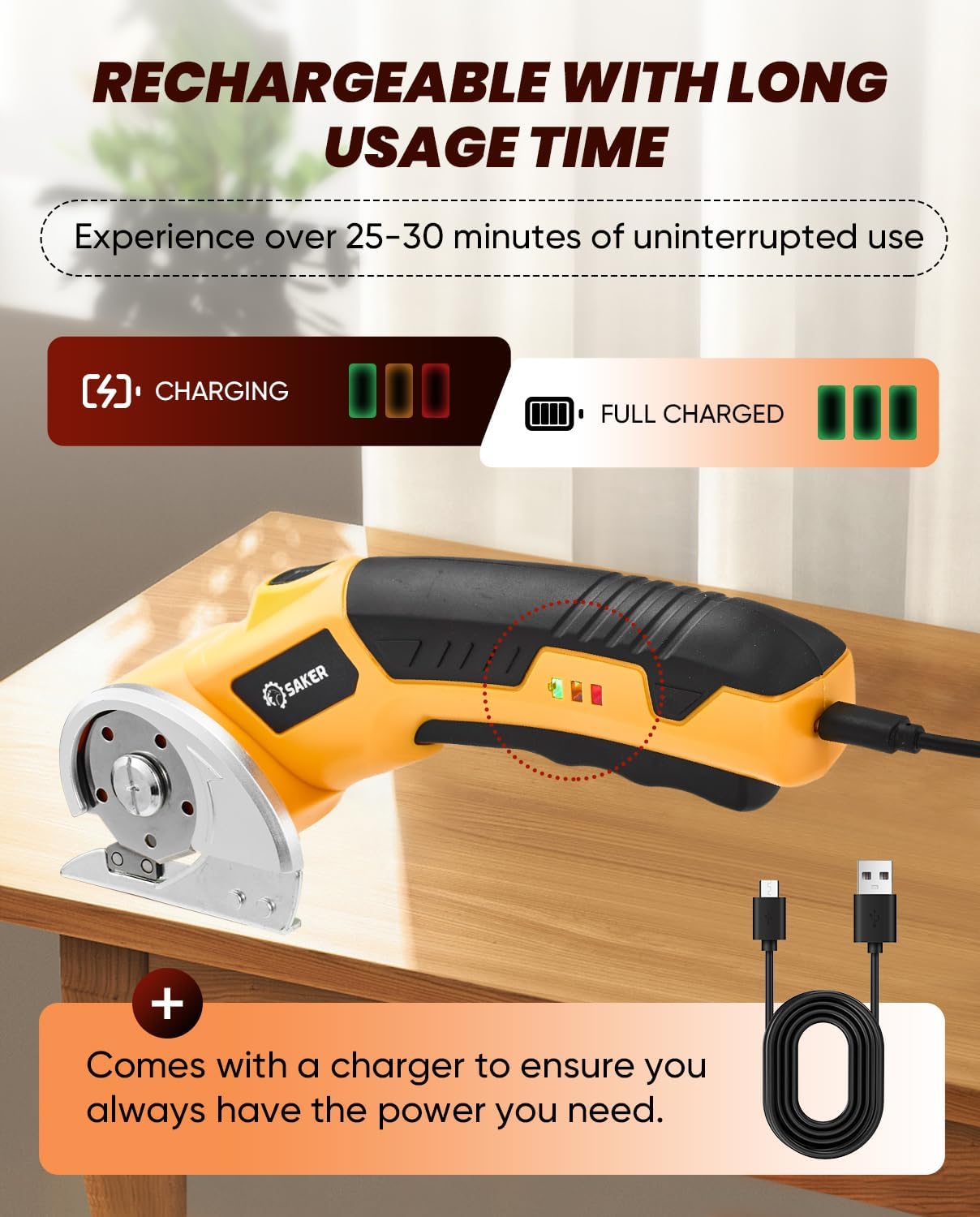
ຮູບທີ 4.1: Illustration of the Saker Cordless Electric Scissor connected to a USB charger, showing battery indicator lights during charging and when fully charged.
5. ຄໍາແນະນໍາການດໍາເນີນງານ
ກຳລັງເລີ່ມອຸປະກອນ:
- Ensure the device is fully charged and the cutting area is clear of obstructions.
- ຈັບມືຈັບໃຫ້ ແໜ້ນ.
- Press and hold the safety lock button (usually located on the side or top of the handle).
- While holding the safety lock button, toggle the on/off switch to start the blade rotation.
- Once the blade is rotating, you may release the safety lock button for continuous operation.

ຮູບທີ 5.1: A hand demonstrating how to press both the safety button and the trigger simultaneously to start the Saker Cordless Electric Scissor.
ວັດສະດຸຕັດ:
The Saker Cordless Electric Scissor is capable of cutting various materials up to 1/4 inch (0.24 inches) thick.
- Place the material to be cut on a stable, flat surface.
- Activate the electric scissor as described above.
- Gently guide the rotating blade along the desired cutting line. Apply steady, even pressure.
- The integrated LED light will illuminate the cutting path, which is particularly useful for dark materials or in low-light conditions.
- For optimal results, avoid forcing the tool through thick materials. Let the blade do the work.

ຮູບທີ 5.2: A user cutting leather with the Saker Cordless Electric Scissor. This tool is suitable for materials such as cardboard, leather, packaging, rope, plastic, and cotton.
ການຢຸດອຸປະກອນ:
Release the on/off switch to stop the blade rotation. The blade will come to a stop quickly.
6. ການສາກໄຟ
The Saker Cordless Electric Scissor is powered by a 4V Max rechargeable lithium-ion battery, providing approximately 25-30 minutes of continuous cutting on a full charge. The device features a simple USB charging mechanism.
- ຕົວຊີ້ວັດຫມໍ້ໄຟ: Monitor the battery indicator lights on the device to determine the remaining charge. Recharge when the indicator shows low battery.
- ເວລາສາກໄຟ: Charging time may vary depending on the power source. Ensure the device is fully charged for optimal performance.
- ຄວາມເຂົ້າກັນໄດ້ຂອງ USB: Use the provided USB cable or a compatible USB-C cable with a standard USB power adapter.
7. ບໍາລຸງຮັກສາ
ທໍາຄວາມສະອາດ:
- Always ensure the device is turned off and disconnected from any power source before cleaning.
- ໃຊ້ຜ້າອ່ອນແລະແຫ້ງເຊັດດ້ານນອກຂອງເຄື່ອງມື.
- Carefully remove any material debris from around the blade area using a small brush or compressed air. Avoid direct contact with the blade.
- Do not use harsh chemicals or abrasive cleaners, as these can damage the tool.
ການດູແລແຜ່ນ:
The Saker Cordless Electric Scissor features a self-sharpening blade, which reduces the need for manual sharpening. However, proper care extends its lifespan.
- Inspect the blade regularly for any signs of damage or excessive wear.
- If the blade becomes dull or damaged over time, replacement blades may be available from the manufacturer or authorized retailers.
8. ການແກ້ໄຂບັນຫາ
| ບັນຫາ | ສາເຫດທີ່ເປັນໄປໄດ້ | ການແກ້ໄຂ |
|---|---|---|
| ອຸປະກອນບໍ່ເລີ່ມຕົ້ນ | ແບັດເຕີຣີplົດ ກະແຈລັອກຄວາມປອດໄພບໍ່ໄດ້ເປີດໃຊ້ຢ່າງຖືກຕ້ອງ | ສາກແບັດເຕີຣີໃຫ້ເຕັມ Ensure safety lock button is pressed while activating the on/off switch |
| ແຜ່ນໃບບໍ່ຖືກຕັດຢ່າງມີປະສິດທິພາບ | Blade is dull or damaged ວັດສະດຸ ໜາ ເກີນໄປ Debris around the blade | Clean the blade area. If still ineffective, consider blade replacement Do not attempt to cut materials exceeding 1/4 inch thickness Clean any accumulated debris from the blade guard |
| ອຸປະກອນຢຸດໃນລະຫວ່າງການປະຕິບັດງານ | ແບັດເຕີຣີເຫຼືອໜ້ອຍ ເປີດໃຊ້ການປ້ອງກັນການໂຫຼດເກີນແລ້ວ | ສາກແບັດເຕີຣີຄືນໃໝ່ Reduce pressure or cut thinner sections of material. Allow the tool to cool if it feels warm. |
9. ຂໍ້ມູນຈໍາເພາະ
| ຄຸນສົມບັດ | ຂໍ້ມູນຈໍາເພາະ |
|---|---|
| ຍີ່ຫໍ້ | ຊາກ |
| ໝາຍເລກຕົວແບບ | SM-5001 |
| ແຫຼ່ງພະລັງງານ | ແບັດເຕີຣີ (ສາມາດສາກໄດ້) |
| ປະເພດຫມໍ້ໄຟ | Lithium-Ion, 4V Max |
| ເວລາ ນຳ ໃຊ້ຢ່າງຕໍ່ເນື່ອງ | ປະມານ. 25-30 ນາທີ |
| ຄວາມໄວມໍເຕີ | 320 RPM |
| ຄວາມຫນາຕັດສູງສຸດ | 1/4 inch (0.24 inches) |
| ນ້ໍາຫນັກລາຍການ | 458 g (ປະມານ 0.9 lbs) |
| ຂະໜາດ (L x W x H) | ປະມານ. 8.27 x 3.35 x 2.95 ນິ້ວ (21.31 x 11.2 x 5.71 cm) |
| ອົງປະກອບລວມ | Electric Scissor, USB Charging Cable |
10. ການຮັບປະກັນແລະການສະຫນັບສະຫນູນ
For warranty information, technical support, or to inquire about replacement parts, please refer to the contact information provided with your purchase or visit the official Saker webເວັບໄຊ. ຮັກສາຫຼັກຖານການຊື້ຂອງທ່ານສໍາລັບການຮຽກຮ້ອງການຮັບປະກັນໃດໆ.


