1. ບົດແນະນຳ
This user manual provides comprehensive instructions for the NiPoGi Hyper H1 Mini PC. Please read this manual thoroughly before operating the device to ensure proper usage and to maximize its performance and lifespan. Keep this manual for future reference.
2. ຂໍ້ມູນຄວາມປອດໄພ
- ໃຊ້ພຽງແຕ່ອະແດັບເຕີໄຟທີ່ໃຫ້ມາກັບອຸປະກອນ.
- ຢ່າປ່ອຍໃຫ້ອຸປະກອນຖືກນໍ້າ, ຄວາມຊຸ່ມຊື່ນ, ຫຼືອຸນຫະພູມທີ່ຮຸນແຮງ.
- ຫຼີກເວັ້ນການວາງອຸປະກອນຢູ່ໃກ້ກັບແຫຼ່ງຄວາມຮ້ອນ ຫຼືຢູ່ໃນແສງແດດໂດຍກົງ.
- ຮັບປະກັນການລະບາຍອາກາດທີ່ເຫມາະສົມເພື່ອປ້ອງກັນຄວາມຮ້ອນເກີນ. ຫ້າມປິດຊ່ອງລະບາຍອາກາດ.
- Do not attempt to disassemble or repair the device yourself. Contact technical support for assistance.
- ຮັກສາອຸປະກອນໃຫ້ຫ່າງຈາກສະຫນາມແມ່ເຫຼັກທີ່ເຂັ້ມແຂງ.
3. ເນື້ອໃນຊຸດ
ກວດສອບວ່າລາຍການທັງຫມົດແມ່ນມີຢູ່ໃນຊຸດ:
- NiPoGi Hyper H1 Mini PC
- Power Adapter
- ສາຍ HDMI
- VESA Mount Bracket ແລະ Screws
- ຄູ່ມືຜູ້ໃຊ້
4. ຜະລິດຕະພັນເກີນview
The NiPoGi Hyper H1 is a compact Mini PC designed for various applications, from office work to multimedia entertainment. It features an AMD Ryzen 7 6800H processor, DDR5 memory, and M.2 NVMe SSD storage.
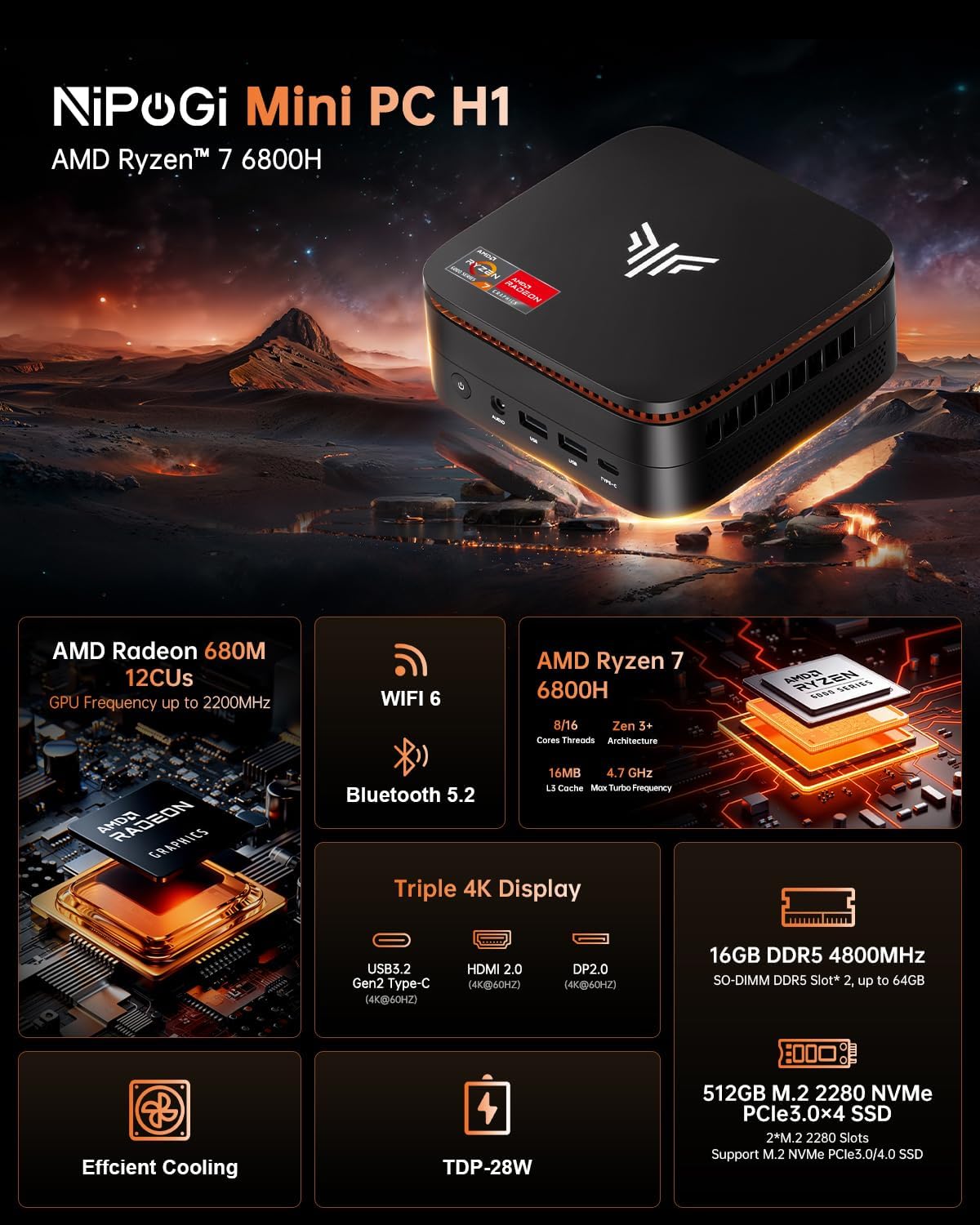
Image 1: NiPoGi Hyper H1 Mini PC with an overview of its main features including AMD Radeon 680M, WiFi 6, Bluetooth 5.2, AMD Ryzen 7 6800H, Triple 4K Display support, DDR5 memory, M.2 NVMe SSD, Efficient Cooling, and TDP-28W.
4.1. ອິນເຕີເຟດ ແລະ ພອດຕ່າງໆ
The Mini PC is equipped with multiple ports for connectivity. Familiarize yourself with the front and back panel interfaces:

ຮູບພາບ 2: ລາຍລະອຽດ view of the front and back ports of the NiPoGi Hyper H1 Mini PC. The front includes a power button, 3.5mm audio jack, two USB 3.2 Gen2 Type-A ports, and one USB 3.2 Gen2 Type-C port. The back features four USB 3.2 Gen1 Type-A ports, a 2.5Gbps LAN port, a DP2.0 port, an HDMI 2.0 port, and a DC IN port.
ແຜງໜ້າ:
- ປຸ່ມເປີດປິດ: ເພື່ອເປີດ/ປິດອຸປະກອນ.
- Jack ສຽງ 3.5mm: ສໍາລັບຫູຟັງຫຼືລໍາໂພງ.
- USB 3.2 Gen2 Type-A (x2): High-speed data transfer (10Gbps).
- USB 3.2 Gen2 Type-C (x1): High-speed data transfer and 4K@60Hz display output.
ແຜງດ້ານຫຼັງ:
- USB 3.2 Gen1 Type-A (x4): Standard data transfer (5Gbps).
- LAN (RJ45): 2.5Gbps Ethernet port for wired network connection.
- DP 2.0: DisplayPort for video output (4K@60Hz).
- HDMI2.0: HDMI port for video output (4K@60Hz).
- DC ໃນ: ພອດປ້ອນພະລັງງານ.
5. ຕັ້ງຄ່າ
- ເຊື່ອມຕໍ່ພະລັງງານ: Plug the power adapter into the DC IN port on the back of the Mini PC, then connect it to a power outlet.
- ເຊື່ອມຕໍ່ຈໍສະແດງຜົນ: Connect your monitor(s) to the Mini PC using the HDMI 2.0, DP 2.0, or USB 3.2 Gen2 Type-C ports.
- ເຊື່ອມຕໍ່ອຸປະກອນຕໍ່ພ່ວງ: Connect your USB keyboard and mouse to any available USB Type-A ports.
- ເປີດ: Press the power button on the front panel. The system will boot up.
- ການຕັ້ງຄ່າເບື້ອງຕົ້ນ: Follow the on-screen instructions to complete the operating system setup (e.g., Windows 11 Pro).
6. ຄໍາແນະນໍາການດໍາເນີນງານ
6.1. ການຕິດຕັ້ງຈໍສະແດງຜົນສາມເທື່ອ
The NiPoGi Hyper H1 Mini PC supports connecting up to three monitors simultaneously, enhancing productivity and entertainment experiences. Use the HDMI 2.0, DP 2.0, and USB 3.2 Gen2 Type-C ports for this configuration.

Image 3: An illustration of the NiPoGi Hyper H1 Mini PC connected to three monitors, demonstrating its triple 4K display capability via USB3.2 Gen2 Type-C, HDMI 2.0, and DP2.0 ports, all supporting 4K resolution at 60Hz.
6.2. ການເຊື່ອມຕໍ່ໄຮ້ສາຍ
The Mini PC is equipped with advanced wireless technologies for stable and fast connections.

Image 4: Visual representation of Wi-Fi 6 and Bluetooth 5.2 capabilities. It highlights Wi-Fi 6's faster upload and download rates compared to Wi-Fi 5, ensuring stable performance.
- Wi-Fi 6 (802.11ax): Provides a more stable and faster wireless network connection, with speeds up to 2400 Mbps/s, approximately 3 times faster than Wi-Fi 5.
- Bluetooth 5.2: Allows for seamless connection with various Bluetooth-enabled devices such as keyboards, mice, headphones, and speakers.
7. ການເກັບຮັກສາແລະການຂະຫຍາຍຫນ່ວຍຄວາມຈໍາ
The NiPoGi Hyper H1 Mini PC offers flexible options for upgrading its memory and storage to meet your evolving needs.
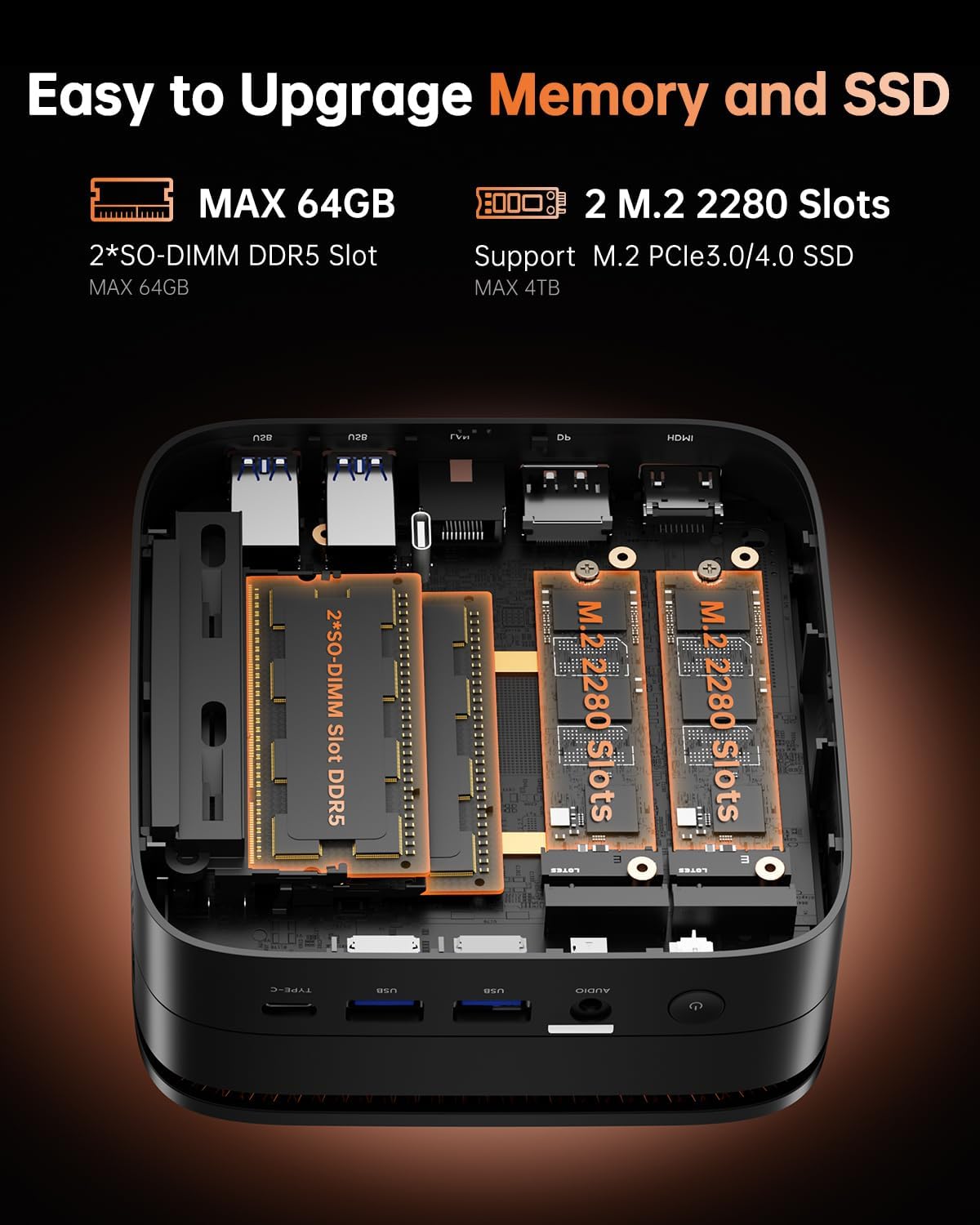
ຮູບພາບ 5: ພາຍໃນ view of the NiPoGi Hyper H1 Mini PC, illustrating the two SO-DIMM DDR5 slots for memory expansion up to 64GB and two M.2 2280 slots for SSD expansion up to 4TB, supporting PCIe3.0/4.0 SSDs.
7.1. RAM Expansion
- The Mini PC comes with 16GB DDR5 memory.
- It features 2 SO-DIMM slots, allowing for expansion up to a maximum of 64GB DDR5 RAM.
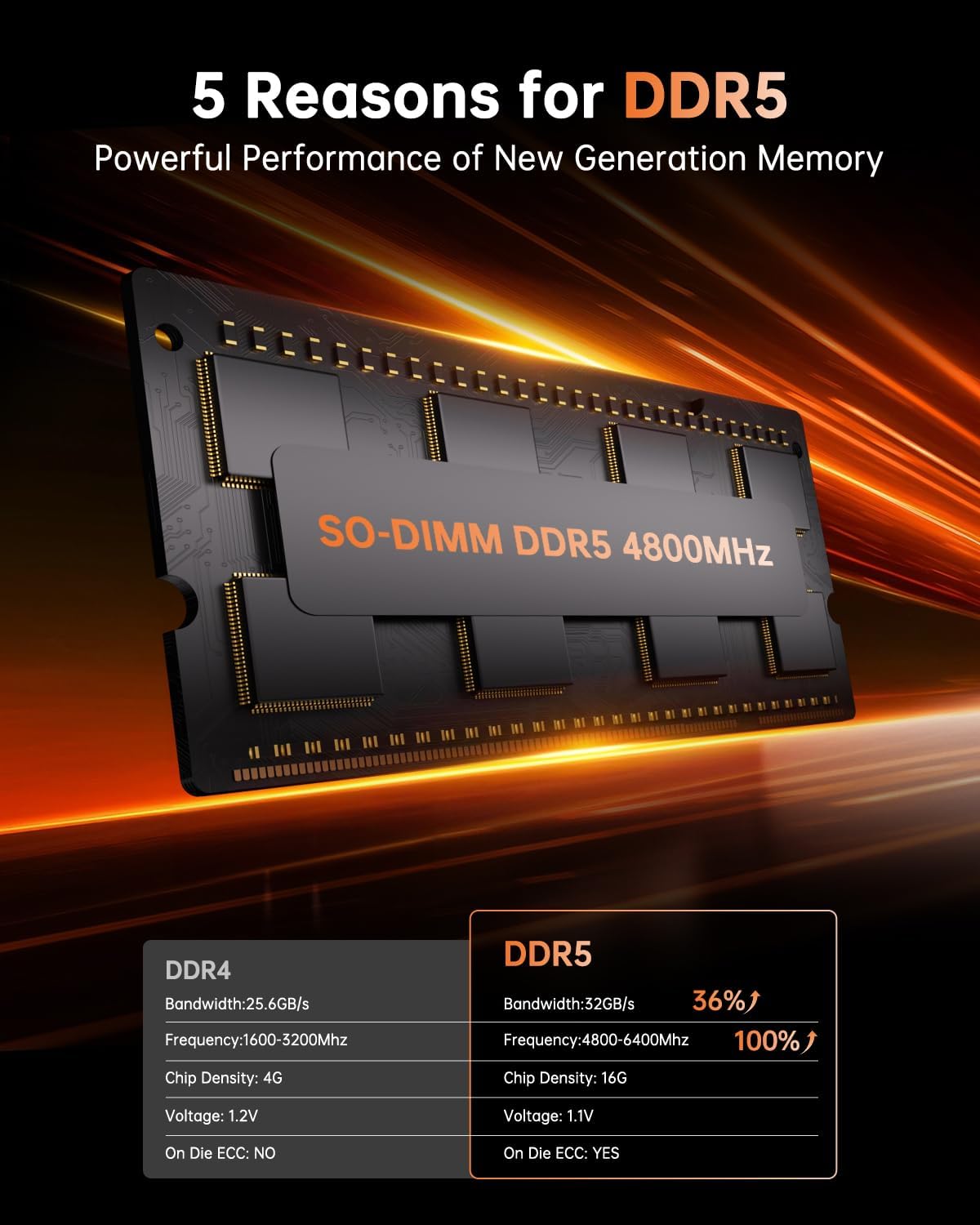
Image 6: A close-up of a SO-DIMM DDR5 4800MHz memory module, alongside a comparison table highlighting the performance advantages of DDR5 over DDR4, including higher bandwidth, frequency, and the presence of On Die ECC.
7.2. SSD Expansion
- The Mini PC includes a 512GB M.2 2280 NVMe PCIe3.0 SSD.
- It has 2 M.2 2280 slots, supporting M.2 NVMe PCIe3.0 or PCIe4.0 SSDs, allowing for storage expansion up to 4TB.
8. ການຕິດຕັ້ງ VESA
The NiPoGi Hyper H1 Mini PC supports VESA mounting, allowing you to attach it to the back of a compatible monitor or to a wall mount. This helps in creating a tidy and space-saving workspace.
- Attach the VESA mount bracket to the back of your monitor or desired surface using the provided screws.
- ເລື່ອນ Mini PC ໄປໃສ່ວົງເລັບຈົນກວ່າມັນຈະກົດເຂົ້າໃສ່ຢ່າງປອດໄພ.
9. ການແກ້ໄຂບັນຫາ
If you encounter issues with your NiPoGi Hyper H1 Mini PC, refer to the following common troubleshooting steps:
- ບໍ່ມີພະລັງງານ: ໃຫ້ແນ່ໃຈວ່າອະແດັບເຕີໄຟເຊື່ອມຕໍ່ຢ່າງປອດໄພກັບທັງ Mini PC ແລະປລັກສຽບໄຟທີ່ເຮັດວຽກໄດ້. ລອງຮ້ານອື່ນ.
- ບໍ່ມີການສະແດງຜົນ: Verify that the monitor is powered on and the display cable (HDMI, DP, or Type-C) is securely connected to both the Mini PC and the monitor. Try a different display cable or port.
- ບໍ່ມີການເຊື່ອມຕໍ່ອິນເຕີເນັດ: For wired connection, check the Ethernet cable and router. For Wi-Fi, ensure Wi-Fi is enabled in the operating system and you are connected to the correct network with the correct password.
- ບໍ່ກວດພົບອຸປະກອນຕໍ່ພ່ວງ: Ensure USB devices are properly connected. Try connecting them to a different USB port.
- ລະບົບຊ້າ: Check for background applications consuming resources. Ensure sufficient free storage space. Consider upgrading RAM or SSD if performance issues persist.
For persistent issues, please contact NiPoGi technical support.
10. ຂໍ້ມູນຈໍາເພາະ
Detailed technical specifications for the NiPoGi Hyper H1 Mini PC:
| ຄຸນສົມບັດ | ຂໍ້ມູນຈໍາເພາະ |
|---|---|
| ຍີ່ຫໍ້ | NiPoGi |
| ໝາຍເລກຕົວແບບ | H1 |
| ໂຮງງານຜະລິດ | AMD Ryzen 7 6800H (8 Cores, 16 Threads, Base 3.2 GHz, Max Turbo 4.7 GHz) |
| ຮູບພາບ | Integrated AMD Radeon 680M (12 CUs, up to 2200 MHz) |
| RAM | 16GB DDR5 4800MHz (Expandable up to 64GB via 2 SO-DIMM slots) |
| ການເກັບຮັກສາ | 512GB M.2 2280 NVMe PCIe3.0 SSD (Expandable up to 4TB via 2 M.2 2280 slots, supports PCIe3.0/4.0) |
| ລະບົບປະຕິບັດການ | Windows 11 Pro (or Linux compatible) |
| ຜົນຜະລິດວິດີໂອ | 1x HDMI 2.0, 1x DP 2.0, 1x USB 3.2 Gen2 Type-C (Supports Triple 4K@60Hz Display) |
| ການເຊື່ອມຕໍ່ໄຮ້ສາຍ | Wi-Fi 6 (802.11ax), Bluetooth 5.2 |
| ການເຊື່ອມຕໍ່ແບບມີສາຍ | 1x 2.5Gbps RJ45 LAN Port |
| ພອດ USB | 2x USB 3.2 Gen2 Type-A, 1x USB 3.2 Gen2 Type-C, 4x USB 3.2 Gen1 Type-A |
| Audio Port | 1x 3.5mm Audio Jack |
| ຂະໜາດ (L x W x H) | 12.9 x 12.9 x 5.1 ຊມ (5.08 x 5.08 x 2.01 ນິ້ວ) |
| ນ້ຳໜັກ | 568 ກຣາມ (1.25 ປອນ) |
11. ບໍາລຸງຮັກສາ
- ທໍາຄວາມສະອາດ: Use a soft, dry cloth to clean the exterior of the Mini PC. Do not use liquid cleaners or aerosols.
- ການລະບາຍອາກາດ: Regularly check that the ventilation openings are clear of dust and debris to ensure optimal airflow and prevent overheating.
- ອັບເດດຊອບແວ: ຮັກສາລະບົບປະຕິບັດງານແລະໄດເວີຂອງທ່ານປັບປຸງເພື່ອຮັບປະກັນຄວາມຫມັ້ນຄົງແລະຄວາມປອດໄພຂອງລະບົບ.
12. ການຮັບປະກັນແລະການສະຫນັບສະຫນູນ
NiPoGi is committed to providing excellent customer service. The NiPoGi Hyper H1 Mini PC comes with:
- 24-hour after-sales service.
- ສະຫນັບສະຫນູນດ້ານວິຊາການຕະຫຼອດຊີວິດ.
If you have any questions, require technical assistance, or need to claim warranty service, please do not hesitate to contact NiPoGi customer support through the official channels or your point of purchase.


