ແນະນຳ
Thank you for choosing the RAINPOINT Sprinkler Timer. This programmable hose controller is designed to simplify your garden watering, offering automatic, manual, and rain delay functions. Featuring a 100% metal water pipe construction, it ensures durability and efficient water flow for your lawn and garden irrigation needs.
ວິດີໂອຜະລິດຕະພັນຢ່າງເປັນທາງການ showcasing the RAINPOINT Sprinkler Timer's features and benefits, including its metal construction and various watering modes.
ຄຸນນະສົມບັດທີ່ສໍາຄັນ
- 100% Metal Water Pipes: Upgraded internal water pipes made entirely of metal, designed to withstand water pressure up to 140 PSI and offer a longer service life compared to plastic alternatives.
- Full-Flow Design: Utilizes a full-bore metal ball valve and larger water pipe diameter to provide a higher water flow (up to 10 Gal/min at 100 PSI) and minimize pressure loss.
- Automatic Watering Mode: Allows setting flexible watering frequencies (1-12 hours or 1-7 days) and durations (1 minute to 3 hours 59 minutes) for automated irrigation.
- Rain Delay & Manual Mode: Features a rain delay function (24H, 48H, or 72H) to pause scheduled watering during rainfall, and a manual mode for temporary watering needs (1 minute to 8 hours) without affecting the main schedule.
- Leak-Proof Brass Water Inlet & Outlet: Equipped with pure brass ¾" standard threaded connections for quick and secure attachment to garden hoses. Anti-twist lock thread design withstands 2000N tensile force, ensuring IP65 waterproof performance for outdoor use.
- ຈໍສະແດງຜົນ LCD 2.5": Large, easy-to-read display for clear programming and status monitoring.
- ການປົກປ້ອງພະລັງງານຕໍ່າ: Automatically turns off the valve to prevent continuous watering when battery is low.
ເນື້ອໃນຊຸດ
ກະລຸນາກວດໃຫ້ແນ່ໃຈວ່າລາຍການທັງໝົດມີຢູ່ເມື່ອ unboxing:
- 1 x RAINPOINT Sprinkler Timer (Model: RP-MIN)
- 1 x ຄູ່ມືຜູ້ໃຊ້
- (Batteries not included - Requires 2 AA batteries)
ຄູ່ມືການຕິດຕັ້ງ
1. ການຕິດຕັ້ງຫມໍ້ໄຟ
The timer requires 2 AA alkaline batteries (not included). Ensure correct polarity when inserting.
- ຊອກຫາຊ່ອງໃສ່ຫມໍ້ໄຟຢູ່ດ້ານຫຼັງຂອງເຄື່ອງຈັບເວລາ.
- ເລື່ອນຝາປິດຫມໍ້ໄຟເປີດ.
- Insert 2 new AA alkaline batteries, observing the +/- markings.
- Close the battery cover securely to ensure the IP65 waterproof seal is maintained.

Image showing the timer's features including IP65 waterproof rating and low power protection, which relates to battery life.
2. ການເຊື່ອມຕໍ່ໂມງຈັບເວລາ
Connect the timer to your outdoor faucet and garden hose.
- ໃຫ້ແນ່ໃຈວ່າ faucet ປິດ.
- Thread the brass inlet of the timer onto your outdoor faucet. Hand-tighten firmly. The ¾" standard GHT fitting ensures compatibility with most garden hoses.
- Thread your garden hose onto the brass outlet of the timer. Hand-tighten firmly.
- Slowly turn on your outdoor faucet. The timer is designed to withstand up to 140 PSI.

The main product image showing the timer connected to a hose and faucet, illustrating proper setup.

ລະອຽດ view of the durable brass inlet and outlet connections, highlighting the quality of the fittings.
3. ການຕັ້ງໂມງ
Before programming, set the current time.
- ຫັນໜ້າປັດໄປທີ່ "SET CLOCK".
- Use the "+" and "-" buttons to adjust the hour. Press "OK" to confirm.
- Use the "+" and "-" buttons to adjust the minute. Press "OK" to confirm.
- Turn the dial to "ON" to save the settings and return to normal operation.
ຄໍາແນະນໍາການດໍາເນີນງານ
ໂຫມດນ້ໍາອັດຕະໂນມັດ
Program your timer for automatic, scheduled watering.
- ຫັນໜ້າປັດໄປທີ່ "START TIME". ໃຊ້ "+" ແລະ "-" ເພື່ອກໍານົດເວລາເລີ່ມຕົ້ນທີ່ຕ້ອງການສໍາລັບການຫົດນໍ້າ. ກົດ "OK".
- Turn the dial to "HOW LONG". Use "+" and "-" to set the watering duration (1 minute to 3 hours 59 minutes). Press "OK".
- Turn the dial to "HOW OFTEN". Use "+" and "-" to set the watering frequency (every 1-12 hours or every 1-7 days). Press "OK".
- ຫັນໜ້າປັດໄປໃສ່ "ON" ເພື່ອເປີດໃຊ້ງານຕາມກຳນົດເວລາທີ່ຕັ້ງໂປຣແກຣມໄວ້.
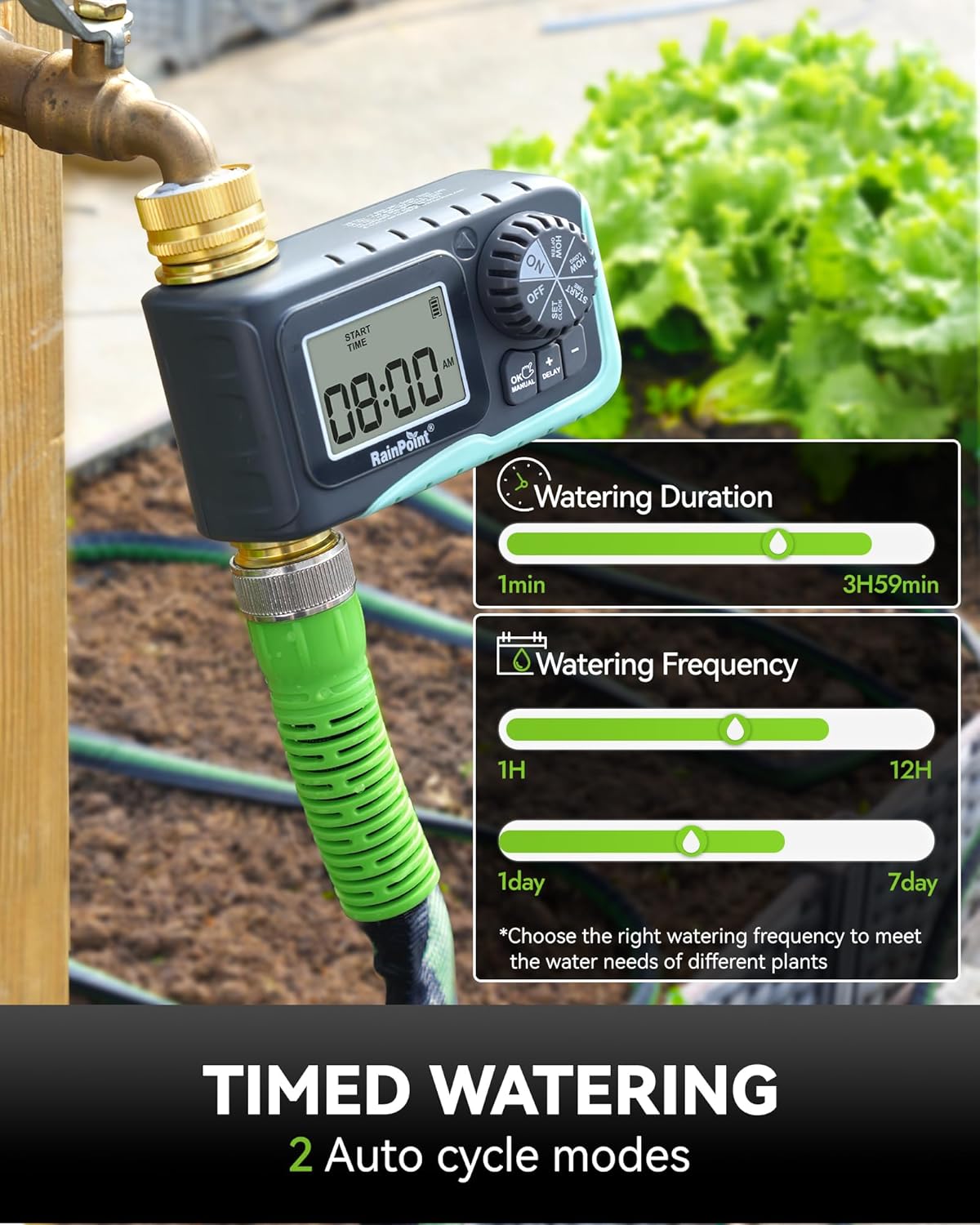
The timer's display showing options for setting watering duration and frequency for automatic cycles.
ໂໝດລ່າຊ້າຝົນ
Temporarily pause your watering schedule due to rain.
- With the dial set to "ON", press the "DELAY" button.
- Each press of the "DELAY" button will cycle through delay options: 24H, 48H, 72H.
- The timer will pause for the selected duration and automatically resume the programmed schedule afterward.

Visual representation of the rain delay function, allowing users to prevent overwatering during rainy periods.
ໂຫມດນ້ໍາຄູ່ມື
Initiate immediate watering without affecting your programmed schedule.
- With the dial set to "ON", press the "MANUAL" button.
- Use the "+" and "-" buttons to set the desired manual watering duration (1 minute to 8 hours).
- Press "OK" to start manual watering.
- To stop manual watering early, press "MANUAL" again or turn the dial to "OFF" and then back to "ON".

An image demonstrating the manual watering feature, showing a user watering plants directly.
Turning Off the Timer
To stop all watering functions, turn the dial to "OFF". The display will show "OFF".
ບໍາລຸງຮັກສາ
- ການປ່ຽນແບັດເຕີຣີ: Replace batteries when the low power indicator appears on the display to ensure continuous operation and prevent unexpected watering.
- ທໍາຄວາມສະອາດ: Periodically clean the filter washer located at the inlet to prevent debris from entering the timer and affecting water flow.
- ລະດູໜາວ: Before the first frost, disconnect the timer from the faucet and hose. Drain any remaining water from the timer and store it indoors in a dry, protected area to prevent freezing damage.
- ການປ້ອງກັນການຮົ່ວໄຫຼ: Ensure all connections are hand-tightened securely. The anti-leak seal ring and robust brass fittings are designed to prevent leaks, but proper installation is crucial.

An illustration highlighting the durable 100% metal water pipe construction, emphasizing its resistance to high pressure and long lifespan.
ການແກ້ໄຂບັນຫາ
| ບັນຫາ | ສາເຫດທີ່ເປັນໄປໄດ້ | ການແກ້ໄຂ |
|---|---|---|
| ໂມງຈັບເວລາບໍ່ເປີດ/ສະແດງຜົນຫວ່າງເປົ່າ. | ແບັດເຕີຣີຕາຍ ຫຼື ຕິດຕັ້ງບໍ່ຖືກຕ້ອງ. | Replace with 2 new AA alkaline batteries, ensuring correct polarity. |
| ບໍ່ມີນ້ໍາໄຫຼ. | Faucet is off; low water pressure; clogged filter; timer is off or not programmed. | Ensure faucet is fully open. Check water pressure. Clean the filter washer at the inlet. Set the dial to "ON" and verify programming. |
| ນ້ໍາຮົ່ວຈາກການເຊື່ອມຕໍ່. | Loose connection; missing or damaged washer. | Hand-tighten all connections firmly. Check that the rubber washer is properly seated in the inlet. Replace if damaged. |
| ໂມງຈັບເວລາບໍ່ເປັນໄປຕາມຕາຕະລາງເວລາ. | ການຂຽນໂປຼແກຼມທີ່ບໍ່ຖືກຕ້ອງ; ຝົນຊັກຊ້າການເຄື່ອນໄຫວ; ແບັດເຕີຣີຕໍ່າ. | Review and re-program the schedule. Check if rain delay is active. Replace batteries. |
ຂໍ້ມູນຈໍາເພາະ
| ຄຸນລັກສະນະ | ລາຍລະອຽດ |
|---|---|
| ຍີ່ຫໍ້ | ຈຸດຝົນ |
| ຕົວແບບ | RP-MIN (1 Outlet) |
| ວັດສະດຸ | ທອງເຫລືອງ, ໂລຫະ |
| ຂະໜາດສິນຄ້າ | 4.5"D x 2.6"W x 4.5"H |
| ຄວາມຕ້ານທານຄວາມກົດດັນນ້ໍາ | ເຖິງ 140 PSI |
| Tensile Force Resistance | 2000N (Anti-twist lock thread) |
| ອັດຕາການໄຫຼຂອງນ້ໍາ | Up to 10 Gal/min at 100 PSI |
| ຄວາມຖີ່ຂອງການຫົດນໍ້າ | 1-12 hours or 1-7 days |
| ໄລຍະເວລາການຫົດນໍ້າ | 1 minute - 3 hours 59 minutes (Automatic); 1 minute - 8 hours (Manual) |
| ການປະເມີນກັນນ້ໍາ | IP65 |
| ຈໍສະແດງຜົນ | ຈໍ LCD 2.5" |
| ແຫຼ່ງພະລັງງານ | 2 x AA ຫມໍ້ໄຟ (ບໍ່ລວມ) |
| ນ້ໍາຫນັກລາຍການ | 12.6 ອອນ |
| ປະເທດຕົ້ນກໍາເນີດ | ຈີນ |
ການຮັບປະກັນແລະການສະຫນັບສະຫນູນ
For warranty information, technical support, or any inquiries regarding your RAINPOINT Sprinkler Timer, please refer to the official RAINPOINT website or contact their customer service directly. Contact details are typically provided on the product packaging or the manufacturer's official online channels.
ນອກນັ້ນທ່ານຍັງສາມາດໄປຢ້ຽມຢາມໄດ້ ຮ້ານ RAINPOINT ໃນ Amazon ສໍາລັບຂໍ້ມູນເພີ່ມເຕີມຜະລິດຕະພັນແລະຊັບພະຍາກອນສະຫນັບສະຫນູນ.


