1. ບົດແນະນຳ
This user manual provides comprehensive instructions for the Callsky 10-inch Wi-Fi Tablet, Model Ctab 10. Please read this manual carefully before using your device to ensure proper operation and to maximize its features. Keep this manual for future reference.
2. ຜະລິດຕະພັນເກີນview
2.1 ເນື້ອໃນຊຸດ
ເມື່ອເປີດກ່ອງ, ໃຫ້ກວດສອບວ່າມີສິນຄ້າທັງໝົດທີ່ລະບຸໄວ້ຂ້າງລຸ່ມນີ້:
- Callsky Ctab 10 Tablet
- ສາຍສາກໄຟ USB Type-C
- Power Adapter
- ຄູ່ມືຜູ້ໃຊ້ (ພາສາຍີ່ປຸ່ນ)

Image: Package contents including the tablet, charging cable, power adapter, and user manual.
2.2 ອົງປະກອບອຸປະກອນ
Familiarize yourself with the physical layout and ports of your tablet:
- ກ້ອງໜ້າ: 5MP ສໍາລັບການໂທວິດີໂອແລະ selfies.
- ກ້ອງຫຼັງ: 8MP with autofocus for high-resolution photos.
- ປຸ່ມເປີດປິດ: ຕັ້ງຢູ່ດ້ານຂ້າງສໍາລັບການເປີດ / ປິດອຸປະກອນແລະການລັອກຫນ້າຈໍ.
- ປຸ່ມລະດັບສຽງ: ປັບລະດັບສຽງ.
- ພອດ USB Type-C: ສໍາລັບການສາກໄຟແລະການໂອນຂໍ້ມູນ.
- Jack ຫູຟັງ 3.5 ມມ: ສໍາລັບຜົນຜະລິດສຽງ.
- ລຳ ໂພງຄູ່: ສໍາລັບປະສົບການສຽງທີ່ປັບປຸງ.
- ຊ່ອງສຽບກາດ MicroSD: ສຳລັບການຂະຫຍາຍບ່ອນເກັບຂໍ້ມູນໄດ້ເຖິງ 2TB.

ຮູບພາບ: ຫຼາຍກວ່າview of tablet features including face recognition, wireless projection, and physical dimensions.
2.3 ລັກສະນະທີ່ສໍາຄັນ
- ການອອກແບບນ້ຳໜັກເບົາ: Ultra-thin at 8.7mm and weighing 425g for easy portability.
- ລະບົບປະຕິບັດການ Android 14: Enhanced privacy, personalized settings, and improved user experience.
- ປະສິດທິພາບສູງ: 1.8GHz Allwinner A523 Octa-core processor and Mali-G57 GPU for smooth multitasking, gaming, and HD video.
- ຫນ່ວຍຄວາມຈໍາ & ການເກັບຮັກສາ: 3GB RAM + 9GB virtual memory, 128GB internal storage, expandable up to 2TB via MicroSD.
- ຈໍສະແດງຜົນ Vivid: 10.1-inch 1280x800 Incell IPS display with eye protection mode and Widevine L1 support for high-quality streaming.
- ການເຊື່ອມຕໍ່: Wi-Fi 6 and Bluetooth 5.4 for stable and high-speed connections.
- ຄຸນສົມບັດຂັ້ນສູງ: Wireless projection, face recognition, and split-screen functionality.
- ແບດເຕີຣີທີ່ຍາວນານ: 6000mAh battery for extended use.

Image: Visual summary of the tablet's core specifications and features.
3. ຕັ້ງຄ່າ
3.1 ການເປີດເຄື່ອງເບື້ອງຕົ້ນ ແລະການຕັ້ງຄ່າພື້ນຖານ
- Press and hold the Power button until the Callsky logo appears.
- Follow the on-screen prompts to select your language (e.g., English).
- Connect to a Wi-Fi network. Select your network from the list and enter the password if required.
- Review and accept the Google Services terms.
- Set up a screen lock (PIN, pattern, or password) for security. You can skip this step and set it up later.
- Complete the remaining setup steps as guided by the Android 14 interface.
3.2 ການໃສ່ບັດ MicroSD
To expand your tablet's storage:
- ຊອກຫາຊ່ອງສຽບກາດ MicroSD ຢູ່ດ້ານຂ້າງຂອງແທັບເລັດ.
- Gently insert the MicroSD card into the slot until it clicks into place. Ensure the card is oriented correctly.
- The tablet will detect the new storage. You may be prompted to format the card for optimal use with the device.
4. ຄໍາແນະນໍາການດໍາເນີນງານ
4.1 ການນໍາທາງພື້ນຖານ
- ທ່າທາງສໍາຜັດ: ແຕະເພື່ອເລືອກ, ປັດເພື່ອເລື່ອນ, ແຕະເພື່ອຊູມ.
- ໜ້າຈໍຫຼັກ: ເຂົ້າເຖິງແອັບ, ວິດເຈັດ ແລະການແຈ້ງເຕືອນ.
- ການແຈ້ງເຕືອນ: ປັດລົງຈາກເທິງສຸດຂອງໜ້າຈໍໄປທີ່ view ການແຈ້ງເຕືອນ ແລະການຕັ້ງຄ່າດ່ວນ.
4.2 Memory and Storage Management
The tablet comes with 3GB of physical RAM and 9GB of virtual memory, totaling 12GB, along with 128GB of internal storage. You can expand storage up to 2TB using a MicroSD card.
- ເພື່ອກວດສອບການເກັບຮັກສາ: ໄປທີ່ ການຕັ້ງຄ່າ > ບ່ອນເກັບຂໍ້ມູນ.
- To manage apps: Go to ການຕັ້ງຄ່າ > ແອັບ.

Image: Details on memory and storage, including RAM, internal storage, and MicroSD expansion.
4.3 ປະສົບການການສະແດງ ແລະສາຍຕາ
The 10.1-inch 1280x800 Incell IPS display provides clear and vibrant visuals. It supports Widevine L1 for high-definition streaming from platforms like Netflix and YouTube.
- ໂໝດປົກປ້ອງຕາ: Activate this mode in settings to reduce blue light and eye strain during prolonged use.
- ໜ້າຈໍແຍກ: Use two applications simultaneously for enhanced productivity.

Image: Tablet demonstrating Widevine L1 support for streaming services.
4.4 ການເຊື່ອມຕໍ່
The tablet supports Wi-Fi 6 and Bluetooth 5.4 for reliable and fast wireless connections.
- Wi-Fi: Connect to 2.4G or 5G networks. Go to ການຕັ້ງຄ່າ > ເຄືອຂ່າຍ ແລະອິນເຕີເນັດ > Wi-Fi ການຄຸ້ມຄອງການເຊື່ອມຕໍ່.
- Bluetooth: Pair with wireless devices like headphones or keyboards. Go to ການຕັ້ງຄ່າ > ອຸປະກອນທີ່ເຊື່ອມຕໍ່ > Bluetooth.
- ການຄາດຄະເນໄຮ້ສາຍ: Share your screen with compatible displays. Access this feature from the quick settings panel.
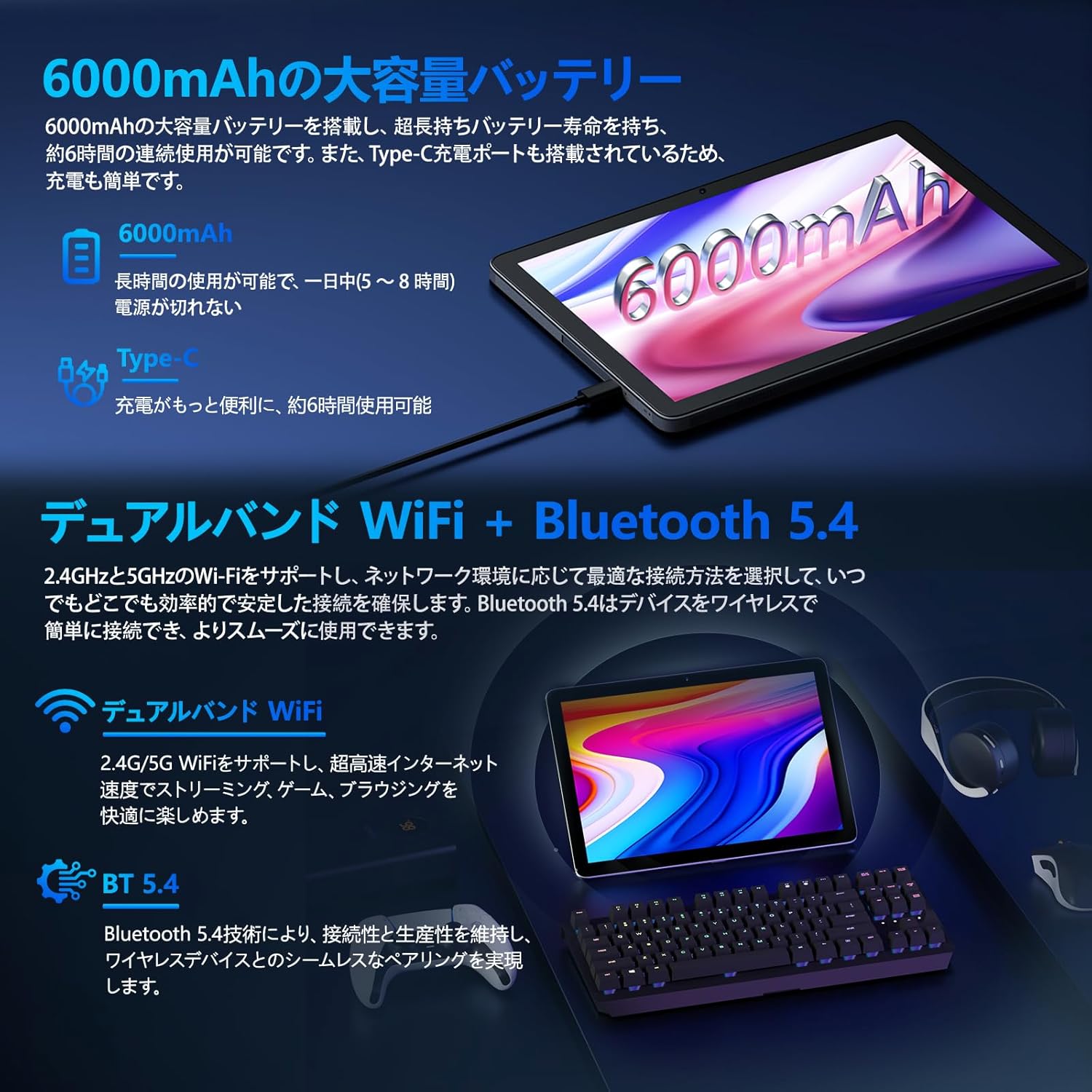
Image: Tablet highlighting battery capacity, Type-C charging, Wi-Fi, and Bluetooth features.
4.5 ກ້ອງຖ່າຍຮູບ
The tablet features a 5MP front camera and an 8MP rear camera with autofocus, suitable for video calls and capturing photos.
- Open the Camera app to take photos or record videos.
- ການຮັບຮູ້ໃບ ໜ້າ: Use the front camera for quick and secure unlocking. Set this up in ການຕັ້ງຄ່າ > ຄວາມປອດໄພ ແລະຄວາມເປັນສ່ວນຕົວ > ການປົດລັອກດ້ວຍໜ້າ.

Image: Illustration of the tablet's front and rear cameras and their resolutions.
4.6 Kids Mode (Parental Controls)
The tablet includes a dedicated Kids Mode and parental control features to ensure a safe and controlled environment for children.
- Access Kids Mode to provide curated content and limit screen time.
- Parents can manage app usage and content access through parental control settings.
4.7 ເຊັນເຊີ
The tablet is equipped with various sensors for enhanced functionality:
- GPS: ສໍາລັບການບໍລິການສະຖານທີ່ແລະການນໍາທາງ.
- Geomagnetic Sensor: ເຮັດໜ້າທີ່ເປັນເຂັມທິດ.
- ເຊັນເຊີຄວາມໃກ້ຊິດ: Prevents unintended screen operations.
- ເຊັນເຊີແສງສະພາບແວດລ້ອມ: ປັບຄວາມສະຫວ່າງຂອງໜ້າຈໍໂດຍອັດຕະໂນມັດ.
- Gyroscope: For tilt operations and AR applications.
- ເຄື່ອງວັດແທກຄວາມເລັ່ງ: Detects tilt, shock, and movement.
5. ບໍາລຸງຮັກສາ
5.1 ການດູແລຫມໍ້ໄຟ
The 6000mAh battery provides long usage times. To prolong battery life:
- ຫຼີກເວັ້ນອຸນຫະພູມທີ່ຮຸນແຮງ.
- ຢ່າປ່ອຍໃຫ້ຫມໍ້ໄຟຫມົດໄປເລື້ອຍໆ.
- Use the provided charger and cable.
- ເພີ່ມປະສິດທິພາບການໃຊ້ແບັດເຕີຣີໃນ ການຕັ້ງຄ່າ > ແບັດເຕີຣີ.

Image: Tablet connected to a Type-C charger, highlighting the 6000mAh battery.
5.2 ການທໍາຄວາມສະອາດ
ໃຊ້ຜ້າແພທີ່ອ່ອນໆ, ບໍ່ມີສານດ່າງເພື່ອເຮັດຄວາມສະອາດໜ້າຈໍ ແລະຕົວເຄື່ອງຂອງແທັບເລັດ. ຫຼີກເວັ້ນການນໍາໃຊ້ສານເຄມີທີ່ຮຸນແຮງຫຼືວັດສະດຸຂັດ.
6. ການແກ້ໄຂບັນຫາ
ຖ້າທ່ານພົບບັນຫາກັບແທັບເລັດຂອງທ່ານ, ໃຫ້ອ້າງອີງເຖິງບັນຫາ ແລະ ວິທີແກ້ໄຂທົ່ວໄປຕໍ່ໄປນີ້:
| ບັນຫາ | ສາເຫດ / ການແກ້ໄຂທີ່ເປັນໄປໄດ້ |
|---|---|
| ແທັບເລັດບໍ່ເປີດ | ໃຫ້ແນ່ໃຈວ່າໄດ້ສາກໄຟແລ້ວ. ເຊື່ອມຕໍ່ສາຍສາກແລ້ວລໍຖ້າສອງສາມນາທີກ່ອນທີ່ຈະພະຍາຍາມເປີດເຄື່ອງອີກຄັ້ງ. |
| ໜ້າຈໍບໍ່ຕອບສະໜອງ | Restart the tablet by holding the power button. If unresponsive, force restart by holding the power button for a longer duration (e.g., 10-15 seconds). |
| ບັນຫາການເຊື່ອມຕໍ່ Wi-Fi | ກວດສອບວ່າ Wi-Fi ຖືກເປີດໃຊ້ງານຢູ່ໃນການຕັ້ງຄ່າແລ້ວຫຼືບໍ່. ປິດເປີດເຣົາເຕີຂອງທ່ານຄືນໃໝ່. ລືມເຄືອຂ່າຍ ແລະ ເຊື່ອມຕໍ່ຄືນໃໝ່. |
| Device overheating / unexpected shutdowns | Close background applications. Avoid using the tablet in direct sunlight or hot environments. If the issue persists, contact customer support. |
| ແອັບຂັດຂ້ອງ ຫຼືຄ້າງ | Clear the app's cache (Settings > Apps > [App Name] > Storage & cache > Clear cache). Update the app. Reinstall the app. |
| ການປະຕິບັດຊ້າ | ປິດແອັບພື້ນຫຼັງທີ່ບໍ່ຈຳເປັນ. ລຶບ cache ແລະຊົ່ວຄາວ files. Ensure sufficient storage space. |
If the problem persists after trying these solutions, please contact Callsky customer support.
7. ຂໍ້ມູນຈໍາເພາະ
| ຄຸນສົມບັດ | ລາຍລະອຽດ |
|---|---|
| ຍີ່ຫໍ້ | ໂທສະກີ |
| ຊື່ຕົວແບບ | Ctab 10 |
| ລະບົບປະຕິບັດການ | Android 14 |
| ຂະໜາດໜ້າຈໍ | 10.1 ນິ້ວ |
| ຄວາມລະອຽດການສະແດງ | 1280x800 pixels (Incell IPS) |
| CPU | Allwinner A523 Octa-core (1.8 GHz) |
| GPU | Mali-G57 (Integrated) |
| RAM | 3GB Physical + 9GB Virtual (Total 12GB) |
| ການເກັບຮັກສາພາຍໃນ | 128 GB |
| ການເກັບຮັກສາທີ່ຂະຫຍາຍໄດ້ | ສູງສຸດ 2TB ຜ່ານບັດ MicroSD |
| ກ້ອງຫຼັງ | 8 MP |
| ກ້ອງໜ້າ | 5 MP |
| Wi-Fi | Wi-Fi 6 (802.11ac, 802.11b, 802.11g, 802.11n) |
| Bluetooth | Bluetooth 5.4 |
| ຄວາມອາດສາມາດຫມໍ້ໄຟ | 6000mAh (22.8 Watt-hours, 1 Lithium Polymer cell) |
| ພອດສາກໄຟ | ປະເພດ-C |
| ຂະໜາດ | 32.4 x 20.3 x 3.4 cm |
| ນ້ຳໜັກ | 425 g |
| ການຢັ້ງຢືນ | GMS Certified, PSE Certified |
8. ການຮັບປະກັນແລະການສະຫນັບສະຫນູນ
The Callsky Ctab 10 tablet comes with a ຮັບປະກັນ 2 ປີ. This warranty covers manufacturing defects and ensures long-term reliability.
8.1 ສະຫນັບສະຫນູນລູກຄ້າ
If you encounter any issues or have questions regarding your Callsky tablet, please contact our customer support team. We are committed to providing prompt assistance.
- ວິທີການຕິດຕໍ່: Refer to your purchase platform (e.g., Amazon) for specific contact details. Typically, you can find seller contact information through your order history.
- ເວລາຕອບສະໜອງ: We aim to respond to inquiries within 24 hours on weekdays and within 48-72 hours on weekends or holidays.
Please have your product model (Ctab 10) and purchase details ready when contacting support.