1. ບົດແນະນຳ
This manual provides essential instructions for the safe and efficient operation, setup, and maintenance of your Happybuy 60 Gallon Sandblasting Cabinet, Model SBC200. This heavy-duty steel cabinet is designed for various surface treatment tasks, including paint, stain, and rust removal, utilizing abrasive media with a working pressure of 40-120 PSI.
Key features include a durable cold-rolled steel construction with a powder-coated finish for corrosion resistance, a large observation window with LED lighting for clear visibility, and a pre-installed sealing strip to minimize dust leakage. The cabinet has a 60-gallon capacity, accommodating up to 203.4 lbs of blasting media.
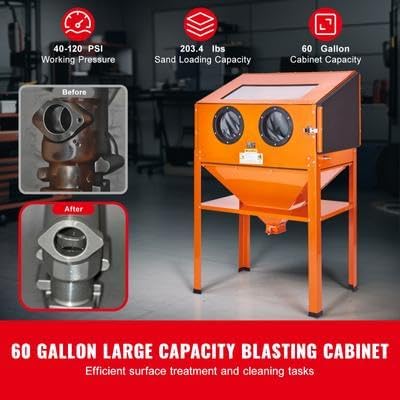
Figure 1: Happybuy 60 Gallon Sandblasting Cabinet, Model SBC200. This image shows the overall view of the sandblasting cabinet, highlighting its robust construction and design for efficient surface treatment.
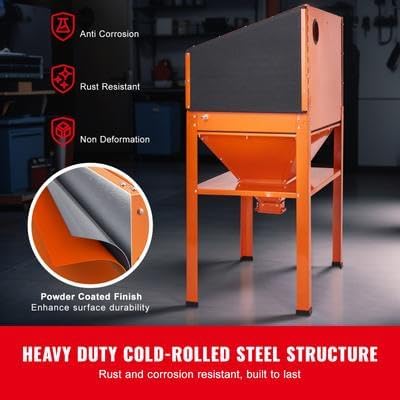
Figure 2: Heavy-duty cold-rolled steel structure. This image emphasizes the cabinet's durable construction with a powder-coated finish, providing anti-corrosion and rust-resistant properties for long-term use.
2. ຄໍາແນະນໍາຄວາມປອດໄພ
Always prioritize safety when operating the sandblasting cabinet. Failure to follow these instructions may result in serious injury or damage to the equipment.
- ອ່ານຄູ່ມື: Before assembly or operation, thoroughly read and understand all instructions in this manual.
- ອຸປະກອນປ້ອງກັນສ່ວນບຸກຄົນ (PPE): Always wear appropriate PPE, including safety glasses, gloves, and a respirator, to protect against abrasive media and dust. The cabinet includes integrated gloves for hand protection during operation.
- ການລະບາຍອາກາດ: Ensure adequate ventilation in the work area to prevent accumulation of dust and fumes.
- ເຄື່ອງອັດອາກາດ: Use an air compressor that meets the specified working pressure (40-120 PSI) and CFM requirements. Ensure the air supply is clean and dry.
- ຄວາມປອດໄພທາງໄຟຟ້າ: If the unit includes electrical components (e.g., LED lighting), ensure proper electrical connections and grounding. Disconnect power before maintenance.
- Abrasive Media: Use only recommended abrasive media. Never use silica sand, as it can cause severe respiratory issues.
- ຄວາມໝັ້ນຄົງ: Ensure the cabinet is placed on a stable, level surface before operation to prevent tipping.
- ເດັກນ້ອຍ ແລະ ຜູ້ຕິດຕາມ: ຮັກສາເດັກນ້ອຍ ແລະບຸກຄະລາກອນທີ່ບໍ່ໄດ້ຮັບອະນຸຍາດຢູ່ຫ່າງຈາກບ່ອນເຮັດວຽກ.
- ບໍາລຸງຮັກສາ: Perform regular maintenance as described in this manual to ensure safe and efficient operation.
3. ເນື້ອໃນຊຸດ
Verify that all components are present and undamaged upon unpacking. If any parts are missing or damaged, contact Happybuy customer support.
- 1 x Blasting Gun
- 1 x 50g Sealant
- 1 x Set of Assembly Accessories
- 4 x Ceramic Nozzles (4.5, 5, 6, 7mm)
- 1 x ຄູ່ມືຜູ້ໃຊ້ (ເອກະສານນີ້)
- 1 x Seal Tape
- 1 x Pair of Gloves (integrated into cabinet)
- 4 x Cabinet Inner Lens Protector
4. ການຕິດຕັ້ງແລະການປະກອບ
Follow these steps to assemble and set up your sandblasting cabinet. It is recommended to have assistance during assembly due to the unit's size and weight.
- Unpack ອົງປະກອບ: Carefully remove all parts from the packaging and lay them out. Refer to the parts list in the assembly accessories set.
- ປະກອບຂາຕັ້ງ: Attach the legs and support beams to form the cabinet stand. Ensure all bolts are securely tightened.
- Mount Cabinet: Carefully lift the main cabinet body and place it onto the assembled stand. Secure it using the provided hardware.
- Install Hopper: Attach the abrasive media hopper to the bottom of the cabinet, ensuring a tight seal to prevent leakage. Use the provided sealant and seal tape as necessary.
- ເຊື່ອມຕໍ່ການສະໜອງອາກາດ: Connect your air compressor hose to the cabinet's air inlet. Ensure all connections are secure and leak-free. The working pressure range is 40-120 PSI.
- Install Blasting Gun and Nozzles: Connect the blasting gun to the internal hose. Select the appropriate ceramic nozzle (4.5, 5, 6, or 7mm) for your application and install it onto the blasting gun.
- Install Lens Protectors: Place the inner lens protectors over the observation window to prevent scratching during operation.
- ການເຊື່ອມຕໍ່ໄຟຟ້າ (ຖ້າມີ): If your model includes LED lighting, connect the power cord to a suitable grounded electrical outlet.
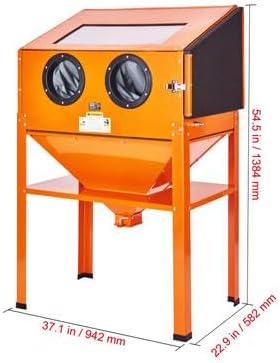
Figure 3: Assembled Happybuy Sandblasting Cabinet. This image illustrates the fully assembled unit, including its dimensions, which are crucial for planning placement and ensuring proper setup.
5. ຄໍາແນະນໍາການດໍາເນີນງານ
ກ່ອນການປະຕິບັດງານ, ໃຫ້ແນ່ໃຈວ່າເຂົ້າໃຈ ແລະ ປະຕິບັດຕາມມາດຕະການຄວາມປອດໄພທັງໝົດ.
- Load Abrasive Media: Open the top lid of the cabinet and carefully pour the desired abrasive media (e.g., glass beads, aluminum oxide) into the hopper. The cabinet has a capacity of 60 gallons, holding up to 203.4 lbs of media. Close the lid securely.
- Connect Air Compressor: Ensure your air compressor is connected and set to the desired working pressure, between 40-120 PSI.
- ໃສ່ຊິ້ນວຽກ: Place the item to be blasted inside the cabinet through the side access door. Ensure the door is securely latched before beginning operation.
- ໃສ່ຖົງມື: Insert your hands into the integrated gloves provided on the front of the cabinet.
- ເປີດໃຊ້ແສງ: If equipped, turn on the internal LED lighting for clear visibility of the workpiece.
- Begin Blasting: Aim the blasting gun at the workpiece and press the trigger to begin abrasive flow. Move the gun steadily across the surface to achieve an even finish.
- ຕິດຕາມຄວາມຄືບໜ້າ: Observe the blasting process through the observation window. Adjust air pressure or nozzle size as needed for optimal results.
- Finish Blasting: Release the trigger to stop the abrasive flow. Allow any airborne dust to settle before opening the cabinet door.
- ເອົາ workpiece ອອກ: Open the side access door and carefully remove the treated item.
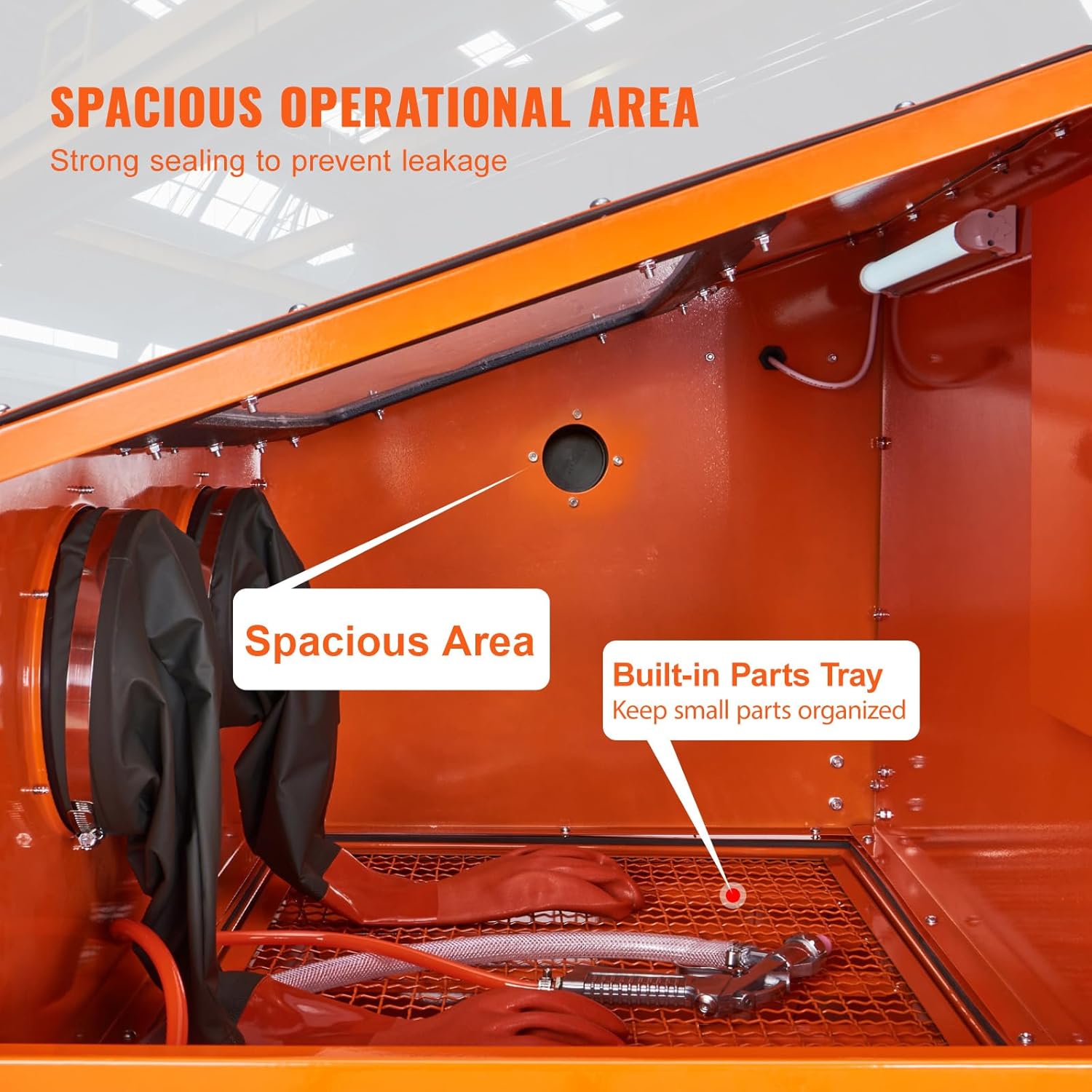
ຮູບ 4: ພາຍໃນ view of the sandblasting cabinet. This image highlights the spacious operational area and built-in parts tray, designed for efficient and organized blasting tasks.

Figure 5: Included ceramic nozzles. This image displays the four ceramic nozzles (4.5mm, 5mm, 6mm, 7mm) and the blasting gun, illustrating the versatility for different precision requirements.
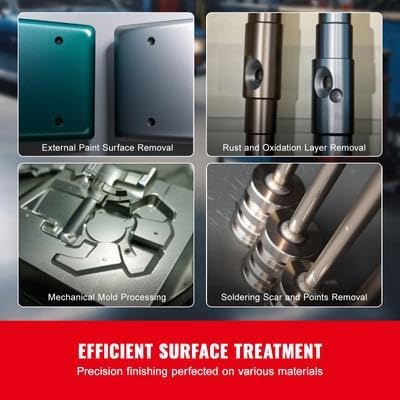
ຮູບທີ 6: ຕົວຢ່າງamples of surface treatment. This image demonstrates the cabinet's effectiveness in removing paint, rust, oxidation layers, and processing mechanical molds, showcasing its versatile applications.
6. ບໍາລຸງຮັກສາ
Regular maintenance ensures the longevity and optimal performance of your sandblasting cabinet.
- Empty Used Media: After each use or when the media becomes contaminated, empty the used abrasive media from the hopper. Dispose of media according to local regulations.
- Clean Cabinet Interior: Periodically clean the interior of the cabinet to remove dust and debris. Use a shop vacuum for best results.
- ກວດສອບ Nozzles: Regularly inspect the ceramic nozzles for wear. Replace worn nozzles to maintain blasting efficiency.
- Check Seals and Hoses: Examine all seals, gaskets, and air hoses for signs of wear, cracks, or leaks. Replace any damaged components to prevent dust leakage and maintain air pressure.
- Replace Lens Protectors: Replace the inner lens protectors when they become scratched or opaque to maintain clear visibility.
- ການບໍາລຸງຮັກສາເຄື່ອງກອງອາກາດ: If your air compressor has an air filter, ensure it is regularly cleaned or replaced to provide clean, dry air to the cabinet.
7. ການແກ້ໄຂບັນຫາ
| ບັນຫາ | ສາເຫດທີ່ເປັນໄປໄດ້ | ການແກ້ໄຂ |
|---|---|---|
| No abrasive flow or weak blasting. |
|
|
| Excessive dust leakage from cabinet. |
|
|
| Poor visibility inside cabinet. |
|
|
8. ຂໍ້ມູນຈໍາເພາະ
| ຄຸນສົມບັດ | ລາຍລະອຽດ |
|---|---|
| ໝາຍເລກຕົວແບບ | SBC200 |
| ຂະໜາດສິນຄ້າ (L x W x H) | 942 x 582 x 1384 ມມ / 37.1 x 22.9 x 54.5 ນິ້ວ |
| Cabinet Capacity | 227 liters / 60 Gallon |
| Sand Loading Capacity (60 Grit) | 92.24 ກິໂລ / 203.4 lbs |
| ນ້ຳໜັກສຸດທິ | 35.7 ກິໂລ / 78.7 lbs |
| ຄວາມກົດດັນການເຮັດວຽກ | 276-827 kPa / 40-120 PSI |
| ວັດສະດຸຫຼັກ | ເຫຼັກກ້າມ້ວນເຢັນ |
| Included Nozzle Sizes | 4.5mm, 5mm, 6mm, 7mm |

Figure 7: Detailed specifications and dimensions. This image provides a visual summary of the key product specifications and overall dimensions of the sandblasting cabinet.
9. ການຮັບປະກັນແລະການສະຫນັບສະຫນູນ
For warranty information, technical support, or to order replacement parts, please contact Happybuy customer service. Keep your purchase receipt and model number (SBC200) handy for faster service.
Visit the official Happybuy webເວັບໄຊສໍາລັບຂໍ້ມູນຕິດຕໍ່ທີ່ທັນສະໄຫມທີ່ສຸດແລະຊັບພະຍາກອນການຊ່ວຍເຫຼືອ.


