1. ບົດແນະນຳ
The LIWAN 4G LTE Cellular Security Camera provides robust outdoor surveillance without the need for a Wi-Fi connection. Designed for off-grid areas, this wired camera offers 24/7 continuous recording, 2K color night vision, two-way audio, and 360-degree viewing capabilities. It comes equipped with a built-in 4G SIM card and a 32GB memory card for local storage.

Image: The LIWAN 4G LTE Cellular Security Camera, showing two units, a power adapter, and a smartphone displaying the camera's live feed.
2. ເນື້ອໃນຊຸດ
ກະລຸນາກວດສອບວ່າລາຍການທັງຫມົດທີ່ລະບຸໄວ້ຂ້າງລຸ່ມນີ້ແມ່ນລວມຢູ່ໃນຊຸດຂອງທ່ານ:
- Cellular Security Camera (x2 for 2-pack)
- 4G SIM Card (pre-installed) and 32G Memory Card (pre-installed)
- Power Adapter (DC 5V/2A) and USB Cord (2.7m)
- ຄູ່ມືການສອນ
- screws ການຕິດຕັ້ງ
- ວົງເລັບຕິດຕັ້ງ
- ຄູ່ມືດ່ວນ
- ສະຕິກເກີເຕືອນ
- ຕຳ ແໜ່ງ ສະຕິກເກີ

Image: A visual representation of all components included in the LIWAN 4G LTE Cellular Security Camera package, numbered for easy identification.
3. ການຕິດຕັ້ງແລະການຕິດຕັ້ງ
3.1 SIM Card and Memory Card
The 4G SIM card and 32GB memory card are pre-installed in the camera. The SIM card supports Verizon, T-Mobile, and AT&T networks in the US. Note that only the built-in SIM card is supported; private SIM cards cannot be used. A complimentary 300MB of data is provided for initial testing. Continued use requires a data subscription plan, which can be managed through the Ubox app.

ຮູບພາບ: A ລາຍລະອຽດ view of the camera's SIM card compartment, indicating the pre-inserted SIM card.
3.2 ການເຊື່ອມຕໍ່ພະລັງງານ
This camera is a wired, plug-in model designed for 24/7 continuous recording. Connect the camera to a power source using the provided DC 5V/2A power adapter and 2.7-meter USB cord. Ensure the power source is stable and continuous for uninterrupted operation.
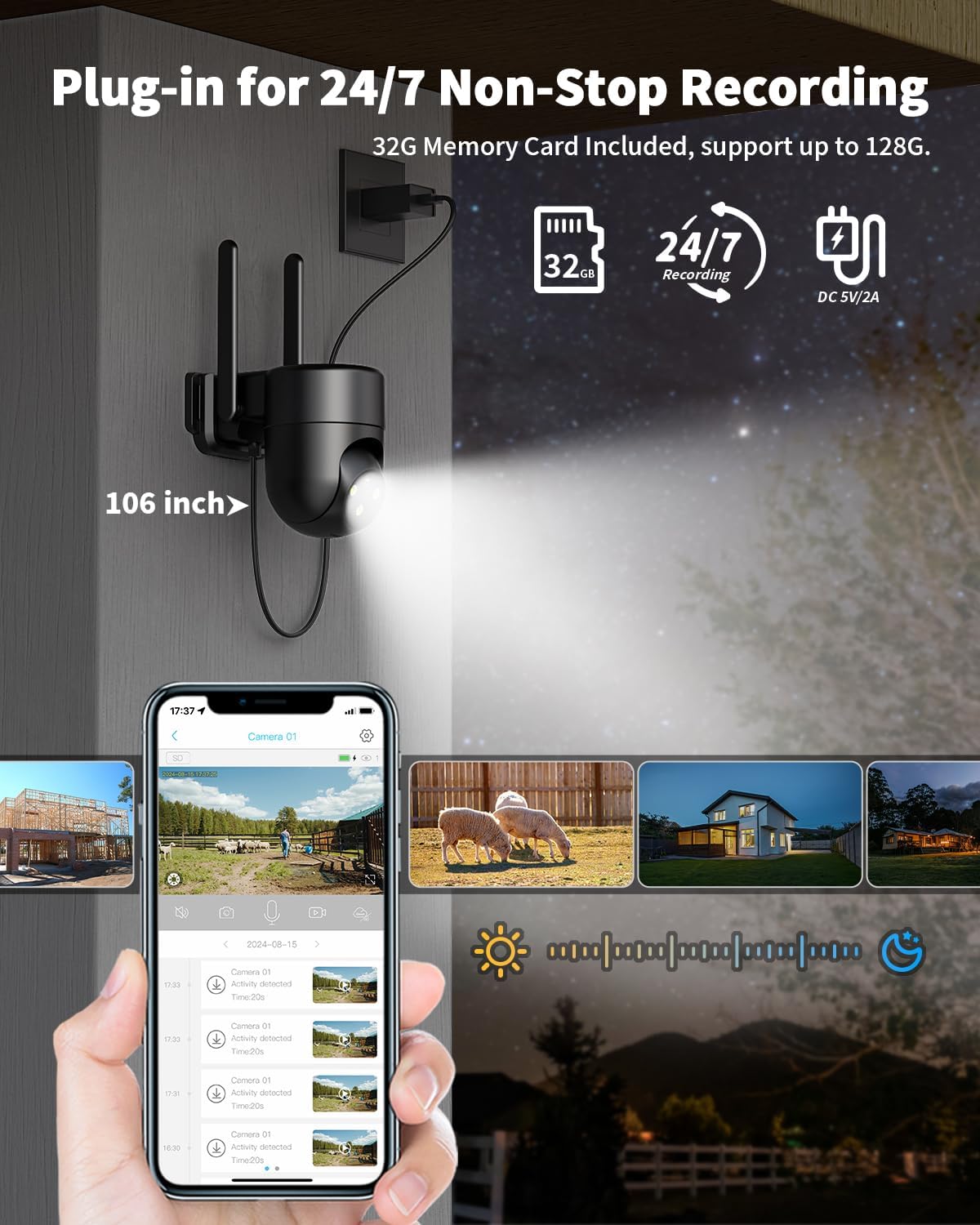
Image: The LIWAN camera mounted outdoors, connected to a power outlet, illustrating its plug-in functionality for continuous recording.
3.3 ການຕິດຕັ້ງ
The camera is designed for outdoor use and can be wall-mounted. Use the included mounting screws and positioning sticker to securely install the camera in your desired location. Ensure the camera has a clear line of sight to the area you wish to monitor and is within reach of a power outlet.

Image: A LIWAN 4G LTE camera mounted on an outdoor wooden beam, demonstrating its suitability for monitoring large outdoor areas like farms or orchards.
4. ຄໍາແນະນໍາການດໍາເນີນງານ
4.1 Ubox App Control
Control and monitor your camera using the Ubox smartphone application. The app allows for remote viewing, configuration of settings, and access to recorded footage. Download the Ubox app from your device's app store.
4.2 Continuous Recording
The camera supports 24/7 non-stop recording, storing footage on the included 32GB memory card (expandable up to 128GB). Cloud storage is available for event recordings with a complimentary 30-day trial.
4.3 ໂໝດວິໄສທັດກາງຄືນ
The camera features 2K color night vision with three selectable modes:
- ວິໄສທັດກາງຄືນອິນຟາເຣດ: ວິໄສທັດກາງຄືນສີດຳ ແລະ ສີຂາວມາດຕະຖານ.
- ວິໄສທັດກາງຄືນສີ: Utilizes built-in spotlights to provide full-color video in low-light conditions.
- ວິໄສທັດກາງຄືນອັດສະລິຍະ: Automatically switches between infrared and color night vision based on detected motion or alarm events.
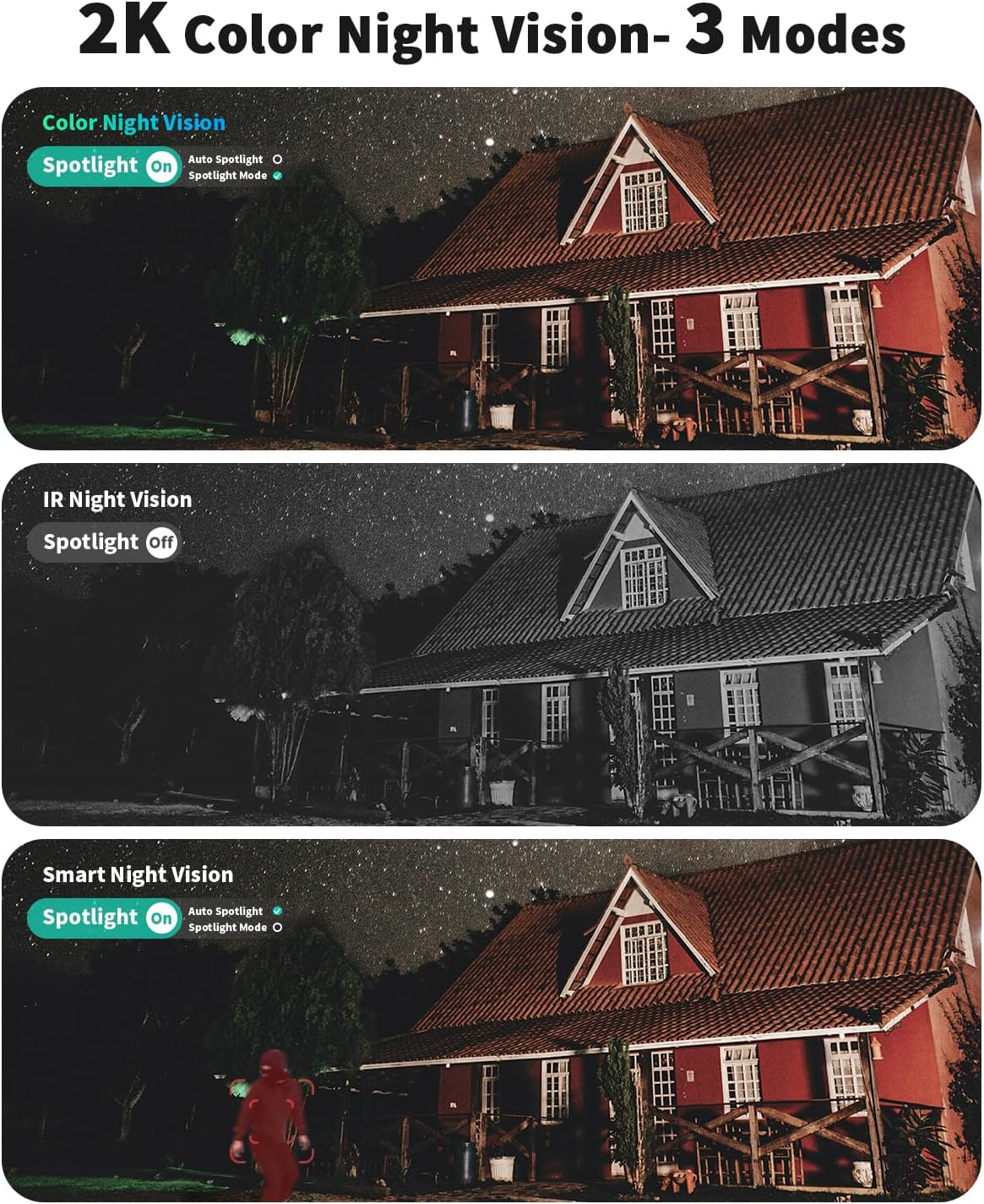
Image: Comparison of the three night vision modes (Color, IR, Smart) offered by the LIWAN camera, showing different visual outputs in a nighttime setting.
4.4 360-Degree Viewing and Digital Zoom
ກ້ອງຖ່າຍຮູບສະຫນອງ 360 ອົງສາ viewing angle, allowing comprehensive monitoring of your surroundings. Utilize the 4X digital zoom feature via the Ubox app to focus on specific details within the camera's field of view.
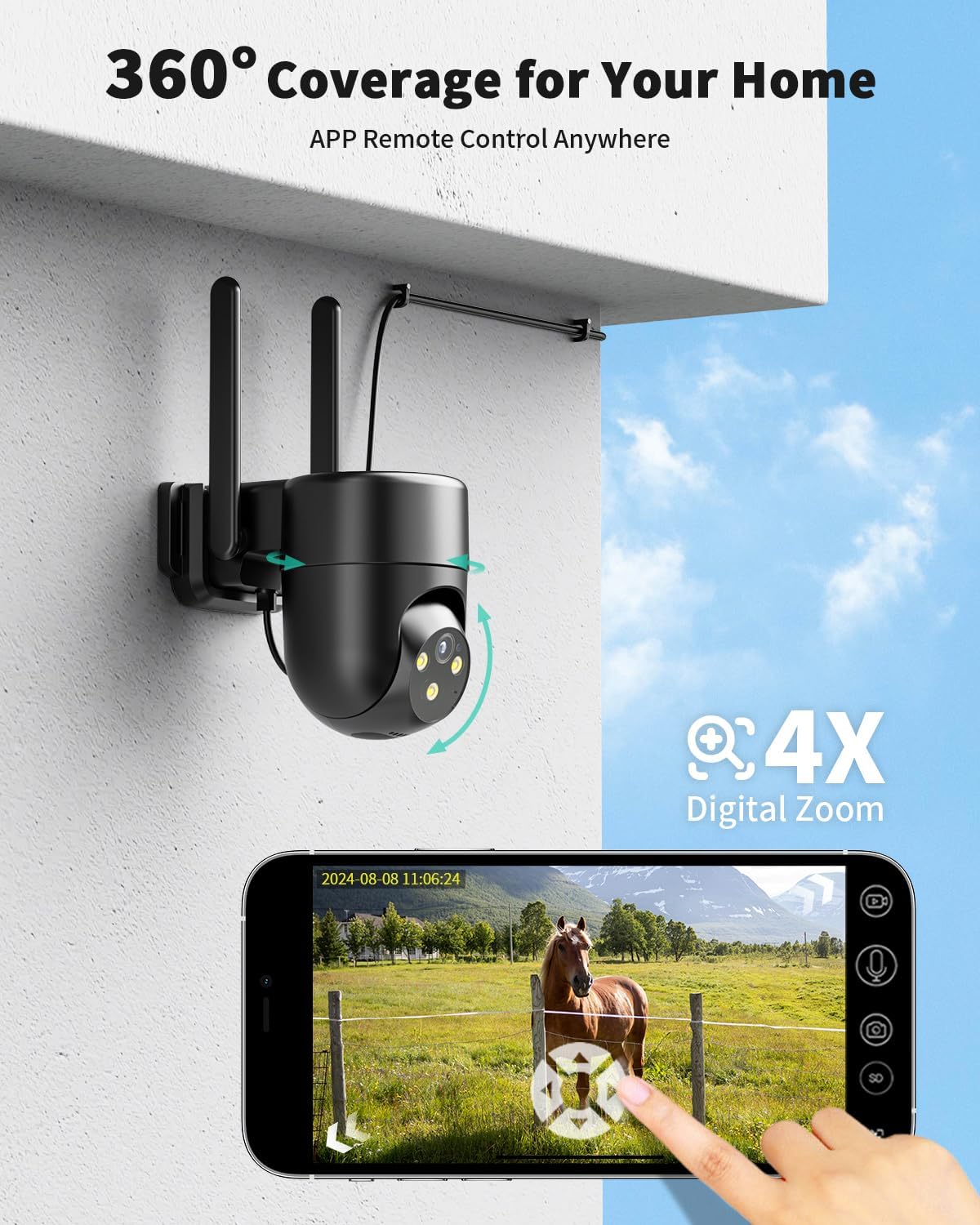
Image: A smartphone screen displaying the Ubox app interface, demonstrating the ability to control the camera's 360-degree pan/tilt and use 4X digital zoom to view a horse in a field.
4.5 Motion Detection and Two-Way Audio
The camera features smart motion detection, sending real-time alerts to your mobile phone. You can customize detection areas within the app to reduce false alarms and protect privacy. The built-in two-way audio allows for real-time communication with visitors or to deter intruders.

Image: An illustration of the camera's motion detection and two-way audio capabilities, showing a notification on a phone and a person speaking through the camera.

Image: The Ubox app interface demonstrating how to set custom detection areas to minimize unwanted alerts.
5. ຂໍ້ມູນຈໍາເພາະ
| ຄຸນສົມບັດ | ລາຍລະອຽດ |
|---|---|
| ໝາຍເລກຕົວແບບ | TZ-SH330 |
| ການນຳໃຊ້ພາຍໃນ/ນອກ | ກາງແຈ້ງ |
| ແຫຼ່ງພະລັງງານ | ໄຟຟ້າມີສາຍ (DC 5V/2A) |
| ອະນຸສັນຍາການເຊື່ອມຕໍ່ | ໂທລະສັບມືຖື (4G LTE) |
| Compatible Networks (US) | Verizon, T-Mobile, AT&T |
| ຄວາມລະອຽດການຖ່າຍວິດີໂອ | 2K |
| ວິໄສທັດກາງຄືນ | 2K Color Night Vision (Infrared, Color, Smart modes) |
| Viewໃນມຸມ | 360 degrees (PTZ) |
| ຊູມດິຈິຕອລ | 4X |
| ການເກັບຮັກສາ | 32GB MicroSD card included (supports up to 128GB), Cloud Storage (event recording) |
| ສຽງ | ສຽງສອງທາງ |
| ລະດັບຄວາມຕ້ານທານນ້ໍາ | ກັນນ້ຳ |
| ຂະໜາດ (L x W x H) | 5.6 x 4.7 x 3.1 ນິ້ວ |
| ນ້ໍາຫນັກລາຍການ | 2.33 ປອນ |
6. ການແກ້ໄຂບັນຫາ
- Camera Not Connecting to Network: Ensure the camera is powered on and the built-in 4G SIM card has an active data subscription. Verify that you are in an area with 4G LTE coverage from Verizon, T-Mobile, or AT&T. Remember, this camera does not support Wi-Fi connections or private SIM cards.
- No 24/7 Recording: Confirm the camera is continuously powered via the included adapter. 24/7 recording is stored on the local memory card. Cloud storage is typically for event-triggered recordings only. Check the memory card status and capacity in the Ubox app.
- Poor Image Quality at Night: Ensure the camera lens is clean and free from obstructions. Adjust night vision settings in the Ubox app (Infrared, Color, or Smart mode) to suit your environment. Ensure the built-in spotlight is enabled for color night vision if desired.
- ການແຈ້ງເຕືອນການເຄື່ອນໄຫວທີ່ບໍ່ຖືກຕ້ອງ: Adjust the motion detection sensitivity settings within the Ubox app. You can also define custom detection zones to exclude areas where frequent, non-threatening movement occurs (e.g., public pathways, swaying trees).
- ບັນຫາສຽງສອງທາງ: Check your smartphone's microphone and speaker settings. Ensure the camera's microphone and speaker are not obstructed. Verify volume levels in the Ubox app.
7. ບໍາລຸງຮັກສາ
- ທໍາຄວາມສະອາດ: ເຮັດຄວາມສະອາດເລນກ້ອງຖ່າຍຮູບ ແລະ ທີ່ຢູ່ອາໃສຢ່າງເປັນປະຈໍາດ້ວຍເຄື່ອງອ່ອນ, ງamp ຜ້າເພື່ອເອົາຂີ້ຝຸ່ນແລະສິ່ງເສດເຫຼືອ. ຢ່າໃຊ້ສານເຄມີທີ່ຮຸນແຮງຫຼືວັດສະດຸຂັດ.
- ການອັບເດດເຟີມແວ: Check the Ubox app periodically for available firmware updates. Keeping your camera's firmware updated ensures optimal performance and security.
- ການຄຸ້ມຄອງກາດຫນ່ວຍຄວາມຈໍາ: If using local storage, periodically review ແລະຈັດການ foo ບັນທຶກtage to ensure sufficient space. The camera supports up to 128GB MicroSD cards.
- ການເຊື່ອມຕໍ່ພະລັງງານ: Ensure the power cable and adapter remain securely connected and free from damage.
8. ການຮັບປະກັນແລະການສະຫນັບສະຫນູນ
For warranty information and technical support, please refer to the contact details provided in your product packaging or visit the official LIWAN webເວັບໄຊ. ຮັກສາໃບຮັບເງິນການຊື້ຂອງທ່ານສໍາລັບການຮ້ອງຂໍການຮັບປະກັນ.
For app-related inquiries or data plan management, please consult the Ubox application directly.


