ແນະນຳ
Thank you for choosing the Porodo Lifestyle 4K Digital Camera. This camera is designed to capture your world in stunning detail, offering 4K video recording and high-resolution 50MP images. With features like 16x digital zoom, a flip flash, and a 180° rotating screen, it is ideal for vlogging, photography, and various content creation needs. This manual provides essential information on setting up, operating, and maintaining your camera to ensure optimal performance and longevity.
ຂໍ້ມູນຄວາມປອດໄພ
- ຢ່າເອົາກ້ອງຖ່າຍຮູບໄປວາງໄວ້ໃນອຸນຫະພູມທີ່ສູງເກີນໄປ, ແສງແດດໂດຍກົງ ຫຼື ຄວາມຊຸ່ມຊື່ນສູງ.
- ຫຼີກລ້ຽງການລຸດລົງ ຫຼື ວາງກ້ອງໃຫ້ຖືກຜົນກະທົບຢ່າງແຮງ.
- Keep the camera away from water and liquids unless specifically designed for underwater use (this model is not).
- ຢ່າພະຍາຍາມຖອດປະກອບ ຫຼືດັດແປງກ້ອງຖ່າຍຮູບ. ນີ້ຈະເປັນການຍົກເລີກການຮັບປະກັນ.
- ໃຊ້ສະເພາະປະເພດແບັດເຕີຣີ ແລະ ວິທີການສາກທີ່ລະບຸໄວ້ເທົ່ານັ້ນ.
- ຮັກສາໃຫ້ໄກຈາກເດັກນ້ອຍ.
ເນື້ອໃນຊຸດ
ກະລຸນາກວດເບິ່ງກ່ອງສໍາລັບລາຍການຕໍ່ໄປນີ້:
- Porodo Lifestyle 4K Digital Camera
- ແບັດເຕີຣີທີ່ສາມາດສາກໄດ້ (650mAh)
- ສາຍໄຟແບບ Type-C
- ຄູ່ມືຜູ້ໃຊ້ (ເອກະສານນີ້)
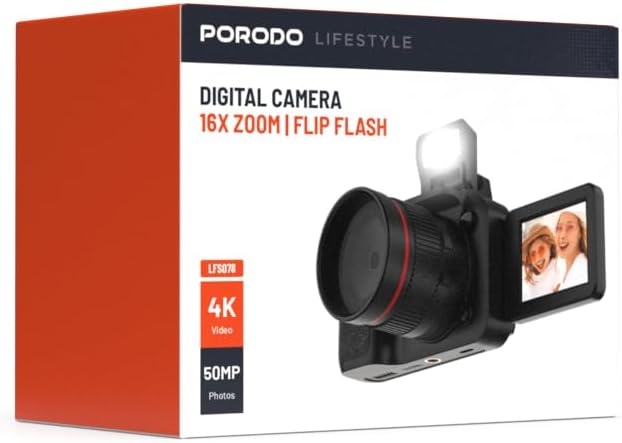
ຮູບພາບ: ທາງຫນ້າ view of the Porodo Lifestyle 4K Digital Camera retail box, showing the camera and key features.

ຮູບພາບ: ກັບຄືນໄປບ່ອນ view of the Porodo Lifestyle 4K Digital Camera retail box, displaying product specifications and features.
ສິນຄ້າເກີນview
Familiarize yourself with the various parts of your Porodo Lifestyle 4K Digital Camera.

Image: The Porodo Lifestyle 4K Digital Camera shown with its 180° rotating screen flipped open and the integrated flash extended upwards.
- ເລນ: Main optical component for capturing images and videos.
- Flip Flash: ໃຫ້ຄວາມສະຫວ່າງເພີ່ມເຕີມໃນສະພາບແສງໜ້ອຍ.
- 180° Rotating Screen (2.2'' Display): ອະນຸຍາດໃຫ້ມີຄວາມຍືດຫຍຸ່ນ viewing angles, ideal for vlogging and selfies.
- ປຸ່ມເປີດປິດ: ເປີດ/ປິດກ້ອງຖ່າຍຮູບ.
- ປຸ່ມຊັດເຕີ: ຖ່າຍຮູບ ຫຼື ເລີ່ມ/ຢຸດການບັນທຶກວິດີໂອ.
- ການຄວບຄຸມການຊູມ: Adjusts the 16x digital zoom.
- ປຸ່ມນຳທາງ: ສຳລັບການນຳທາງເມນູ ແລະ ການປັບການຕັ້ງຄ່າ.
- Type-C Port: ສໍາລັບການສາກໄຟແລະການໂອນຂໍ້ມູນ.
- ຊ່ອງໃສ່ກາດຫນ່ວຍຄວາມຈໍາ: ສຳລັບໃສ່ SD card (ບໍ່ລວມ).
ຕັ້ງຄ່າ
1. ການຕິດຕັ້ງ ແລະສາກແບັດເຕີຣີ
- ຊອກຫາຝາປິດຊ່ອງໃສ່ຫມໍ້ໄຟຢູ່ດ້ານລຸ່ມຂອງກ້ອງຖ່າຍຮູບ.
- ເລື່ອນສະລັກເພື່ອເປີດຝາປິດ.
- Insert the provided 650mAh battery, ensuring the contacts align correctly.
- Close the battery compartment cover until it clicks securely.
- Connect the camera to a power source using the Type-C charging cable. The charging indicator will illuminate.
- A full charge takes approximately 2.5 hours. The indicator will change or turn off when charging is complete.
2. ການຕິດຕັ້ງກາດຫນ່ວຍຄວາມຈໍາ
ຕ້ອງມີກາດໜ່ວຍຄວາມຈຳ (ບັດ SD, ບໍ່ລວມ) ເພື່ອເກັບຮັກສາຮູບພາບ ແລະ ວິດີໂອ.
- Locate the memory card slot, usually on the side or bottom of the camera.
- Insert the SD card with the metal contacts facing the correct direction (refer to the diagram near the slot if available) until it clicks into place.
- ເພື່ອເອົາອອກ, ຄ່ອຍໆຍູ້ບັດເຂົ້າຈົນກ່ວາມັນອອກມາ.
3. ການເປີດເຄື່ອງເບື້ອງຕົ້ນ
- Press and hold the Power button for a few seconds until the screen illuminates.
- Upon first use, you may be prompted to set the date and time. Use the navigation buttons to adjust and confirm.
ຄໍາແນະນໍາການດໍາເນີນງານ
Basic Photo Mode (50MP)
- ເປີດກ້ອງຖ່າຍຮູບ. ໂດຍປົກກະຕິມັນຈະເປັນຄ່າເລີ່ມຕົ້ນເປັນໂໝດຮູບ.
- Frame your shot using the 2.2'' display.
- Press the Shutter button halfway down to focus (if applicable).
- Press the Shutter button fully to capture a 50MP image.

Image: A person holding the Porodo Lifestyle 4K Digital Camera, demonstrating a typical usage scenario for capturing photos.

ຮູບພາບ: ອື່ນ view of a person holding the Porodo Lifestyle 4K Digital Camera, illustrating the camera's ergonomic design during use.
Basic Video Mode (4K)
- Switch the camera to video mode (usually via a dedicated button or menu option).
- Press the Shutter button once to start 4K video recording. A recording indicator (e.g., red dot, timer) will appear on the screen.
- ກົດປຸ່ມ Shutter ອີກຄັ້ງເພື່ອຢຸດການບັນທຶກສຽງ.

Image: The Porodo Lifestyle 4K Digital Camera highlighting its 4K video resolution capability.
Using the 16X Digital Zoom
- While in photo or video mode, use the zoom controls (often marked with 'W' for Wide and 'T' for Telephoto) to adjust the 16x digital zoom.
- Press 'T' to zoom in and 'W' to zoom out.
Using the Flip Flash
- To activate the flash, manually flip it up from its resting position.
- The camera will automatically use the flash when needed in low-light conditions, depending on your flash settings (e.g., Auto, Fill-in, Red-eye reduction).
- To turn off the flash, gently push it back down until it locks into place.
Using the 180° Rotating Screen
- The 2.2'' display can be rotated 180 degrees.
- Flip the screen out from the side of the camera and rotate it to face forward for selfies or vlogging, or to various angles for creative shots.
- Ensure the screen is securely positioned before shooting.

Image: The Porodo Lifestyle 4K Digital Camera illustrating its 2.2-inch display and 180-degree flip screen functionality.
ການຫຼິ້ນແລະການລຶບ Files
- Enter Playback mode (usually via a dedicated button or menu option).
- Use the navigation buttons to scroll through your photos and videos.
- ເພື່ອລຶບ ກ file, select it and press the Delete button (often marked with a trash can icon). Confirm deletion when prompted.
ການເຊື່ອມຕໍ່ກັບຄອມພິວເຕີ
- ປິດກ້ອງຖ່າຍຮູບ.
- Connect the camera to your computer using the provided Type-C cable.
- Turn on the camera. It should appear as a removable disk drive on your computer.
- ດຽວນີ້ທ່ານສາມາດໂອນຮູບພາບ ແລະ ວິດີໂອໄປຍັງຄອມພິວເຕີຂອງທ່ານໄດ້ແລ້ວ.
ບໍາລຸງຮັກສາ
ການທໍາຄວາມສະອາດກ້ອງຖ່າຍຮູບ
- ໃຊ້ຜ້າທີ່ອ່ອນໆ, ບໍ່ມີສານດ່າງເພື່ອເຮັດຄວາມສະອາດຕົວກ້ອງຖ່າຍຮູບ.
- For the lens and screen, use a specialized lens cleaning cloth and solution. Do not use abrasive materials.
- Avoid spraying cleaning solutions directly onto the camera. Apply to the cloth first.
ການດູແລຫມໍ້ໄຟ
- Recharge the battery fully before first use.
- ຫຼີກລ່ຽງການລະບາຍແບັດເຕີຣີໃຫ້ໝົດເລື້ອຍໆເພື່ອຍືດອາຍຸການໃຊ້ງານຂອງມັນ.
- If storing the camera for an extended period, charge the battery to about 50% and remove it from the camera.
ການເກັບຮັກສາ
- ເກັບຮັກສາກ້ອງຖ່າຍຮູບໄວ້ໃນບ່ອນທີ່ເຢັນ, ແຫ້ງ, ຫ່າງຈາກແສງແດດໂດຍກົງ ແລະອຸນຫະພູມທີ່ຮ້າຍກາດ.
- ໃຊ້ກະເປົ໋າກ້ອງ ຫຼືກະເປົ໋າເພື່ອປົກປ້ອງມັນຈາກຂີ້ຝຸ່ນ ແລະຮອຍຂີດຂ່ວນ.
ການແກ້ໄຂບັນຫາ
| ບັນຫາ | ສາເຫດທີ່ເປັນໄປໄດ້ | ການແກ້ໄຂ |
|---|---|---|
| ກ້ອງຖ່າຍຮູບບໍ່ເປີດ. | ແບັດເຕີຣີໝົດແລ້ວ ຫຼື ບໍ່ໄດ້ຕິດຕັ້ງຢ່າງຖືກຕ້ອງ. | ສາກແບັດເຕີຣີ. ກວດໃຫ້ແນ່ໃຈວ່າໃສ່ແບັດດ້ວຍຂົ້ວທີ່ຖືກຕ້ອງ. |
| ບໍ່ສາມາດຖ່າຍຮູບ/ວິດີໂອໄດ້. | ກາດຫນ່ວຍຄວາມຈໍາເຕັມ, ບໍ່ໄດ້ໃສ່, ຫຼືເສຍຫາຍ. | ໃສ່ແຜ່ນຄວາມຊົງຈໍາ. ລຶບທີ່ບໍ່ຈໍາເປັນ files. Format the card (this will erase all data). |
| Images/Videos are blurry. | Lens is dirty. Insufficient light. Camera shake. | Clean the lens. Use the flash or shoot in brighter conditions. Hold the camera steady. |
| ແຟລດບໍ່ເຮັດວຽກ. | Flash is not flipped up. Flash setting is off. | Ensure the flash is manually flipped up. Check flash settings in the menu. |
| ກ້ອງຖ່າຍຮູບຄ້າງ. | ຊອບແວຂັດຂ້ອງ. | ຖອດແລະໃສ່ແບັດເຕີຣີຄືນເພື່ອຕັ້ງຄ່າກ້ອງຖ່າຍຮູບຄືນໃໝ່. |
ຂໍ້ມູນຈໍາເພາະ
Detailed technical specifications for the Porodo Lifestyle 4K Digital Camera:

Image: Visual representation of the camera's core capabilities: 4K video, 50MP photos, and 16x digital zoom.

Image: A detailed table outlining the technical specifications of the Porodo Lifestyle 4K Digital Camera.
- ຊື່ຕົວແບບ: Porodo Lifestyle 4K Digital Camera – 50MP, 16x Zoom, Flip Flash, 180° Rotating Screen
- ໝາຍເລກຕົວແບບ: 6849108448116
- ຍີ່ຫໍ້: ໂປໂຣໂດ
- ສູງສຸດ Webຄວາມລະອຽດຂອງກ້ອງ: 50 MP
- ຄວາມລະອຽດວິດີໂອ: 4K (3840x2160)
- ຊູມດິຈິຕອນ: 16X
- Optical Zoom: 1.0
- ຈໍສະແດງຜົນ: 2.2'' (180° Rotating Screen)
- ຄວາມອາດສາມາດຫມໍ້ໄຟ: 650mAh (1 P76 battery included)
- ເວລາເຮັດວຽກ: ສູງສຸດ 3 ຊົ່ວໂມງ
- ເວລາເຕີມເງິນ: ປະມານ 2.5 ຊົ່ວໂມງ
- ຊ່ອງສາກໄຟ: ປະເພດ-C
- ເທັກໂນໂລຍີເຊັນເຊີຮູບພາບ: CMOS
- ສະຫນັບສະຫນູນ File ຮູບແບບ: JPG (images), AVI (videos)
- ສະຖຽນລະພາບຮູບພາບ: ດິຈິຕອລ
- ອັດຕາສ່ວນ: 16:9, 4:3
- ລາຍລະອຽດການວັດແທກ: ຈຸດ
- ຂະໜາດຜະລິດຕະພັນ: ຂະ ໜາດ 6 x 13 x 9 ຊມ; 310 ກ
- ປະເທດຕົ້ນກໍາເນີດ: ຈີນ
ການຮັບປະກັນແລະການສະຫນັບສະຫນູນ
Porodo products are designed with quality and reliability in mind. For warranty information and technical support, please refer to the official Porodo webສະຖານທີ່ຫຼືຕິດຕໍ່ຜູ້ຈັດຈໍາຫນ່າຍທ້ອງຖິ່ນຂອງທ່ານ.
ສະຫນັບສະຫນູນອອນໄລນ໌: ຢ້ຽມຢາມ Porodo Store on Amazon ສໍາລັບຂໍ້ມູນຜະລິດຕະພັນແລະການປັບປຸງ.
ຕົວເລືອກການຮັບປະກັນແບບຂະຫຍາຍ: Additional warranty plans may be available through authorized retailers. Please check with your point of purchase for details.


