1. ຂໍ້ມູນຄວາມປອດໄພທີ່ສໍາຄັນ
Please read this entire manual before installation and assembly. If you have any questions regarding any of the instructions or warnings, please contact your local distributor for assistance.
- We accept no responsibility for incorrect or faulty installation.
- Follow the enclosed installation instructions carefully.
- Check the condition and completeness of all items before beginning.
- The fastening materials supplied for wall mounting are intended exclusively for fastening to solid masonry or concrete. For other wall types, such as hollow bricks, plasterboard, or lightweight construction, please contact a specialist retailer for information on suitable fastening elements.
- Under no circumstances should you exceed the limit values specified for the product.
2. ເນື້ອໃນຊຸດ
Verify that all components are present and undamaged before installation. If any parts are missing or damaged, do not attempt to install. Contact customer support for replacement parts.

Figure 2.1: XTRARM TiTon Double TV Wall Mount and included hardware components, including various screws, anchors, washers, and a drilling template.
ໂດຍປົກກະຕິຊຸດປະກອບມີ:
- XTRARM TiTon Double TV Wall Mount assembly
- Standard mounting hardware for TV and wall (various screws, anchors, washers)
- ແມ່ແບບເຈາະ
- Small spirit level
- Multiple hook-and-loop straps for cable management
3. ຂໍ້ມູນຈໍາເພາະ
| ຄຸນສົມບັດ | ຂໍ້ມູນຈໍາເພາະ |
|---|---|
| ປະເພດການຕິດຕັ້ງ | ຕິດຝາ |
| ປະເພດການເຄື່ອນໄຫວ | Articulated, Swivel, Tilt, Rotate |
| ວັດສະດຸ | ໂລຫະ |
| ສີ | ດຳ |
| ໄລຍະທາງຝາ | 12.9 cm (retracted) to 120 cm (extended) |
| ພືດຫມູນວຽນ | Up to 90° (portrait/landscape) |
| ໝູນ | Up to 180° (90° left/right) |
| ອຽງ | -5° ເຖິງ +12° |
| ຂະໜາດໂທລະພາບທີ່ແນະນຳ | Approximately 52 – 110 inches |
| ຄວາມອາດສາມາດນ້ໍາຫນັກ | ສູງສຸດ 80 ກິໂລ |
| ຄວາມເຂົ້າກັນໄດ້ຂອງ VESA | 100x100mm, 100x200mm, 200x100mm, 200x200mm, 200x300mm, 300x200mm, 300x300mm, 400x200mm, 400x300mm, 400x400mm, 500x300mm, 600x200mm, 600x400mm |

Figure 3.1: VESA compatibility and maximum weight capacity.

Figure 3.2: Key dimensions and movement capabilities of the mount.
Figure 3.3: Comprehensive technical drawing with detailed dimensions and adjustment ranges.
4. ການຕິດຕັ້ງແລະການຕິດຕັ້ງ
Proper installation is crucial for the safety and stability of your TV. Ensure you have the necessary tools and assistance before proceeding.
4.1 ເຄື່ອງມືທີ່ຕ້ອງການ (ບໍ່ໄດ້ລວມ)
- ເຈາະ
- ເຄື່ອງຊອກຫາສະກູ (ຖ້າຕິດຕັ້ງໃສ່ສະກູໄມ້)
- ສໍ
- ເທບວັດແທກ
- ປະແຈສຽບ ຫຼື ປະແຈປັບໄດ້
- ໝວດ ຫົວ screwdriver Phillips
4.2 ການເລືອກສະຖານທີ່ຕິດຕັ້ງ
Select a wall location that can safely support the weight of the mount and your TV. For solid concrete or masonry walls, use the provided anchors. For wood stud walls, ensure the mount is centered on a stud. Avoid mounting to drywall alone.
4.3 Attaching the Wall Plate
- Position the drilling template at the desired height on the wall and mark the drill holes with a pencil. Use the included spirit level to ensure it is perfectly horizontal.
- Drill pilot holes at the marked locations. The drill bit size will depend on your wall type and the chosen anchors/screws.
- ສຽບຕົວຍຶດຝາ (ຖ້າຈຳເປັນສຳລັບປະເພດຝາຂອງທ່ານ) ເຂົ້າໄປໃນຮູນຳທາງ.
- Align the wall plate with the drilled holes and secure it to the wall using the appropriate screws and washers. Ensure it is firmly attached.
4.4 ການຕິດຕົວຍຶດ TV ກັບ TV
- ຄ່ອຍໆວາງໂທລະທັດຂອງທ່ານໃຫ້ຫງາຍໜ້າລົງເທິງພື້ນຜິວທີ່ອ່ອນ ແລະ ສະອາດ ເພື່ອປ້ອງກັນຄວາມເສຍຫາຍຕໍ່ໜ້າຈໍ.
- ລະບຸຮູສຽບ VESA ຢູ່ດ້ານຫຼັງຂອງໂທລະພາບຂອງທ່ານ.
- Select the correct size screws and spacers (if needed) from the provided hardware that fit your TV's VESA pattern.
- Attach the two vertical TV brackets to the back of your TV, ensuring they are level and securely fastened. Do not overtighten.
4.5 ການຕິດຕັ້ງໂທລະທັດກັບແຜ່ນຕິດຝາ
- ດ້ວຍການຊ່ວຍເຫຼືອ, ຍົກໂທລະທັດຂຶ້ນຢ່າງລະມັດລະວັງ ແລະ ຕິດຂາຕັ້ງໂທລະທັດທີ່ຕິດຢູ່ໃສ່ກັບແຜ່ນຕິດຝາ.
- ໃຫ້ແນ່ໃຈວ່າໂທລະພາບຖືກຕິດຕັ້ງໄວ້ຢ່າງແໜ້ນໜາຢູ່ເທິງແຜ່ນຕິດຝາ.
- ໃຫ້ໃຊ້ກົນໄກລັອກຄວາມປອດໄພໃດໆໃສ່ວົງເລັບເພື່ອປ້ອງກັນການຫຼຸດອອກໂດຍບັງເອີນ.

ຮູບທີ 4.1: ຕົວຢ່າງample of the XTRARM TiTon Double TV Wall Mount installed with a television.
5. ຄໍາແນະນໍາການດໍາເນີນງານ
The XTRARM TiTon Double mount offers full motion capabilities for optimal viewມຸມ.
5.1 Adjusting Wall Distance
Gently pull or push the TV to extend or retract the mount. The mount allows for a wall distance ranging from 12.9 cm to 120 cm.

Figure 5.1: Adjustable wall distance of the mount.
5.2 ການປັບການຫມຸນ
The mount can swivel up to 180 degrees (90 degrees left or right) to direct the screen towards different viewຂົງເຂດ.

Figure 5.2: Swivel capability of the mount.
5.3 ການປັບຕົວອຽງ
Adjust the vertical tilt of your TV from -5 degrees to +12 degrees to reduce glare and optimize viewing comfort. Loosen the tilt adjustment knobs, set the desired angle, and then retighten the knobs.
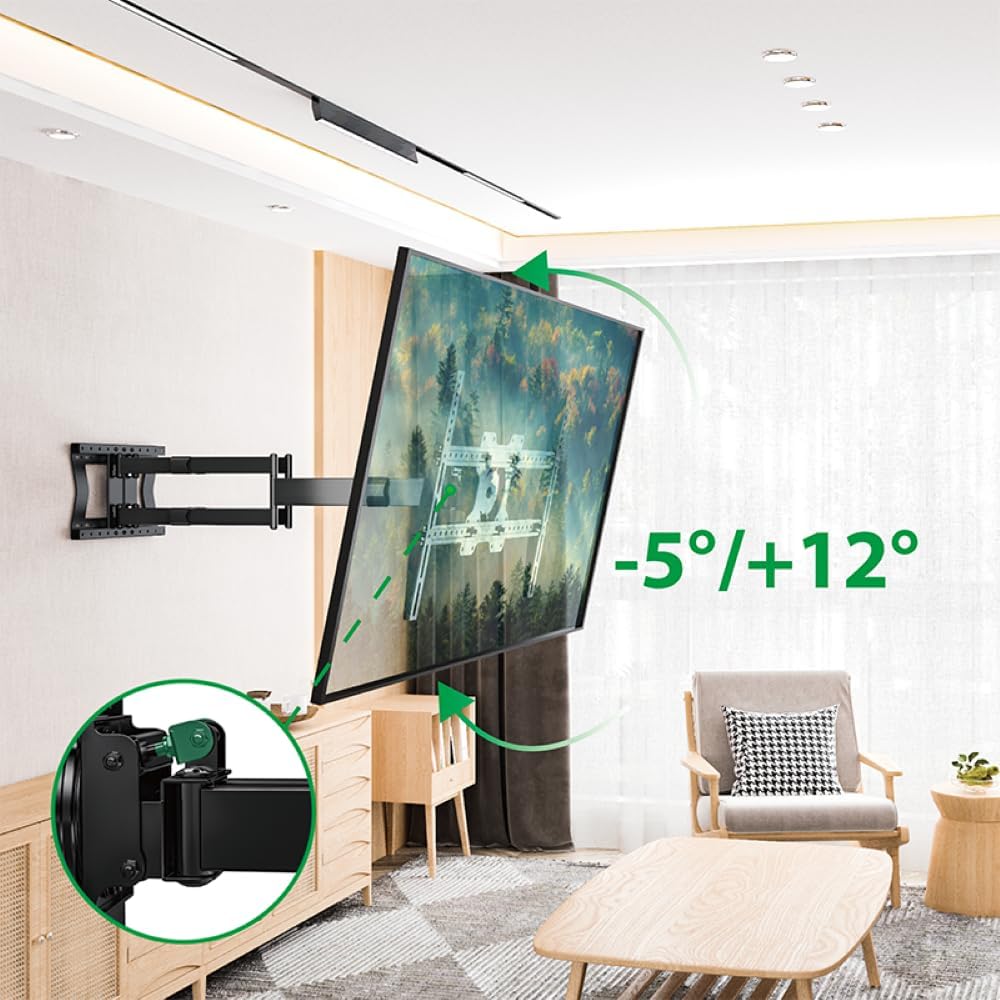
Figure 5.3: Tilt adjustment range and mechanism.
5.4 ການປັບການໝຸນ
The mount allows for a 90-degree rotation, enabling you to switch between landscape and portrait orientation for your TV.

Figure 5.4: 90-degree rotation capability.
5.5 ການຈັດການສາຍ
Use the provided hook-and-loop straps to bundle and organize cables along the mount arms for a tidy appearance and to prevent snagging during adjustments.
6. ບໍາລຸງຮັກສາ
ການບໍາລຸງຮັກສາເປັນປົກກະຕິຮັບປະກັນອາຍຸຍືນແລະການດໍາເນີນງານທີ່ປອດໄພຂອງເຄື່ອງຕິດຝາໂທລະພາບຂອງທ່ານ.
- ທໍາຄວາມສະອາດ: ເຊັດຕົວຍຶດດ້ວຍຜ້າອ່ອນໆແລະແຫ້ງ. ຫຼີກລ່ຽງນໍ້າຢາທໍາຄວາມສະອາດທີ່ມີສີຂັດ ຫຼື ຕົວລະລາຍທີ່ອາດຈະທໍາລາຍສີໄດ້.
- ກວດສອບການເຊື່ອມຕໍ່: ກວດສອບສະກູ ແລະ ສະກູທັງໝົດເປັນໄລຍະເພື່ອຮັບປະກັນວ່າພວກມັນຍັງແໜ້ນຢູ່. ຂັນຄືນຖ້າຈຳເປັນ, ແຕ່ຢ່າຂັນເກີນໄປ.
- ກວດສອບການສວມໃສ່: ກວດກາຕົວຍຶດເປັນປະຈຳເພື່ອເບິ່ງຮ່ອງຮອຍຂອງການສວມໃສ່, ຄວາມເສຍຫາຍ ຫຼື ການກັດກ່ອນ. ຖ້າພົບບັນຫາໃດໆ, ໃຫ້ຢຸດໃຊ້ ແລະ ຕິດຕໍ່ຝ່າຍຊ່ວຍເຫຼືອລູກຄ້າ.
7. ການແກ້ໄຂບັນຫາ
If you encounter any issues with your XTRARM TiTon Double TV Wall Mount, refer to the following common problems and solutions:
| ບັນຫາ | ສາເຫດທີ່ເປັນໄປໄດ້ | ການແກ້ໄຂ |
|---|---|---|
| ໂທລະພາບບໍ່ໄດ້ລະດັບ | Wall plate or TV brackets not level during installation. | Carefully remove the TV, adjust the wall plate or TV brackets using a spirit level, and re-mount. |
| Difficulty moving the mount | Joints may be too tight or require lubrication. | Check for any overtightened bolts. Apply a small amount of silicone-based lubricant to moving joints if necessary. |
| Mount ມີຄວາມຮູ້ສຶກບໍ່ຫມັ້ນຄົງ | Loose wall plate, incorrect anchors, or exceeding weight capacity. | Immediately remove the TV. Re-check all wall plate fasteners. Ensure correct anchors were used for your wall type. Verify TV weight does not exceed 80 kg. If issues persist, consult a professional installer. |
8. ການຮັບປະກັນແລະການສະຫນັບສະຫນູນ
For information regarding warranty coverage, technical support, or replacement parts, please refer to the documentation provided at the time of purchase or visit the official XTRARM webເວັບໄຊ. ຮັກສາໃບຮັບເງິນການຊື້ຂອງທ່ານໄວ້ເປັນຫຼັກຖານການຊື້.


