1. ບົດແນະນຳ
Welcome to the user manual for your new DOOGEE S119 (2025) Rugged Phone. This guide provides essential information to help you set up, operate, maintain, and troubleshoot your device. The DOOGEE S119 is designed for durability and performance, featuring a robust build, a large battery, and advanced camera capabilities, making it ideal for demanding environments and active lifestyles.
2. ເນື້ອໃນຊຸດ
ກະລຸນາກວດສອບເນື້ອໃນຂອງຊຸດຂອງທ່ານເພື່ອໃຫ້ແນ່ໃຈວ່າລາຍການທັງຫມົດມີຢູ່:
- 1 x DOOGEE S119 ໂທລະສັບສະຫຼາດ Rugged
- 1 x ເຄື່ອງສາກ (33W)
- 1 x ສາຍ USB Type-C
- 1 x Anti-explosion film (Screen Protector)
- 1 x ຄູ່ມືຜູ້ໃຊ້
3. ຜະລິດຕະພັນເກີນview
The DOOGEE S119 is engineered for resilience and functionality. Key features include:
- 1.32" Multifunctional Rear Display: Provides quick access to notifications, call alerts, media controls, and more.
- ແບດເຕີຣີ້ມາດຕະຖານ 10200mAh: Offers extended usage time with 33W fast charging and OTG reverse charging capabilities.
- RAM 24GB + ROM 512GB: Ample memory and storage, expandable up to 2TB via TF card.
- 6.72" FHD+ IPS Waterdrop Screen: Vibrant display with 1080x2400 resolution.
- ກ້ອງຫຼັກ 100MP AI: High-resolution main camera for detailed photos.
- ກ້ອງຖ່າຍພາບກາງຄືນ 20MP: ບັນທຶກພາບທີ່ຊັດເຈນໃນສະພາບແສງໜ້ອຍ.
- Mediatek MT8788 Octa-core Processor: ຮັບປະກັນປະສິດທິພາບທີ່ລຽບງ່າຍ ແລະ ການໃຊ້ພະລັງງານທີ່ມີປະສິດທິພາບ.
- ລະບົບ Android 14: Latest Android OS for a seamless user experience.
- ການຮັບຮອງ Rugged: IP68/IP69K/MIL-STD-810H certified for water, dust, and drop resistance.
- ການເຊື່ອມຕໍ່: NFC, Dual SIM, GPS (Glonass, Galileo, Beidou), Bluetooth, Wi-Fi, USB.
- ຄວາມປອດໄພ: Fingerprint ID and Face Unlock.

ຮູບ 3.1: ດ້ານຫນ້າແລະຫລັງ view of the DOOGEE S119 (2025) Rugged Phone, highlighting its robust design and rear display.

ຮູບທີ 3.2: ລາຍລະອຽດ view of the 1.32" multifunctional rear display, showing various functions like call answering, camera, calendar, message view, music, and alarm clock.

Figure 3.3: Illustration of the 10200mAh mega battery with 33W fast charging and OTG reverse charging capabilities.

Figure 3.4: Visual representation of the 24GB RAM (8GB Basic + 16GB Extended) and 512GB ROM, expandable to 2TB.

Figure 3.5: Close-up of the 6.72" FHD+ IPS Waterdrop Screen, highlighting its aspect ratio, color depth, and brightness.
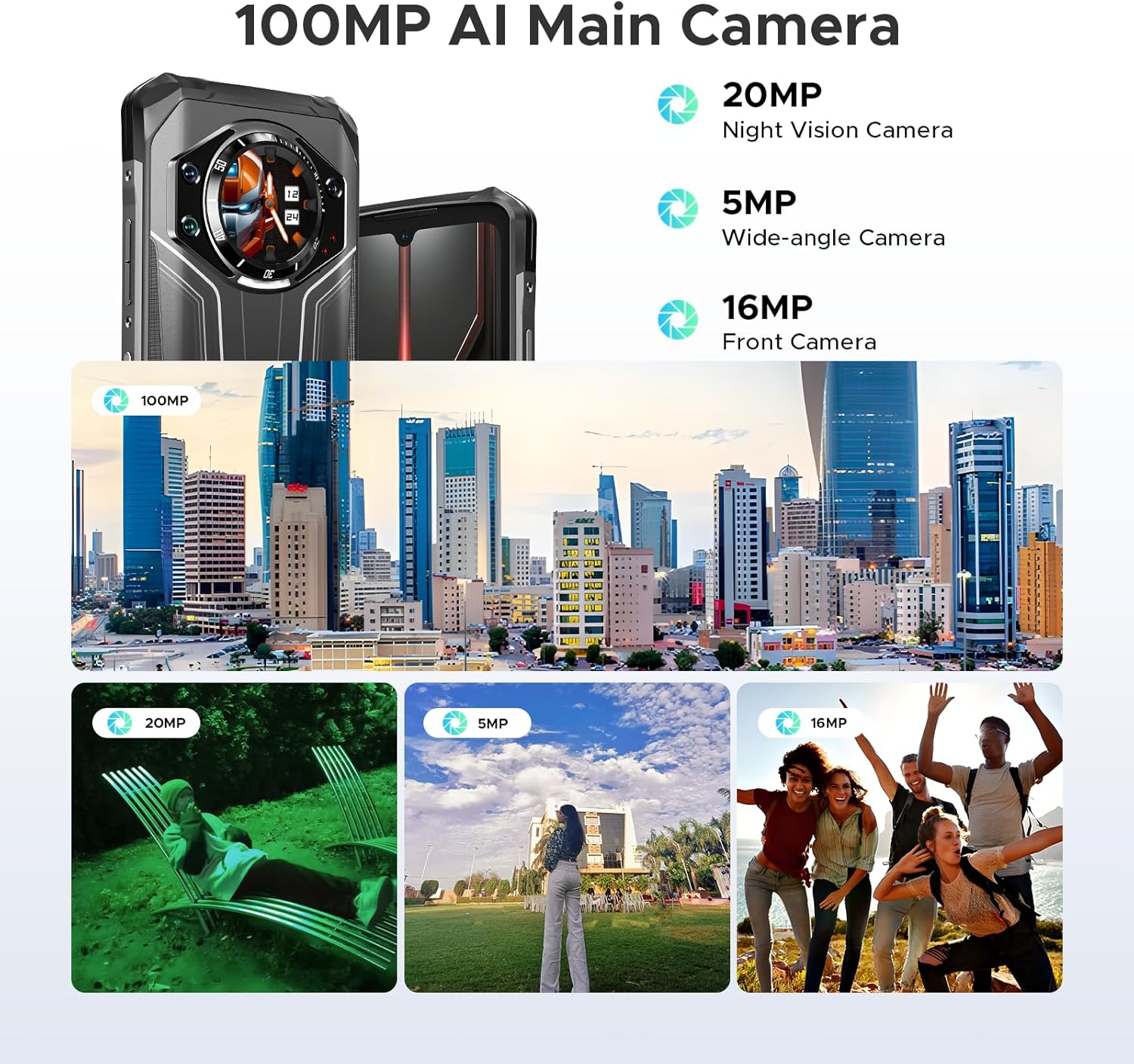
ຮູບ 3.6: ເກີນview of the camera system, including the 100MP AI Main Camera, 20MP Night Vision Camera, 5MP Wide-angle Camera, and 16MP Front Camera, with example ຮູບ.

Figure 3.7: Diagram illustrating the MediaTek MT8788 Octa-core Processor, its LPDDR4 Flash Memory, 12nm Production Process, and 2.0GHz Operating Frequency.

Figure 3.8: Depiction of the latest Android 14 System with various app icons, emphasizing a security-enhanced Linux base.
4. ຕັ້ງຄ່າ
4.1 ການໃສ່ຊິມກາດ ແລະ ບັດ TF
The DOOGEE S119 supports a triple card slot (2 SIM cards + 1 TF card).
- ຊອກຫາຖາດຊິມກາດຢູ່ດ້ານຂ້າງຂອງໂທລະສັບ.
- ໃຊ້ເຄື່ອງມືຖອດຊິມທີ່ສະໜອງໃຫ້ເພື່ອເປີດຖາດ.
- ເອົາບັດ Nano-SIM ແລະ/ຫຼືບັດ TF ຂອງທ່ານໃສ່ໃນຊ່ອງທີ່ກຳນົດໄວ້ຢ່າງລະມັດລະວັງ. ຮັບປະກັນທິດທາງທີ່ຖືກຕ້ອງ.
- ຄ່ອຍໆຍູ້ຖາດກັບໃສ່ໂທລະສັບຈົນກວ່າມັນຈະກົດໃສ່ບ່ອນ.
4.2 ການເປີດເຄື່ອງເບື້ອງຕົ້ນ ແລະການຕັ້ງຄ່າພື້ນຖານ
- ກົດປຸ່ມເປີດປິດຄ້າງໄວ້ (ຢູ່ດ້ານຂ້າງ) ຈົນກ່ວາໂລໂກ້ DOOGEE ປະກົດຂຶ້ນ.
- ປະຕິບັດຕາມການເຕືອນໃນຫນ້າຈໍເພື່ອເລືອກພາສາຂອງທ່ານ, ເຊື່ອມຕໍ່ກັບ Wi-Fi, ແລະຕັ້ງຄ່າບັນຊີ Google ຂອງທ່ານ.
- Configure security features such as Fingerprint ID and Face Unlock for convenient and secure access.
5. ຄໍາແນະນໍາການດໍາເນີນງານ
5.1 Using the 1.32" Rear Display
The rear display offers quick access to various functions without needing to fully activate the main screen:
- ການແຈ້ງເຕືອນ: View ສາຍໂທເຂົ້າ, ຂໍ້ຄວາມ, ແລະການແຈ້ງເຕືອນແອັບ.
- ການຮັບສາຍ: Answer or reject calls directly from the rear screen.
- ການຄວບຄຸມດົນຕີ: ຫຼິ້ນ, ຢຸດຊົ່ວຄາວ, ຂ້າມເພງ ແລະ ປັບລະດັບສຽງສຳລັບການຫຼິ້ນສື່.
- ກ້ອງຖ່າຍຮູບ: ໃຊ້ເປັນ viewfinder for rear camera selfies or quick shots.
- Clock/Calendar: Display time, date, and set alarms.
- ກວດສອບຫມໍ້ໄຟ: ດ່ວນ view ເປີເຊັນຫມໍ້ໄຟtage.
- ເຂັມທິດ: Access a digital compass for navigation.
Video 5.1: Demonstration of the DOOGEE S119 (2025) Rugged Phone's 1.32" multifunctional rear display features, including call answering, music control, and quick access to information.
5.2 ການດໍາເນີນງານກ້ອງຖ່າຍຮູບ
The S119 features a versatile camera system:
- ກ້ອງຫຼັກ 100MP AI: For high-resolution photos. Open the Camera app and select "Photo" mode.
- ກ້ອງຖ່າຍພາບກາງຄືນ 20MP: Ideal for low-light environments. Switch to "Night Vision" mode in the camera app.
- 5MP ກ້ອງມຸມກວ້າງ: For capturing broader scenes. Select the wide-angle option in the camera interface.
- ກ້ອງໜ້າ 16MP: For selfies and video calls. Switch to the front camera in the app.
- ໂໝດ: Explore various modes like HDR, Panorama, and Pro Mode for enhanced photography.
5.3 ການຄຸ້ມຄອງຫມໍ້ໄຟ
ແບດເຕີຣີ້ 10200 mAh ສະຫນອງການນໍາໃຊ້ທີ່ຍາວນານ. ເພື່ອເພີ່ມປະສິດທິພາບອາຍຸຫມໍ້ໄຟ:
- Use the included 33W fast charger for quick power-ups.
- ເປີດໃຊ້ໂໝດປະຢັດແບັດເຕີຣີເມື່ອແບັດເຕີຣີເຫຼືອໜ້ອຍ.
- ປິດແອັບພລິເຄຊັນພື້ນຫຼັງທີ່ບໍ່ໄດ້ໃຊ້.
- Utilize OTG reverse charging to power other devices (cable not included).
5.4 General Phone Use
- ການນໍາທາງ: Use GPS, Glonass, Galileo, and Beidou for accurate location services.
- NFC: ເປີດໃຊ້ NFC ໃນການຕັ້ງຄ່າສໍາລັບການຈ່າຍເງິນແບບ contactless ແລະການໂອນຂໍ້ມູນ.
- Dual Unlock: Use side fingerprint sensor or face unlock for quick and secure access.
- Android 14: Customize settings, manage apps, and utilize Google services.
6. ບໍາລຸງຮັກສາ
To ensure the longevity and optimal performance of your DOOGEE S119:
- ທໍາຄວາມສະອາດ: ເຊັດໂທລະສັບໃຫ້ອ່ອນໆ, ງamp ຜ້າ. ຫຼີກເວັ້ນການສານເຄມີທີ່ຮຸນແຮງຫຼືວັດສະດຸຂັດ.
- ຄວາມຕ້ານທານນ້ໍາ: While IP68/IP69K certified, ensure all ports and covers are securely closed before exposing to water. Do not intentionally submerge the device beyond specified limits.
- ອຸນຫະພູມ: Avoid exposing the phone to extreme temperatures (very hot or very cold) for prolonged periods.
- ການປ້ອງກັນ ໜ້າ ຈໍ: Apply the provided anti-explosion film to protect the main screen from scratches.
- ອັບເດດຊອບແວ: ກວດສອບ ແລະຕິດຕັ້ງການອັບເດດລະບົບເປັນປະຈຳເພື່ອຮັບປະກັນປະສິດທິພາບ ແລະຄວາມປອດໄພທີ່ດີທີ່ສຸດ.
7. ການແກ້ໄຂບັນຫາ
| ບັນຫາ | ການແກ້ໄຂທີ່ເປັນໄປໄດ້ |
|---|---|
| ໂທລະສັບບໍ່ເປີດ. | ໃຫ້ແນ່ໃຈວ່າໄດ້ສາກໄຟແລ້ວ. ເຊື່ອມຕໍ່ກັບສາຍສາກຢ່າງໜ້ອຍ 10 ນາທີກ່ອນທີ່ຈະພະຍາຍາມເປີດເຄື່ອງ. |
| ສັນຍານເຄືອຂ່າຍບໍ່ດີ ຫຼື ບໍ່ມີການບໍລິການ. | Check SIM card insertion. Verify network compatibility with your carrier (FDD, TDD, WCDMA, GSM bands). Move to an area with better coverage. |
| ແອັບຯຊ້າ ຫຼືຂັດຂ້ອງ. | Close background apps. Clear app cache. Restart the phone. Ensure sufficient storage space. |
| ແບັດເຕີຣີໝົດໄວ. | Reduce screen brightness. Disable unused features like Wi-Fi, Bluetooth, GPS. Limit background app activity. |
| Rear display not responding. | Restart the phone. Check for system updates. |
| ບໍ່ສາມາດເຊື່ອມຕໍ່ກັບ Wi-Fi ໄດ້. | Restart your router and phone. Re-enter Wi-Fi password. Ensure you are within range. |
8. ຂໍ້ມູນຈໍາເພາະ
| ຄຸນສົມບັດ | ລາຍລະອຽດ |
|---|---|
| ຕົວແບບ | DOOGEE S119 |
| ລະບົບປະຕິບັດການ | Android 14 |
| ໂຮງງານຜະລິດ | Mediatek MT8788 Octa-core (2 GHz CPU Speed) |
| RAM | 24 GB (8GB ທາງກາຍະພາບ + 16GB virtual) |
| ການເກັບຮັກສາພາຍໃນ | 512 GB ROM (Expandable up to 2TB via TF card) |
| ຈໍສະແດງຜົນຫຼັກ | 6.72 inches FHD+ IPS Waterdrop Screen (1080 x 2400 resolution) |
| ຈໍສະແດງຜົນຫລັງ | 1.32 inches Multifunctional Round Display (386 PPI) |
| ກ້ອງຫຼັກ | ກ້ອງຫຼັກ AI ຄວາມລະອຽດ 100MP |
| Night Vision Camera | 20MP |
| ກ້ອງມຸມກວ້າງ | 5MP |
| ກ້ອງໜ້າ | 16MP |
| ຄວາມອາດສາມາດຫມໍ້ໄຟ | 10200 mAh (81 Hours Phone Talk Time) |
| ກຳລັງສາກໄຟ | ການສາກໄວ 33W, OTG Reverse Charging |
| ຄວາມທົນທານ | IP68, IP69K, MIL-STD-810H certified (Waterproof, Dustproof, Drop-proof) |
| ການເຊື່ອມຕໍ່ | Bluetooth, Wi-Fi, USB Type-C, NFC, GPS (Glonass, Galileo, Beidou) |
| ຊ່ອງໃສ່ຊິມກາດ | Triple Card Slot (2 SIM Cards + 1 TF Card) |
| ຄຸນນະສົມບັດຄວາມປອດໄພ | Side Fingerprint ID, Face Unlock |
| ຂະໜາດ | 7.02 x 3.27 x 7.04 ນິ້ວ |
| ນ້ໍາຫນັກລາຍການ | 1.32 ປອນ |
9. ການຮັບປະກັນແລະການສະ ໜັບ ສະ ໜູນ
DOOGEE provides comprehensive support for its products:
- ການຮັບປະກັນ: ຜະລິດຕະພັນມາພ້ອມກັບການຮັບປະກັນ 2 ປີຈໍາກັດ.
- ຜົນຕອບແທນ: Enjoy a 30-Day Money Back Guarantee and Free Return policy.
- ບໍລິການລູກຄ້າ: For any inquiries or technical assistance, please contact DOOGEE customer support. Refer to the official DOOGEE website or the contact information provided in your package for details.

ຮູບ 9.1: ເກີນview of DOOGEE's customer service, including 30-day money-back guarantee, 2-year limited warranty, and 24/7 online support.


