ແນະນຳ
This manual provides essential information for the proper setup, operation, and maintenance of your Roland RD-2000 EX 88-key Digital Piano Essentials Bundle. Please read this manual thoroughly before using the product and keep it for future reference.
ຂໍ້ມູນຄວາມປອດໄພ
ເພື່ອຮັບປະກັນການດຳເນີນງານທີ່ປອດໄພ, ໃຫ້ປະຕິບັດຕາມຂໍ້ຄວນລະວັງຕໍ່ໄປນີ້ສະເໝີ:
- ຫ້າມບໍ່ໃຫ້ອຸປະກອນຖືກອຸນຫະພູມສູງ, ຄວາມຊຸ່ມຊື່ນ, ຫຼືແສງແດດໂດຍກົງ.
- ຫຼີກລ່ຽງການວາງເຄື່ອງໃກ້ແຫຼ່ງຄວາມຮ້ອນ ຫຼື ໃນບໍລິເວນທີ່ມີລະບາຍອາກາດບໍ່ດີ.
- Do not place objects containing liquids on the unit.
- ໃຊ້ພຽງແຕ່ອະແດັບເຕີພະລັງງານທີ່ລະບຸໄວ້.
- ຮັກສາເຄື່ອງໃຫ້ຫ່າງຈາກເດັກນ້ອຍ.
- ຖອດສາຍໄຟໃນລະຫວ່າງພາຍຸຟ້າຜ່າ ຫຼືເມື່ອບໍ່ໄດ້ໃຊ້ເປັນເວລາດົນນານ.
ເນື້ອໃນຊຸດ
ກວດສອບວ່າລາຍການທັງຫມົດທີ່ລະບຸໄວ້ຂ້າງລຸ່ມນີ້ແມ່ນລວມຢູ່ໃນຊຸດຂອງທ່ານ:
- Roland RD-2000 EX 88-Key Digital Stage ເປຍໂນ
- Knox Gear Adjustable X-Style Keyboard Bench
- FocusProAudio Adjustable Double X Keyboard Stand
- ໃນ Stage KSP100 Keyboard Piano Style Sustain Pedal (Black)
- Power Adapter
- ການພັກຜ່ອນດົນຕີ
ຕັ້ງຄ່າ
1. Assembling the Keyboard Stand
Unfold the FocusProAudio Adjustable Double X Keyboard Stand and adjust it to a comfortable playing height. Ensure all locking mechanisms are securely fastened to provide stable support for the digital piano.

Image: FocusProAudio Adjustable Double X Keyboard Stand, shown in its unfolded position.
2. Setting up the Keyboard Bench
Unfold the Knox Gear Adjustable X-Style Keyboard Bench. Adjust the bench height to your preference. The bench features a 2-inch padded cushion for comfort and rubber-tipped feet for stability.

Image: Knox Gear Adjustable X-Style Keyboard Bench, showing its X-frame design.

Image: Features of the Knox Gear Adjustable X-Style Keyboard Bench, highlighting its adjustability and X-style design.

Image: Close-up of the Knox Gear Adjustable X-Style Keyboard Bench's 2-inch padded cushion.
3. Placing the Digital Piano
Carefully place the Roland RD-2000 EX Digital Piano onto the assembled keyboard stand. Ensure it is centered and stable.

Image: Roland RD-2000 EX 88-key Digital Piano, showcasinແປ້ນພິມ ແລະ ແຜງຄວບຄຸມເຕັມຮູບແບບຂອງມັນ.
4. ການເຊື່ອມຕໍ່ Sustain Pedal
Connect the On Stage KSP100 Keyboard Piano Style Sustain Pedal to the designated pedal input on the rear panel of the RD-2000 EX. This pedal provides sustain control for your playing.
5. ເປີດ / ປິດພະລັງງານ
Connect the power adapter to the DC IN jack on the rear panel of the digital piano, then plug the adapter into a power outlet. Press the power button located on the control panel to turn the unit ON or OFF.

Image: Rear panel of the Roland RD-2000 EX, showing various input/output connections including power, pedal, and audio outputs.
ຄໍາແນະນໍາການດໍາເນີນງານ
1. ການຄວບຄຸມພື້ນຖານ
The RD-2000 EX features a streamlined control panel for intuitive operation. Adjust the master volume using the dedicated slider. The power button controls the unit's on/off state.
2. Sound Engines and Keybed
The digital piano is equipped with dual sound engines and a PHA-50 Progressive Hammer-action Keybed, providing a realistic piano playing experience. The keybed offers a graded hammer feel, mimicking an acoustic grand piano.
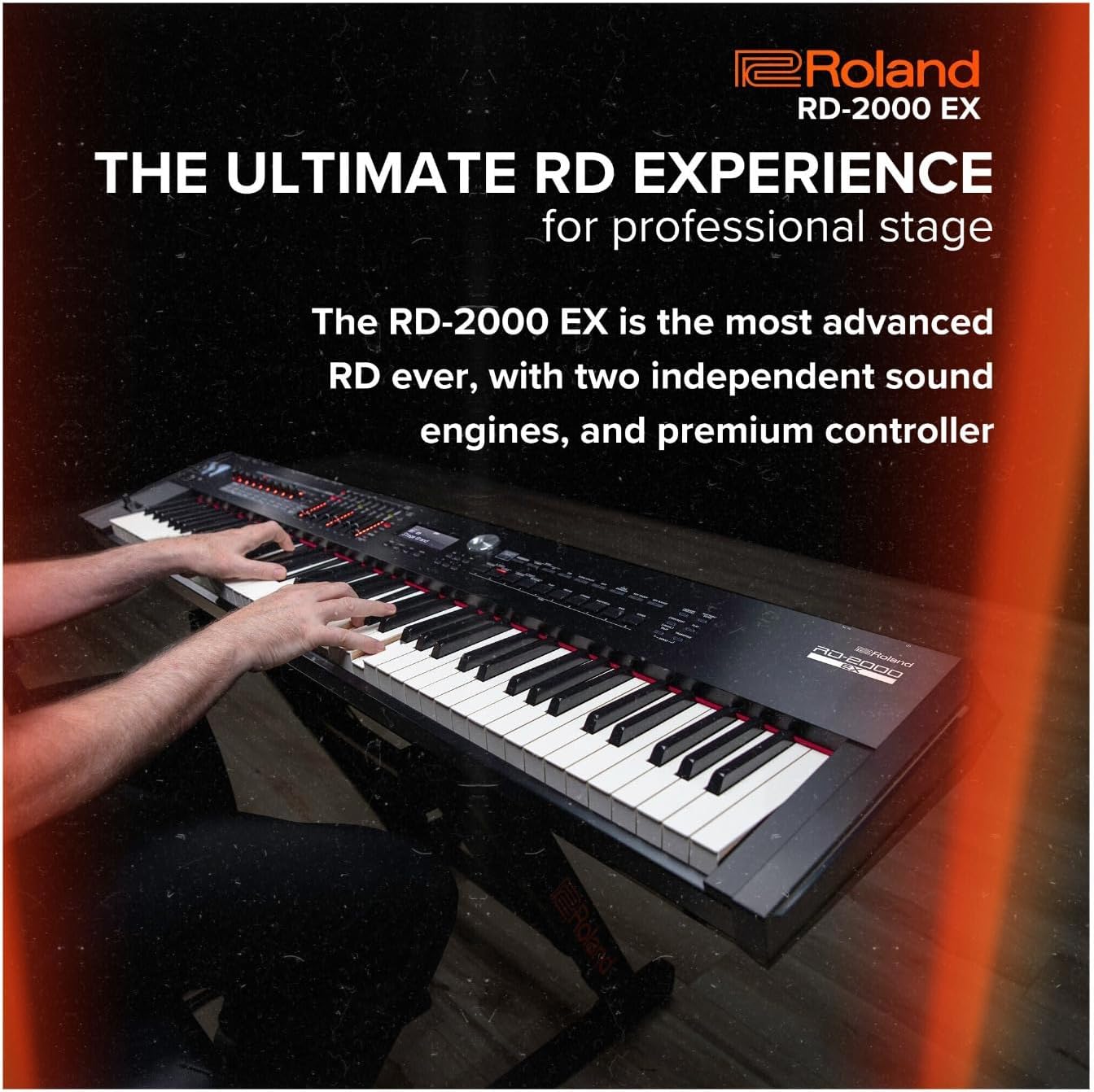
Image: A person playing the Roland RD-2000 EX Digital Piano, demonstrating its use in a performance setting.
3. ການເລືອກສຽງ
Access a variety of sounds, including advanced V-Piano modeling technology, for diverse musical expression. The intuitive interface allows for quick selection and customization of tones.
4. Controller Functionality
The RD-2000 EX includes advanced controller functionality, allowing seamless integration with external software and hardware. Utilize the onboard controls for real-time sound manipulation and performance adjustments.
5. USB Audio/MIDI Interface
The piano features an onboard 24-bit/192kHz USB Audio/MIDI Interface. Connect the piano to a computer via USB to record audio and MIDI data, or to use the piano as a MIDI controller for software instruments.
ວິດີໂອຜະລິດຕະພັນຢ່າງເປັນທາງການ
Watch this official product video from Roland US for a detailed overview of the RD-2000 EX Digital Stage ເປຍໂນ.
Video: Roland Premium Digital Stage Piano RD-2000 EX. This video provides an in-depth look at the features and capabilities of the digital piano.
ຂໍ້ມູນຈໍາເພາະ
| ຄຸນສົມບັດ | ລາຍລະອຽດ |
|---|---|
| ຍີ່ຫໍ້ | ໂຣແລນ |
| ຊື່ຕົວແບບ | RD-2000 EX |
| ຈໍານວນກະແຈ | 88 |
| Keybed Type | PHA-50 Progressive Hammer-action |
| ເຄື່ອງຈັກສຽງ | Dual Sound Engines, V-Piano Modeling |
| ການເຊື່ອມຕໍ່ | USB Audio/MIDI Interface (24-bit/192kHz) |
| ສີ | ດຳ |
| ນ້ໍາຫນັກລາຍການ | 16 ounces (0.45 kg) - Note: Product description states 1 pound, specification states 16 ounces. |
| ຂະໜາດສິນຄ້າ | 9.1 x 9.1 x 9.1 ນິ້ວ (23.1 x 23.1 x 23.1 cm) |
ບໍາລຸງຮັກສາ
To maintain your Roland RD-2000 EX Digital Piano and accessories in optimal condition:
- ທໍາຄວາມສະອາດ: Use a soft, dry cloth to wipe the surface of the piano and accessories. For stubborn dirt, slightly dampen ຜ້າທີ່ມີນ້ໍາແລະຢາຊັກຊັກອ່ອນໂຍນ, ຫຼັງຈາກນັ້ນເຊັດໃຫ້ແຫ້ງທັນທີ. ຫຼີກລ້ຽງການເຮັດຄວາມສະອາດຂັດຫຼືສານລະລາຍ.
- ການເກັບຮັກສາ: When not in use, cover the piano with a dust cover to protect it from dust and debris. Store in a stable environment away from direct sunlight and extreme temperature changes.
- ການຂົນສົ່ງ: When moving the piano, ensure it is properly secured in a protective case to prevent damage. Disassemble the stand and bench for easier and safer transport.
ການແກ້ໄຂບັນຫາ
If you encounter issues with your Roland RD-2000 EX, refer to the following common solutions:
- ບໍ່ມີສຽງ: Check if the power is on, the volume is turned up, and headphones are not plugged in (unless intended). Ensure all cables (audio, pedal) are securely connected.
- ປຸ່ມບໍ່ຕອບສະໜອງ: Verify the unit is powered on. If specific keys are unresponsive, contact customer support.
- ສຽງບິດເບືອນ: Check the volume levels of the piano and any connected audio equipment. Ensure cables are not damaged and connections are secure.
- Pedal Not Working: Confirm the sustain pedal is correctly plugged into the designated jack on the rear panel.
ການຮັບປະກັນ & ສະຫນັບສະຫນູນ
ສຳລັບຂໍ້ມູນການຮັບປະກັນ ແລະ ການຊ່ວຍເຫຼືອດ້ານວິຊາການ, ກະລຸນາອ້າງອີງເຖິງ Roland ຢ່າງເປັນທາງການ webຫຼື ຕິດຕໍ່ຕົວແທນຈຳໜ່າຍ Roland ທີ່ໄດ້ຮັບອະນຸຍາດຂອງທ່ານ. ເກັບໃບຮັບເງິນຊື້ຂອງທ່ານໄວ້ເປັນຫຼັກຖານການຊື້ສຳລັບການຮຽກຮ້ອງການຮັບປະກັນ.
Online resources, including FAQs and additional documentation, may be available on the Roland support page.


