ແນະນຳ
This manual provides essential information for the setup, operation, and maintenance of your NIMO 15.6" FHD IPS Business Gaming Laptop. Designed for both productivity and light gaming, this laptop features an AMD Ryzen 5 6600H processor, 32GB DDR5 RAM, and a 1TB PCIe SSD, ensuring fast performance and ample storage. Please read this manual thoroughly to ensure proper use and longevity of your device.
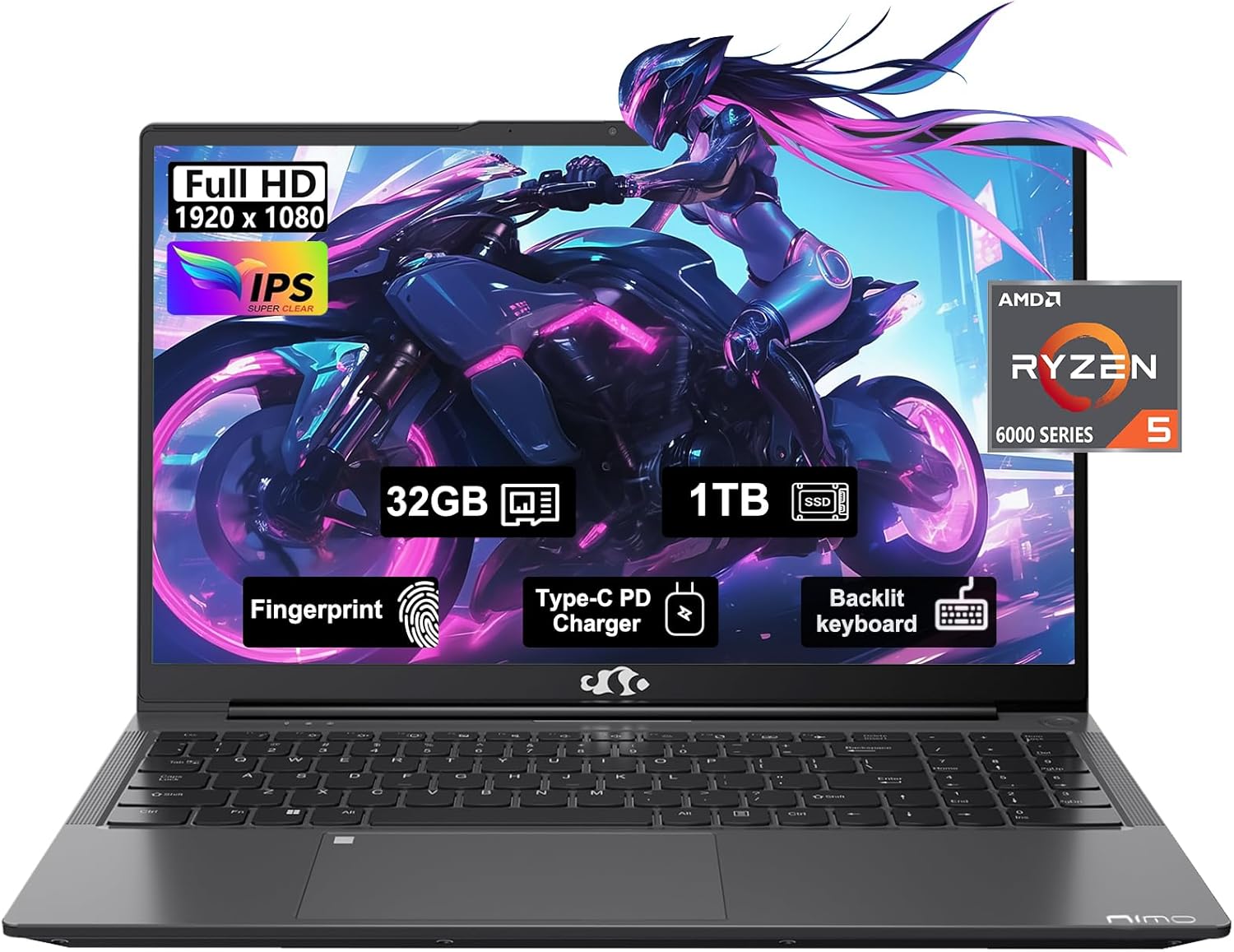
Figure 1: NIMO 15.6" FHD IPS Business Gaming Laptop overview.
ຕັ້ງຄ່າ
1. Unboxing ແລະການກວດກາເບື້ອງຕົ້ນ
ເອົາສ່ວນປະກອບທັງຫມົດອອກຈາກການຫຸ້ມຫໍ່ຢ່າງລະມັດລະວັງ. ກ່ອງຄວນປະກອບດ້ວຍ:
- 1 x Nimo N153 Laptop
- 1 x ເຄື່ອງສາກໄຟໄວ Type-C 100W PD
- 1 x ຄູ່ມືຜູ້ໃຊ້
ໃຫ້ກວດສອບຄອມພິວເຕີໂນດບຸກ ແລະ ອຸປະກອນເສີມຕ່າງໆວ່າມີຮ່ອງຮອຍຄວາມເສຍຫາຍຫຼືບໍ່. ຖ້າມີອົງປະກອບໃດໆທີ່ຂາດຫາຍໄປ ຫຼື ເສຍຫາຍ, ໃຫ້ຕິດຕໍ່ຝ່າຍບໍລິການລູກຄ້າທັນທີ.
2. ການເປີດ ແລະສາກເບື້ອງຕົ້ນ
Before first use, it is recommended to fully charge the laptop.
- Connect the Type-C 100W PD Fast Charger to the laptop's Type-C port (Multifunction) and to a power outlet.
- The charge LED indicator will illuminate. Allow the laptop to charge until the LED indicates a full charge.
- ກົດປຸ່ມເປີດປິດເພື່ອເປີດແລັບທັອບ.

Figure 2: Connecting the Type-C 100W PD Fast Charger.
3. ການຕິດຕັ້ງລະບົບປະຕິບັດການ (Windows 11)
Follow the on-screen prompts to complete the initial setup of Windows 11. This typically includes:
- ການເລືອກພາກພື້ນ ແລະຮູບແບບແປ້ນພິມຂອງທ່ານ.
- ກຳລັງເຊື່ອມຕໍ່ກັບເຄືອຂ່າຍ Wi-Fi.
- ເຂົ້າສູ່ລະບົບດ້ວຍ ຫຼືສ້າງບັນຊີ Microsoft.
- ຕັ້ງຄ່າ PIN ຫຼືລະຫັດຜ່ານ.
- ກຳລັງຕັ້ງຄ່າຄວາມເປັນສ່ວນຕົວ.
ການປະຕິບັດແລັບທັອບຂອງທ່ານ
1. ແປ້ນພິມ ແລະ Touchpad
The NIMO laptop features a full-size backlit keyboard and a large touchpad for comfortable and efficient input.
- ແປ້ນພິມ Backlit: Use the function keys (Fn + F-key combination, typically F3 or F4) to adjust keyboard backlight brightness.
- ແຜ່ນສໍາຜັດ: ສະຫນັບສະຫນູນ gestures multi-touch ສໍາລັບການນໍາທາງ. ເບິ່ງການຕັ້ງຄ່າ Windows ສໍາລັບການປັບແຕ່ງ.
- ເຄື່ອງອ່ານລາຍນິ້ວມື: Located on the touchpad, allows for secure login via Windows Hello.

Figure 3: Laptop keyboard layout with backlit keys and integrated fingerprint reader.
2. ພອດແລະການເຊື່ອມຕໍ່
Your NIMO laptop is equipped with various ports for versatile connectivity:
- ພອດ USB 2.0: 1 port for connecting peripherals.
- ພອດ USB 3.0: 2 ພອດສຳລັບການໂອນຂໍ້ມູນຄວາມໄວສູງ.
- Type-C Ports (Multifunction): 2 ports supporting power delivery (PD) and data.
- HDMI Port: ສໍາລັບການເຊື່ອມຕໍ່ກັບຈໍສະແດງຜົນພາຍນອກ.
- ຫູຟັງ Jack: ສໍາລັບຜົນຜະລິດສຽງ.
- ຊ່ອງໃສ່ Micro SD Card: ສຳລັບການຂະຫຍາຍບ່ອນເກັບຂໍ້ມູນ ຫຼື ການໂອນຂໍ້ມູນຈາກກາດໜ່ວຍຄວາມຈຳ.
- Kensington Lock Slot: ສໍາລັບຄວາມປອດໄພທາງດ້ານຮ່າງກາຍ.
- ການເຊື່ອມຕໍ່ແບບໄຮ້ສາຍ: Supports Wi-Fi 802.11a/b/g/n/ac and Bluetooth 5.2.

ຮູບ 4: ເກີນview of laptop ports for various connections.
3. ຈໍສະແດງຜົນ
The laptop features a 15.6" FHD IPS (1920x1080) Anti-Glare Display with an 85% screen-to-body ratio. This display is designed to provide clear visuals and reduce eye strain during extended use.

Figure 5: The 15.6-inch Full HD IPS display.
4. ການປະຕິບັດ
Powered by an AMD Ryzen 5 6600H processor (6 Cores, 12 Threads, up to 4.5 GHz) and 32GB DDR5 RAM, the laptop delivers robust performance for business tasks, content creation, and light gaming. The integrated AMD Radeon 660M GPU handles graphics processing efficiently.

Figure 6: AMD Ryzen 5 6600H processor, central to the laptop's performance.
The 1TB PCIe SSD provides fast boot times and rapid data access, enhancing overall system responsiveness.
ບໍາລຸງຮັກສາ
1. ເຮັດຄວາມສະອາດແລັບທັອບຂອງເຈົ້າ
- ໃຊ້ຜ້າແພທີ່ອ່ອນໆ ທີ່ບໍ່ມີເສັ້ນດ່າງ dampສໍາເລັດດ້ວຍນ້ໍາຫຼືເຄື່ອງເຮັດຄວາມສະອາດຫນ້າຈໍເພື່ອເຮັດຄວາມສະອາດຈໍສະແດງຜົນ.
- ສໍາລັບແປ້ນພິມ ແລະຕົວເຄື່ອງ, ໃຫ້ໃຊ້ຜ້າອ່ອນໆ. ຫຼີກເວັ້ນການສານເຄມີທີ່ຮຸນແຮງຫຼືວັດສະດຸຂັດ.
- ໃຊ້ອາກາດບີບອັດເພື່ອລ້າງຂີ້ຝຸ່ນອອກຈາກຊ່ອງລະບາຍອາກາດ ແລະພອດເປັນໄລຍະໆ.
2. ການປັບປຸງຊອບແວ
ກວດສອບ ແລະ ຕິດຕັ້ງການອັບເດດ Windows ແລະ ໄດຣເວີເປັນປະຈຳເພື່ອຮັບປະກັນປະສິດທິພາບ ແລະ ຄວາມປອດໄພທີ່ດີທີ່ສຸດ.
- ໄປທີ່ ການຕັ້ງຄ່າ > Windows Update to check for OS updates.
- Visit the NIMO support webເວັບໄຊທ໌ສໍາລັບການອັບເດດໄດເວີຫຼ້າສຸດ.
3. ການຄຸ້ມຄອງການເກັບຮັກສາ
To maintain performance, regularly manage your 1TB SSD storage:
- ລຶບທີ່ບໍ່ຈໍາເປັນ files ແລະຄໍາຮ້ອງສະຫມັກ.
- ໃຊ້ພື້ນທີ່ເກັບຂໍ້ມູນໃນຄລາວສຳລັບພື້ນທີ່ຂະໜາດໃຫຍ່ files.
- Periodically run Disk Cleanup (built-in Windows tool).
4. ການດູແລຫມໍ້ໄຟ
ເພື່ອເພີ່ມອາຍຸແບັດເຕີຣີໃຫ້ສູງສຸດ:
- ຫຼີກເວັ້ນອຸນຫະພູມທີ່ຮຸນແຮງ.
- ຢ່າປ່ອຍໃຫ້ສຽບແລັບທັອບສຽບໄຟດ້ວຍຄ່າ 100% ເປັນເວລາດົນ ຖ້າບໍ່ໄດ້ໃຊ້.
- ປັບຕັ້ງແບັດເຕີລີເປັນບາງໂອກາດໂດຍການຖອດສາກອອກໃຫ້ເຕັມ ແລະສາກມັນຄືນໃໝ່.
5. ການຍົກລະດັບໜ່ວຍຄວາມຈຳ ແລະ ບ່ອນເກັບຂໍ້ມູນ
The NIMO laptop supports dual-channel memory upgrades (up to 2 x 16GB DDR5 RAM) and features an upgradable PCIe SSD. Consult a qualified technician for hardware upgrades to avoid voiding your warranty.
ການແກ້ໄຂບັນຫາ
ພາກສ່ວນນີ້ແກ້ໄຂບັນຫາທົ່ວໄປທີ່ທ່ານອາດຈະພົບ.
ແລັບທັອບບໍ່ເປີດ
- ໃຫ້ແນ່ໃຈວ່າເຄື່ອງສາກໄຟໄດ້ເຊື່ອມຕໍ່ກັບທັງຄອມພິວເຕີໂນດບຸກ ແລະ ປລັກໄຟທີ່ໃຊ້ງານໄດ້ຢ່າງແໜ້ນໜາແລ້ວ.
- ກວດສອບວ່າປລັກສຽບໄຟເຮັດວຽກໄດ້ໂດຍການສຽບໃສ່ອຸປະກອນອື່ນ.
- ລອງກົດປຸ່ມເປີດປິດຄ້າງໄວ້ 15-20 ວິນາທີເພື່ອເຮັດການຣີເຊັດຍາກ.
- ຖ້າແບດເຕີລີ່ຫມົດແລ້ວ, ປ່ອຍໃຫ້ມັນສາກຢ່າງຫນ້ອຍ 30 ນາທີກ່ອນທີ່ຈະພະຍາຍາມເປີດ.
Screen Remains Blank
- Check if the laptop is powered on (listen for fan noise or look for indicator lights).
- Connect an external monitor via the HDMI port to check if the display output works.
- ຣີສະຕາດແລັບທັອບ.
ປະສິດທິພາບຊ້າ
- ປິດແອັບພລິເຄຊັນທີ່ບໍ່ຈໍາເປັນທີ່ເຮັດວຽກຢູ່ໃນພື້ນຫຼັງ.
- ກວດເບິ່ງ ແລະຕິດຕັ້ງການອັບເດດ Windows ທີ່ຍັງຄ້າງຢູ່.
- Ensure there is sufficient free space on your SSD.
- ດໍາເນີນການສະແກນໄວຣັສ.
ບັນຫາການເຊື່ອມຕໍ່ Wi-Fi
- ໃຫ້ແນ່ໃຈວ່າ Wi-Fi ຖືກເປີດໃຊ້ໃນການຕັ້ງຄ່າ Windows.
- ຣີສະຕາດເຣົາເຕີ ແລະໂມເດັມຂອງທ່ານ.
- ອັບເດດໄດເວີອະແດັບເຕີເຄືອຂ່າຍໄຮ້ສາຍຂອງທ່ານ.
- ລືມເຄືອຂ່າຍ ແລະເຊື່ອມຕໍ່ຄືນໃໝ່.
ສຳລັບບັນຫາທີ່ບໍ່ໄດ້ກວມເອົາຢູ່ນີ້, ກະລຸນາອ້າງອີງໃສ່ພາກສ່ວນການຮັບປະກັນ ແລະ ການສະໜັບສະໜູນສຳລັບຂໍ້ມູນຕິດຕໍ່.
ຂໍ້ມູນຈໍາເພາະ
| ຄຸນສົມບັດ | ລາຍລະອຽດ |
|---|---|
| ຍີ່ຫໍ້ | ນິໂມ |
| ຊື່ຕົວແບບ | Nimo N153G |
| ຂະໜາດໜ້າຈໍ | 15.6 ນິ້ວ |
| ຄວາມລະອຽດໜ້າຈໍ | 1920 x 1080 pixels (FHD IPS Anti-Glare) |
| ໂຮງງານຜະລິດ | AMD Ryzen 5 6600H (6 ຄໍ, 12 ຫົວຂໍ້, ສູງສຸດ 4.5 GHz) |
| RAM | 32GB DDR5 (Dual-channel, upgradable to 2x16GB) |
| ຮາດດິດ | 1TB PCIe SSD |
| Graphics Coprocessor | AMD Integrated graphics (Radeon 660M GPU) |
| ລະບົບປະຕິບັດການ | Windows 11 |
| ປະເພດໄຮ້ສາຍ | 802.11a/b/g/n/ac (Wi-Fi 5), Bluetooth 5.2 |
| ທ່າເຮືອ | 1x USB 2.0, 2x USB 3.0, 2x Type-C (Multifunction), 1x HDMI, 1x Headphone Jack, 1x Micro SD Slot |
| ຄຸນນະສົມບັດພິເສດ | Fingerprint Reader, HD Audio, Backlit Keyboard, Numeric Keypad |
| ແຫຼ່ງພະລັງງານ | Battery Powered, Type-C 100W PD Fast Charger |
| ອາຍຸຫມໍ້ໄຟສະເລ່ຍ | 5 ຊົ່ວໂມງ |
| ນ້ໍາຫນັກລາຍການ | 6 ປອນ |
| ຂະໜາດສິນຄ້າ | 14.07 x 8.98 x 0.76 ນິ້ວ |
| ສີ | Space Grey |
ການຮັບປະກັນແລະການສະຫນັບສະຫນູນ
ການຮັບປະກັນຂອງຜູ້ຜະລິດ
Your NIMO laptop is covered by a comprehensive ການຮັບປະກັນຂອງຜູ້ຜະລິດ 2 ປີ offered by Nimo Direct Inc. This warranty covers defects in materials and workmanship under normal use.
Additionally, Nimo Direct Inc. offers 90-Day Hassle-Free Returns. If you encounter any concerns or issues with your product within this period, please contact customer support for assistance with resolution or replacement.
ຕິດຕໍ່ສະຫນັບສະຫນູນ
For technical assistance, warranty claims, or return inquiries, please contact NIMO customer support. Refer to the contact information provided on the official NIMO webເວັບໄຊ ຫຼືເອກະສານປະກອບກັບຜະລິດຕະພັນຂອງທ່ານ.
Please have your product model number (Nimo N153) and purchase details ready when contacting support.


