1. ບົດແນະນຳ
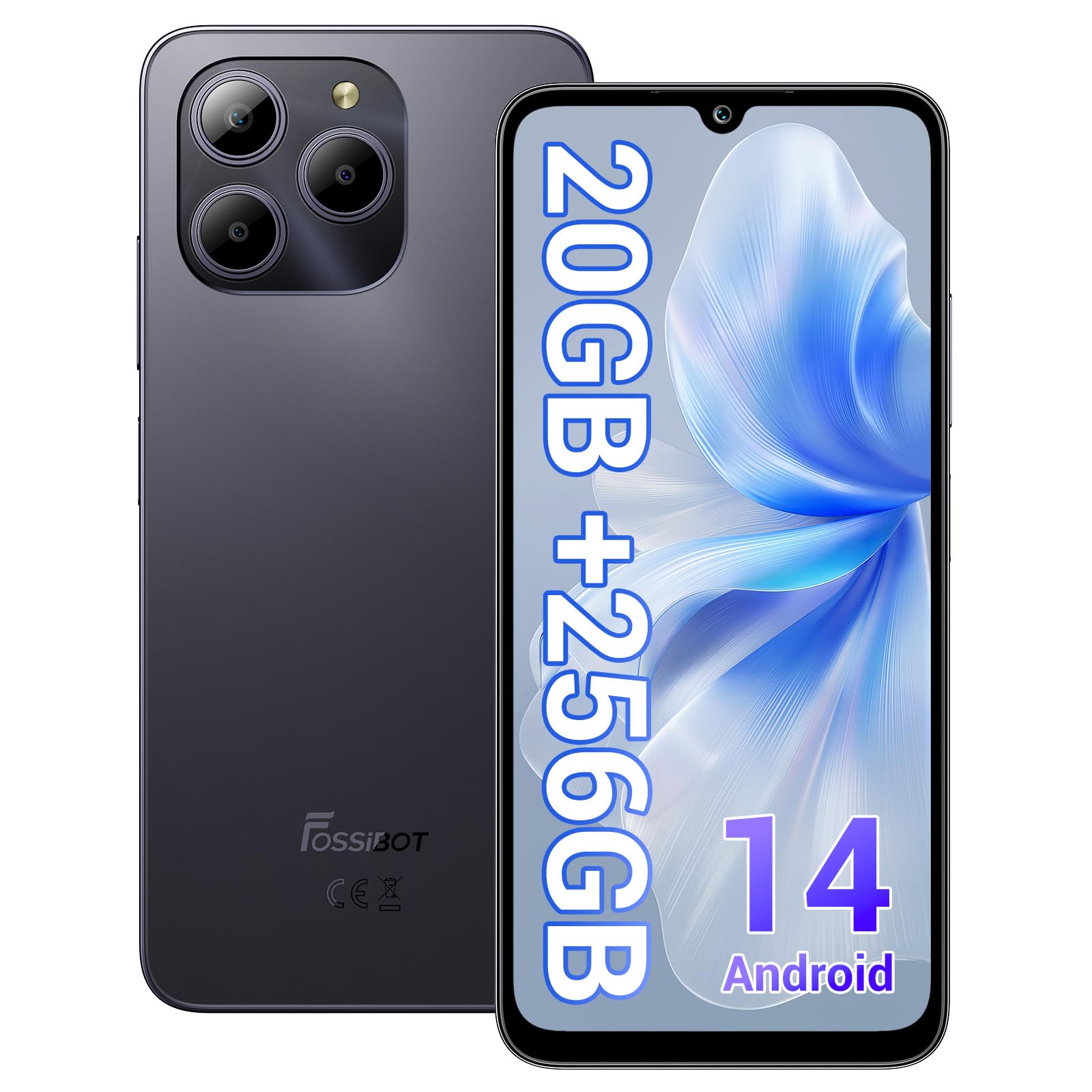
Welcome to the FOSSIBOT S2 Smartphone user manual. This guide provides essential information for setting up, operating, maintaining, and troubleshooting your new device. The FOSSIBOT S2 is an unlocked smartphone featuring Android 14, a 6.72-inch FHD+ display, a 50MP main camera, a 5000mAh battery, and advanced security features like Face ID and a fingerprint sensor.
2. ຂໍ້ມູນຄວາມປອດໄພ
- ຄວາມປອດໄພຫມໍ້ໄຟ: Do not attempt to replace the battery yourself. Use only FOSSIBOT-approved chargers and cables. Avoid exposing the device to extreme temperatures or direct sunlight.
- ຄວາມຕ້ານທານນ້ໍາ: ອຸປະກອນນີ້ບໍ່ສາມາດກັນນໍ້າໄດ້. ຫຼີກເວັ້ນການສໍາຜັດກັບຂອງແຫຼວ.
- ການປ້ອງກັນການໄດ້ຍິນ: ຫຼີກເວັ້ນການຟັງດົນໆໃນລະດັບສຽງສູງເພື່ອປ້ອງກັນຄວາມເສຍຫາຍຂອງການໄດ້ຍິນ.
- ຄວາມປອດໄພໃນການຂັບຂີ່: ຢ່າໃຊ້ໂທລະສັບຂອງທ່ານໃນຂະນະທີ່ຂັບລົດ. ໃຫ້ຄວາມສຳຄັນຕໍ່ຄວາມປອດໄພທາງຖະໜົນສະເໝີ.
- ການຖິ້ມຂີ້ເຫຍື້ອ: Dispose of the device and its accessories responsibly according to local regulations. Do not dispose of with household waste.
3. ເນື້ອໃນຊຸດ
ກວດສອບວ່າລາຍການທັງຫມົດແມ່ນມີຢູ່ໃນຊຸດຜະລິດຕະພັນຂອງທ່ານ:
- FOSSIBOT S2 Smartphone
- ປັກໝຸດຊິມກາດ
- ສາຍ USB Type-C
- ເຄື່ອງສາກ 18W
- ຄູ່ມືຜູ້ໃຊ້ / ບັດຮັບປະກັນ
- ກໍລະນີ TPU

4. ອຸປະກອນເກີນview
Familiarize yourself with the physical components of your FOSSIBOT S2 smartphone.

- ດ້ານໜ້າ: 6.72-inch FHD+ display, 16MP front camera, earpiece.
- ດ້ານຫຼັງ: 50MP main camera, LED flash, fingerprint sensor (side-mounted).
- ດ້ານ: Power button, volume buttons, SIM/SD card tray, USB Type-C port, 3.5mm audio jack.
5. ຕັ້ງຄ່າ
5.1 ການໃສ່ແຜ່ນ SIM ແລະ SD
- ຊອກຫາຖາດຊິມກາດຢູ່ດ້ານຂ້າງຂອງອຸປະກອນຂອງທ່ານ.
- ໃສ່ເຄື່ອງມືຖອດຊິມກາດທີ່ໃຫ້ມາເຂົ້າໄປໃນຮູນ້ອຍໆຂ້າງຖາດ ແລະ ກົດຄ່ອຍໆຈົນກວ່າຖາດຈະເດັ້ງອອກມາ.
- Place your Nano-SIM cards (up to two) and/or a microSD card (for storage expansion up to 1TB) into the designated slots on the tray. Ensure the gold contacts face downwards.
- ໃສ່ຖາດໃສ່ໂທລະສັບຄືນໃໝ່ຢ່າງລະມັດລະວັງຈົນກວ່າມັນຈະກົດໃສ່ບ່ອນ.

5.2 ການເປີດເຄື່ອງ ແລະ ການຕິດຕັ້ງເບື້ອງຕົ້ນ
- Press and hold the Power button until the FOSSIBOT logo appears.
- ປະຕິບັດຕາມການເຕືອນໃນຫນ້າຈໍເພື່ອເລືອກພາສາຂອງທ່ານ, ເຊື່ອມຕໍ່ກັບເຄືອຂ່າຍ Wi-Fi, ແລະຕັ້ງຄ່າບັນຊີ Google ຂອງທ່ານ.
- You will be guided through setting up security features such as a PIN, pattern, fingerprint, and Face ID.
6. ປະຕິບັດການອຸປະກອນຂອງທ່ານ
6.1 ຈໍສະແດງຜົນ
The FOSSIBOT S2 features a 6.72-inch FHD+ In-cell display with a resolution of 1080 x 2400 pixels, providing clear and vibrant visuals.

6.2 ການປະຕິບັດ
Powered by the MediaTek G85 Octa-Core processor and 20GB RAM (8GB physical + 12GB virtual), the FOSSIBOT S2 delivers smooth performance for multitasking, gaming, and streaming. It includes 256GB of internal storage, expandable up to 1TB with a TF card.

6.3 ກ້ອງຖ່າຍຮູບ
Capture high-quality photos and videos with the 50MP AI main camera and take clear selfies with the 16MP front camera. The camera system supports various modes for different shooting scenarios.

6.4 ແບັດເຕີຣີແລະການສາກໄຟ
The FOSSIBOT S2 is equipped with a 5000mAh battery, providing extended usage time. It supports 18W fast charging via the Type-C port.
6.5 ຄຸນສົມບັດຄວາມປອດໄພ
Unlock your device securely using the side-mounted fingerprint sensor or Face ID recognition.

6.6 ການເຊື່ອມຕໍ່
The FOSSIBOT S2 supports dual 4G SIM cards for reliable network coverage. It also includes NFC for contactless payments and GPS/GLONASS/Galileo/Beidou for accurate navigation.

6.7 ລະບົບປະຕິບັດການ Android 14
Experience the latest features and security enhancements with Android 14, offering improved privacy controls, smarter battery management, and a customizable user interface.

7. ບໍາລຸງຮັກສາ
- ອັບເດດຊອບແວ: ກວດສອບ ແລະຕິດຕັ້ງການອັບເດດລະບົບເປັນປະຈຳເພື່ອຮັບປະກັນປະສິດທິພາບ ແລະຄວາມປອດໄພທີ່ດີທີ່ສຸດ.
- ທໍາຄວາມສະອາດ: ໃຊ້ຜ້າອ່ອນໆທີ່ບໍ່ມີຂົນເພື່ອທຳຄວາມສະອາດໜ້າຈໍ ແລະ ຕົວໂທລະສັບ. ຫຼີກລ່ຽງສານເຄມີທີ່ຮຸນແຮງ.
- ການດູແລຫມໍ້ໄຟ: To prolong battery life, avoid fully discharging the battery frequently. Charge the device before it drops below 20%.
- ການຈັດການການເກັບຮັກສາ: ລ້າງບໍ່ຈໍາເປັນເປັນໄລຍະ files ແລະແອັບເພື່ອຮັກສາຄວາມໄວຂອງອຸປະກອນ ແລະເພີ່ມພື້ນທີ່ຫວ່າງ.
8. ການແກ້ໄຂບັນຫາ
If you encounter issues with your FOSSIBOT S2, refer to the following common solutions:
- ອຸປະກອນບໍ່ເປີດ: Ensure the battery is charged. Connect the phone to the charger for at least 15 minutes, then try powering on again.
- ແອັບຂັດຂ້ອງ/ແຊ່ແຂງ: Close background apps. Clear the cache of the problematic app or reinstall it. If the issue persists, perform a factory reset (back up data first).
- ສັນຍານເຄືອຂ່າຍບໍ່ດີ: Check if your SIM card is properly inserted. Ensure you are within network coverage. Restart the device.
- ການລະບາຍຫມໍ້ໄຟຢ່າງໄວວາ: Reduce screen brightness, disable unused features like Wi-Fi, Bluetooth, and GPS when not needed. Check battery usage in settings to identify power-hungry apps.
- Fingerprint/Face ID Not Working: Ensure your fingers are clean and dry for fingerprint recognition. For Face ID, ensure your face is well-lit and unobstructed. Re-register your fingerprint or face if necessary.
For more complex issues, please contact FOSSIBOT customer support.
9. ຂໍ້ມູນຈໍາເພາະ
| ຄຸນສົມບັດ | ຂໍ້ມູນຈໍາເພາະ |
|---|---|
| ຊື່ຕົວແບບ | S2 |
| ລະບົບປະຕິບັດການ | Android 14 |
| ໂຮງງານຜະລິດ | MediaTek Helio G85 Octa-Core (2 GHz) |
| RAM | 20 GB (8GB ທາງກາຍະພາບ + 12GB virtual) |
| ການເກັບຮັກສາພາຍໃນ | 256 GB |
| ການເກັບຮັກສາທີ່ຂະຫຍາຍໄດ້ | ສູງສຸດ 1TB ຜ່ານບັດ TF |
| ຂະຫນາດຈໍສະແດງຜົນ | 6.72 Inches FHD+ In-cell |
| ຄວາມລະອຽດການສະແດງ | 1080 x 2400 ພິກເຊລ |
| ກ້ອງຫຼັງ | 50MP |
| ກ້ອງໜ້າ | 16MP |
| ຄວາມອາດສາມາດຫມໍ້ໄຟ | 5000mAh |
| ກຳລັງສາກໄຟ | ການສາກໄວ 18W (Type-C) |
| ການເຊື່ອມຕໍ່ | ຊິມຄູ່ 4G, Wi-Fi, Bluetooth, NFC |
| ການນໍາທາງ | GPS, GLONASS, Galileo, Beidou |
| ຄວາມປອດໄພ | Fingerprint Sensor, Face ID |
| ສຽງ Jack | 3.5 ມມ |
| ຂະໜາດ | 6.57 x 3.03 x 0.34 ນິ້ວ |
| ນ້ຳໜັກ | 1.04 ປອນ |
10. ການຮັບປະກັນແລະການສະຫນັບສະຫນູນ
Your FOSSIBOT S2 smartphone comes with a standard manufacturer's warranty. Please refer to the included Warranty Card in your package for specific terms and conditions, including warranty duration and coverage details.
For technical support, service inquiries, or to access additional resources, please visit the official FOSSIBOT website or contact their customer service department. Contact information can typically be found on the Warranty Card or the FOSSIBOT brand store page.
ສະຫນັບສະຫນູນອອນໄລນ໌: Visit the FOSSIBOT Store on Amazon


