1. ການແນະນໍາ ແລະຫຼາຍກວ່າview
This manual provides essential information for the safe and effective use of your Sharp Humidifying Air Purifier, model KI-TS50-W. This appliance combines air purification with humidification, featuring Sharp's unique Plasmacluster 25000 technology and an efficient Coanda airflow system. Its slim design is suitable for various room sizes, including single rooms and bedrooms.

Image: The Sharp KI-TS50-W Humidifying Air Purifier positioned in a modern living space, highlighting its slim profile.
2. ຂໍ້ມູນຄວາມປອດໄພ
ກະລຸນາອ່ານຄໍາແນະນໍາດ້ານຄວາມປອດໄພທັງໝົດຢ່າງລະມັດລະວັງກ່ອນທີ່ຈະໃຊ້ເຄື່ອງໃຊ້ເພື່ອປ້ອງກັນການບາດເຈັບ ຫຼືຄວາມເສຍຫາຍ. ຮັກສາຄູ່ມືນີ້ໄວ້ສໍາລັບການອ້າງອີງໃນອະນາຄົດ.
- Always connect the appliance to a power outlet with the specified voltage.
- Do not block the air inlet or outlet vents. Ensure adequate space around the unit for proper airflow.
- ຫ້າມໃສ່ນິ້ວມື ຫຼື ວັດຖຸໃດໆເຂົ້າໄປໃນຊ່ອງເປີດໃດໆ.
- Do not use the appliance near flammable gases or combustible materials.
- Unplug the power cord before cleaning, maintenance, or when not in use for extended periods.
- ຮັກສາເຄື່ອງໃຊ້ໃຫ້ໄກຈາກເດັກນ້ອຍ ແລະສັດລ້ຽງ.
- Use only clean tap water in the water tank. Do not add chemicals or aromatic substances.
3. ອົງປະກອບຂອງຜະລິດຕະພັນ
Familiarize yourself with the main parts of your air purifier:
- ຫົວໜ່ວຍຫຼັກ: ເປັນບ່ອນຕັ້ງຂອງພັດລົມ, ມໍເຕີ ແລະ ແຜງຄວບຄຸມ.
- ຖັງນໍ້າ: ຖັງທີ່ສາມາດຖອດອອກໄດ້ສຳລັບການເພີ່ມຄວາມຊຸ່ມຊື່ນ.
- ການກັ່ນຕອງກ່ອນ: Captures large dust particles. Located on the rear panel.
- Electrostatic HEPA Filter: Captures fine particles.
- Double Deodorizing Filter: Absorbs various odors.
- Humidifying Filter: Used for humidification.

ຮູບພາບ: ທາງຫນ້າ view of the Sharp KI-TS50-W Humidifying Air Purifier, showing the main unit and control panel.

ຮູບພາບ: ດ້ານຫລັງ view of the Sharp KI-TS50-W Humidifying Air Purifier, showing the air intake and pre-filter location.

ຮູບພາບ: ລະເບີດ view of the internal filter assembly, showing the pre-filter, electrostatic HEPA filter, and double deodorizing filter.
4. ຕັ້ງຄ່າ
ປະຕິບັດຕາມຂັ້ນຕອນເຫຼົ່ານີ້ເພື່ອຕັ້ງຄ່າເຄື່ອງຟອກອາກາດຂອງທ່ານ:
- ການຫຸ້ມຫໍ່: ເອົາອຸປະກອນອອກຈາກການຫຸ້ມຫໍ່ຢ່າງລະມັດລະວັງ. ເກັບການຫຸ້ມຫໍ່ໄວ້ເພື່ອການຂົນສົ່ງ ຫຼື ການເກັບຮັກສາໃນອະນາຄົດ.
- ການຕິດຕັ້ງຕົວກອງ: Open the rear panel. Ensure all filters (pre-filter, HEPA filter, deodorizing filter) are correctly installed and any protective plastic bags are removed. Close the rear panel securely.
- ການຈັດວາງ: Place the unit on a stable, flat surface. Ensure there is at least 20 cm of space from walls or furniture to allow for optimal airflow. Avoid placing it in direct sunlight or near heat sources.
- Fill Water Tank (for humidification): Remove the water tank from the side of the unit. Fill it with clean tap water up to the maximum fill line. Reinsert the tank firmly into the unit.
- ການເຊື່ອມຕໍ່ພະລັງງານ: ສຽບສາຍໄຟໃສ່ບ່ອນສຽບໄຟຟ້າທີ່ມີດິນ.
5. ຄໍາແນະນໍາການດໍາເນີນງານ
The control panel on top of the unit allows you to manage various functions.

Image: Close-up of the top control panel with various buttons and indicators.
- ເປີດ/ປິດ: ກົດປຸ່ມເປີດປິດເພື່ອເປີດ ຫຼືປິດເຄື່ອງ.
- ການເລືອກໂໝດ: Cycle through available modes such as Air Purification Only, Humidifying Air Purification, and various fan speed settings.
- ຄວາມໄວພັດລົມ: Adjust the fan speed (e.g., Silent, Medium, High, Auto). The 'Silent' mode operates at a low noise level, ideal for bedrooms.
- Plasmacluster Operation: The Plasmacluster 25000 function operates automatically in most modes to release ions into the air, helping to purify and deodorize.
- Coanda Airflow: The unit utilizes Coanda airflow to efficiently draw in dust and particles from a wide area, enhancing air purification performance.

Image: Diagram showing the Coanda airflow pattern, where air is circulated to draw in dust from a wide area, combined with Plasmacluster ion release.
The unit is designed for low-noise operation, achieving approximately 43dB even during strong humidification, ensuring a comfortable environment.

Image: Visual representation of humidification mist being released from the top of the unit, emphasizing quiet operation.
6. ບໍາລຸງຮັກສາ
ການບໍາລຸງຮັກສາເປັນປົກກະຕິຮັບປະກັນປະສິດທິພາບທີ່ດີທີ່ສຸດແລະອາຍຸຍືນຂອງເຄື່ອງຟອກອາກາດຂອງທ່ານ.
- ການທໍາຄວາມສະອາດກ່ອນການກັ່ນຕອງ: The large pre-filter on the rear panel can be easily cleaned by vacuuming directly without removing the panel. Clean approximately once a month or as needed.

Image: A person demonstrating how to clean the pre-filter on the rear of the air purifier using a vacuum cleaner attachment.
- ການອະນາໄມຖັງນໍ້າ: Clean the water tank regularly to prevent mold and bacteria growth. Rinse with clean water and wipe dry.
- Humidifying Filter Cleaning: The humidifying filter should be cleaned periodically. Refer to the detailed instructions in the full manual for specific cleaning methods and frequency.
- Electrostatic HEPA Filter & Double Deodorizing Filter: These filters are not washable and should be replaced according to the recommended schedule (typically every 10 years, depending on usage and environment).

Image: Diagram showing the three filter layers: the pre-filter, the double deodorizing filter, and the electrostatic HEPA filter.

Image: Illustration of the double deodorizing filter and various odors it is designed to absorb, such as tobacco smoke, pet odors, cooking smells, and VOCs.
7. ການແກ້ໄຂບັນຫາ
ຖ້າເຈົ້າພົບບັນຫາກັບເຄື່ອງຟອກອາກາດຂອງເຈົ້າ, ໃຫ້ອ້າງອີງເຖິງບັນຫາທົ່ວໄປ ແລະວິທີແກ້ໄຂບັນຫາຕໍ່ໄປນີ້:
- ຫນ່ວຍບໍລິການບໍ່ເປີດ: Check if the power cord is securely plugged into the outlet. Ensure the rear panel and water tank are correctly installed.
- No humidification: Check if the water tank is filled with water and correctly inserted. Ensure the humidification mode is selected.
- ສິ່ງລົບກວນຜິດປົກກະຕິ: Check for any foreign objects in the air inlets or outlets. Ensure filters are properly seated. If the noise persists, contact customer support.
- ການຫຼຸດຜ່ອນການໄຫຼວຽນຂອງອາກາດຫຼືການເຮັດຄວາມສະອາດ: Clean the pre-filter. Check if other filters need replacement.
- Indicator lights flashing: Refer to the full instruction manual for specific error codes or indicator light patterns. This often indicates a need for cleaning or water refill.
ຖ້າບັນຫາຍັງຄົງຢູ່ຫຼັງຈາກລອງໃຊ້ວິທີແກ້ໄຂເຫຼົ່ານີ້ແລ້ວ, ກະລຸນາຕິດຕໍ່ຫາຝ່າຍສະໜັບສະໜູນລູກຄ້າຂອງ Sharp.
8. ຂໍ້ມູນຈໍາເພາະ
| ຄຸນສົມບັດ | ຂໍ້ມູນຈໍາເພາະ |
|---|---|
| ໝາຍເລກຕົວແບບ | KI-TS50-W |
| ຍີ່ຫໍ້ | ແຫຼມ |
| Recommended Plasmacluster Area (approx.) | 13 tatami mats (approx. 21.5 m²) |
| Recommended Air Purification Area (approx.) | 23 tatami mats (approx. 38 m²) |
| Maximum Humidification Capacity | 600 ມລ/ຊມ |
| Air Purification Time (8 tatami mats) | 12 ນາທີ |
| ລະດັບສຽງລົບກວນປະຕິບັດງານ | 17-51 dB |
| ຂະໜາດ (ກວ້າງ x ສູງ) | 38.4 x 23 x 61.9 cm |
| ນ້ຳໜັກສິນຄ້າ | 7.9 ກິໂລ |
| ແຫຼ່ງພະລັງງານ | ສາຍໄຟ AC |
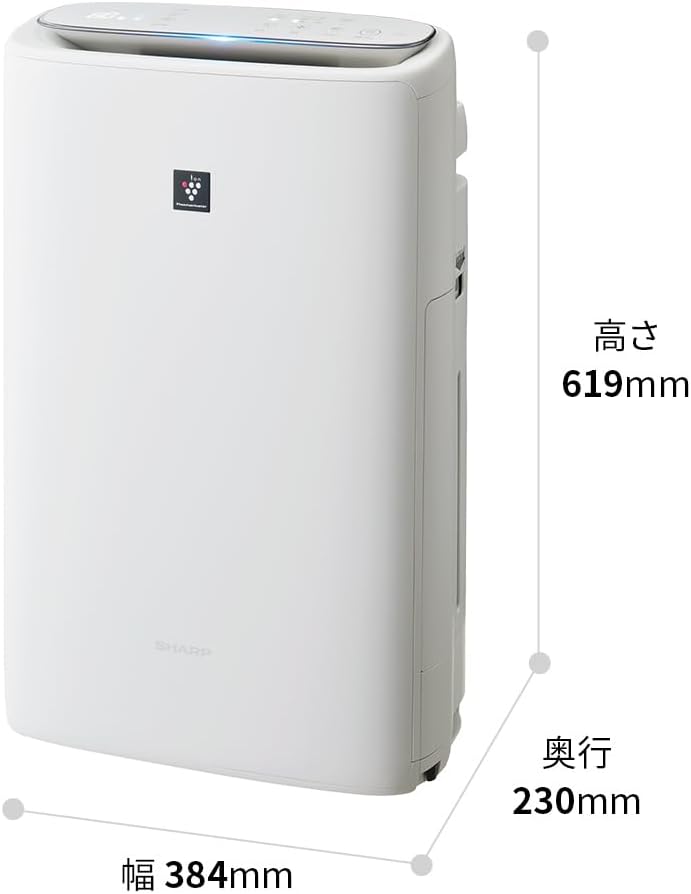
Image: Diagram illustrating the width (384mm), depth (230mm), and height (619mm) of the Sharp KI-TS50-W unit.
9. ການຮັບປະກັນແລະການສະຫນັບສະຫນູນ
For warranty information, please refer to the separate warranty card included with your product. For technical support, replacement parts, or further assistance, please contact Sharp customer service. Contact details can typically be found on the manufacturer's webສະຖານທີ່ຫຼືຢູ່ໃນເອກະສານການຮັບປະກັນ.


