ແນະນຳ
This manual provides essential information for setting up, operating, maintaining, and troubleshooting your Acer TravelLite TL14-42M Business Laptop. Please read this guide thoroughly to ensure proper use and to maximize the lifespan of your device.
ດ້ານໜ້າ view of the Acer TravelLite TL14-42M laptop, showcasing ການອອກແບບ sleek ແລະການສະແດງຂອງຕົນ.
ຕັ້ງຄ່າ
1. Unboxing ແລະການກວດກາເບື້ອງຕົ້ນ
Carefully remove the laptop and all accessories from the packaging. Verify that the following items are included:
- Acer TravelLite TL14-42M Laptop
- Power Adapter
- ສາຍໄຟ
- ຄູ່ມືຜູ້ໃຊ້ (ເອກະສານນີ້)
ໃຫ້ກວດສອບຄອມພິວເຕີໂນດບຸກວ່າມີຄວາມເສຍຫາຍທາງກາຍະພາບຫຼືບໍ່. ຖ້າພົບຄວາມເສຍຫາຍ, ໃຫ້ຕິດຕໍ່ຫາຮ້ານຄ້າປີກຂອງທ່ານທັນທີ.
2. ການເຊື່ອມຕໍ່ອະແດບເຕີພະລັງງານ
Connect the power adapter to the laptop's charging port and then plug the power cord into an electrical outlet. It is recommended to fully charge the battery before initial use.
3. ການເປີດເຄື່ອງເບື້ອງຕົ້ນ ແລະການຕິດຕັ້ງ Windows 11
Press the power button located on the keyboard deck to turn on the laptop. Follow the on-screen instructions to complete the Windows 11 Home setup process. This includes selecting your region, language, connecting to a Wi-Fi network, and creating a user account.
4. ເຊື່ອມຕໍ່ອຸປະກອນເສີມ
Utilize the available ports to connect external devices such as a mouse, external display, or USB drives.

ຂ້າງ view of the laptop, illustrating the various connectivity ports including USB, HDMI, and LAN.
ຄໍາແນະນໍາການດໍາເນີນງານ
1. ການຄຸ້ມຄອງພະລັງງານ
- ເປີດ: ກົດປຸ່ມເປີດປິດ.
- ຮູບແບບການນອນ: ປິດຝາ ຫຼືກົດປຸ່ມເປີດປິດຊົ່ວຄາວ.
- ປິດລົງ: ຄລິກທີ່ປຸ່ມເລີ່ມຕົ້ນ, ຈາກນັ້ນເປີດປິດ > ປິດລົງ.
- ຣີສະຕາດ: ຄລິກທີ່ປຸ່ມ Start, ຈາກນັ້ນ Power > Restart.
2. ແປ້ນພິມ ແລະ Touchpad
The laptop features a multi-language A4 size isolated spill-resistant keyboard and an extra-large touchpad. Use the touchpad for navigation and gestures. Refer to Windows 11 settings for touchpad customization.
3. ຄຸນສົມບັດການສະແດງ
The 14-inch Full HD (1920 x 1080) anti-glare TFT LCD provides clear visuals. Adjust display settings via Windows 11 for brightness and resolution preferences.

The laptop's 14-inch Full HD display offers vivid clarity for various tasks.
4. ການເຊື່ອມຕໍ່
The laptop supports 802.11ac and 802.11ax wireless standards for Wi-Fi connectivity. It also includes a Gigabit LAN port for wired network connections.
5. Ports Overview
Your TravelLite laptop is equipped with the following ports:
- 1 x ພອດ HDMI
- 1 x SD Card Slot
- 1 x Gigabit LAN Port
- 1 x USB 3.2 Gen 2 Type-C (Full function, supports display over Type-C & charging)
- 2 x USB 3.2 Type-A (1 with power-off charging)
6. ລັກສະນະຄວາມເປັນສ່ວນຕົວ
The laptop includes a built-in camera shutter for enhanced privacy and enterprise-level security with TPM 2.0.

The laptop emphasizes privacy with a built-in camera shutter and TPM 2.0 security.
ບໍາລຸງຮັກສາ
1. ເຮັດຄວາມສະອາດ Laptop
ໃຊ້ຜ້າແພທີ່ອ່ອນໆ ທີ່ບໍ່ມີເສັ້ນດ່າງ dampເຊັດດ້ວຍນໍ້າ ຫຼື ນໍ້າຢາທໍາຄວາມສະອາດໜ້າຈໍພິເສດເພື່ອທໍາຄວາມສະອາດໜ້າຈໍ. ສໍາລັບແປ້ນພິມ ແລະ ຕົວເຄື່ອງ, ໃຫ້ໃຊ້ຜ້າອ່ອນໆ ແລະ ແຫ້ງ. ຫຼີກລ່ຽງສານເຄມີທີ່ຮຸນແຮງ ຫຼື ວັດສະດຸຂັດ.
2. ການດູແລຫມໍ້ໄຟ
To prolong battery life, avoid extreme temperatures. It is recommended to fully discharge and recharge the battery periodically. If storing the laptop for an extended period, ensure the battery is charged to approximately 50%.
3. ການປັບປຸງຊອບແວ
Regularly update your Windows 11 operating system and drivers to ensure optimal performance and security. Windows 11 Home includes automatic updates.
4. ການຄຸ້ມຄອງການເກັບຮັກສາ
ແຕ່ລະໄລຍະເຮັດຄວາມສະອາດທີ່ບໍ່ຈໍາເປັນ files and applications to maintain sufficient storage space on the 512GB SSD. Utilize cloud storage or external drives for large files.
ການແກ້ໄຂບັນຫາ
ພາກສ່ວນນີ້ແກ້ໄຂບັນຫາທົ່ວໄປທີ່ເຈົ້າອາດຈະພົບກັບແລັບທັອບຂອງເຈົ້າ.
1. ແລັບທັອບບໍ່ເປີດ
- ກວດໃຫ້ແນ່ໃຈວ່າອະແດັບເຕີໄຟເຊື່ອມຕໍ່ຢ່າງປອດໄພກັບແລັບທັອບ ແລະປລັກສຽບໄຟທີ່ເຮັດວຽກໄດ້.
- ກວດສອບວ່າປລັກສຽບໄຟເຮັດວຽກໄດ້ໂດຍການສຽບໃສ່ອຸປະກອນອື່ນ.
- ຖ້າແບດເຕີລີ່ຫມົດແລ້ວ, ປ່ອຍໃຫ້ມັນສາກຢ່າງຫນ້ອຍ 30 ນາທີກ່ອນທີ່ຈະພະຍາຍາມເປີດ.
2. ສະແດງບັນຫາ
- If the screen is blank, try adjusting the brightness settings using the function keys.
- Connect an external monitor to determine if the issue is with the laptop's display or the graphics output.
3. ບັນຫາການເຊື່ອມຕໍ່ Wi-Fi
- ໃຫ້ແນ່ໃຈວ່າ Wi-Fi ຖືກເປີດໃຊ້ໃນການຕັ້ງຄ່າ Windows.
- ຣີສະຕາດເຣົາເຕີ ແລະໂມເດັມຂອງທ່ານ.
- ກວດເບິ່ງວ່າອຸປະກອນອື່ນສາມາດເຊື່ອມຕໍ່ກັບເຄືອຂ່າຍ Wi-Fi ດຽວກັນຫຼືບໍ່.
4. ປະສິດທິພາບຊ້າ
- ປິດແອັບພລິເຄຊັນທີ່ບໍ່ຈໍາເປັນທີ່ເຮັດວຽກຢູ່ໃນພື້ນຫຼັງ.
- ດໍາເນີນການເຮັດຄວາມສະອາດແຜ່ນດິດ ແລະ ການຈັດລຽງຂໍ້ມູນ (ສໍາລັບ HDD, ເຖິງແມ່ນວ່າ SSD ຈະຈັດການສິ່ງນີ້ແຕກຕ່າງກັນ).
- ໃຫ້ແນ່ໃຈວ່າ Windows ແລະໄດເວີແມ່ນອັບເດດແລ້ວ.
ສໍາລັບບັນຫາທີ່ສັບສົນຫຼາຍ, ອ້າງອີງເຖິງການສະຫນັບສະຫນູນ Acer webເວັບໄຊ ຫຼືຕິດຕໍ່ບໍລິການລູກຄ້າ.
ຂໍ້ມູນຈໍາເພາະ
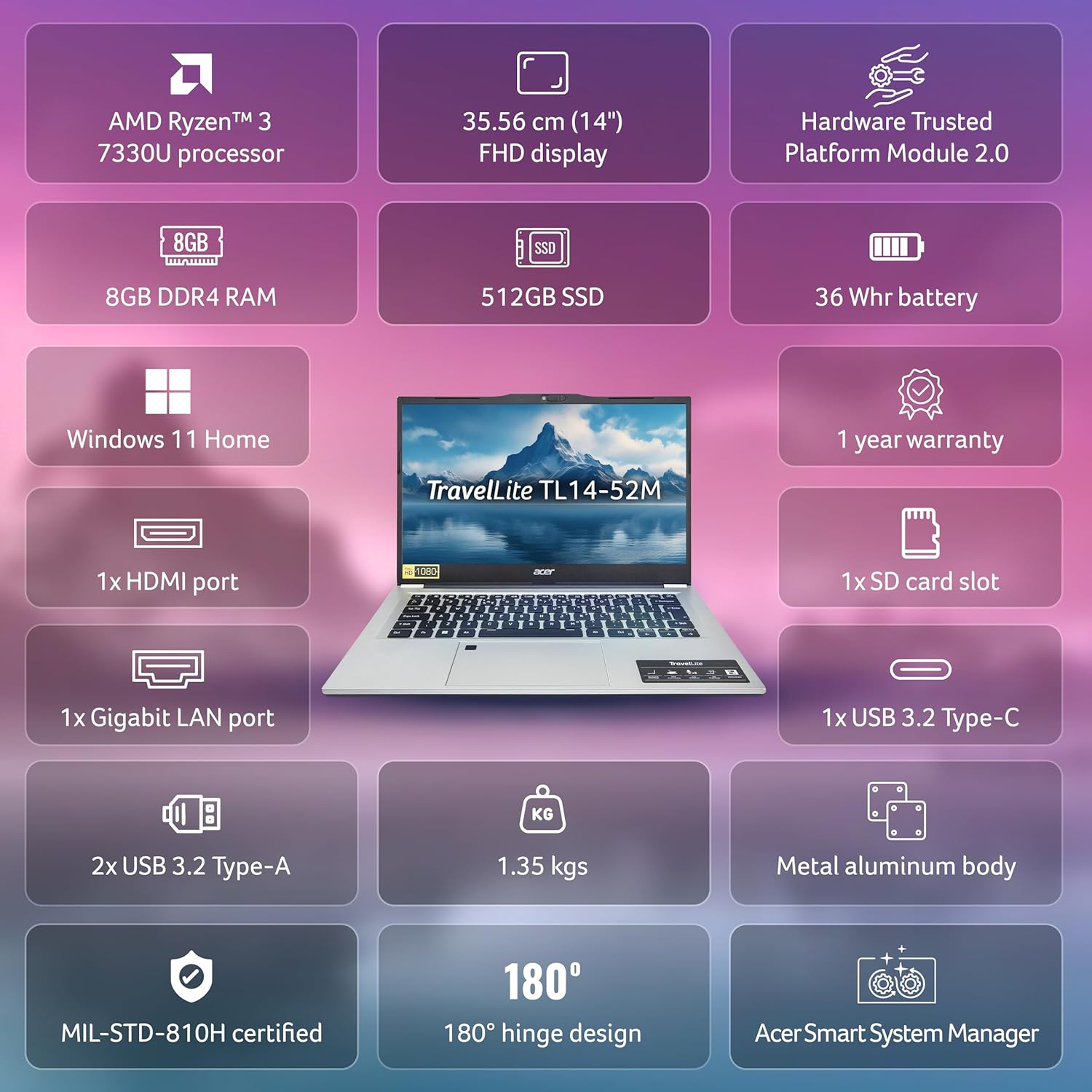
Below are the detailed technical specifications for the Acer TravelLite TL14-42M Business Laptop:

ຫຼາຍກວ່າview of the Acer TravelLite TL14-42M's key features and specifications.
| ຄຸນສົມບັດ | ຂໍ້ມູນຈໍາເພາະ |
|---|---|
| ໝາຍເລກຕົວແບບ | TL14-42M |
| ໂຮງງານຜະລິດ | AMD R3 7330U with AMD Radeon Graphics |
| ລະບົບປະຕິບັດການ | ໜ້າຫຼັກ Windows 11 |
| ຈໍສະແດງຜົນ | 14-inch Full HD (1920 x 1080) Anti-glare TFT LCD |
| RAM | 8 GB DDR4 |
| ການເກັບຮັກສາ | SSD 512 GB |
| ຮູບພາບ | Integrated AMD Radeon R3 |
| ທ່າເຮືອ | 1x HDMI, 1x SD Card Slot, 1x Gigabit LAN, 1x USB 3.2 Gen 2 Type-C, 2x USB 3.2 Type-A |
| ການເຊື່ອມຕໍ່ໄຮ້ສາຍ | 802.11ac, 802.11ax |
| ແບັດເຕີຣີ | 36 Watt Hours, 3-cell Lithium Ion (Approx. 4 hours average battery life) |
| ຂະໜາດ (LxWxH) | 22 x 32.5 x 1.9 cm |
| ນ້ຳໜັກ | 1.34 ກິໂລ |
| ອົງປະກອບລວມ | ຄອມພິວເຕີໂນດບຸກ, ສາຍໄຟ, ອະແດບເຕີ, ຄູ່ມືຜູ້ໃຊ້ |
ການຮັບປະກັນແລະການສະຫນັບສະຫນູນ
Your Acer TravelLite TL14-42M laptop comes with a 1-year manufacturer's warranty. For detailed warranty terms and conditions, please refer to the warranty card included with your product or visit the official Acer support webເວັບໄຊ.
For technical assistance, driver downloads, or service inquiries, please visit the Acer support portal or contact their customer service department. Keep your product's serial number and proof of purchase readily available when seeking support.


