1. ການແນະນໍາ ແລະຫຼາຍກວ່າview
The SVANTTO Android Barcode Scanner PDA is a robust and versatile mobile computer designed for efficient data collection and management in various professional environments. This device integrates advanced barcode scanning capabilities with the functionality of a modern Android smartphone, providing a comprehensive solution for inventory management, point-of-sale, logistics, and more. Available with either Android 11 or Android 13, it offers enhanced security, performance, and user experience.

Figure 1.1: SVANTTO Android Barcode Scanner PDA with charging dock and handheld view. This image illustrates the device's compact design and its compatibility with a dedicated charging cradle.
2. ຄຸນລັກສະນະຂອງຜະລິດຕະພັນ
- Advanced Android System:
- Android 13 (IPDA063): Offers enhanced security, smarter memory management, advanced permission controls, optimized battery life, and an intuitive user interface.
- Android 11 (061): Provides enhanced security, improved privacy controls, and seamless multitasking capabilities.

Figure 2.1: Visual representation of the advanced features of the Android 13 operating system, highlighting security, multitasking, and energy efficiency.
- CPU ປະສິດທິພາບສູງ: Equipped with the Mediatek MT8781V/CA 8-Core CPU, delivering significant boosts in speed and efficiency for faster app launches and smoother multitasking.

Figure 2.2: Diagram illustrating the superior performance of the MT8781V CPU compared to other standard processors, indicating faster loading times and task execution.
- Robust Scanning Engine: Integrates the Zebra SE4710 scanner engine, providing exceptional scanning performance for 1D/2D barcodes and QR codes. Features two scan buttons for user convenience.

Figure 2.3: Image demonstrating the Zebra SE4710 scanner engine in action, accurately reading different types of barcodes and QR codes on a package.
- ຫນ່ວຍຄວາມຈໍາແລະການເກັບຮັກສາ: Features 4GB RAM and 64GB ROM flash memory, enabling quick processing and ample storage for applications and data.

Figure 2.4: Graphic illustrating the extensive 4GB RAM and 64GB ROM storage capacity, symbolizing limitless data storage for user applications and files.
- ການອອກແບບກະທັດຮັດແລະ Portable: Weighs approximately 285g, designed for comfortable one-handed use and prolonged operation without fatigue.
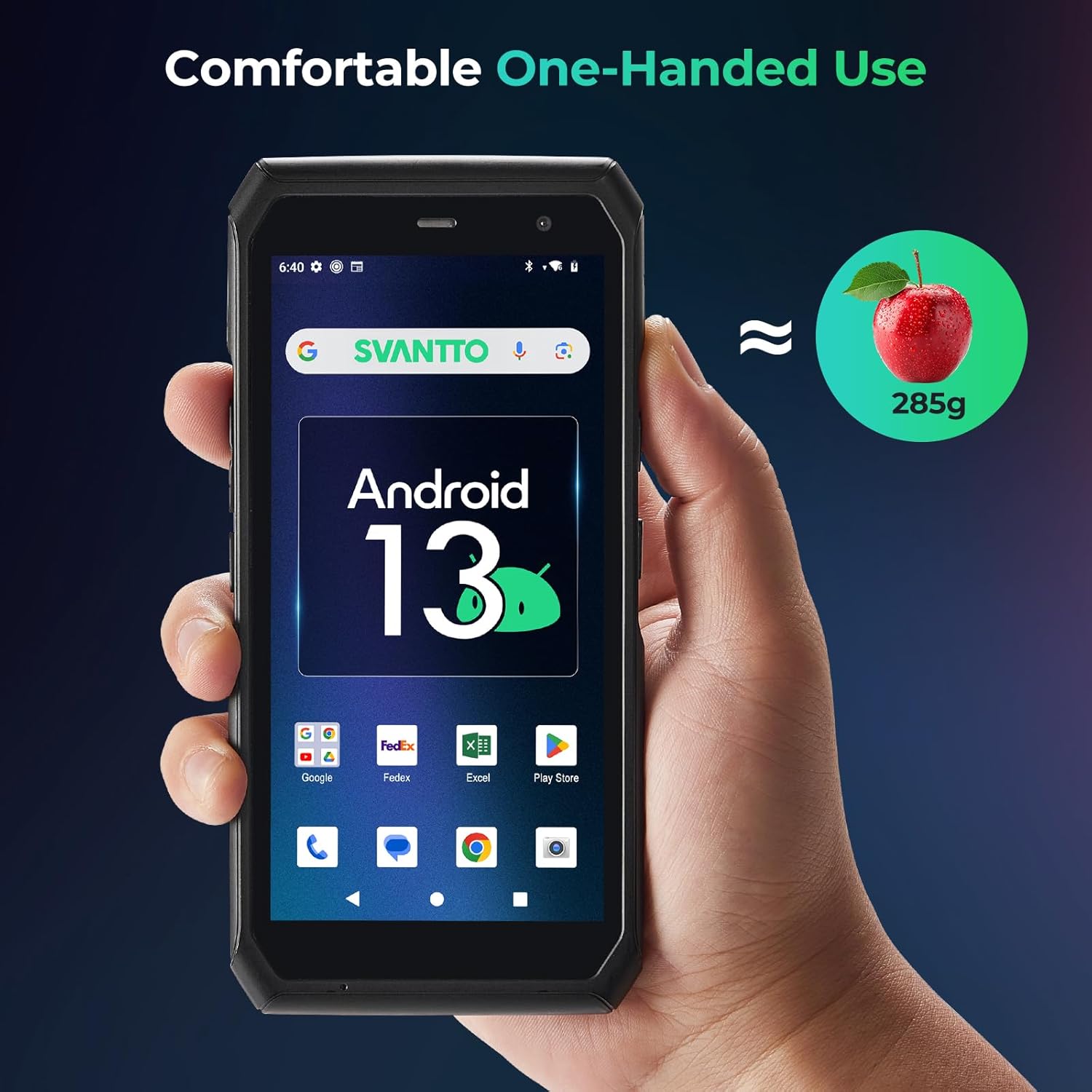
Figure 2.5: Image depicting the SVANTTO PDA comfortably held in one hand, emphasizing its lightweight (285g) and ergonomic design for extended use.
- ຄວາມເຂົ້າກັນໄດ້ຂອງຊອບແວ: Compatible with popular inventory management applications such as Zoho Inventory, Ocra Scan, inFlow Inventory, and Finale Inventory.
- ປຸ່ມທີ່ສາມາດປັບແຕ່ງໄດ້: Features customized buttons with API/SDK support for developing integrated software solutions.
3. ຄູ່ມືການຕິດຕັ້ງ
3.1 ການສາກໄຟເບື້ອງຕົ້ນ
Before first use, fully charge the device using the provided USB-C cable and power adapter, or by placing it in the optional charging dock. The charging indicator light will typically show red while charging and turn green when fully charged.
3.2 ການເປີດ/ປິດ
- ເພື່ອເປີດເຄື່ອງ: Press and hold the Power button (usually located on the side) for a few seconds until the SVANTTO logo appears on the screen.
- ປິດເຄື່ອງ: ກົດປຸ່ມເປີດ/ປິດຄ້າງໄວ້ຈົນກວ່າເມນູຕົວເລືອກພະລັງງານຈະປາກົດຂຶ້ນ. ເລືອກ "ປິດເຄື່ອງ" ແລະຢືນຢັນ.
- ເພື່ອເລີ່ມຕົ້ນໃໝ່: ຈາກເມນູຕົວເລືອກພະລັງງານ, ເລືອກ "Restart".
3.3 SIM/SD Card Installation (if applicable)
Locate the SIM/SD card slot, typically under a protective cover on the side or back of the device. Insert your Nano-SIM card and/or microSD card into the designated trays, ensuring correct orientation. Close the cover securely.
3.4 ການເຊື່ອມຕໍ່ເຄືອຂ່າຍ
- Wi-Fi: ໄປທີ່ ການຕັ້ງຄ່າ > ເຄືອຂ່າຍ ແລະອິນເຕີເນັດ > Wi-Fi. ເປີດ Wi-Fi, ເລືອກເຄືອຂ່າຍທີ່ທ່ານຕ້ອງການ, ແລະໃສ່ລະຫັດຜ່ານຖ້າຖືກເຕືອນ.
- ຂໍ້ມູນມືຖື: Ensure a valid SIM card is installed. Go to ການຕັ້ງຄ່າ > ເຄືອຂ່າຍ ແລະອິນເຕີເນັດ > ເຄືອຂ່າຍມືຖື ແລະເປີດໃຊ້ຂໍ້ມູນມືຖື.
3.5 ການຕິດຕັ້ງຊອບແວເບື້ອງຕົ້ນ
Upon first power-on, follow the on-screen prompts to complete the initial Android setup, including language selection, Google account login, and basic settings configuration. Install any necessary applications from the Google Play Store or via your organization's deployment method.
4. ຄໍາແນະນໍາການດໍາເນີນງານ
4.1 ການນໍາທາງພື້ນຖານ
- ໜ້າຈໍສຳຜັດ: Navigate the device using standard Android touch gestures (tap, swipe, pinch-to-zoom).
- ປຸ່ມທາງດ້ານຮ່າງກາຍ: Utilize the power button, volume buttons, and dedicated scan buttons for quick access to functions.
4.2 ການສະແກນບາໂຄດ
The SVANTTO PDA is equipped with a high-performance Zebra SE4710 scanner engine for efficient barcode and QR code reading.
- Open the application that requires barcode input (e.g., inventory management app).
- Point the scanner window at the barcode or QR code you wish to scan.
- Press one of the dedicated scan buttons located on the sides of the device. A red laser or illumination will activate.
- Hold steady until the device registers the scan, usually indicated by a beep or vibration, and the data appears in the application.
Note: The camera and the scan engine cannot be running at the same time.

Figure 4.1: User holding the SVANTTO PDA and scanning a barcode, showing the red laser beam emitted from the device's scanner.
4.3 Data Entry and Application Usage
Utilize the on-screen keyboard for manual data entry. For specific application functionalities, refer to the respective application's user guide. The device is optimized for use with various business applications, including:
- Zoho Inventory
- Ocra Scan
- inFlow Inventory
- Finale Inventory
5. ບໍາລຸງຮັກສາ
5.1 ການທໍາຄວາມສະອາດອຸປະກອນ
To clean the device, power it off and gently wipe the screen and body with a soft, lint-free cloth. For stubborn smudges, slightly dampen the cloth with water or a screen-safe cleaning solution. Avoid using harsh chemicals, abrasive materials, or excessive moisture.
5.2 ການດູແລຫມໍ້ໄຟ
- ຫຼີກເວັ້ນການເປີດເຜີຍອຸປະກອນກັບອຸນຫະພູມທີ່ຮຸນແຮງ.
- ຢ່າປ່ອຍໃຫ້ແບດເຕີລີ່ໄຫຼເຕັມເລື້ອຍໆເລື້ອຍໆ.
- Use only SVANTTO-approved chargers and cables.
5.3 ການປັບປຸງຊອບແວ
ກວດສອບແລະຕິດຕັ້ງການປັບປຸງລະບົບເປັນປົກກະຕິເພື່ອຮັບປະກັນການປະຕິບັດທີ່ດີທີ່ສຸດ, ຄວາມປອດໄພ, ແລະການເຂົ້າເຖິງຄຸນສົມບັດໃຫມ່. ໄປທີ່ ການຕັ້ງຄ່າ > ລະບົບ > ການປັບປຸງລະບົບ ເພື່ອກວດສອບການອັບເດດທີ່ມີຢູ່.
5.4 ການຄຸ້ມຄອງການເກັບຮັກສາ
ແຕ່ລະໄລຍະview and manage the device's internal storage. Uninstall unused applications, clear cache data, and transfer large files to external storage (microSD card) or cloud services to maintain performance.
6. ການແກ້ໄຂບັນຫາ
6.1 ບັນຫາທົ່ວໄປ ແລະການແກ້ໄຂ
| ສະບັບ | ສາເຫດທີ່ເປັນໄປໄດ້ | ການແກ້ໄຂ |
|---|---|---|
| ອຸປະກອນບໍ່ເປີດ | ຫມໍ້ໄຟຕ່ໍາ; ຊອບແວຂັດຂ້ອງ | ສາກອຸປະກອນຢ່າງໜ້ອຍ 30 ນາທີ. ດໍາເນີນການ restart ບັງຄັບໂດຍການກົດປຸ່ມເປີດປິດສໍາລັບ 10-15 ວິນາທີ. |
| Barcode scanner not working | Scanner disabled; poor lighting; damaged barcode; camera app running | Ensure scanner is enabled in settings. Check lighting conditions. Clean scanner window. Ensure no other app is using the camera. Restart the device. |
| Wi-Fi/Cellular connectivity issues | Incorrect password; out of range; network problem; SIM card issue | Verify Wi-Fi password. Move closer to router. Restart router/modem. Reinsert SIM card. Contact network provider. |
| ອຸປະກອນຊ້າ ຫຼື ບໍ່ຕອບສະໜອງ | ແອັບທີ່ເຮັດວຽກຫຼາຍເກີນໄປ; ການເກັບຮັກສາຕ່ໍາ; ຊອບແວລ້າສະໄຫມ | Close background apps. Clear app caches. Free up storage space. Check for and install system updates. Restart the device. |
If the issue persists after attempting these solutions, please contact SVANTTO customer support for further assistance.
7. ຂໍ້ມູນຈໍາເພາະ
- ລະບົບປະຕິບັດການ: Android 11 (061) / Android 13 (IPDA063)
- CPU: Mediatek MT8781V/CA (8-Core)
- ໜ່ວຍຄວາມຈຳ: RAM 4GB + ROM 64GB
- ຈໍສະແດງຜົນ: ໜ້າ ຈໍ ສຳ ພັດ 5.5 ນິ້ວ
- Scanner Engine: Zebra SE4710 (Supports 1D/2D Barcodes, QR Codes)
- ນ້ຳໜັກ: ປະມານ 285g
- ການເຊື່ອມຕໍ່: Wi-Fi, 4G LTE, Bluetooth (assumed)
- ພອດ: USB-C (for charging and data transfer)
- ASIN: B0DNK224ML
- ທໍາອິດທີ່ມີຢູ່: ວັນທີ 19 ພະຈິກ 2024
8. ການຮັບປະກັນແລະການສະຫນັບສະຫນູນ
8.1 ການຮັບປະກັນຈໍາກັດ
SVANTTO products typically come with a limited warranty covering manufacturing defects. Please refer to the warranty card included with your product or visit the official SVANTTO webເວັບໄຊສໍາລັບເງື່ອນໄຂການຮັບປະກັນລາຍລະອຽດ.
8.2 ສະຫນັບສະຫນູນດ້ານວິຊາການ
For technical assistance, troubleshooting, or inquiries regarding API/SDK for software integration, SVANTTO offers comprehensive support services. This includes 24/6/365 technical advisory services.

Figure 8.1: Graphic illustrating the comprehensive assistance provided by SVANTTO, including SDK development kits and 24/6/365 technical advisory services.
Please visit the official SVANTTO website or contact their customer service for contact information and support channels.
ທ່ານສາມາດໄປຢ້ຽມຢາມໄດ້ SVANTTO Store on Amazon ສໍາລັບຂໍ້ມູນເພີ່ມເຕີມ.


