1. ບົດແນະນຳ
Welcome to the PETKIT PUROBOT MAX PRO AI-Camera Self Cleaning Cat Litter Box. This advanced device is designed to provide a hygienic and convenient solution for cat waste management, featuring AI-powered health monitoring, smart app control, and efficient odor elimination. This manual will guide you through the setup, operation, and maintenance of your new litter box.
ສິນຄ້າເກີນview
The PETKIT PUROBOT MAX PRO is an AI-Camera self-cleaning cat litter box that comes with two bags of mixed cat litter. Key features include:
- AI-Powered Camera: High-resolution camera with 210° wide viewing angle and IR night vision for detailed toileting data and health monitoring.
- No-touch Semi-automatic Bag Sealing: Innovative design for hygienic waste disposal.
- ການຄວບຄຸມ Smart App: Connects via 2.4&5GHz Wi-Fi for real-time monitoring and control.
- xSecure System: High-precision sensors and anti-pinch structure ensure pet safety.
- ຄວາມອາດສາມາດຂະຫນາດໃຫຍ່ພິເສດ: 8L waste bin for up to 17 days of scooping-free operation for one cat.
- ການດໍາເນີນງານທີ່ງຽບສະຫງົບທີ່ສຸດ: Noise level of only 35-45 decibels.

Figure 1.1: PETKIT PUROBOT MAX PRO AI-Camera Self Cleaning Cat Litter Box with included accessories.
2. ຂໍ້ມູນຄວາມປອດໄພ
Please read all safety instructions carefully before using the PETKIT PUROBOT MAX PRO. Failure to follow these instructions may result in injury or damage to the product.
ຂໍ້ແນະນຳຄວາມປອດໄພທົ່ວໄປ
- ຫ້າມນຳອຸປະກອນຈຸ່ມໃສ່ນ້ຳຫຼືຂອງແຫຼວອື່ນໆ.
- ຮັບປະກັນວ່າສາຍໄຟບໍ່ເສຍຫາຍ ຫຼື ຖືກປັກ.
- ຮັກສາໃຫ້ໄກຈາກເດັກນ້ອຍນ້ອຍໆ.
- ໃຊ້ພຽງແຕ່ອະແດັບເຕີໄຟທີ່ໃຫ້ມາ.
- ຢ່າພະຍາຍາມຖອດປະກອບ ຫຼືສ້ອມແປງອຸປະກອນດ້ວຍຕົນເອງ. ຕິດຕໍ່ຝ່າຍຊ່ວຍເຫຼືອລູກຄ້າເພື່ອຂໍຄວາມຊ່ວຍເຫຼືອ.
- ໃຫ້ແນ່ໃຈວ່າອຸປະກອນຖືກວາງຢູ່ເທິງພື້ນຜິວທີ່ມີລະດັບຄວາມຫມັ້ນຄົງ.
xSecure System for Pet Safety
The PUROBOT MAX PRO is equipped with an advanced xSecure System featuring high-precision sensors and an anti-pinch design to ensure the safety of your pet. The cylinder will immediately stop operation upon detecting a pet's proximity. The anti-pinch structure keeps the entrance open at all times, preventing cats from getting stuck.

Figure 2.1: Safety Protection for Every Visit, highlighting the patented anti-pinch design and 12 sensors.
3. ເນື້ອໃນຊຸດ
ຖອດກ່ອງຢ່າງລະມັດລະວັງ ແລະຮັບປະກັນວ່າສິນຄ້າທັງໝົດມີຢູ່ ແລະຢູ່ໃນສະພາບດີ. ຖ້າລາຍການໃດຂາດຫາຍໄປຫຼືເສຍຫາຍ, ກະລຸນາຕິດຕໍ່ຝ່າຍຊ່ວຍເຫຼືອລູກຄ້າ.
- PETKIT PUROBOT MAX PRO AI-Camera Self Cleaning Cat Litter Box
- Power Adapter
- 2 Bags of Mixed Cat Litter
- Waste Bags (pre-installed or included separately)
- ຄູ່ມືຜູ້ໃຊ້ (ເອກະສານນີ້)
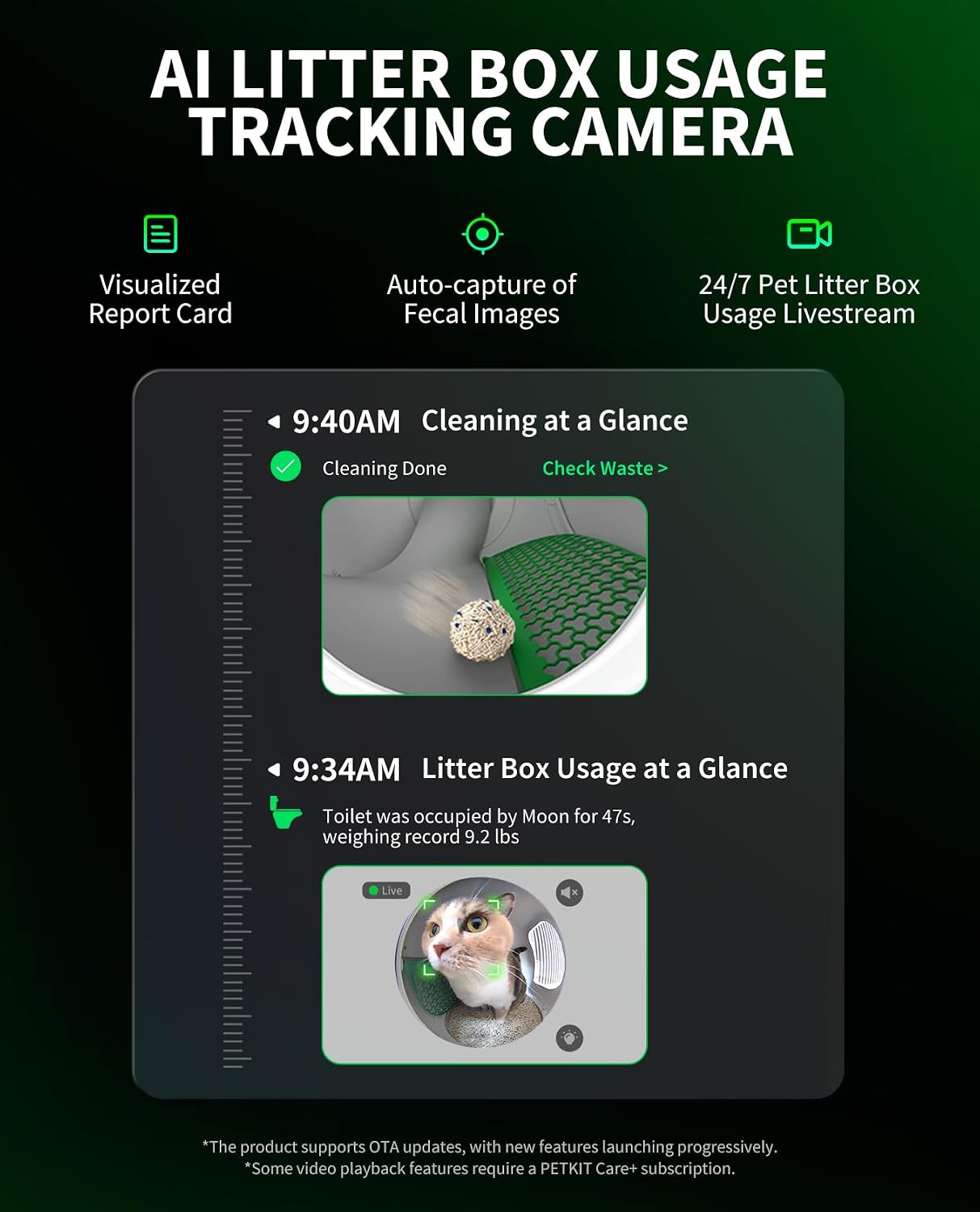
Figure 3.1: All components included in the PETKIT PUROBOT MAX PRO package.
4. ຕັ້ງຄ່າ
4.1 ການຫຸ້ມຫໍ່ແລະການຈັດວາງ
- Remove all packaging materials from the litter box.
- Place the litter box on a firm, level surface in a well-ventilated area. Ensure there is enough space around the unit for proper operation and maintenance.
- ຫຼີກລ້ຽງການວາງເຄື່ອງຢູ່ໃນບ່ອນຖືກແສງແດດໂດຍກົງ ຫຼືໃກ້ກັບແຫຼ່ງຄວາມຮ້ອນ.
4.2 ການເຊື່ອມຕໍ່ພະລັງງານ
- Connect the power adapter to the power input port on the back of the litter box.
- ສຽບອະແດບເຕີໄຟເຂົ້າໄປໃນເຕົ້າສຽບຝາມາດຕະຖານ.
- ອຸປະກອນຈະເປີດອັດຕະໂນມັດ.
4.3 Litter Filling
- Open the top lid or access panel of the litter box.
- Pour the recommended amount of cat litter into the main compartment. The PETKIT PUROBOT MAX PRO is compatible with all types of cat litter.
- Ensure the litter level is within the indicated maximum and minimum lines inside the drum.
- ປິດຝາຢ່າງປອດໄພ.
5. ຄໍາແນະນໍາການດໍາເນີນງານ
5.1 ການເປີດ/ປິດ
The device powers on automatically when plugged in. To turn off, unplug the power adapter. For temporary pauses, use the app or physical buttons if available.
5.2 ການຄວບຄຸມແອັບອັດສະລິຍະ
The PETKIT MAX PRO is 2.4&5GHz Wi-Fi enabled and can be controlled via the PETKIT app. Download the PETKIT app from your smartphone's app store and follow the in-app instructions to connect your device.
ຜ່ານແອັບ, ເຈົ້າສາມາດ:
- Initiate auto-scooping modes.
- Adjust deodorization settings.
- Monitor your pet's activity and fecal condition in real-time.
- Receive pop-up notifications and check device status.

Figure 5.1: All-in-One Smart App Control interface.
5.3 AI-Powered Camera Features
The integrated AI-powered camera provides comprehensive monitoring capabilities:
- ການຕິດຕາມການນໍາໃຊ້: Clearly captures details of toileting, recording data on urine and poop balls to help assess your cat's health.
- Fecal Image Capture: The camera captures fecal images after each cleaning, and the app detects abnormalities in color or size.
- Multi-Cat Recognition: Identifies individual cats by face and weight, providing personalized health profiles for each kitten.

Figure 5.2: AI Litter Box Usage Tracking Camera features.

Figure 5.3: Cat Recognition in Multi-Cat Family.
5.4 Cleaning Cycles
The litter box automatically initiates cleaning cycles after your cat exits the unit. You can also manually trigger cleaning cycles via the PETKIT app.
5.5 ການຄວບຄຸມກິ່ນ
The PUROBOT MAX PRO employs an efficient triple odor control system:
- 45-Day Cylinder Deodorization: Smart fragrance diffusion within the cylinder.
- 98% Ammonia Neutralization: Specifically targets ammonia for waste bin odor control.
- Odor-Trapping Sealed Waste Bin: Prevents odors from escaping.

Figure 5.4: Efficient Triple Odor Control system.
6. ບໍາລຸງຮັກສາ
6.1 Waste Bin Emptying
The 8L waste bin allows for up to 17 days of scooping-free operation for one cat. When the waste bin is full, the app will notify you.
To empty the waste bin, utilize the no-touch semi-automatic bag sealing design:
- Open the waste compartment door.
- Pull the packing rope to seal the waste bag.
- Remove the sealed bag and dispose of it.
- Insert a new waste bag and close the compartment door.

Figure 6.1: Patented Drawstring Waste Packing for contactless waste management.
6.2 ການທໍາຄວາມສະອາດທົ່ວໄປ
Regularly wipe down the exterior of the litter box with a damp cloth. For deeper cleaning, refer to the app for specific instructions on disassembling and cleaning the internal components.
6.3 ການປ່ຽນແທນຂີ້ເຫຍື້ອ
Completely replace the cat litter as needed, typically every 2-4 weeks depending on usage and litter type. Always ensure the litter level is maintained within the recommended range.
6.4 Dust-Free Operation
The PETKIT PUROBOT MAX PRO is designed for 99% dust-free operation, utilizing ultra-high hardness litter and 7 dust removal processes to minimize airborne dust.

Figure 6.2: 99% Dust-Free operation.
7. ການແກ້ໄຂບັນຫາ
If you encounter any issues with your PETKIT PUROBOT MAX PRO, please refer to the following common problems and solutions. For more detailed troubleshooting, consult the PETKIT app or contact customer support.
| ບັນຫາ | ສາເຫດທີ່ເປັນໄປໄດ້ | ການແກ້ໄຂ |
|---|---|---|
| ອຸປະກອນບໍ່ເປີດ | ບໍ່ໄດ້ເຊື່ອມຕໍ່ສາຍໄຟ; ບັນຫາປລັກສຽບໄຟຟ້າ | ໃຫ້ແນ່ໃຈວ່າໄດ້ສຽບສາຍໄຟຢ່າງປອດໄພ; ລອງຮ້ານອື່ນ. |
| Litter box not cleaning | Waste bin full; Litter level too low/high; Sensor obstruction | Empty waste bin; Adjust litter level; Clean sensors. |
| ບັນຫາການເຊື່ອມຕໍ່ແອັບ | Incorrect Wi-Fi password; Router too far; Network interference | Verify Wi-Fi credentials; Move device closer to router; Restart router and device. |
| ກິ່ນຫອມຍັງຄົງຢູ່ | Deodorizer needs replacement; Waste bin not sealed properly | Check deodorizer status in app; Ensure waste bag is sealed and bin door is closed. |
| ກ້ອງຖ່າຍຮູບບໍ່ເຮັດວຽກ | Lens obstructed; Software glitch | Clean camera lens; Restart device; Check app for firmware updates. |
If the problem persists after trying these solutions, please contact PETKIT customer support.
8. ຂໍ້ມູນຈໍາເພາະ
| ຄຸນສົມບັດ | ລາຍລະອຽດ |
|---|---|
| ຍີ່ຫໍ້ | PETKIT |
| ຕົວແບບ | PUROBOT MAX PRO |
| ສີ | ສີຂາວ |
| ວັດສະດຸ | ພາດສະຕິກ |
| ຄວາມອາດສາມາດຂອງຖັງຂີ້ເຫຍື້ອ | 8 ລິດ |
| ການເຊື່ອມຕໍ່ | Wi-Fi 2.4GHz ແລະ 5GHz |
| ຄຸນນະສົມບັດພິເສດ | AI-powered health monitoring, Semi-automatic bag sealing, Smart app control, Secure pet safety system (xSecure) |
| ລະດັບສຽງ | 35-45 decibels |
9. ການຮັບປະກັນແລະການສະຫນັບສະຫນູນ
9.1 ຂໍ້ມູນການຮັບປະກັນ
Your PETKIT PUROBOT MAX PRO AI-Camera Self Cleaning Cat Litter Box comes with a limited manufacturer's warranty. Please refer to the warranty card included in your package or visit the official PETKIT webເວັບໄຊສໍາລັບເງື່ອນໄຂການຮັບປະກັນລາຍລະອຽດ.
9.2 ສະຫນັບສະຫນູນລູກຄ້າ
For technical assistance, troubleshooting, or any other inquiries, please contact PETKIT customer support. You can find contact information on the official PETKIT website or through the PETKIT app.
Visit the official PETKIT Store for more information: PETKIT Store on Amazon


