ແນະນຳ
Thank you for choosing the FLEXISPOT EC5 Plus Electric Sit-Stand Desk Frame. This manual provides essential information for the safe and efficient assembly, operation, and maintenance of your new desk frame. Designed with ergonomics in mind, this dual-motor frame offers smooth and quiet height adjustment, allowing you to effortlessly switch between sitting and standing positions for a healthier work environment.
ຄໍາແນະນໍາຄວາມປອດໄພທີ່ສໍາຄັນ
ກະລຸນາອ່ານຄໍາແນະນໍາທັງຫມົດຢ່າງລະອຽດກ່ອນທີ່ຈະປະກອບແລະນໍາໃຊ້. ການບໍ່ປະຕິບັດຕາມຄໍາແນະນໍາເຫຼົ່ານີ້ອາດຈະເຮັດໃຫ້ເກີດການບາດເຈັບຫຼືຄວາມເສຍຫາຍຕໍ່ຜະລິດຕະພັນ.
- ໃຫ້ແນ່ໃຈວ່າອົງປະກອບທັງໝົດມີຢູ່ ແລະ ບໍ່ເສຍຫາຍກ່ອນການປະກອບ. ຢ່າໃຊ້ຖ້າມີຊິ້ນສ່ວນໃດຂາດຫາຍໄປ ຫຼື ເສຍຫາຍ.
- Keep children and pets away from the desk during operation to prevent injury from moving parts.
- Do not place hands or other body parts near the lifting columns or crossbar during height adjustment to avoid pinching.
- Ensure the desk is placed on a level surface to prevent tipping.
- Do not overload the desk. The maximum load capacity is 120 kg (265 lbs).
- ໃຊ້ພຽງແຕ່ອະແດບເຕີໄຟ ແລະ ສາຍໄຟທີ່ໃຫ້ມາເທົ່ານັ້ນ.
- ຕັດການເຊື່ອມຕໍ່ໄຟຟ້າກ່ອນທີ່ຈະທໍາຄວາມສະອາດຫຼືບໍາລຸງຮັກສາ.
- The anti-collision system is designed to prevent damage, but always exercise caution during operation.
ເນື້ອໃນຊຸດ
ກວດສອບວ່າອົງປະກອບຕໍ່ໄປນີ້ລວມຢູ່ໃນຊຸດຂອງທ່ານ:
- ຂາໂຕະ (2)
- ແຖບຂ້າມ (1)
- ວົງເລັບຂ້າງ (2)
- ຕູ້ຄວບຄຸມ (1)
- Handset/Control Panel (1)
- ອະແດບເຕີໄຟຟ້າ (1)
- ສາຍໄຟ (1)
- ຖາດຈັດການສາຍ (1)
- Hardware Kit (screws, tools, etc.)
- ຄູ່ມືຜູ້ໃຊ້ (ເອກະສານນີ້)

ຄູ່ມືການຕິດຕັ້ງ
ຄໍາແນະນໍາຂອງສະພາແຫ່ງ
Assembly typically requires two people. Follow the steps below for a successful setup. Refer to the detailed diagrams in the included printed manual for visual guidance.
- Unpack ອົງປະກອບ: ເອົາຊິ້ນສ່ວນທັງໝົດອອກຈາກເຄື່ອງຫຸ້ມຫໍ່ຢ່າງລະມັດລະວັງ ແລະ ວາງອອກເທິງພື້ນຜິວທີ່ສະອາດ, ອ່ອນນຸ້ມເພື່ອປ້ອງກັນຮອຍຂີດຂ່ວນ.
- ຕິດວົງເລັບຂ້າງກັບຂາ: Secure the side brackets to the top of each lifting column (leg) using the provided screws.
- Assemble Crossbar: Connect the two halves of the crossbar, ensuring the motor cables are properly routed.
- Connect Legs to Crossbar: Attach the assembled legs to the crossbar. Ensure all connections are secure.
- ຕິດຕັ້ງກ່ອງຄວບຄຸມ: Mount the control box to the designated area on the crossbar using the provided screws.
- Connect Motors and Handset: Plug the motor cables from each leg into the control box. Connect the handset/control panel cable to the control box.
- ຄັດຕິດອະແດບເຕີໄຟຟ້າ: Connect the power adapter to the control box and then to the power cable.
- Mount Tabletop: Carefully place your chosen tabletop (not included) onto the assembled frame. Ensure it is centered and aligned. Secure the tabletop to the frame using appropriate screws (ensure screw length is suitable for your tabletop thickness to avoid piercing through). The frame is compatible with tabletops from 120 to 180 cm in length and 60 to 80 cm in width.
- ການຄຸ້ມຄອງສາຍໄຟ: Use the included cable management tray and ties to organize all cables neatly.
- ການເພີ່ມພະລັງງານເບື້ອງຕົ້ນ: Plug the power cable into a wall outlet. The desk should be ready for initial calibration or operation.

ຄໍາແນະນໍາການດໍາເນີນງານ
ແຜງຄວບຄຸມຜ່ານview
The EC5 Plus features an intuitive control panel with an LED display and memory functions.
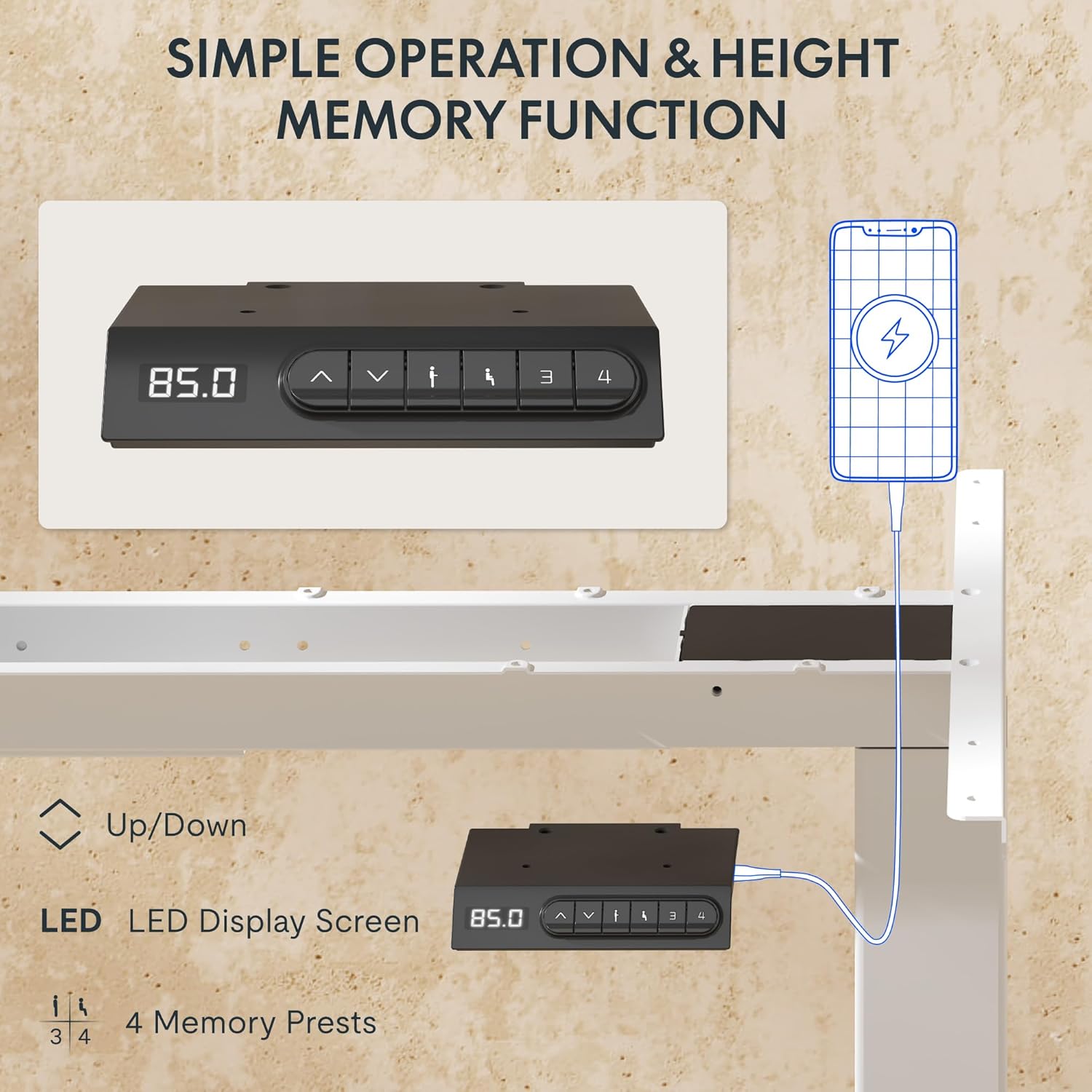
- ຈໍສະແດງຜົນ LED: Shows the current height of the desk in centimeters.
- ລູກສອນຂຶ້ນ/ລົງ (▲ / ▼): ກົດຄ້າງໄວ້ເພື່ອປັບຄວາມສູງຂອງໂຕະດ້ວຍຕົນເອງ.
- ໜ່ວຍຄວາມຈຳທີ່ຕັ້ງໄວ້ລ່ວງໜ້າ (1, 2, 3, 4): Store and recall preferred height settings.
- ພອດ USB-A ແລະ USB-C: Integrated charging ports for your devices.
ການປັບຄວາມສູງ
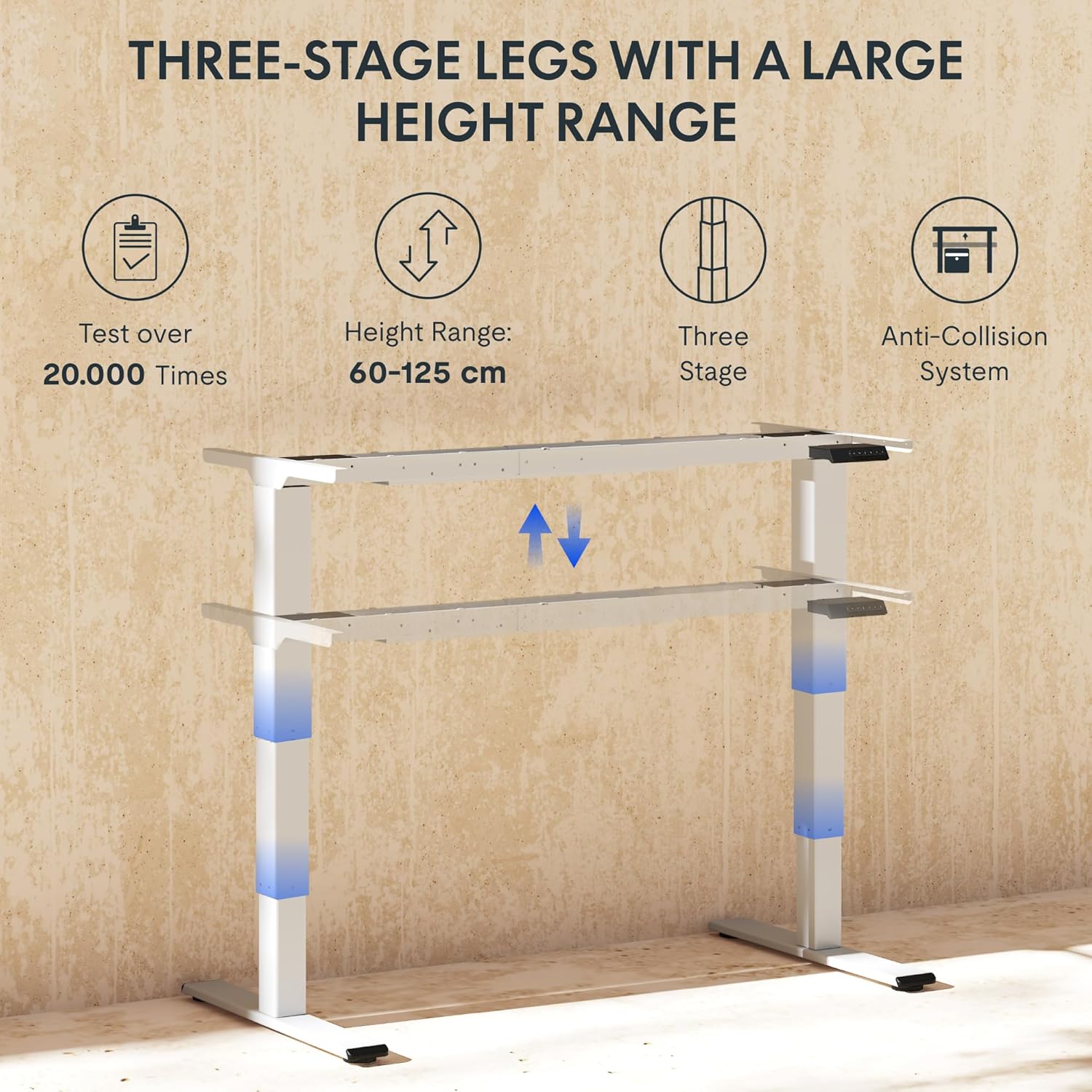
To adjust the desk height, press and hold the ▲ (ຂຶ້ນ) ຫຼື ▼ (Down) arrow button until the desk reaches your desired height. The LED display will show the current height in real-time. The desk frame supports a height range of 60 cm to 125 cm.
ຕັ້ງຄ່າຄວາມຈຳໄວ້ລ່ວງໜ້າ
The desk allows you to save up to four preferred height settings for quick recall:
- ປັບໂຕະກັບຄວາມສູງທີ່ທ່ານຕ້ອງການໂດຍໃຊ້ລູກສອນຂຶ້ນ/ລົງ.
- Press the "M" or "SET" button (if available, otherwise proceed to step 3).
- Press one of the numbered memory preset buttons (1, 2, 3, or 4) within 3 seconds. The LED display will show "S-" followed by the number, indicating the height has been saved.
- To recall a saved height, simply press the corresponding numbered memory preset button. The desk will automatically move to the saved position.
ລະບົບຕ້ານການຊົນ
The EC5 Plus is equipped with an intelligent anti-collision system. If the desk encounters an obstacle during height adjustment, it will automatically stop and reverse slightly to prevent damage or injury. This system has adjustable sensitivity levels. Refer to the detailed manual for instructions on adjusting sensitivity.
ພອດສາກໄຟ USB
The control panel includes integrated USB-A and USB-C charging ports. Simply connect your smartphone, tablet, or other compatible devices to these ports for convenient charging directly from your desk.
ບໍາລຸງຮັກສາ
Regular maintenance ensures the longevity and optimal performance of your FLEXISPOT EC5 Plus desk frame.
- ທໍາຄວາມສະອາດ: ເຊັດກອບໂຕະດ້ວຍຜ້າອ່ອນໆ, ເຊັດໃຫ້ແຫ້ງ.amp cloth. Avoid using abrasive cleaners or solvents that may damage the finish. Ensure the desk is unplugged before cleaning.
- ການກວດກາ: ກວດເບິ່ງທຸກສະກູແລະການເຊື່ອມຕໍ່ເປັນໄລຍະເພື່ອຮັບປະກັນວ່າພວກມັນແຫນ້ນ. ຮັດແໜ້ນ ຖ້າຈຳເປັນ.
- ການຄຸ້ມຄອງສາຍໄຟ: ໃຫ້ແນ່ໃຈວ່າສາຍໄຟບໍ່ຖືກບີບ ຫຼື ພັນກັນ, ເຊິ່ງອາດຈະສົ່ງຜົນກະທົບຕໍ່ການເຮັດວຽກຂອງໂຕະ ຫຼື ເຮັດໃຫ້ເກີດຄວາມເສຍຫາຍໄດ້.
- ການລະບາຍສີ: The lifting columns are designed to be maintenance-free and do not require lubrication.
ການແກ້ໄຂບັນຫາ
If you encounter any issues with your desk frame, refer to the table below for common problems and solutions.
| ບັນຫາ | ສາເຫດທີ່ເປັນໄປໄດ້ | ການແກ້ໄຂ |
|---|---|---|
| ໂຕະບໍ່ຍ້າຍ. | Power cable disconnected; control box not connected; motor cables loose. | Check all power and motor connections. Ensure the power outlet is functional. |
| ໂຕະເຄື່ອນທີ່ບໍ່ສະໝ່ຳສະເໝີ ຫຼືສົ່ງສຽງລົບກວນຜິດປົກກະຕິ. | ໂຫຼດເກີນ; ການເຊື່ອມຕໍ່ວ່າງ; ການອຸດຕັນ. | Reduce weight on the desk. Check all screws and connections. Ensure no obstructions are present. Perform a reset (refer to manual for specific reset procedure). |
| Anti-collision system triggers too often or not at all. | ການຕັ້ງຄ່າຄວາມອ່ອນໄຫວບໍ່ຖືກຕ້ອງ. | Adjust the anti-collision sensitivity via the control panel (refer to manual for specific steps). |
| ຈໍ LED ສະແດງລະຫັດຂໍ້ຜິດພາດ. | ຜິດປົກກະຕິສະເພາະ. | ເບິ່ງຄູ່ມືຜູ້ໃຊ້ສະບັບເຕັມສໍາລັບບັນຊີລາຍຊື່ຂອງລະຫັດຄວາມຜິດພາດແລະວິທີແກ້ໄຂທີ່ສອດຄ້ອງກັນຂອງເຂົາເຈົ້າ. ຖ້າບັນຫາຍັງຄົງຢູ່, ໃຫ້ຕິດຕໍ່ຝ່າຍຊ່ວຍເຫຼືອລູກຄ້າ. |
ຂໍ້ມູນຈໍາເພາະ
Detailed technical specifications for the FLEXISPOT EC5 Plus Desk Frame:
| ຄຸນສົມບັດ | ລາຍລະອຽດ |
|---|---|
| ຍີ່ຫໍ້ | FLEXISPOT |
| ໝາຍເລກຕົວແບບ | EC5W-PL-IE |
| ສີ | ສີຂາວ |
| ຂະໜາດສິນຄ້າ (L x W x H) | 80 x 180 x 125 cm (frame dimensions, adaptable to tabletop) |
| ນ້ໍາຫນັກລາຍການ | 22.6 ກິໂລກຣາມ |
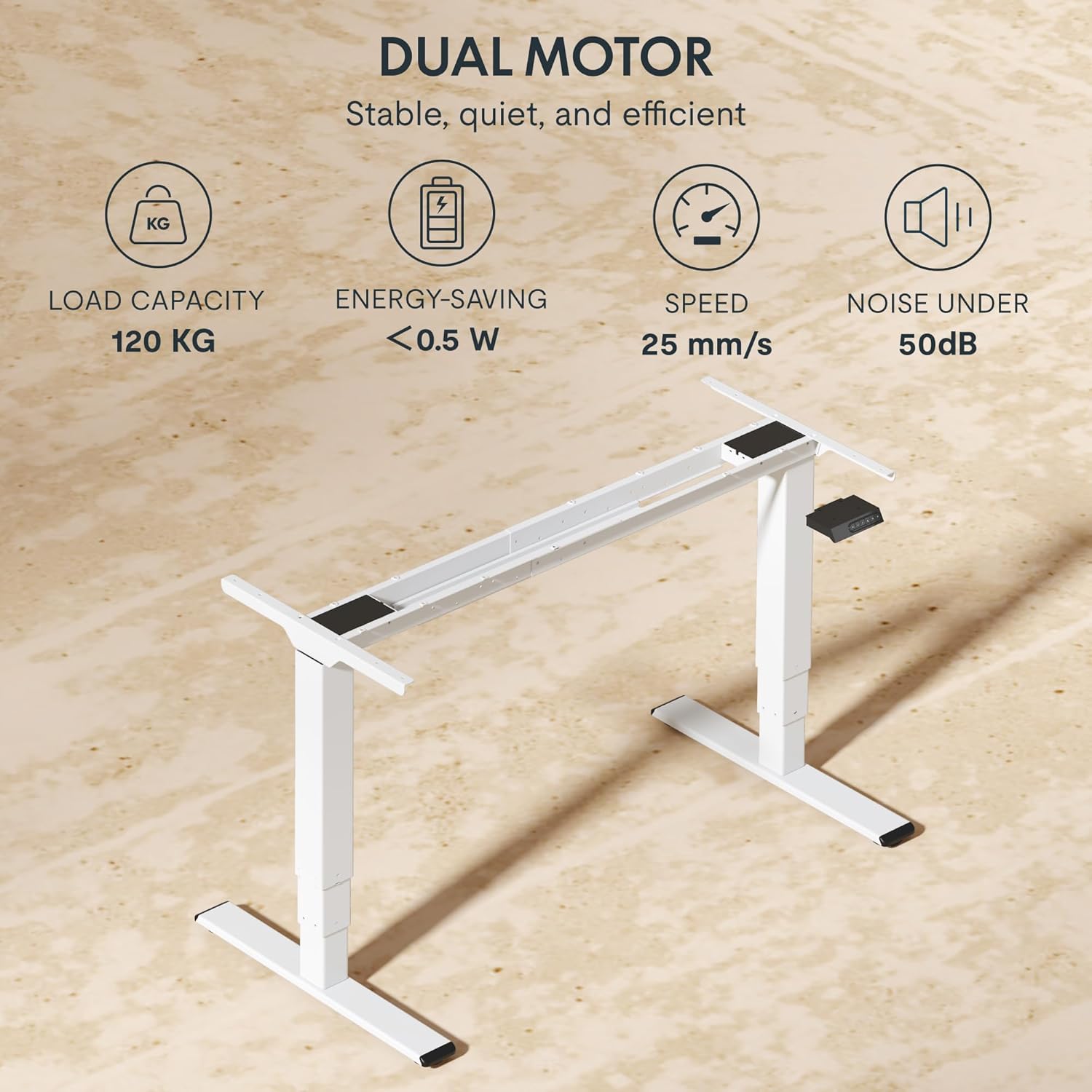
| ຄວາມອາດສາມາດໂຫຼດ | 120 ກິໂລ (265 ປອນ) |
| ປະເພດມໍເຕີ | ລະບົບມໍເຕີຄູ່ |
| ຊ່ວງການປັບຄວາມສູງ | 60 ຊມ - 125 ຊມ (23.6 ນິ້ວ - 49.2 ນິ້ວ) |
| ຄວາມໄວໃນການຍົກ | 25 ມມ/ວິນາທີ |
| ລະດັບສຽງ | ຕ່ຳກວ່າ 50 dB |
| ຂາ Stages | ສາມສtage telescopic legs |
| ກະດານຄວບຄຸມ | LED display, 4 memory presets, Up/Down buttons |
| ພອດສາກໄຟ | Integrated USB-A and USB-C ports |
| ຄຸນນະສົມບັດພິເສດ | Ergonomic design, Anti-Collision System, Energy-saving (<0.5W standby) |
| Compatible Tabletop Sizes | Length: 120-180 cm; Width: 60-80 cm |
| ວັດສະດຸພື້ນຖານ | ໂລຫະ |
ການຮັບປະກັນແລະການສະຫນັບສະຫນູນ
FLEXISPOT stands behind the quality of its products. Your EC5 Plus Desk Frame comes with the following warranty:
- ການຮັບປະກັນກອບ: 5 ປີ
- ການຮັບປະກັນມໍເຕີ: 3 ປີ
This warranty covers defects in materials and workmanship under normal use. For warranty claims or technical assistance, please contact FLEXISPOT customer support. Lifetime free technical support is provided.
For the most up-to-date contact information, please visit the official FLEXISPOT webເວັບໄຊ ຫຼືອ້າງອີງໃສ່ເອກະສານການຊື້ຂອງທ່ານ.
Webເວັບໄຊ: www.flexispot.com


