1. ບົດແນະນຳ
The Fenton Pulse65 is a versatile portable party speaker designed for various events and environments. It delivers powerful sound, offers wireless connectivity, and features dynamic lighting. This manual provides essential information for the safe and optimal use of your Pulse65 speaker.
ຄຸນນະສົມບັດທີ່ສໍາຄັນ:
- 60W RMS (140W max) output for clear, powerful sound with deep bass.
- Bluetooth 5.3 for wireless streaming and stereo pairing (TWS).
- Dynamic multicolour light show synchronized with music.
- IPX4 splashproof design for outdoor use.
- Integrated 12-hour rechargeable battery.
- Includes a wireless UHF microphone and remote control.
- USB playback and FM radio functionality.
2. ຂໍ້ມູນຄວາມປອດໄພ
ກະລຸນາອ່ານ ແລະ ເຂົ້າໃຈຄຳແນະນຳດ້ານຄວາມປອດໄພທັງໝົດກ່ອນທີ່ຈະນຳໃຊ້ຜະລິດຕະພັນນີ້. ເກັບຄູ່ມືນີ້ໄວ້ເພື່ອອ້າງອີງໃນອະນາຄົດ.
- ຄວາມຕ້ານທານນ້ໍາ: The Pulse65 is IPX4 splashproof. Do not immerse the speaker in water or expose it to heavy rain. Ensure all port covers are securely closed when used near water.
- ແຫຼ່ງພະລັງງານ: Use only the specified charging cable and power adapter. Do not attempt to open or modify the battery compartment.
- ການລະບາຍອາກາດ: ຢ່າອຸດຕັນຊ່ອງລະບາຍອາກາດໃດໆ. ຮັບປະກັນໃຫ້ມີກະແສລົມໄຫຼວຽນພຽງພໍອ້ອມຮອບລຳໂພງ.
- ທໍາຄວາມສະອາດ: ຕັດການເຊື່ອມຕໍ່ໄຟກ່ອນທີ່ຈະທໍາຄວາມສະອາດ. ໃຊ້ຜ້າອ່ອນ, ແຫ້ງ. ຢ່າໃຊ້ເຄື່ອງເຮັດຄວາມສະອາດຂອງແຫຼວຫຼື aerosols.
- ອຸນຫະພູມ: Avoid extreme temperatures. Do not expose to direct sunlight for extended periods or place near heat sources.
- ເດັກນ້ອຍ: ຮັກສາໃຫ້ພົ້ນມືເດັກນ້ອຍ. ຜະລິດຕະພັນນີ້ບໍ່ແມ່ນຂອງຫຼິ້ນ.
3. ເນື້ອໃນຊຸດ
ກວດສອບວ່າລາຍການທັງຫມົດແມ່ນມີຢູ່ໃນຊຸດ:
- Fenton Pulse65 Portable Party Speaker
- ໄມໂຄຣໂຟນ UHF ແບບໄຮ້ສາຍ
- ການຄວບຄຸມໄລຍະໄກ
- ສາຍສາກ USB
- ຄູ່ມືຜູ້ໃຊ້
4. ຕັ້ງຄ່າ
4.1. ການສາກໄຟເບື້ອງຕົ້ນ
Before first use, fully charge the speaker. Connect the provided USB charging cable to the speaker's charging port and a suitable USB power adapter (not included). The charging indicator will show the charging status. A full charge provides approximately 12 hours of playback, depending on usage volume and light effects.
4.2. ເປີດ / ປິດພະລັງງານ
ກົດຄ້າງໄວ້ ພະລັງງານ button on the control panel to turn the speaker on or off.
4.3. ການຕັ້ງຄ່າໄມໂຄຣໂຟນໄຮ້ສາຍ
The included wireless UHF microphone is pre-paired with the speaker. Ensure the microphone has fresh batteries (not included) and is powered on. The microphone's display will indicate its status.

Image: The Fenton Pulse65 speaker shown with its wireless microphone and remote control, illustrating the complete package.
5. ຄໍາແນະນໍາການດໍາເນີນງານ
5.1. ກະດານຄວບຄຸມຫຼາຍກວ່າview
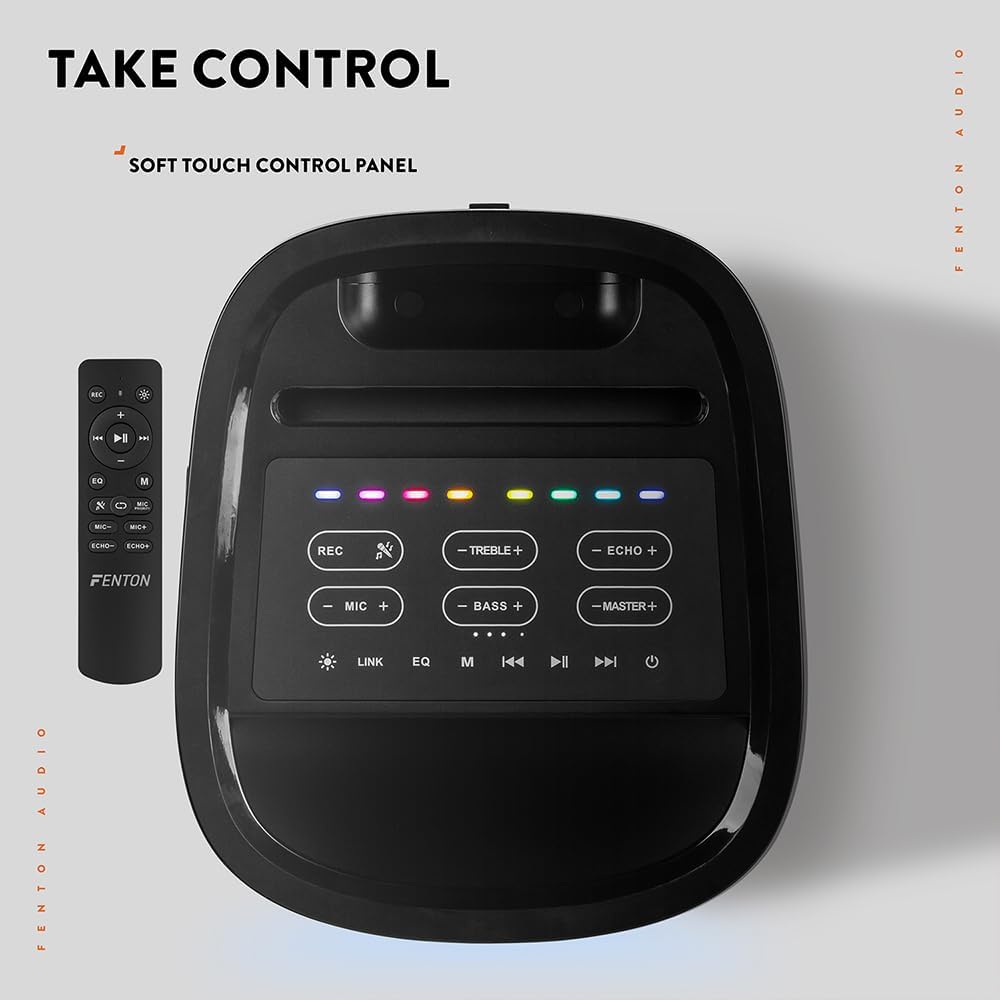
ຮູບພາບ: ເທິງລົງລຸ່ມ view of the Fenton Pulse65 speaker's soft-touch control panel, alongside the remote control, highlighting various buttons for audio and light adjustments.
The top panel features soft-touch controls for various functions:
- REC: ບັນທຶກສຽງ.
- TREBLE +/-: Adjust treble levels.
- ECHO +/-: ປັບເອັບເຟັກສຽງສະທ້ອນຂອງໄມໂຄຣໂຟນ.
- MIC +/-: ປັບລະດັບສຽງຂອງໄມໂຄຣໂຟນ.
- BASS +/-: Adjust bass levels.
- MASTER +/-: Adjust overall master volume.
- ລິ້ງ: Activate TWS (True Wireless Stereo) pairing.
- EQ: ວົນໄປຕາມຄ່າທີ່ຕັ້ງໄວ້ລ່ວງໜ້າຂອງຕົວປັບສຽງ.
- M (ໂໝດ): Switch between input modes (Bluetooth, USB, FM Radio, AUX).
- ຫຼິ້ນ/ຢຸດ: ຫຼິ້ນ ຫຼືຢຸດການຫຼິ້ນສຽງໄວ້ຊົ່ວຄາວ.
- ທີ່ຜ່ານມາ/ຕໍ່ໄປ: Skip tracks or tune FM radio stations.
- ພະລັງງານ: ເປີດ/ປິດ ລຳໂພງ.
5.2. ການເຊື່ອມຕໍ່ບູທູດ
- Turn on the Pulse65 speaker.
- ກົດ M (ໂໝດ) button until the Bluetooth indicator lights up or you hear a Bluetooth pairing prompt.
- ໃນອຸປະກອນມືຖືຂອງທ່ານ, ເປີດໃຊ້ Bluetooth ແລະຊອກຫາອຸປະກອນທີ່ມີຢູ່.
- Select "Fenton Pulse65" from the list.
- Once connected, the speaker will confirm with an audible prompt.

Image: The Fenton Pulse65 speaker with a smartphone placed in its integrated dock, illustrating the Bluetooth streaming and charging capabilities.
5.3. True Wireless Stereo (TWS) ການຈັບຄູ່
To link two Pulse65 speakers for stereo sound:
- Ensure both Pulse65 speakers are powered on and in Bluetooth mode, but not connected to any device.
- ໃນລໍາໂພງຫນຶ່ງ (ນີ້ຈະເປັນລໍາໂພງຕົ້ນຕໍ), ກົດປຸ່ມ ລິ້ງ button. It will search for another Pulse65.
- The primary speaker will automatically connect to the secondary speaker. Once connected, you will hear a confirmation tone.
- Now, connect your mobile device to the primary Pulse65 speaker via Bluetooth as described in section 5.2.
- ດຽວນີ້ສຽງຈະຫຼິ້ນເປັນສະເຕີລິໂອໃນທົ່ວລຳໂພງທັງສອງ.
5.4. ການຫຼິ້ນ USB
ໃສ່ USB flash drive ທີ່ບັນຈຸສຽງ MP3 files into the USB port on the back of the speaker. The speaker will automatically switch to USB mode and begin playback. Use the Play/Pause and Previous/Next buttons to control playback.
5.5. ວິທະຍຸ FM
- ກົດ M (ໂໝດ) ປຸ່ມເພື່ອປ່ຽນເປັນໂໝດວິທະຍຸ FM.
- ກົດຄ້າງໄວ້ ຫຼິ້ນ/ຢຸດຊົ່ວຄາວ ປຸ່ມເພື່ອສະແກນອັດຕະໂນມັດ ແລະບັນທຶກສະຖານີ FM ທີ່ມີຢູ່.
- ໃຊ້ ກ່ອນໜ້າ/ຕໍ່ໄປ ປຸ່ມເພື່ອນໍາທາງຜ່ານສະຖານີທີ່ບັນທຶກໄວ້.
5.6. ການປ້ອນຂໍ້ມູນໄມໂຄຣໂຟນ ແລະກີຕ້າ
The speaker features dedicated inputs for a wired microphone and a guitar on the rear panel. Connect your devices to these ports. Use the MIC +/- ແລະ ECHO +/- controls on the top panel to adjust the microphone's volume and echo effect.

Image: A composite image showing the rear panel of the Fenton Pulse65 speaker with its various input ports, and a front view of the speaker with a microphone, illustrating connectivity options.
5.7. ໂLightດແສງ
The multicolour LED lights on the speaker can be controlled via the remote control or specific buttons on the control panel (if available, refer to the remote for full control). Cycle through different light patterns or turn them off as desired.

ຮູບພາບ: A close-up view of the Fenton Pulse65 speaker, highlighting its multicolour LED light ring on the front grille, indicating its splashproof design.
6. ບໍາລຸງຮັກສາ
6.1. ທໍາຄວາມສະອາດ
Wipe the speaker's exterior with a soft, dry, or slightly damp cloth. Do not use abrasive cleaners, waxes, or solvents. Ensure all port covers are closed before cleaning if using a damp ຜ້າ.
6.2. ການເກັບຮັກສາ
ເກັບຮັກສາລຳໂພງໄວ້ໃນບ່ອນທີ່ເຢັນ, ແຫ້ງ, ຫ່າງຈາກແສງແດດໂດຍກົງ ແລະ ອຸນຫະພູມທີ່ຮ້າຍກາດ. ຖ້າເກັບຮັກສາໄວ້ເປັນໄລຍະເວລາ, ສາກແບັດເຕີຣີໃຫ້ເຫຼືອປະມານ 50% ທຸກໆສອງສາມເດືອນເພື່ອຮັກສາສຸຂະພາບຂອງແບັດເຕີຣີ.
6.3. ການດູແລຫມໍ້ໄຟ
To prolong battery life, avoid fully discharging the battery frequently. Recharge the speaker when the low battery indicator appears. Do not expose the battery to excessive heat.
7. ການແກ້ໄຂບັນຫາ
If you encounter issues with your Fenton Pulse65, refer to the following common problems and solutions:
| ບັນຫາ | ສາເຫດທີ່ເປັນໄປໄດ້ | ການແກ້ໄຂ |
|---|---|---|
| ລຳໂພງບໍ່ເປີດ. | ຫມໍ້ໄຟຕ່ໍາ; ກົດປຸ່ມເປີດປິດບໍ່ຖືກຕ້ອງ. | ສາກລຳໂພງໃຫ້ເຕັມ. ກົດປຸ່ມເປີດປິດຄ້າງໄວ້ສອງສາມວິນາທີ. |
| ບໍ່ມີສຽງຈາກລຳໂພງ. | ລະດັບສຽງຕໍ່າເກີນໄປ; ຮູບແບບການປ້ອນຂໍ້ມູນບໍ່ຖືກຕ້ອງ; ອຸປະກອນບໍ່ໄດ້ເຊື່ອມຕໍ່. | Increase master volume. Press 'M' to select correct input mode. Ensure Bluetooth device is connected or USB is inserted correctly. |
| ການຈັບຄູ່ Bluetooth ລົ້ມເຫລວ. | ລຳໂພງບໍ່ຢູ່ໃນໂໝດຈັບຄູ່; ອຸປະກອນໄກເກີນໄປ; ແຊກແຊງ. | Ensure speaker is in Bluetooth mode and not connected to another device. Move device closer to speaker. Turn off other Bluetooth devices. |
| ໄມໂຄຣໂຟນບໍ່ເຮັດວຽກ. | Microphone off; Low battery in mic; Mic volume too low. | Ensure wireless mic is powered on. Replace mic batteries. Increase MIC volume on speaker. |
| ການຈັບຄູ່ TWS ລົ້ມເຫລວ. | ລຳໂພງໄດ້ເຊື່ອມຕໍ່ກັບອຸປະກອນແລ້ວ; ລຳໂພງຢູ່ຫ່າງກັນເກີນໄປ. | Disconnect both speakers from any Bluetooth devices. Ensure both are in Bluetooth mode. Place speakers close together during pairing. |
8. ຂໍ້ມູນຈໍາເພາະ
- ຍີ່ຫໍ້: ເຟັນຕັນ
- ຕົວແບບ: ກຳມະຈອນ65
- ລຳໂພງກຳລັງຜົນຜະລິດສູງສຸດ: 140 ວັດ (ສູງສຸດ)
- ການຕອບສະໜອງຄວາມຖີ່: 12000 Hz
- ເຕັກໂນໂລຍີການເຊື່ອມຕໍ່: Bluetooth 5.3
- ໂModeດອອກສຽງ: ສະເຕຣິໂອ
- ປະເພດການຕິດຕັ້ງ: ໂຕະ
- ປະເພດລຳໂພງ: ກາງແຈ້ງ
- ຂະໜາດຜະລິດຕະພັນ: 49 x 34.5 x 39.5 cm
- ນ້ຳໜັກ: 7.6 ກິໂລ
- ແບັດເຕີຣີ: 1 Nonstandard Battery (included), 12-hour playback
- ການຈັດອັນດັບ IP: IPX4 (ກັນນໍ້າກະແຈກກະຈາຍ)
- ຜູ້ຜະລິດ: Tronios BV
- ປະເທດຕົ້ນກໍາເນີດ: ຈີນ

Image: The Fenton Pulse65 speaker displayed with its approximate dimensions (40cm height, 32cm width, 27cm depth) and an icon indicating 12 hours of battery life.
9. ການຮັບປະກັນແລະການສະຫນັບສະຫນູນ
For warranty information and customer support, please refer to the documentation provided with your purchase or visit the official Fenton brand store. You can find more information and contact details at the Fenton Brand Store.


