ແນະນຳ
Welcome to your RCA Wave-68 True Wireless Earbuds. This manual provides detailed instructions on how to set up, operate, maintain, and troubleshoot your earbuds to ensure optimal performance and a seamless audio experience. Please read this manual thoroughly before using your device.
ເນື້ອໃນຊຸດ
- ຫູຟັງໄຮ້ສາຍ RCA Wave-68 True (ຊ້າຍ ແລະ ຂວາ)
- ກ່ອງສາກ
- ສາຍສາກ USB
- ຄູ່ມືຜູ້ໃຊ້
ສິນຄ້າເກີນview
Familiarize yourself with the components of your RCA Wave-68 earbuds and charging case.

ຮູບພາບ: The RCA Wave-68 earbuds are shown inside their open charging case. The case features a digital display indicating the battery levels of both the case and individual earbuds.
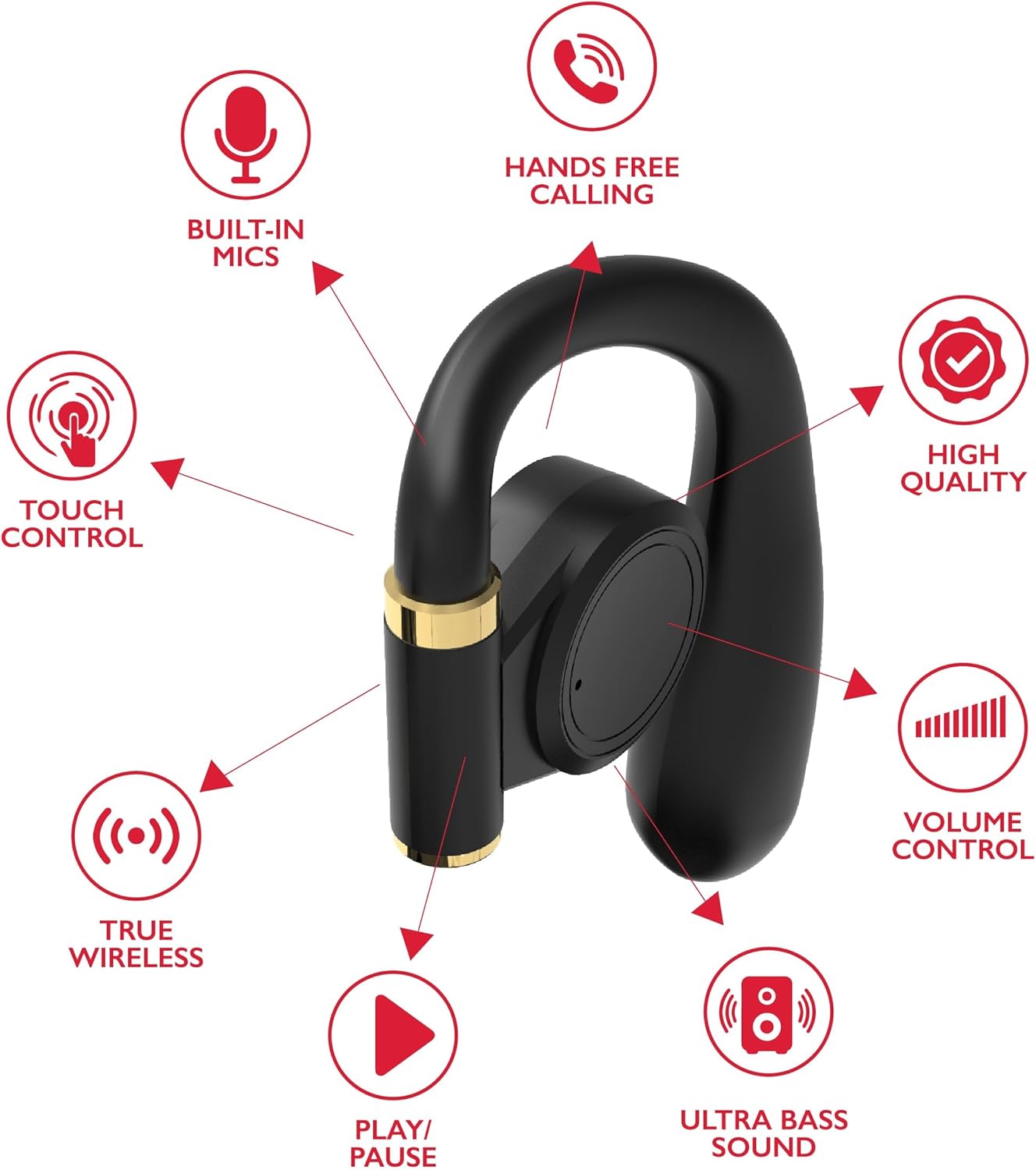
ຮູບພາບ: A diagram highlights key features of a single RCA Wave-68 earbud, including built-in mics, hands-free calling, touch control, true wireless connectivity, play/pause function, ultra bass sound, volume control, and high-quality audio.
ຕັ້ງຄ່າ
1. ການສາກຫູຟັງ ແລະ ເຄສ
Before first use, fully charge the earbuds and charging case. Place the earbuds into the charging case. Connect the USB charging cable to the charging port on the case and to a power source. The digital display on the case will show the charging status. A full charge provides approximately 20 hours of total playtime with the charging case.
2. ການຈັບຄູ່ Bluetooth
- ເປີດ: Open the charging case. The earbuds will automatically power on and enter pairing mode. You may see a blinking light indicator on the earbuds.
- ເປີດໃຊ້ Bluetooth: ໃນອຸປະກອນຂອງທ່ານ (ໂທລະສັບສະຫຼາດ, ແທັບເລັດ, ແລະອື່ນໆ), ເປີດໃຊ້ Bluetooth.
- ເລືອກອຸປະກອນ: ຊອກຫາ "RCA Wave-68" in the list of available Bluetooth devices and select it to connect.
- ການຢືນຢັນ: Once connected, the earbuds will indicate successful pairing, and the light indicator may stop blinking or turn off.
If pairing fails, ensure the earbuds are charged and within range of your device. Turn off Bluetooth on other nearby devices to avoid interference.
ຄໍາແນະນໍາການດໍາເນີນງານ
ເປີດ/ປິດ
- ເປີດ: ເປີດກ່ອງສາກ, ແລະຫູຟັງເອຍບັດຈະເປີດອັດຕະໂນມັດ. ອີກທາງເລືອກ, ກົດພື້ນທີ່ຄວບຄຸມການສຳຜັດຢູ່ຫູຟັງທັງສອງຄ້າງໄວ້ເປັນເວລາ 3 ວິນາທີ.
- ປິດພະລັງງານ: ໃສ່ຫູຟັງຄືນໃນກ່ອງສາກໄຟ ແລະ ປິດຝາປິດ. ພວກມັນຈະປິດໂດຍອັດຕະໂນມັດ. ຫຼື, ກົດພື້ນທີ່ຄວບຄຸມແບບສຳຜັດໃນຫູຟັງທັງສອງຂ້າງຄ້າງໄວ້ 5 ວິນາທີ.
ແຕະການຄວບຄຸມ
ຫູຟັງ RCA Wave-68 ມີການຄວບຄຸມການສໍາພັດທີ່ເຂົ້າໃຈງ່າຍເພື່ອຈັດການການຫຼິ້ນສຽງ, ການໂທ ແລະຟັງຊັນຜູ້ຊ່ວຍສຽງ.
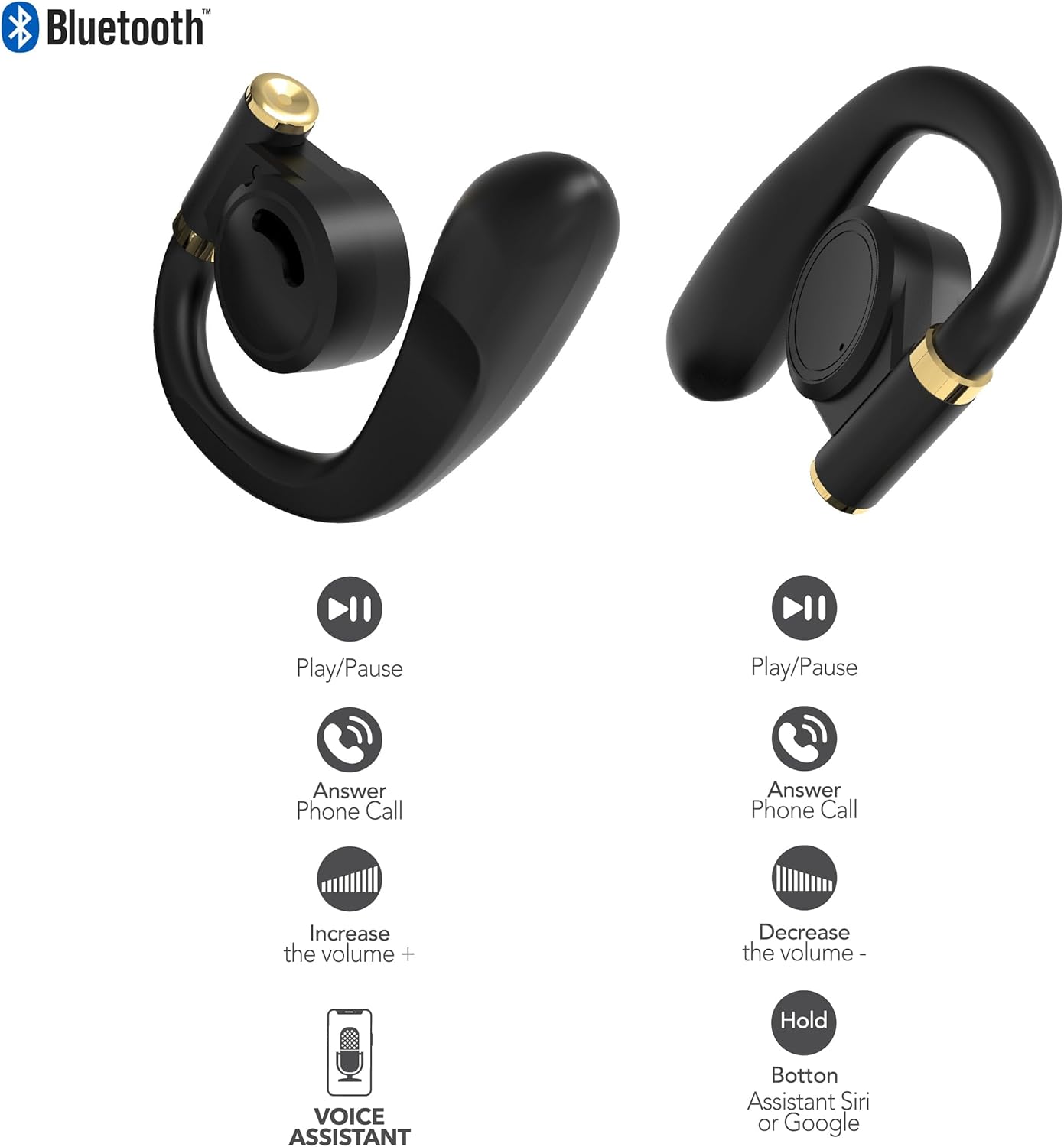
ຮູບພາບ: This diagram illustrates the touch control functions for both the left and right RCA Wave-68 earbuds, including play/pause, answer phone call, volume increase/decrease, and activating the voice assistant.
- ຫຼິ້ນ/ຢຸດ: ແຕະເທື່ອດຽວໃສ່ຫູຟັງຫູຟັງ.
- ເພງຕໍ່ໄປ: ແຕະສອງເທື່ອໃສ່ຫູຟັງເບື້ອງຂວາ.
- ຕິດຕາມກ່ອນ ໜ້າ ນີ້: ແຕະສອງເທື່ອໃສ່ຫູຟັງທາງຊ້າຍ.
- ປະລິມານຂຶ້ນ: ແຕະສາມເທື່ອໃສ່ຫູຟັງເບື້ອງຂວາ.
- ປະລິມານລົງ: ແຕະສາມເທື່ອໃສ່ຫູຟັງທາງຊ້າຍ.
- ຮັບ/ສາຍໂທ: ແຕະເທື່ອດຽວໃສ່ຫູຟັງຫູຟັງລະຫວ່າງສາຍໂທເຂົ້າ ຫຼືສາຍທີ່ເປີດຢູ່.
- ປະຕິເສດການໂທ: ກົດຫູຟັງອັນໃດອັນໜຶ່ງຄ້າງໄວ້ 2 ວິນາທີໃນລະຫວ່າງສາຍໂທເຂົ້າ.
- ເປີດໃຊ້ຜູ້ຊ່ວຍສຽງ (Siri/Google Assistant): ກົດຫູຟັງອັນໃດອັນໜຶ່ງຄ້າງໄວ້ 3 ວິນາທີ.
ໂໝດຄວາມໂປ່ງໃສ
The Transparency Mode allows you to hear your surroundings while still enjoying your audio. This feature is useful for awareness in environments like busy streets or public transport.
- Activate/Deactivate Transparency Mode: Consult your device's Bluetooth settings or specific app if available, or refer to the product's quick start guide for a specific touch control gesture if not listed above.
ບໍາລຸງຮັກສາ
ທໍາຄວາມສະອາດ
ການທໍາຄວາມສະອາດເປັນປົກກະຕິຊ່ວຍຮັກສາຄຸນນະພາບສຽງແລະສຸຂະອະນາໄມ.
- ໃຊ້ຜ້າແພທີ່ອ່ອນ, ແຫ້ງ, ບໍ່ມີເສັ້ນດ່າງເພື່ອເຊັດຫູຟັງຫູຟັງ ແລະ ກ່ອງສາກ.
- ຢ່າໃຊ້ເຄື່ອງເຮັດຄວາມສະອາດຂັດ, ເຫຼົ້າ, ຫຼືສານລະລາຍສານເຄມີ.
- Gently remove any earwax or debris from the earbud tips and speaker mesh using a small, clean brush or cotton swab.
ການເກັບຮັກສາ
ເມື່ອບໍ່ໄດ້ໃຊ້, ໃຫ້ເກັບຮັກສາຫູຟັງໃສ່ໃນກະເປົ໋າສາກໄຟເພື່ອປົກປ້ອງພວກມັນຈາກຝຸ່ນ ແລະຄວາມເສຍຫາຍ.
- ເກັບຮັກສາໄວ້ໃນບ່ອນທີ່ເຢັນ, ແຫ້ງ, ຫ່າງຈາກອຸນຫະພູມທີ່ສຸດ.
- ຫຼີກເວັ້ນການສໍາຜັດກັບແສງແດດໂດຍກົງຫຼືຄວາມຊຸ່ມຊື່ນເປັນເວລາດົນ.
ການແກ້ໄຂບັນຫາ
If you encounter issues with your RCA Wave-68 earbuds, refer to the following common solutions:
- Earbuds not powering on automatically: Ensure the charging case is charged. Place earbuds back in the case, close the lid, then open it again. If issues persist, manually power on by pressing and holding the touch control area for 3 seconds.
- ຫູຟັງບໍ່ຈັບຄູ່: Make sure both earbuds are fully charged. Turn off Bluetooth on your device, then turn it back on. Forget "RCA Wave-68" from your device's Bluetooth list and attempt to pair again. Ensure no other devices are actively connected to the earbuds.
- ບໍ່ມີສຽງຈາກຫູຟັງອັນໜຶ່ງ: Place both earbuds back into the charging case, close the lid, and then take them out again. This often re-syncs them. Check your device's audio balance settings.
- Charging case not displaying battery info/not charging: Ensure the USB cable is securely connected to both the case and the power source. Try a different USB cable or power adapter. Clean the charging port on the case for any debris.
- ລະດັບສຽງຕໍ່າ ຫຼືຄຸນນະພາບສຽງບໍ່ດີ: Adjust the volume on both your device and the earbuds. Ensure the earbuds are properly seated in your ears for a good seal. Clean any debris from the earbud speaker mesh.
- ຫູຟັງຫຼຸດອອກ: Ensure you are using the correct ear tip size for a secure and comfortable fit.
ຂໍ້ມູນຈໍາເພາະ
| ຄຸນສົມບັດ | ລາຍລະອຽດ |
|---|---|
| ຊື່ຕົວແບບ | ຄື້ນ-68 |
| ຍີ່ຫໍ້ | RCA |
| ເຕັກໂນໂລຊີການເຊື່ອມຕໍ່ | ໄຮ້ສາຍ (Bluetooth) |
| ລຸ້ນ Bluetooth | 5.3 |
| ຊີວິດຫມໍ້ໄຟ | ດົນເຖິງ 20 ຊົ່ວໂມງ (ພ້ອມກ່ອງສາກ) |
| ວິທີການຄວບຄຸມ | ແຕະ |
| ການຈັດວາງຫູ | ໃນຫູ |
| ປັດໄຈແບບຟອມ | ໃນຫູ |
| ວັດສະດຸ | ພາດສະຕິກ, ຊິລິໂຄນ |
| ຄຸນນະສົມບັດພິເສດ | Built-In Voice Assistant, Transparency Mode |
| UPC | 850068964468 |
ຂໍ້ມູນຄວາມປອດໄພ
- ຫ້າມຖອດອອກ ຫຼື ດັດແປງຫູຟັງເອຍບັດ ຫຼື ກ່ອງສາກໄຟ.
- Avoid exposing the device to extreme temperatures, humidity, or liquids.
- ຢ່າໃຊ້ຫູຟັງເອຍບັດໃນປະລິມານທີ່ສູງເປັນເວລາດົນເພື່ອປ້ອງກັນຄວາມເສຍຫາຍຂອງການໄດ້ຍິນ.
- ຮັກສາໃຫ້ໄກຈາກເດັກນ້ອຍ ແລະສັດລ້ຽງ.
- ຖິ້ມອຸປະກອນຢ່າງມີຄວາມຮັບຜິດຊອບຕາມລະບຽບການທ້ອງຖິ່ນ.
ການຮັບປະກັນແລະການສະຫນັບສະຫນູນ
RCA products are designed for reliability and performance. For warranty information or technical support, please refer to the warranty card included in your package or visit the official RCA support webເວັບໄຊ. ກະລຸນາຮັກສາຫຼັກຖານການຊື້ຂອງທ່ານສໍາລັບການຮຽກຮ້ອງການຮັບປະກັນ.


