1. ຜະລິດຕະພັນເກີນview
The LIWAN 4G LTE Cellular Security Camera is designed for robust outdoor surveillance in locations without Wi-Fi access. Utilizing 4G LTE connectivity, this wired camera provides continuous 24/7 recording, 2K high-definition video, 360-degree pan/tilt/zoom capabilities, and advanced night vision modes. It features two-way audio for communication and smart motion detection with real-time alerts. Ideal for off-grid areas such as farms, ranches, construction sites, garages, and vacation homes, ensuring constant monitoring and security.

Figure 1.1: LIWAN 4G LTE Cellular Security Camera and its components.
2. ເນື້ອໃນຊຸດ
ກະລຸນາກວດສອບວ່າລາຍການທັງຫມົດທີ່ລະບຸໄວ້ຂ້າງລຸ່ມນີ້ແມ່ນລວມຢູ່ໃນຊຸດຂອງທ່ານ:
- LIWAN 4G LTE Cellular Security Camera
- 4G SIM Card (pre-inserted)
- 32GB Memory Card (pre-inserted)
- ອະແດັບເຕີໄຟ (DC 5V/2A)
- ສາຍສາກໄຟ USB (2.7 ແມັດ)
- ວົງເລັບຕິດຕັ້ງ
- Screw Pack
- ຄູ່ມືດ່ວນ
- ຄູ່ມືຜູ້ໃຊ້
- ສະຕິກເກີເຕືອນ
- ຕຳ ແໜ່ງ ສະຕິກເກີ
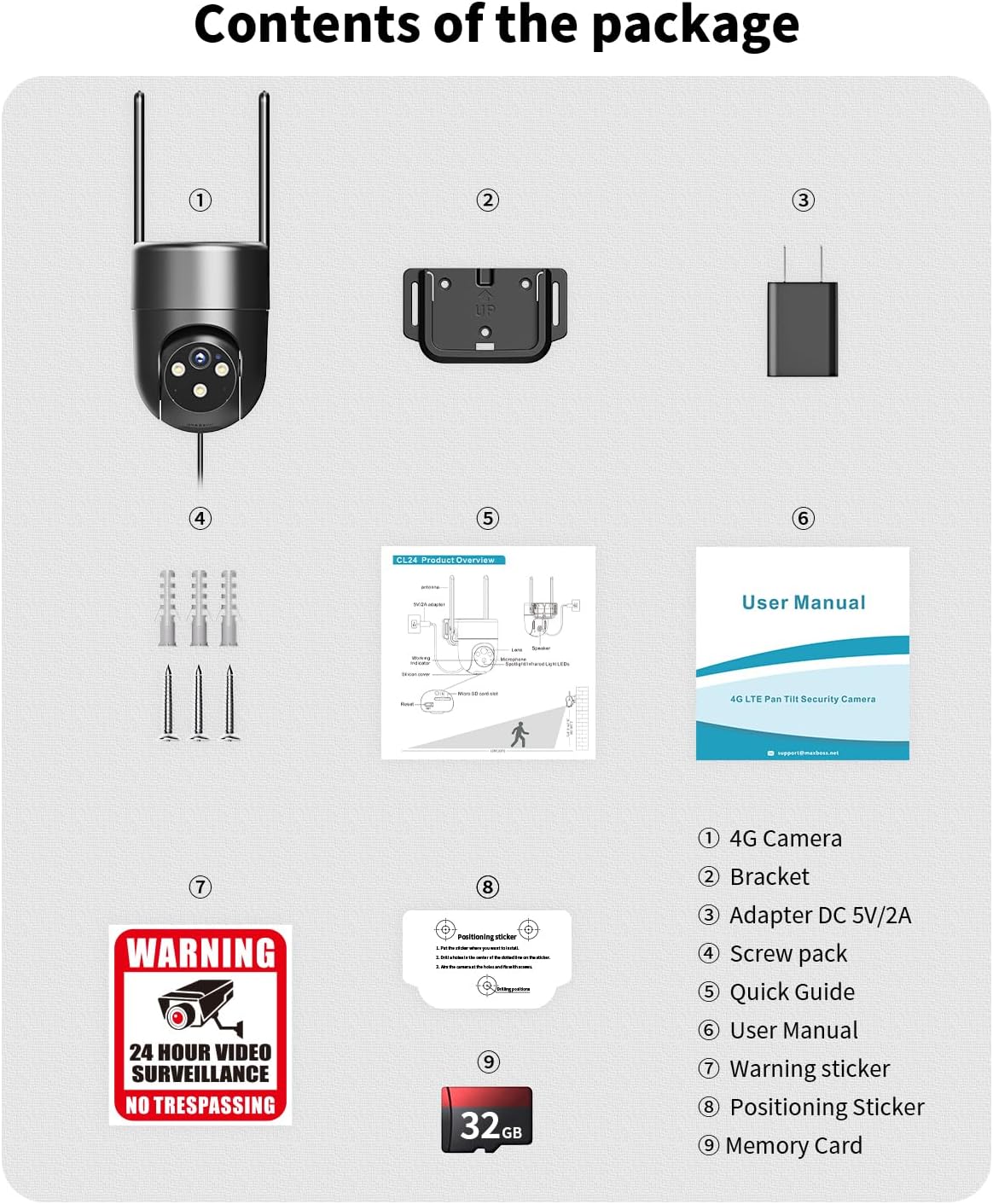
ຮູບທີ 2.1: ເນື້ອໃນຂອງຊຸດຜະລິດຕະພັນ.
3. ຄູ່ມືການຕິດຕັ້ງ
3.1 ການຕິດຕັ້ງທາງດ້ານຮ່າງກາຍ
- Choose a suitable outdoor location for installation. Ensure the camera is within reach of a power outlet, as it requires a wired connection for continuous operation.
- Use the provided positioning sticker to mark the drill holes for the mounting bracket.
- Drill holes and secure the mounting bracket to the wall or desired surface using the screw pack.
- ແນບກ້ອງໃສ່ຕົວຍຶດ.
- Connect the USB charging cable to the camera and then to the power adapter. Plug the power adapter into an electrical outlet.
3.2 ການຕິດຕັ້ງແອັບ ແລະ ການຕັ້ງຄ່າເບື້ອງຕົ້ນ
- Download the 'Ubox' app from your smartphone's app store (iOS or Android).
- Open the Ubox app and create an account or log in.
- Follow the in-app instructions to add your new camera. This typically involves scanning a QR code located on the camera or its packaging.
- Once connected, the camera will appear in your Ubox app, ready for live viewການຕັ້ງຄ່າແລະການຕັ້ງຄ່າ.
3.3 SIM Card and Data Plan
The camera comes with a pre-inserted 4G SIM card and complimentary 300MB of data for initial testing. For continuous operation, a data subscription is required. The camera supports 4G networks from Verizon, T-Mobile, and AT&T in the US. Please note that the built-in SIM card cannot be replaced with a private SIM card.
- Subscription plans are available directly through the Ubox app (e.g., $19.99 for 30 days, $99.99 for 180 days).
- Ensure your installation location has adequate 4G cellular signal for optimal performance.

Figure 3.1: The camera features a built-in SIM card for 4G LTE connectivity.
4. ຄໍາແນະນໍາການດໍາເນີນງານ
4.1 24/7 Non-Stop Recording
The LIWAN camera is designed for continuous 24/7 recording when connected to a power source. It comes with a pre-inserted 32GB memory card for local storage, and cloud storage options are available (complimentary 30-day trial). All recorded videos can be replayed or downloaded directly via the Ubox app.
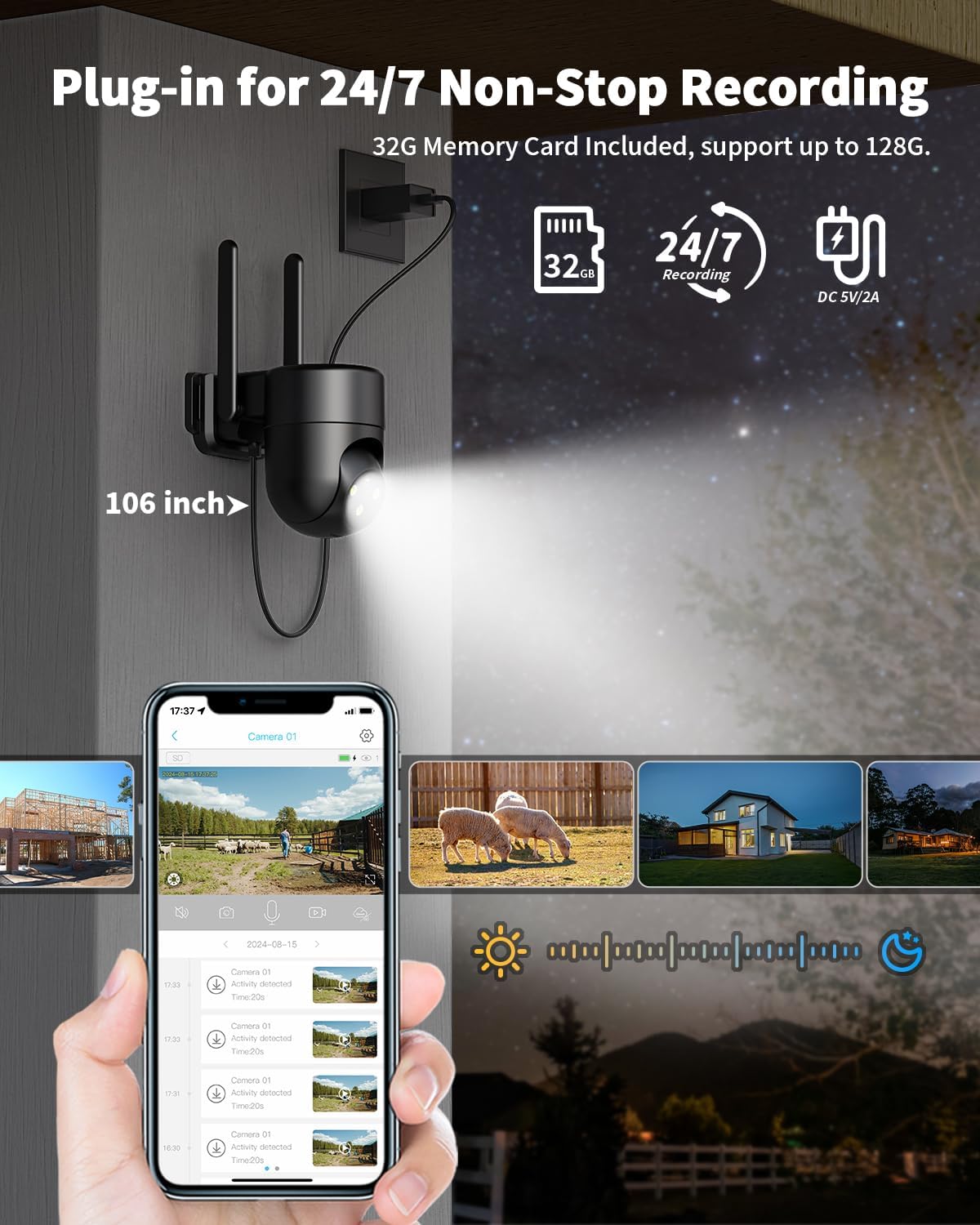
Figure 4.1: Continuous recording capability of the camera.
4.2° Viewing and Digital Zoom
Control the camera's pan and tilt functions remotely through the Ubox app to achieve a 360-degree viewing angle. The camera also supports 4x digital zoom, allowing you to focus on specific details within the monitored area.
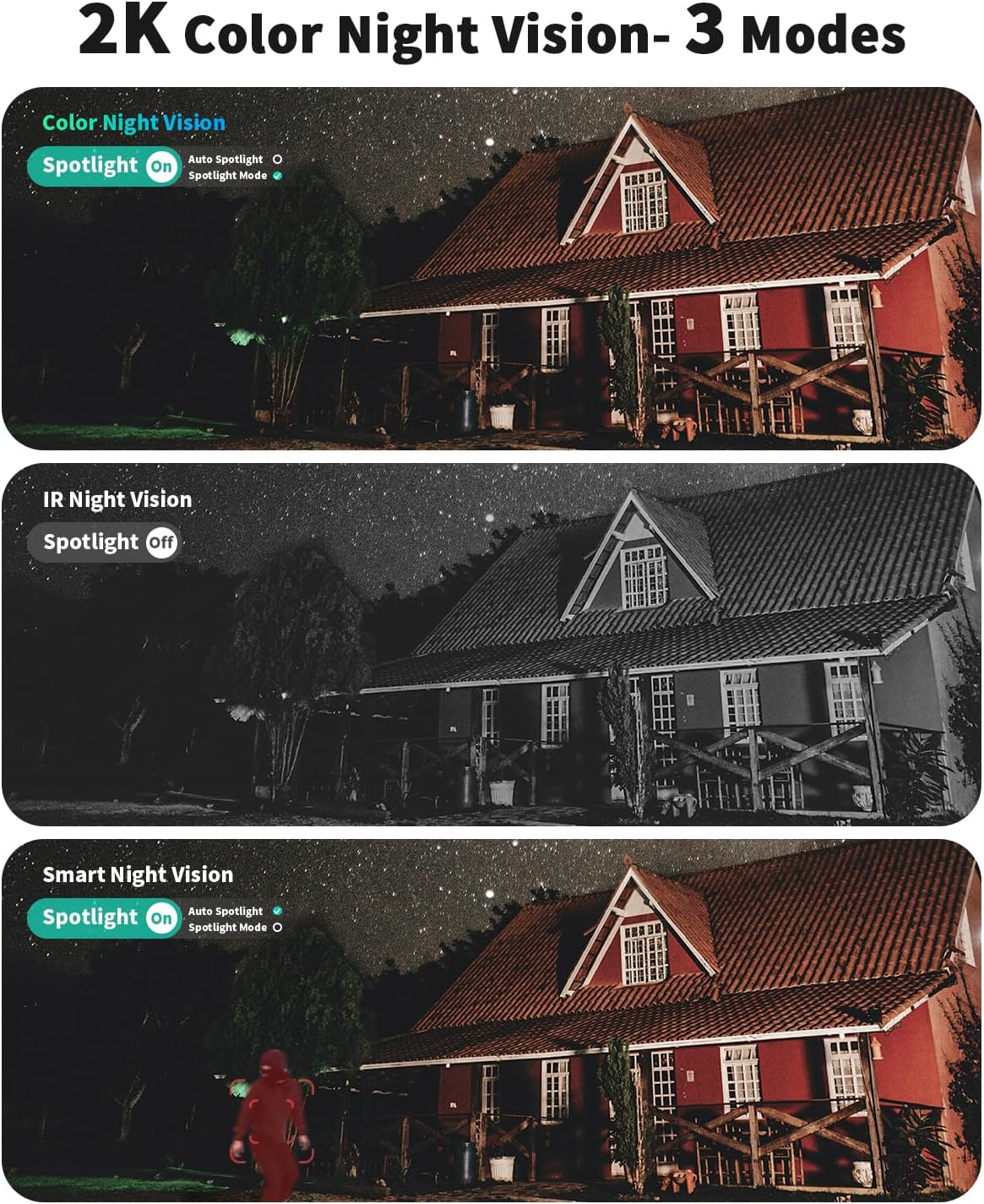
Figure 4.2: Remote 360-degree coverage via the Ubox app.
4.3 2K Color Night Vision - 3 Modes
ກ້ອງຖ່າຍຮູບສະເໜີໂໝດການເບິ່ງເຫັນໃນຕອນກາງຄືນທີ່ແຕກຕ່າງກັນສາມແບບເພື່ອໃຫ້ເໝາະສົມກັບສະພາບແສງຕ່າງໆ:
- ວິໄສທັດກາງຄືນອິນຟາເຣດ: Provides clear black and white video in complete darkness.
- ວິໄສທັດກາງຄືນສີ: Utilizes built-in spotlights to deliver full-color video even at night.
- ວິໄສທັດກາງຄືນອັດສະລິຍະ: Automatically switches between infrared and color modes based on detected motion or light conditions. The spotlight will activate when an alarm sounds at night.

Figure 4.3: Different night vision modes for enhanced visibility.
4.4 Motion Detection and Two-Way Audio
The camera features smart motion detection, sending real-time alerts to your mobile phone. You can customize detection areas and adjust sensitivity settings within the Ubox app to reduce false alarms and protect privacy. The integrated two-way audio allows for real-time conversations with visitors or to deter unwanted individuals.
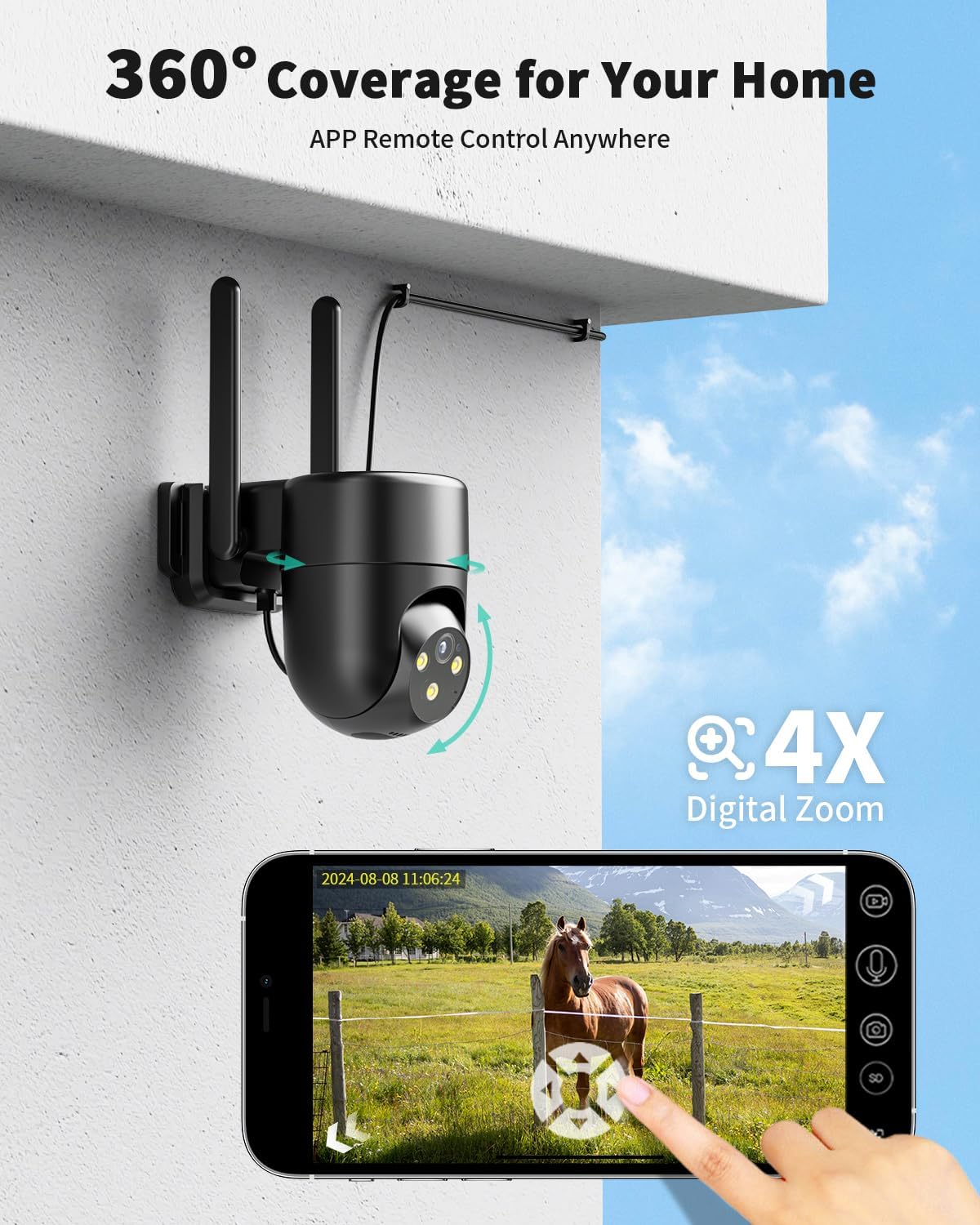
Figure 4.4: Motion detection and two-way audio features.
4.5 ການແບ່ງປັນການເຂົ້າເຖິງ
You can share live views and recorded footage with family members or trusted individuals through the Ubox app, allowing multiple users to monitor the camera simultaneously.
5. ບໍາລຸງຮັກສາ
- ທໍາຄວາມສະອາດ: ເຊັດເລນກ້ອງຖ່າຍຮູບ ແລະຕົວເຄື່ອງເປັນປະຈຳດ້ວຍຄວາມອ່ອນ, ງamp ຜ້າເພື່ອເອົາຝຸ່ນແລະຝຸ່ນ. ຫຼີກເວັ້ນການນໍາໃຊ້ສານເຄມີທີ່ຮຸນແຮງຫຼືວັດສະດຸຂັດ.
- ກວດສອບການເຊື່ອມຕໍ່: Periodically inspect the power cable and connections to ensure they are secure and free from damage.
- ການອັບເດດເຟີມແວ: Check the Ubox app regularly for available firmware updates. Keeping the camera's firmware updated ensures optimal performance and security.
- ການປົກປ້ອງສະພາບອາກາດ: While the camera is waterproof (IP65 rated), ensure it is installed in a location that minimizes direct exposure to extreme weather conditions for prolonged durability.
6. ການແກ້ໄຂບັນຫາ
6.1 No Connection / Offline
- Ensure the camera is properly powered on and the power adapter is securely plugged into an active outlet.
- Verify that the 4G cellular signal is strong in the camera's location. Poor signal can lead to connectivity issues.
- Check your data plan status in the Ubox app to ensure it is active and has sufficient data.
- ຣີສະຕາດກ້ອງຖ່າຍຮູບໂດຍການຖອດປລັກສາຍໄຟອອກແລ້ວສຽບໃໝ່.
6.2 ຄຸນນະພາບວິດີໂອບໍ່ດີ
- ເຮັດຄວາມສະອາດເລນກ້ອງຖ່າຍຮູບເພື່ອກໍາຈັດຮອຍເປື້ອນຫຼືຝຸ່ນ.
- Ensure adequate lighting, especially during night vision modes.
- Check the 4G signal strength; a weak signal can affect streaming quality.
6.3 ບັນຫາການກວດຈັບການເຄື່ອນໄຫວ
- Adjust the motion detection sensitivity settings in the Ubox app.
- Review and reconfigure custom detection areas to ensure they cover the desired monitoring zones.
- ໃຫ້ແນ່ໃຈວ່າບໍ່ມີສິ່ງກີດຂວາງໃດໆທີ່ຂັດຂວາງກ້ອງຖ່າຍຮູບ view ໃນເຂດກວດສອບໄດ້.
6.4 Two-Way Audio Problems
- Ensure your phone's volume is up and the microphone is enabled for the Ubox app.
- Check the camera's audio settings in the Ubox app.
- Verify that there are no physical obstructions covering the camera's microphone or speaker.
7. ຂໍ້ມູນຈໍາເພາະ
| ຄຸນສົມບັດ | ລາຍລະອຽດ |
|---|---|
| ຊື່ຕົວແບບ | 4g lte cellular security camera wired |
| ເຕັກໂນໂລຊີການເຊື່ອມຕໍ່ | ມີສາຍ (4G LTE Cellular) |
| ການນຳໃຊ້ພາຍໃນ/ນອກ | ກາງແຈ້ງ |
| ແຫຼ່ງພະລັງງານ | ໄຟຟ້າມີສາຍ (DC 5V/2A) |
| ຄວາມລະອຽດການຖ່າຍວິດີໂອ | 2K |
| ວິໄສທັດກາງຄືນ | Infrared, Color, Smart Night Vision |
| ສຽງ | ສຽງສອງທາງ |
| ກວດຈັບການເຄື່ອນໄຫວ | Smart Motion Sensor, Customizable Detection Areas |
| ການເກັບຮັກສາ | 32GB Flash Memory (pre-inserted), Cloud Storage (optional) |
| ວິທີການຄວບຄຸມ | Ubox App |
| ຂະໜາດ (L x W x H) | 5.6 x 4.7 x 3.1 ນິ້ວ |
| ນ້ໍາຫນັກລາຍການ | 1.21 ປອນ |
| ລະດັບຄວາມຕ້ານທານນ້ໍາ | ກັນນ້ ຳ (IP65) |
| Optical Zoom | 4x |
| ເຄືອຂ່າຍທີ່ຮອງຮັບ | Verizon, T-Mobile, AT&T (US) |
8. ການຮັບປະກັນແລະການສະຫນັບສະຫນູນ
For detailed warranty information, please refer to the warranty card included in your product package or visit the official LIWAN website. For technical support, troubleshooting assistance, or any inquiries regarding your LIWAN 4G LTE Cellular Security Camera, please contact LIWAN customer service through the Ubox app or their official support channels.


