1. ບົດແນະນຳ
This manual provides essential instructions for the setup, operation, and maintenance of your GOBOULT Drift+ Smart Watch. Please read this guide thoroughly to ensure proper use and to maximize the device's features.

Image 1.1: The GOBOULT Drift+ Smart Watch.
The GOBOULT Drift+ Smart Watch features a 1.85-inch HD display, Bluetooth calling capabilities, IP68 water resistance, and comprehensive health monitoring functions.

ຮູບພາບ 1.2: ຫຼາຍກວ່າview of GOBOULT Drift+ Smart Watch features.
2. ສິ່ງທີ່ຢູ່ໃນກ່ອງ
ກວດສອບວ່າລາຍການທັງໝົດຕໍ່ໄປນີ້ໄດ້ລວມຢູ່ໃນການຫຸ້ມຫໍ່ຜະລິດຕະພັນຂອງທ່ານແລ້ວ:
- GOBOULT Drift+ Smart Watch
- ສາຍສາກ
- ຄູ່ມືຜູ້ໃຊ້ (ເອກະສານນີ້)
- ບັດຮັບປະກັນ
3. ຕັ້ງຄ່າ
3.1 ການສາກໄຟເບື້ອງຕົ້ນ
Before first use, fully charge your GOBOULT Drift+ Smart Watch. Connect the provided charging cable to the charging port on the back of the watch and to a standard USB power adapter (not included). The watch typically takes approximately 2.5 hours to fully charge.

Image 3.1: Charging the GOBOULT Drift+ Smart Watch.
3.2 ການຈັບຄູ່ກັບໂທລະສັບສະຫຼາດຂອງທ່ານ
- Download the official GOBOULT application from your smartphone's app store (compatible with iOS and Android).
- ໃຫ້ແນ່ໃຈວ່າ Bluetooth ຖືກເປີດໃຊ້ຢູ່ໃນໂທລະສັບສະຫຼາດຂອງທ່ານ.
- Open the GOBOULT app and follow the on-screen instructions to create an account or log in.
- Select 'Add Device' or a similar option within the app and choose 'Drift+' from the list of available devices.
- ຢືນຢັນຄຳຮ້ອງຂໍການຈັບຄູ່ໃນສະມາດໂຟນ ແລະໂມງອັດສະລິຍະຂອງທ່ານ.
4. ຄໍາແນະນໍາການດໍາເນີນງານ
4.1 ການນໍາທາງພື້ນຖານ
The GOBOULT Drift+ Smart Watch features a 1.85-inch HD touchscreen display. Swipe left, right, up, or down to navigate through menus and functions. Press the side button to return to the home screen or access the app list.
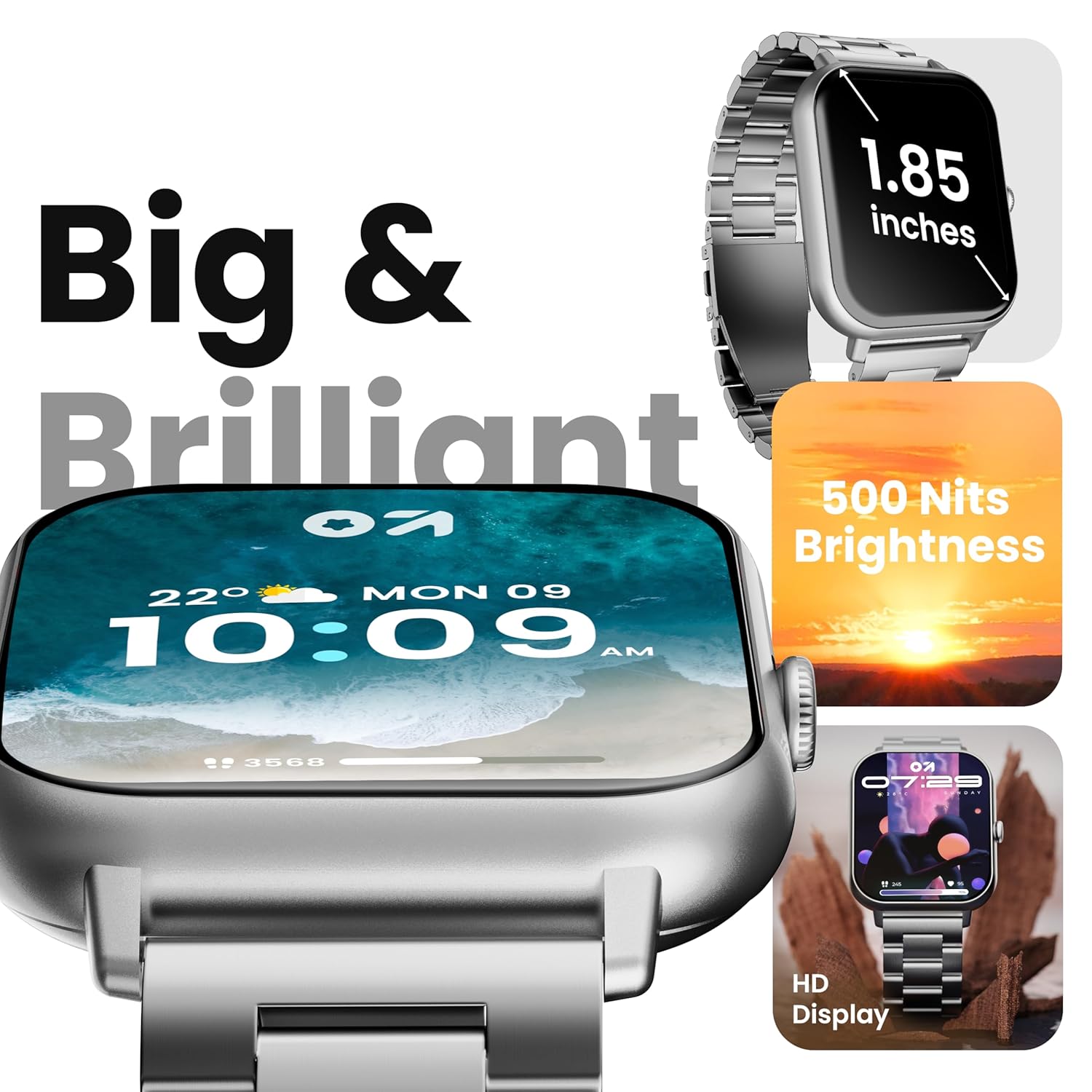
Image 4.1: The 1.85-inch HD display of the smart watch.
4.2 Bluetooth ໂທ
Once paired with your smartphone, the Drift+ Smart Watch allows you to make and receive calls directly from your wrist. The watch is equipped with a built-in speaker and microphone for clear audio communication.
- ຮັບສາຍ: ເມື່ອມີສາຍໂທເຂົ້າມາ, ແຕະໄອຄອນຮັບສາຍສີຂຽວໃນໜ້າຈໍໂມງ.
- ໂທອອກ: Access the dialer or contacts through the watch menu to initiate a call.

Image 4.2: Bluetooth calling feature in use.
4.3 ປັບແຕ່ງໜ້າໂມງ
The watch supports over 150 cloud-based watch faces and custom watch face options. To change your watch face:
- Long-press on the current watch face on your watch.
- Swipe left or right to browse pre-installed watch faces.
- For more options, open the GOBOULT app on your smartphone and navigate to the 'Watch Faces' section to download and apply new designs.

Image 4.3: Customizing watch faces.
4.4 ໂໝດກິລາ
The GOBOULT Drift+ offers over 100 sports modes to track various physical activities. To access and use sports modes:
- From the watch's main menu, select the 'Sports' or 'Workout' icon.
- Choose your desired activity from the list (e.g., running, cycling, walking).
- Tap to start tracking. The watch will record data such as steps, distance, calories burned, and heart rate.
- To end a workout, swipe right or press the side button and select 'End'.

Image 4.4: Tracking activities with sports modes.
4.5 ການຕິດຕາມສຸຂະພາບ
The watch provides comprehensive health insights, including:
- ການຕິດຕາມອັດຕາການເຕັ້ນຫົວໃຈ 24/7: ຕິດຕາມອັດຕາການເຕັ້ນຫົວໃຈຂອງທ່ານຢ່າງຕໍ່ເນື່ອງ.
- SpO2 Blood Oxygen Tracking: ວັດແທກລະດັບຄວາມອີ່ມຕົວຂອງອົກຊີໃນເລືອດ.
- ການຕິດຕາມຄວາມດັນເລືອດ: ໃຫ້ການອ່ານຄວາມດັນເລືອດປະມານ.
- ການຕິດຕາມຮອບວຽນປະຈຳເດືອນຂອງຜູ້ຍິງ: Helps track and predict menstrual cycles.
- Drink Water Reminders: ກະຕຸ້ນໃຫ້ທ່ານດື່ມນໍ້າຢ່າງພຽງພໍ.
- ເຕືອນປະຈຳຕົວ: Encourages movement after periods of inactivity.
ເຂົ້າເຖິງຄຸນສົມບັດເຫຼົ່ານີ້ຜ່ານເມນູສຸຂະພາບໃນໂມງ ຫຼື view detailed data in the GOBOULT app.

Image 4.5: Health monitoring features.
4.6 AI Voice Assistant
Activate the AI voice assistant on your watch for hands-free assistance. This feature allows you to perform tasks, ask questions, and control certain functions using voice commands. Ensure your watch is connected to your smartphone for full functionality.
4.7 ການແຈ້ງເຕືອນອັດສະລິຍະ
Receive notifications from your favorite social apps, messages, and calls directly on your watch. Configure notification settings within the GOBOULT app on your smartphone.
5. ບໍາລຸງຮັກສາ
5.1 ການຕໍ່ຕ້ານນ້ໍາ
The GOBOULT Drift+ Smart Watch is IP68 water resistant, meaning it is protected against dust and can withstand immersion in water up to 1.5 meters for up to 30 minutes. It is suitable for daily use, such as hand washing or light rain exposure. However, it is not recommended for swimming, diving, or exposure to hot water/steam.

ຮູບພາບ 5.1: ຄວາມຕ້ານທານນ້ຳ IP68.
5.2 ການທໍາຄວາມສະອາດ
To clean your smart watch, gently wipe the screen and strap with a soft, damp, lint-free cloth. Avoid using harsh chemicals or abrasive materials, as these can damage the device.
5.3 ການດູແລຫມໍ້ໄຟ
ເພື່ອຍືດອາຍຸແບັດເຕີຣີ:
- ຫຼີກເວັ້ນອຸນຫະພູມທີ່ຮຸນແຮງ.
- ສາກໂມງເປັນປະຈຳ, ແຕ່ຫຼີກລ່ຽງການປະໃຫ້ມັນສາກເຕັມ ຫຼື ໝົດໄປເປັນເວລາດົນ.
- Reduce screen brightness and disable unnecessary features when not in use.
The watch offers up to 7 days of battery life in regular mode, 2-3 days with heavy Bluetooth calling, and an impressive 25 days in standby mode.
6. ການແກ້ໄຂບັນຫາ
| ສະບັບ | ການແກ້ໄຂທີ່ເປັນໄປໄດ້ |
|---|---|
| ເບິ່ງບໍ່ໄດ້ເປີດ | ກວດໃຫ້ແນ່ໃຈວ່າໂມງຖືກສາກເຕັມແລ້ວ. ເຊື່ອມຕໍ່ມັນກັບເຄື່ອງສາກຢ່າງໜ້ອຍ 30 ນາທີ. |
| ບໍ່ສາມາດຈັບຄູ່ກັບສະມາດໂຟນໄດ້ | Check if Bluetooth is enabled on your phone. Restart both the watch and phone. Ensure the GOBOULT app is updated. |
| Bluetooth calling not working | Verify that the watch is properly connected for both media and call audio in your phone's Bluetooth settings. Check app permissions. |
| ຂໍ້ມູນສຸຂະພາບບໍ່ຖືກຕ້ອງ | Ensure the watch is worn snugly on your wrist, not too tight or too loose. Clean the sensors on the back of the watch. Note that smart watch data is for reference and not for medical diagnosis. |
| ອາຍຸແບັດເຕີຣີສັ້ນ | Reduce screen brightness, disable 'Always-On Display' if active, limit frequent heart rate monitoring, and turn off unnecessary notifications. |
7. ຂໍ້ມູນຈໍາເພາະ
| ຄຸນສົມບັດ | ລາຍລະອຽດ |
|---|---|
| ຊື່ຕົວແບບ | Drift+ |
| ຂະຫນາດຈໍສະແດງຜົນ | 1.85 ນິ້ວຄວາມລະອຽດສູງ |
| ຄວາມສະຫວ່າງ | 500 ນິດ |
| ການຕໍ່ຕ້ານນ້ໍາ | IP68 |
| ປະເພດໄຮ້ສາຍ | Bluetooth 5.1 |
| ຄວາມເຂົ້າກັນໄດ້ຂອງລະບົບປະຕິບັດການ | iOS, Android |
| ປະເພດຫມໍ້ໄຟ | ລີໂທມໂພລີເມີ |
| ເວລາສາກແບັດເຕີຣີ | ປະມານ. 2.5 ຊົ່ວໂມງ |
| ອາຍຸການໃຊ້ງານປົກກະຕິຂອງແບດເຕີຣີ້ | ສູງສຸດ 7 ມື້ |
| Heavy Usage (BT Calling) Battery Life | 2-3 ມື້ |
| ເວລາສະແຕນບາຍ | ສູງສຸດ 25 ມື້ |
| ນ້ໍາຫນັກລາຍການ | 38 g |
| ອົງປະກອບລວມ | Smart Watch, Charging Cable, User Manual, Warranty Card |
8. ການຮັບປະກັນແລະການສະຫນັບສະຫນູນ
Your GOBOULT Drift+ Smart Watch comes with a manufacturer's warranty. Please refer to the included Warranty Card for detailed terms and conditions, including warranty period and coverage.
For technical support, service, or further inquiries, please visit the official GOBOULT website or contact customer service using the information provided on your Warranty Card or the product packaging.
Manufacturer: Exotic Mile Private Limited, Boult Audio, B-67 Wazirpur Industrial Area, New Delhi 110052, India.


