1. ບົດແນະນຳ
The EZVIZ HB8-4G is a battery-powered, pan and tilt security camera designed for outdoor use. It offers 2K+ resolution, 360-degree coverage, smart human motion detection, and active defense features. This manual provides instructions for setting up, operating, maintaining, and troubleshooting your camera.
2. ເນື້ອໃນຊຸດ
ກວດສອບວ່າລາຍການທັງຫມົດແມ່ນມີຢູ່ໃນຊຸດຂອງທ່ານ:
- HB8 2K+ Camera
- ແມ່ແບບເຈາະ
- ສາຍ USB
- ຊຸດສະກູ
- ຄູ່ມືການຕິດຕັ້ງດ່ວນ
3. ຕັ້ງຄ່າ
3.1 ການສາກກ້ອງ
The HB8-4G camera is equipped with a large 5200 mAh Lithium Ion battery. Before initial use, fully charge the camera using the provided USB cable. For continuous power, the camera can be connected to an EZVIZ solar panel (sold separately).

Image: The EZVIZ HB8-4G camera highlighting its 5200 mAh battery capacity.
3.2 ການໃສ່ຊິມກາດ
This camera operates using a 4G cellular network. Insert a micro SIM card with an active data plan into the designated slot. A Nano to Micro SIM card adapter is included if needed.
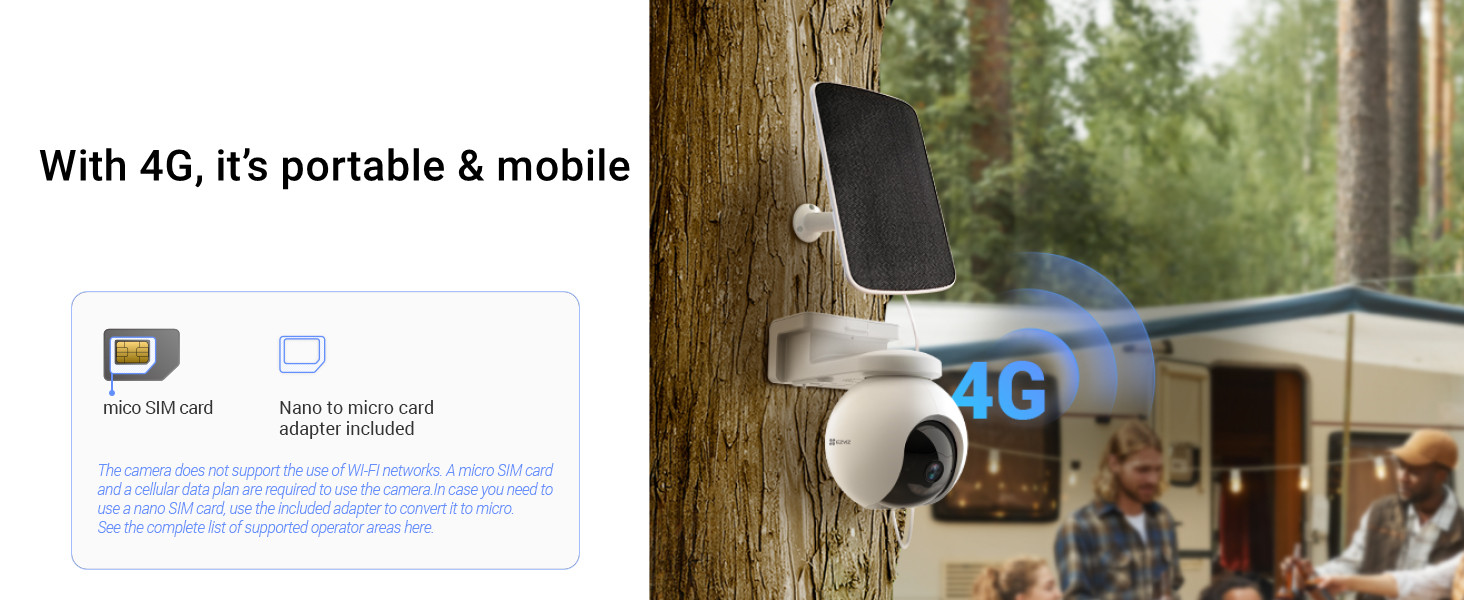
Image: The EZVIZ HB8-4G camera demonstrating its 4G connectivity and SIM card insertion.
3.3 ຕິດຕັ້ງກ້ອງ
The camera is designed for wall mount installation. Use the provided drilling template and screw kit to securely attach the camera to a suitable outdoor surface. Ensure the camera is positioned for optimal coverage and, if using, solar panel exposure.

Image: The EZVIZ HB8-4G camera mounted on an exterior wall, showing its outdoor placement.
3.4 ການຕິດຕັ້ງແອັບ ແລະ ການຕັ້ງຄ່າເບື້ອງຕົ້ນ
Download the EZVIZ app from the Google Play Store or Apple App Store. Follow the in-app instructions to create an account and add your HB8-4G camera. This process typically involves scanning a QR code on the camera.
4. ປະຕິບັດການກ້ອງຖ່າຍຮູບ
4.1 ໜ້າທີ່ຂອງກ້ອງເລື່ອນ ແລະ ອຽງ
The camera features pan and tilt capabilities, allowing for 360-degree horizontal and 80-degree vertical rotation. Control the camera's view remotely via the EZVIZ app. You can also set preset locations for quick viewໃນຂົງເຂດສະເພາະ.

Image: The EZVIZ HB8-4G camera illustrating its 360-degree pan and 80-degree tilt range.
4.2 Smart Human Motion Detection and Tracking
The HB8-4G integrates a PIR sensor and a person-shape detection algorithm to accurately identify human movement, reducing false alarms. Upon detection, the camera can automatically track the person's movement within its field of view.

Image: The camera's smart human motion detection and auto-tracking feature in action.
4.3 Active Defense
When a person is detected, the camera's active defense function can trigger a loud siren and flash two spotlights to deter intruders. You will also receive a notification push to your connected device.

Image: The camera's active defense system with siren and flashing spotlights.
4.4 ວິໄສທັດໃນຕອນກາງຄືນສີ
The HB8-4G provides clear color night vision up to 15 meters (49 feet), allowing for detailed monitoring even in low-light conditions.

Image: A comparison showing the clarity of color night vision provided by the camera.
4.5 ການສົນທະນາສອງທາງ
Utilize the built-in microphone and speaker for two-way communication through the EZVIZ app, allowing you to speak to visitors or deter unwanted guests.
4.6 ການເກັບຮັກສາວິດີໂອ
The camera includes a 32 GB eMMC storage capacity. It also supports a microSD card up to 512 GB for local storage. Additionally, cloud storage options are available through EZVIZ CloudPlay (subscription may be required).

Image: The camera's storage options, including microSD card and cloud services.
4.7 App Features and Compatibility
The EZVIZ app provides live view, video playback, customizable detection zones, and various settings adjustments. The camera is compatible with smart home ecosystems like Google Assistant and Amazon Alexa.

Image: A smartphone displaying the EZVIZ app interface with live camera feed and timeline.
5. ບໍາລຸງຮັກສາ
5.1 ການອອກແບບທີ່ທົນທານຕໍ່ສະພາບອາກາດ
The HB8-4G camera features a weatherproof design, allowing it to withstand various outdoor conditions such as sun, rain, and snow.

Image: The camera's weatherproof design, shown enduring rain.
5.2 ການດູແລຫມໍ້ໄຟ
To maximize battery life, ensure the camera is regularly charged, especially if not connected to a solar panel. Avoid extreme temperatures that can degrade battery performance.
5.3 ການທໍາຄວາມສະອາດ
ເຮັດຄວາມສະອາດເລນກ້ອງຖ່າຍຮູບ ແລະ ທີ່ຢູ່ອາໃສເປັນໄລຍະໆດ້ວຍເຄື່ອງອ່ອນ, ງamp cloth to ensure clear image quality and proper operation. Do not use harsh chemicals or abrasive materials.
6. ການແກ້ໄຂບັນຫາ
6.1 ບັນຫາການເຊື່ອມຕໍ່
- ບໍ່ມີສັນຍານ 4G: Ensure your SIM card is active and has a data plan. Check the SIM card insertion. Verify 4G coverage in the camera's location.
- ກ້ອງຖ່າຍຮູບອອບລາຍ: Check battery level. If the battery is low, recharge the camera. Restart the camera by pressing the reset button (refer to the quick installation guide for location).
6.2 ແບັດເຕີຣີໝົດໄວ
- Frequent Motion Detection: High activity in the camera's view will consume more battery. Adjust motion detection sensitivity or detection zones in the app.
- ດໍາລົງຊີວິດ View ການນຳໃຊ້: Frequent access to live view via the app will reduce battery life.
- ອຸນຫະພູມສູງສຸດ: Cold weather can significantly impact battery performance.
- ແຜງແສງອາທິດ: Ensure the solar panel (if used) is clean and receives adequate sunlight.
6.3 ການກວດຈັບການເຄື່ອນໄຫວບໍ່ເຮັດວຽກ
- ກວດເບິ່ງການຕັ້ງຄ່າ: Verify that motion detection is enabled in the EZVIZ app and that detection zones are correctly configured.
- ອຸປະສັກ: ໃຫ້ແນ່ໃຈວ່າບໍ່ມີສິ່ງກີດຂວາງທາງກາຍະພາບທີ່ກີດຂວາງກ້ອງຖ່າຍຮູບ view or the PIR sensor.
7. ຂໍ້ມູນຈໍາເພາະ
| ຄຸນສົມບັດ | ຂໍ້ມູນຈໍາເພາະ |
|---|---|
| ຕົວແບບ | CS-HB8-R100-1K3FL4GA |
| ສີ | ສີຂາວ |
| ຄວາມລະອຽດ | 2K+ / 3MP (1440p Video Capture) |
| ເຕັກໂນໂລຊີການເຊື່ອມຕໍ່ | Wireless (4G LTE) |
| ຄຸນນະສົມບັດພິເສດ | PTZ Technology, Smart Human Motion Detection, Color Night Vision, Two-Way Talk, Active Defense |
| ການນຳໃຊ້ພາຍໃນ/ນອກ | ກາງແຈ້ງ |
| ແຫຼ່ງພະລັງງານ | Battery Powered (5200 mAh Lithium Ion) |
| ການເກັບຮັກສາ | 32 GB eMMC, MicroSD Card (up to 512 GB) |
| ປະເພດການຕິດຕັ້ງ | ຕິດຝາ |
| ຂະໜາດສິນຄ້າ | 18.3 x 11.6 x 16.6 cm |
| ນ້ໍາຫນັກລາຍການ | 1.06 ກິໂລ |
| ຮູບແບບການຖ່າຍຮູບວິດີໂອ | MP4 (H.265 compression) |
8. ການຮັບປະກັນແລະການສະຫນັບສະຫນູນ
8.1 ຂໍ້ມູນການຮັບປະກັນ
For warranty details, please refer to the warranty card included in your product packaging or visit the official EZVIZ website. An optional 1-year extended warranty may be available from third-party providers.
8.2 ສະຫນັບສະຫນູນລູກຄ້າ
For technical assistance or product inquiries, please contact EZVIZ customer support. In India, support is provided by Prama Hikvision India Pvt. Ltd. You can reach them via email at rma@pramahikvision.com.


