1. ບົດແນະນຳ
ຂອບໃຈສໍາລັບການຊື້asing the Jazmm Model 213 Portable Multi-Band Radio. This device is designed to provide versatile audio entertainment and essential weather information. It features AM, FM, Shortwave (SW), and NOAA Weather Band (WB) reception, Bluetooth 5.4 connectivity, TF card playback, a powerful 5W speaker, and a built-in rechargeable battery with flashlight functionality. This manual provides detailed instructions for the proper use and maintenance of your radio.
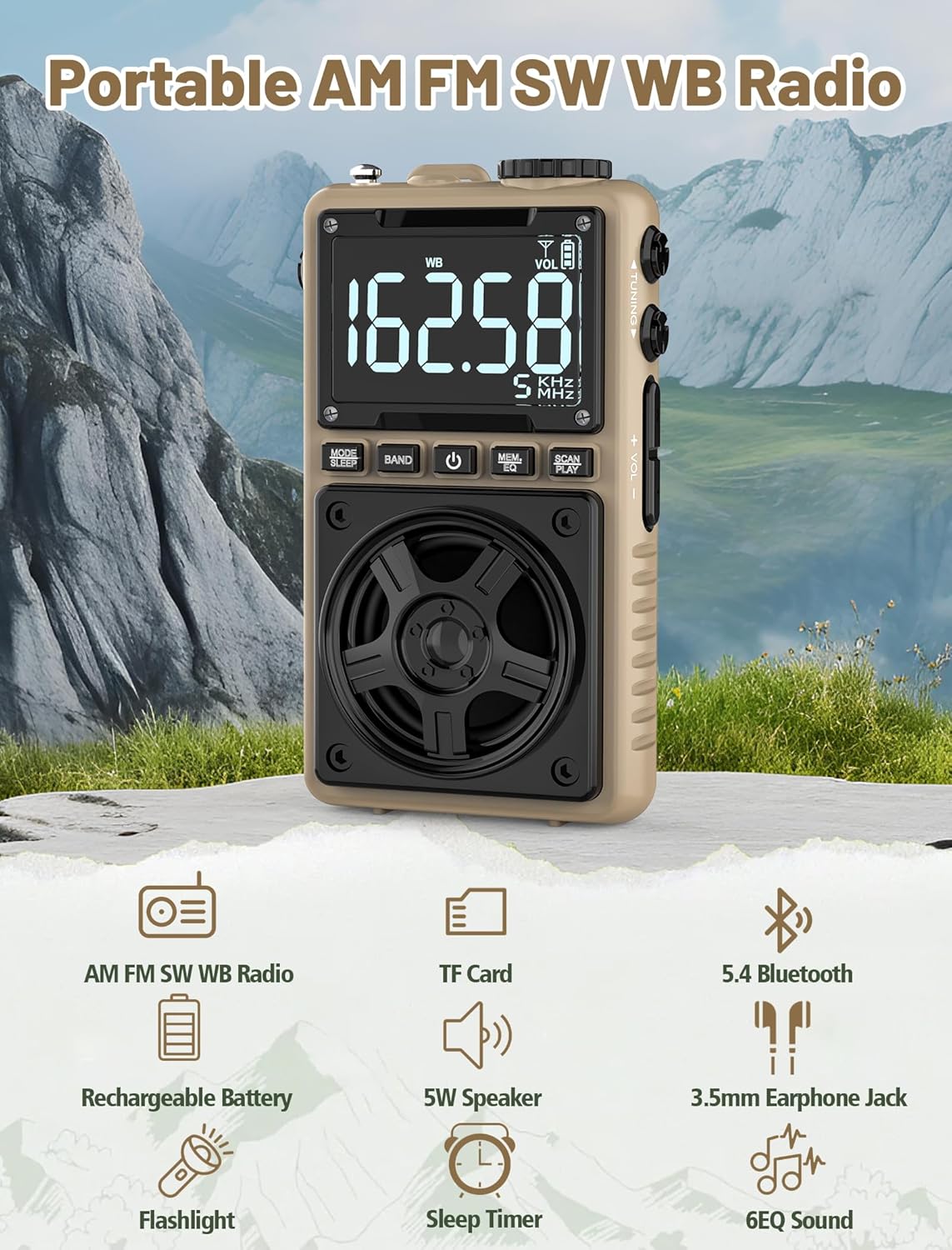
Image 1.1: The Jazmm Model 213 Portable Multi-Band Radio highlighting its key features including AM/FM/SW/WB radio, TF card support, Bluetooth 5.4, 5W speaker, rechargeable battery, flashlight, sleep timer, and 6 EQ sound effects.
2. ຂໍ້ມູນຄວາມປອດໄພ
ກະລຸນາອ່ານ ແລະ ເຂົ້າໃຈຄຳແນະນຳດ້ານຄວາມປອດໄພທັງໝົດກ່ອນທີ່ຈະນຳໃຊ້ຜະລິດຕະພັນນີ້. ເກັບຮັກສາຄຳແນະນຳເຫຼົ່ານີ້ໄວ້ເພື່ອອ້າງອີງໃນອະນາຄົດ.
- ຢ່າເຮັດໃຫ້ອຸປະກອນຢູ່ໃນອຸນຫະພູມທີ່ຮຸນແຮງ, ແສງແດດໂດຍກົງ, ຫຼືຄວາມຊຸ່ມຊື່ນສູງ.
- ຫຼີກລ້ຽງການຫຼຸດລົງຫຼືການອຸປະກອນທີ່ມີຜົນກະທົບທີ່ເຂັ້ມແຂງ.
- ຫ້າມຖອດປະກອບ, ສ້ອມແປງ, ຫຼືດັດແປງອຸປະກອນດ້ວຍຕົນເອງ. ອ້າງອີງການບໍລິການທັງໝົດໃຫ້ກັບບຸກຄະລາກອນທີ່ມີຄຸນວຸດທິ.
- ຮັກສາອຸປະກອນໃຫ້ຫ່າງຈາກນ້ໍາແລະຂອງແຫຼວອື່ນໆ.
- ໃຊ້ສາຍສາກທີ່ໃຫ້ມາ ຫຼື ສາຍ Type-C ທີ່ໄດ້ຮັບການຮັບຮອງເທົ່ານັ້ນສຳລັບການສາກໄຟ.
- ຖິ້ມແບດເຕີລີ່ຕາມກົດລະບຽບທ້ອງຖິ່ນ. ຫ້າມຈູດ.
- ການຟັງດົນໆໃນລະດັບສຽງສູງອາດເຮັດໃຫ້ເກີດຄວາມເສຍຫາຍຕໍ່ການໄດ້ຍິນ. ປັບລະດັບສຽງໃຫ້ຢູ່ໃນລະດັບປານກາງ.
3. ເນື້ອໃນຊຸດ
ກວດສອບວ່າລາຍການທັງຫມົດແມ່ນມີຢູ່ໃນຊຸດ:
- Jazmm Model 213 AM FM SW WB Radio
- ຄູ່ມືເຈົ້າຂອງ (ເອກະສານສະບັບນີ້)
- ສາຍໄຟ USB Type-C
4. ຜະລິດຕະພັນເກີນview
ຄຸ້ນເຄີຍກັບອົງປະກອບ ແລະການຄວບຄຸມຂອງວິທະຍຸ.

ຮູບພາບ 4.1: ດ້ານໜ້າ ແລະ ດ້ານຂ້າງ view of the Jazmm Model 213 radio. The front features a large digital display, speaker, and control buttons (MODE/SLEEP, BAND, Power, MEM/EQ, SCAN/PLAY). The side shows the LOCK/LIGHT switch, TF card slot, DC 5V Type-C charging port, and a 1250mAh battery indicator.
ການຄວບຄຸມ ແລະພອດ:
- ຈໍດິຈິຕອນ: Shows frequency, band, volume, battery level, and other indicators.
- ລໍາໂພງ: ກຳລັງສົ່ງ 5W ສຳລັບສຽງທີ່ຊັດເຈນ.
- MODE/SLEEP Button: Switches between modes (Radio, Bluetooth, TF Card) and activates sleep timer.
- ປຸ່ມ BAND: Selects radio bands (FM, AM, SW, WB).
- ປຸ່ມເປີດປິດ: ເປີດ/ປິດວິທະຍຸ.
- MEM/EQ Button: Accesses memory functions and cycles through EQ sound effects.
- SCAN/PLAY Button: Initiates auto-scan for radio stations or plays/pauses in Bluetooth/TF card mode.
- ປຸ່ມປັບ: ປັບຄວາມຖີ່.
- ລະດັບສຽງ +/- ປຸ່ມ: ປັບລະດັບສຽງ.
- LOCK/LIGHT Switch: Locks buttons or activates the flashlight.
- ສະລັອດຕິງບັດ TF: For Micro SD card playback (up to 128GB).
- DC 5V Type-C Charging Port: ສໍາລັບການຊາດຫມໍ້ໄຟພາຍໃນ.
- Jack ຫູຟັງ 3.5 ມມ: ສໍາລັບການຟັງສ່ວນຕົວ.
- ເສົາອາກາດ Telescopic: ສໍາລັບການປັບປຸງການຮັບວິທະຍຸ.
- Back Clip & Wrist Strap: For portability and secure carrying.
5. ຕັ້ງຄ່າ
5.1 ການສາກໄຟເບື້ອງຕົ້ນ
Before first use, fully charge the radio's internal 1250mAh lithium polymer battery. Connect the provided USB Type-C power cord to the DC 5V charging port on the side of the radio and plug the other end into a compatible USB power adapter (not included) or a computer USB port. The charging indicator on the display will show charging status. A full charge typically takes approximately 1.5 hours and provides 10-12 hours of usage.

Image 5.1: The Jazmm Model 213 radio connected to a power adapter via its Type-C charging port, illustrating the charging process for its 1250mAh rechargeable battery.
5.2 ການປັບສາຍອາກາດ
For optimal radio reception, extend the telescopic antenna fully when listening to FM, SW, or WB bands. For AM reception, the internal antenna is generally sufficient, but adjusting the radio's orientation may improve signal strength.
6. ຄໍາແນະນໍາການດໍາເນີນງານ
6.1 ເປີດ/ປິດ
ກົດຄ້າງໄວ້ ປຸ່ມເປີດປິດ ( ) for approximately 2 seconds to turn the radio on or off.
6.2 ການເລືອກໂໝດ
ກົດ MODE/SLEEP Button to cycle through available modes: Radio (FM/AM/SW/WB), Bluetooth, and TF Card (if a card is inserted).
6.3 Radio Band Selection and Tuning
ໃນໂຫມດວິທະຍຸ, ກົດປຸ່ມ ປຸ່ມແຖບ to switch between FM, AM, Shortwave (SW), and NOAA Weather Band (WB).
- FM: 87-108 MHz
- ຕອນເຊົ້າ: 520-1710 KHz
- SW: 4.75-21.85 MHz
- WB: 162.400-162.550 MHz

Image 6.1: The radio displaying different frequencies across FM, AM, SW, and WB bands, illustrating its multi-band reception capability with an extended antenna.
ຄູ່ມືການປບັຄູ່ມື:
ໝຸນ ປຸ່ມປັບ on the side of the radio to manually adjust the frequency.
ສະແກນອັດຕະໂນມັດ:
ກົດ SCAN/PLAY Button to automatically scan for and save available stations. The radio can store up to 100 preset stations.
6.4 ສະຖານີທີ່ຕັ້ງໄວ້ລ່ວງ ໜ້າ
After an automatic scan, use the ປຸ່ມປັບ ຫຼື MEM/EQ Button to navigate through saved preset stations. Refer to the display for preset numbers (e.g., P01, P02).

Image 6.2: The radio positioned on a nightstand, illustrating the sleep timer function and the display of preset station numbers (P01, P05, P19, etc.).
6.5 ການຄວບຄຸມປະລິມານ
ໃຊ້ ປຸ່ມລະດັບສຽງ +/- on the side of the radio to increase or decrease the audio output.
6.6 ແບບບູທູດ
ສະຫຼັບໄປໂໝດ Bluetooth ໂດຍໃຊ້ປຸ່ມ MODE/SLEEP Button. The radio will enter pairing mode, indicated by a blinking Bluetooth icon on the display. On your smartphone, tablet, or laptop, search for Bluetooth devices and select "Jazmm 213" to connect. The radio acts as a Bluetooth speaker. Note: This radio does not support connection to Bluetooth earphones.
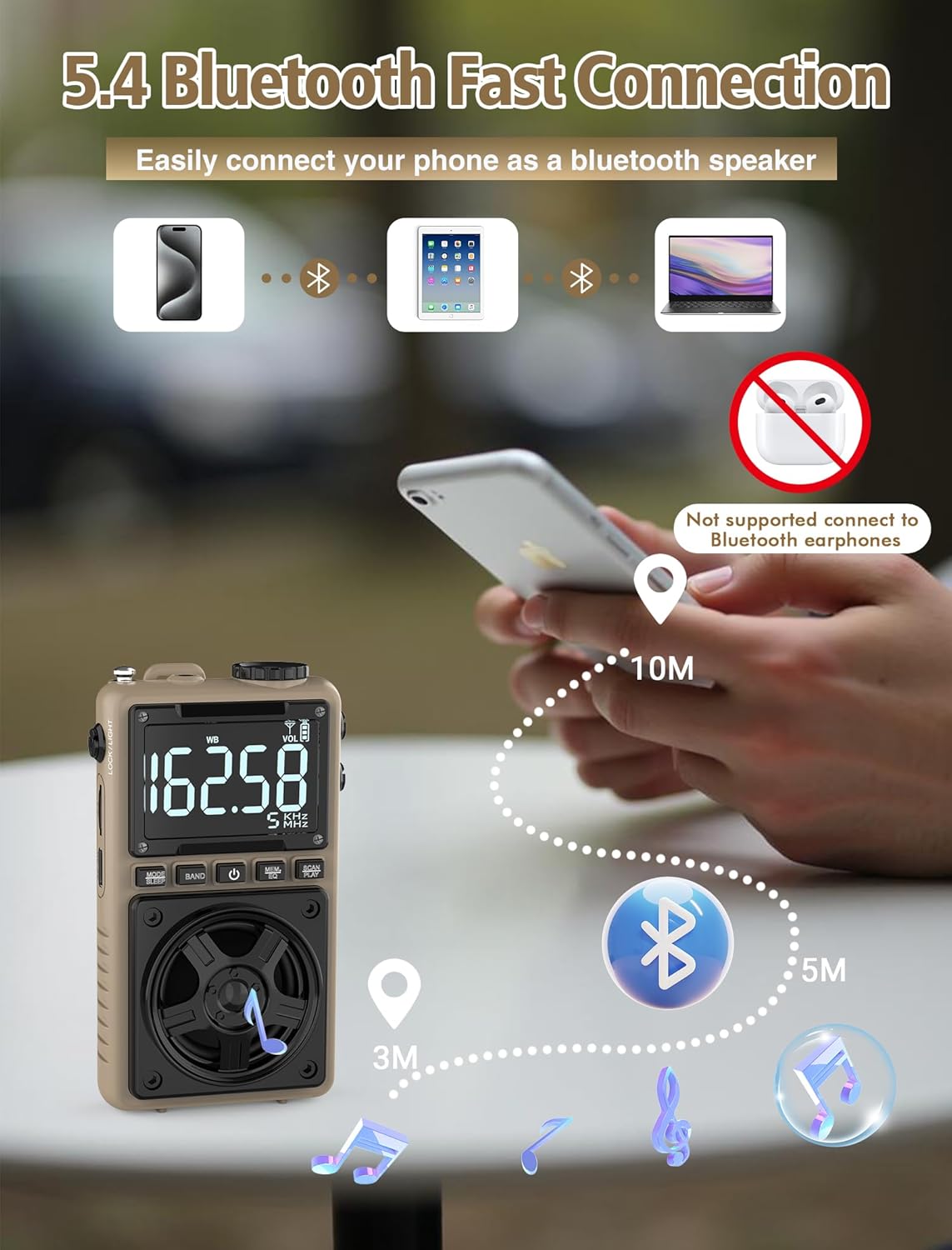
Image 6.3: A visual representation of the Jazmm Model 213 radio establishing a Bluetooth connection with various devices like smartphones, tablets, and laptops, functioning as a Bluetooth speaker.
6.7 TF Card Playback (MP3 Player)
Insert a Micro SD card (up to 128GB) with MP3 audio files ເຂົ້າໄປໃນ ສະລັອດຕິງບັດ TF. Switch to TF Card mode using the MODE/SLEEP Button. The radio will automatically begin playing music from the card. Use the SCAN/PLAY Button to play/pause and the ປຸ່ມປັບ ເພື່ອຂ້າມເພງ.

Image 6.4: A user enjoying music through headphones connected to the Jazmm Model 213 radio, with an inset showing the TF card slot for Micro SD card insertion.
6.8 ການໃຊ້ຫູຟັງ
Plug standard 3.5mm headphones into the ຊ່ອງສຽບຫູຟັງ 3.5 ມມ for private listening. The radio's speaker will automatically mute when headphones are connected.
6.9 ການແຈ້ງເຕືອນສະພາບອາກາດ NOAA
In WB (Weather Band) mode, the radio is capable of receiving real-time weather alerts and updates from the National Oceanic and Atmospheric Administration. This feature helps you prepare for potential weather hazards. Ensure the antenna is extended for best reception.

Image 6.5: The radio displaying a NOAA weather alert, with a flashlight beam illuminating the foreground and a stormy sky in the background, emphasizing its emergency preparedness features.
6.10 ຟັງຊັນໄຟສາຍ
ເລື່ອນໄດ້ LOCK/LIGHT Switch to activate the built-in LED flashlight. This can be useful in low-light conditions or emergencies.
6.11 ຈັບເວລານອນ
ກົດຄ້າງໄວ້ MODE/SLEEP Button to activate the sleep timer. Repeated presses will cycle through available durations (e.g., 10, 60, 90, 120 minutes). The radio will automatically turn off after the selected time.
6.12 ກະແຈລັອກ
ເລື່ອນໄດ້ LOCK/LIGHT Switch to the 'LOCK' position to prevent accidental button presses. This is useful when carrying the radio in a pocket or bag.
6.13 EQ ສຽງເອັບເຟັກ
ກົດ MEM/EQ Button (short press) to cycle through 6 preset EQ sound effects: Normal, Rock, Pop, Jazz, Class, and Village. Select the effect that best suits your audio preference.

Image 6.6: The radio's 5W speaker is highlighted, surrounded by icons representing the six available EQ stereo sound effects: Normal, Rock, Pop, Jazz, Class, and Village.
7. ຂໍ້ມູນຈໍາເພາະ
| ຄຸນສົມບັດ | ລາຍລະອຽດ |
|---|---|
| ໝາຍເລກຕົວແບບ | 213 |
| ຂະໜາດສິນຄ້າ | 2.3 x 4 x 1.3 ນິ້ວ (5.84 x 10.16 x 3.3 cm) |
| ນ້ໍາຫນັກລາຍການ | 4.6 ອອນສ໌ (130 ກຣາມ) |
| ແຖບວິທະຍຸສະຫນັບສະຫນູນ | FM (87-108MHz), AM (520-1710KHz), SW (4.75-21.85MHz), WB (162.400-162.550MHz) |
| ເຕັກໂນໂລຊີການເຊື່ອມຕໍ່ | Bluetooth 5.4 |
| ລຳໂພງ Output | 5W |
| ແບັດເຕີຣີ | 1250mAh Lithium Polymer (Rechargeable, included) |
| ພອດສາກໄຟ | USB ປະເພດ-C (DC 5V) |
| ເວລາສາກໄຟ | ປະມານ. 1.5 ຊົ່ວໂມງ |
| ເວລານຳໃຊ້ | ປະມານ 10-12 ຊົ່ວໂມງ (ຂຶ້ນກັບການນຳໃຊ້) |
| ຮອງຮັບກາດຫນ່ວຍຄວາມຈໍາ | Micro SD (TF Card) up to 128GB |
| ຄຸນນະສົມບັດພິເສດ | NOAA Weather Alert, Built-In Flashlight, SOS Alarm, Sleep Timer, 100 Preset Stations, Digital Backlight Screen, Back Clip, Wrist Strap |
8. ການແກ້ໄຂບັນຫາ
| ບັນຫາ | ສາເຫດ / ການແກ້ໄຂທີ່ເປັນໄປໄດ້ |
|---|---|
| ວິທະຍຸບໍ່ເປີດ. |
|
| ການຮັບວິທະຍຸທີ່ບໍ່ດີ. |
|
| Bluetooth ບໍ່ເຊື່ອມຕໍ່. |
|
| ບັດ TF ບໍ່ສາມາດຫຼິ້ນໄດ້. |
|
| ບໍ່ມີສຽງຈາກລຳໂພງ/ຫູຟັງ. |
|
9. ບໍາລຸງຮັກສາ
- ທໍາຄວາມສະອາດ: ໃຊ້ຜ້າປຽກແຫ້ງເພື່ອເຮັດຄວາມສະອາດດ້ານນອກຂອງວິທະຍຸ. ຢ່າໃຊ້ເຄື່ອງເຮັດຄວາມສະອາດຂັດຫຼືສານລະລາຍ.
- ການເກັບຮັກສາ: ເມື່ອບໍ່ໄດ້ໃຊ້ເປັນເວລາດົນ, ໃຫ້ເກັບຮັກສາວິທະຍຸໄວ້ໃນບ່ອນທີ່ເຢັນ, ແຫ້ງ.
- ການດູແລຫມໍ້ໄຟ: To prolong battery life, avoid fully discharging the battery frequently. Recharge the radio periodically even if not in use.
- ເສົາອາກາດ: Handle the telescopic antenna gently to prevent bending or breaking. Retract it when not in use.
10. ການຮັບປະກັນແລະການສະຫນັບສະຫນູນ
Jazmm products are designed for reliability and performance. For warranty information, please refer to the documentation provided at the time of purchase or contact your retailer. If you encounter any issues or require technical assistance, please contact Jazmm customer support through the retailer's platform or the official Jazmm webເວັບໄຊ.
ກະລຸນາມີໝາຍເລກຕົວແບບຂອງຜະລິດຕະພັນ (213) ແລະລາຍລະອຽດການຊື້ພ້ອມແລ້ວເມື່ອຕິດຕໍ່ກັບຝ່າຍຊ່ວຍເຫຼືອ.


