1. ບົດແນະນຳ
Thank you for choosing the Daakro SR-3800 5.1 Channel Home Audio Amplifier. This manual provides essential information for the proper setup, operation, and maintenance of your new audio system. Please read it thoroughly before use to ensure optimal performance and safety.
The Daakro SR-3800 is designed to deliver high-quality audio for your home theater, studio, or entertainment needs, featuring a dynamic DSP display, multiple input options, and Bluetooth 5.4 connectivity.
ວິດີໂອ 1.1: ເກີນview of the Daakro SR-3800 5.1 Channel Home Audio Amplifier, showcasing its design, features, and connectivity options.
2. ຂໍ້ມູນຄວາມປອດໄພ
- ຄວາມປອດໄພທາງໄຟຟ້າ: To reduce the risk of fire or electric shock, do not expose this appliance to rain or moisture. Do not open the casing; ສົ່ງການບໍລິການທັງໝົດໃຫ້ກັບບຸກຄະລາກອນທີ່ມີຄຸນວຸດທິ.
- ການລະບາຍອາກາດ: ຮັບປະກັນການລະບາຍອາກາດທີ່ພຽງພໍຢູ່ອ້ອມໜ່ວຍ. ຫ້າມປິດຊ່ອງລະບາຍອາກາດ.
- ການຈັດວາງ: Place the unit on a stable, flat surface. Avoid direct sunlight, heat sources, and excessive dust or vibration.
- ການສະຫນອງພະລັງງານ: Use only the specified power supply (110 Volts AC).
- ຄວາມເຂົ້າກັນໄດ້ຂອງລໍາໂພງ: ນີ້ amplifier is compatible only with 5-12 inch passive speakers with an impedance of 4 to 16 ohms. The subwoofer interface supports passive subwoofers only.
- ການນຳໃຊ້ໄມໂຄຣໂຟນ: External wired and wireless microphones may cause feedback noise if not positioned correctly or if gain levels are too high.
3. ເນື້ອໃນຊຸດ
ກວດສອບວ່າລາຍການທັງຫມົດແມ່ນມີຢູ່ໃນຊຸດ:
- Daakro SR-3800 5.1 Channel Home Audio Ampມີຊີວິດຊີວາ
- ຄວບຄຸມໄລຍະໄກ
- ຄູ່ມືຜູ້ໃຊ້ (ເອກະສານນີ້)
- ສາຍໄຟ
- ເສົາອາກາດ FM
- ເສົາອາກາດ Bluetooth
4. ຜະລິດຕະພັນເກີນview
4.1 ແຜງຄວບຄຸມດ້ານໜ້າ
ຮູບທີ 4.1: Detailed diagram of the Daakro SR-3800 front panel, highlighting all controls and their functions, including microphone volume, power, delay, echo, microphone bass/treble, wireless microphone volume, master volume, bass, treble, subwoofer volume, and input selection buttons.
The front panel provides access to all primary controls and the dynamic DSP display. Key controls include:
- MIC VOL: ປັບປະລິມານການປ້ອນຂໍ້ມູນໄມໂຄຣໂຟນ.
- ເປີດ/ປິດພະລັງງານ: ສະຫຼັບພະລັງງານຫຼັກ.
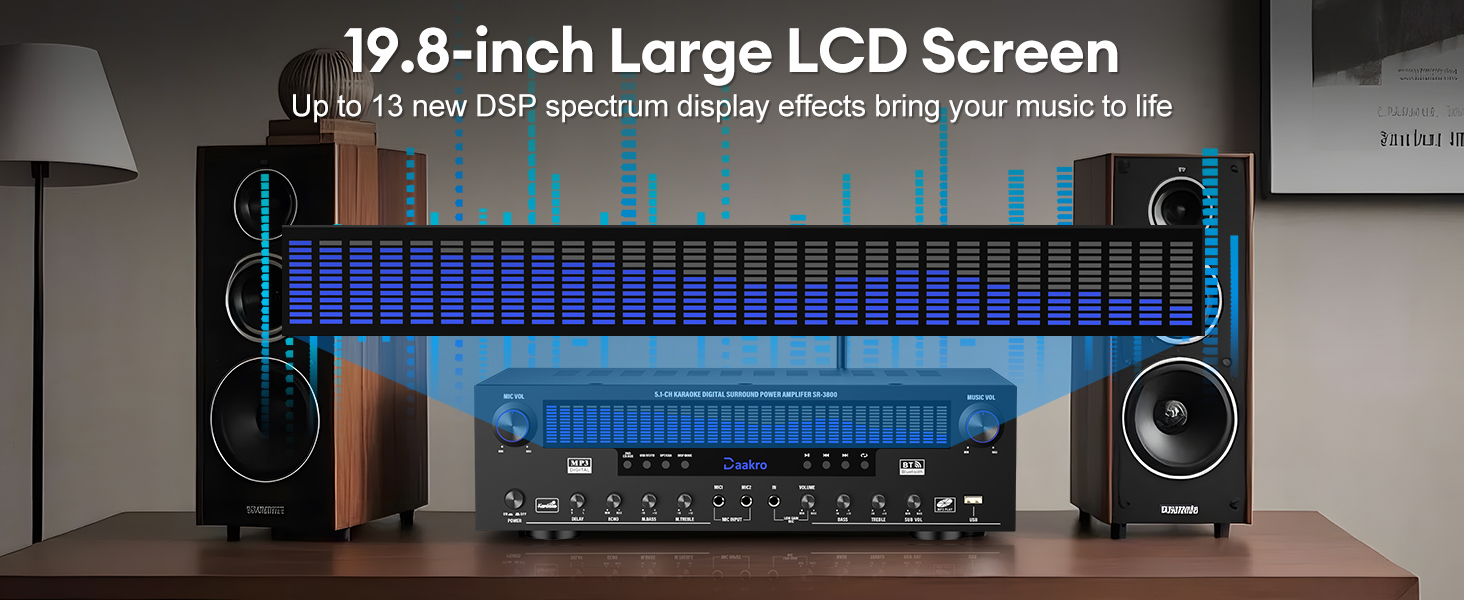
- ຈໍ LCD: Displays current mode, input, and dynamic DSP spectrum.
- ຊັກຊ້າ/ແອັກໂກ້: Adjusts microphone delay and echo effects.
- M.BASS/M.TREBLE: Adjusts microphone bass and treble.
- WIRELESS MIC VOL: Adjusts volume for wireless microphones.
- ກຳ ມະບານ: Master music volume control.
- ເບສ/ສຽງແກມ: Adjusts music bass and treble.
- SUB VOL: Adjusts passive subwoofer volume.
- ປຸ່ມເລືອກອິນພຸດ: Select between DVD/CD/AUX, USB/BT/FM, OPT/COAX, and DISP modes.
- ການຄວບຄຸມການຫຼິ້ນ: Play/Pause, Previous, Next, Single Song/Playlist Loop.
4.2 ການເຊື່ອມຕໍ່ແຜງດ້ານຫລັງ

ຮູບທີ 4.2: Detailed diagram of the Daakro SR-3800 rear panel, illustrating all input and output ports for connecting speakers, audio sources, and antennas.
The rear panel houses all input and output ports for connecting your audio sources and speakers:
- FM ANT: FM antenna input.
- AUX ໃນ: ວັດສະດຸປ້ອນເຂົ້າຊ່ວຍ 3.5mm.
- OPT/COAX: Optical and Coaxial digital audio inputs.
- BT ANT: ການເຊື່ອມຕໍ່ເສົາອາກາດ Bluetooth.
- AUDIO INPUT (DVD, CD, LINE): RCA stereo inputs for DVD, CD players, and other line-level sources.
- AUDIO OUT (LINE): RCA stereo line output for connecting to active speakers or another ampມີຊີວິດຊີວາ.
- ສຽງອອກຂອງລຳໂພງ: Terminals for connecting passive speakers (Front Left/Right, Center, Surround Left/Right, Subwoofer).
- ການ ນຳ ເຂົ້າພະລັງງານ: ການເຊື່ອມຕໍ່ພະລັງງານ AC.
4.3 Dynamic DSP Display

ຮູບທີ 4.3: The 19.8-inch dynamic DSP display of the Daakro SR-3800, illustrating real-time music rhythm analysis with various spectrum effects.
The 19.8-square-inch LED display screen analyzes and displays music rhythms in real-time within the 20 Hz to 20 kHz frequency response range. It offers 13 spectrum effects, enhancing your audio-visual experience.
5. ຄໍາແນະນໍາການຕິດຕັ້ງ
5.1 ການເຊື່ອມຕໍ່ລໍາໂພງ
Connect your passive speakers to the corresponding terminals on the rear panel. Ensure correct polarity (+ to + and - to -) for each speaker. The amplifier supports 5-12 inch passive speakers with an impedance of 4 to 16 ohms.
- Front Left (FL) / Front Right (FR): For your main stereo speakers.
- Center (C): For the center channel speaker.
- Surround Left (SL) / Surround Right (SR): For your surround sound speakers.
- Subwoofer (SUB): For a passive subwoofer only.

ຮູບທີ 5.1: ແຜງດ້ານຫລັງຂອງ amplifier showing various audio inputs and speaker outputs with cables connected, demonstrating a typical setup.
5.2 ການເຊື່ອມຕໍ່ແຫຼ່ງສຽງ
Connect your audio sources to the appropriate input ports on the rear panel:
- DVD/CD/LINE: Use RCA cables to connect DVD players, CD players, or other analog audio devices.
- OPT/COAX: Use optical or coaxial cables for digital audio sources like TVs or game consoles.
- AUX ໃນ: Use a 3.5mm audio cable for portable devices.
- USB: Insert a USB drive for direct media playback.
5.3 ການເຊື່ອມຕໍ່ເສົາອາກາດ
- Connect the provided FM antenna to the FM ANT terminal for radio reception.
- Connect the Bluetooth antenna to the BT ANT terminal for optimal Bluetooth signal reception.
5.4 ການເຊື່ອມຕໍ່ພະລັງງານ
After all audio and speaker connections are made, connect the power cable to the ການປ້ອນຂໍ້ມູນພະລັງງານ on the rear panel and then to a standard 110V AC power outlet.
6. ຄໍາແນະນໍາການດໍາເນີນງານ
6.1 ເປີດ/ປິດ
ກົດ ເປີດ/ປິດ switch on the front panel to turn the ampຊີວິດເປີດຫຼືປິດ.
6.2 ການຄັດເລືອກການປ້ອນຂໍ້ມູນ
Use the input selection buttons on the front panel or the remote control to choose your desired audio source (DVD/CD/AUX, USB/BT/FM, OPT/COAX).
6.3 ການຈັບຄູ່ Bluetooth
ເພື່ອເຊື່ອມຕໍ່ອຸປະກອນ Bluetooth:
- ເລືອກ USB/BT/FM input mode. The display will show 'BT'.
- On your smartphone, tablet, or other Bluetooth device, search for available devices and select 'Daakro SR-3800'.
- ເມື່ອຈັບຄູ່ແລ້ວ, ໜ້າຈໍຈະສະແດງວ່າການເຊື່ອມຕໍ່ສຳເລັດແລ້ວ.
ໄດ້ amplifier features Bluetooth 5.4 for a stable connection within a 30-foot range.

ຮູບທີ 6.1: The Daakro SR-3800 amplifier demonstrating its Bluetooth 5.4 connectivity with a stable 30-foot range, surrounded by various compatible smart devices.
6.4 Volume and Equalizer Control
Use the rotary knobs on the front panel or the remote control to adjust audio parameters:
- ກຳ ມະບານ: Controls the overall music volume.
- ເບສ/ສຽງແກມ: Adjusts the low and high frequencies of the music.
- SUB VOL: Adjusts the volume of the connected passive subwoofer.
- The remote control also offers preset EQ settings (e.g., 'Hall') for quick sound adjustments.
6.5 ການນຳໃຊ້ໄມໂຄຣໂຟນ
ໄດ້ amplifier supports two wired microphones and one wireless microphone input. Connect your microphones to the designated inputs on the front panel.

ຮູບທີ 6.2: The Daakro SR-3800 amplifier facilitating a karaoke session with multiple microphone inputs, allowing for simultaneous use.
Use the dedicated microphone controls:
- MIC VOL: Adjusts the overall microphone volume.
- ຊັກຊ້າ/ແອັກໂກ້: Adds delay and echo effects to the microphone audio.
- M.BASS/M.TREBLE: Adjusts the bass and treble for microphone audio.
- WIRELESS MIC VOL: Adjusts the volume for the wireless microphone input.
ວິທະຍຸ 6.6 FM
In USB/BT/FM mode, select FM to access the radio tuner. Use the playback control buttons (Previous/Next) to scan for stations. Ensure the FM antenna is properly connected for optimal reception.
7. ບໍາລຸງຮັກສາ
7.1 ການທໍາຄວາມສະອາດ
Wipe the unit with a soft, dry cloth. Do not use liquid cleaners or aerosol sprays, as they may damage the finish or internal components.
7.2 ລະບາຍອາກາດ
The Daakro SR-3800 features an innovative cooling system with built-in fans, heat sinks, and side ventilation ports. Ensure these vents are not obstructed to maintain optimal cooling efficiency and extend the equipment's lifespan. The fan operates quietly and is virtually inaudible at idle.
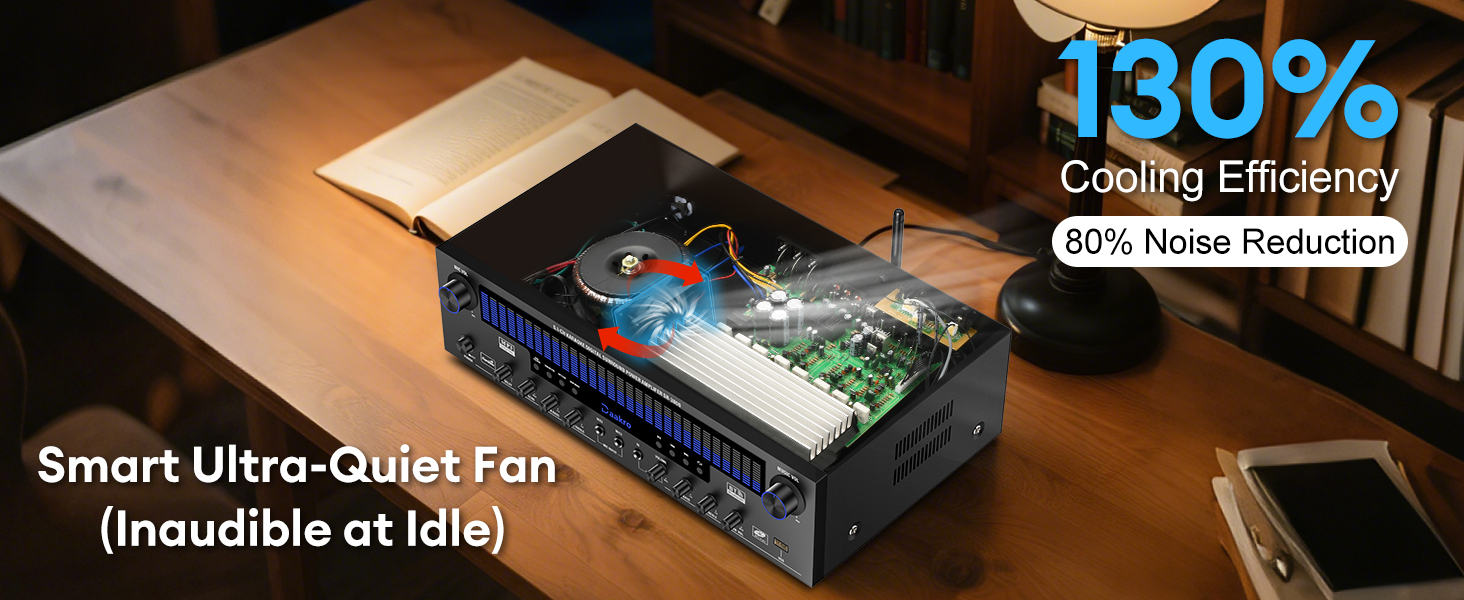
ຮູບທີ 7.1: ພາຍໃນ view of the Daakro SR-3800 amplifier, illustrating the smart ultra-quiet fan and heat sinks designed for efficient cooling and noise reduction.
8. ການແກ້ໄຂບັນຫາ
| ບັນຫາ | ສາເຫດທີ່ເປັນໄປໄດ້ | ການແກ້ໄຂ |
|---|---|---|
| ບໍ່ມີພະລັງງານ | Power cable not connected; Power switch off; Outlet issue | Ensure power cable is securely connected; Turn power switch on; Test outlet with another device. |
| ບໍ່ມີສຽງຈາກ ລຳ ໂພງ | Incorrect input selected; Speaker cables loose/incorrectly connected; Speaker impedance mismatch; Volume too low | Select correct input; Check all speaker connections for polarity; Ensure speakers are 4-16 ohms passive; Increase volume. |
| Bluetooth ບໍ່ເຊື່ອມຕໍ່ | Not in Bluetooth mode; Device too far; Interference; Bluetooth antenna loose | Select USB/BT/FM mode; Move device closer (within 30ft); Ensure Bluetooth antenna is securely attached. |
| Microphone feedback/noise | Microphone too close to speakers; Gain levels too high | Reposition microphone; Reduce MIC VOL or individual microphone gain controls. |
| ການຄວບຄຸມໄລຍະໄກບໍ່ເຮັດວຽກ | Batteries dead/incorrectly inserted; Obstruction between remote and unit | Replace batteries; Ensure clear line of sight to the ampຕົວຮັບ IR ຂອງ lifier. |
| Subwoofer ບໍ່ເຮັດວຽກ | Active subwoofer connected; Incorrect connection | Ensure only a passive subwoofer is connected to the SUB output; Check subwoofer cable connection. |
9. ຂໍ້ມູນຈໍາເພາະ
| ຄຸນສົມບັດ | ຂໍ້ມູນຈໍາເພາະ |
|---|---|
| ໝາຍເລກຕົວແບບ | SR-3800 |
| ຜົນຜະລິດທີ່ໄດ້ຮັບການໃຫ້ຄະແນນ | 300W (50W ຕໍ່ຊ່ອງ) |
| ຈໍານວນຊ່ອງ | 5.1 |
| ລຳໂພງ Impedance | 4-16 Ohms (Passive Speakers) |
| ລຸ້ນ Bluetooth | 5.4 |
| ຊ່ວງ Bluetooth | ສູງເຖິງ 30 ຟຸດ (10 ແມັດ) |
| DSP Display Size | 19.8 ນິ້ວ |
| ຊ່ວງການຕອບສະໜອງຄວາມຖີ່ | 20 Hz ຫາ 20 kHz |
| ການໂຕ້ຕອບການປ້ອນຂໍ້ມູນ | Bluetooth, USB, Wireless Mic, 2x Wired Mic, FM, AUX, OPT, COAX, DVD, CD, LINE |
| Output Interfaces | 5.1 Channel Passive Speaker Output, Passive Subwoofer Output, Line Output |
| ສະບັບtage | 110 ໂວນ (AC) |
| ນ້ໍາຫນັກລາຍການ | 13.31 ປອນ |
| ຂະໜາດແພັກເກັດ | 19.45 x 13.39 x 7.64 ນິ້ວ |
10. ການຮັບປະກັນແລະການສະຫນັບສະຫນູນ
The Daakro SR-3800 amplifier ມາພ້ອມກັບ a ຮັບປະກັນ 30 ວັນ from the date of purchase. Daakro is committed to providing high-quality products and customer satisfaction.
For technical assistance, troubleshooting, or warranty claims, please contact our customer support team. We offer ບໍລິການລູກຄ້າອອນໄລນ໌ຕະຫຼອດ 24 ຊົ່ວໂມງ to address your inquiries promptly.
You can find more information and support on the official Daakro brand store: Daakro Brand Store.


