1. ບົດແນະນຳ
This manual provides essential instructions for setting up, operating, and maintaining your CWOWDEFU P16 Android Tablet. Please read this manual thoroughly before using your device to ensure proper function and longevity.
1.1 ສິ່ງທີ່ຢູ່ໃນກ່ອງ
- CWOWDEFU Android Tablet P16
- Screen Protector (one pre-applied, one additional)
- Charger/Charge Cable
- SIM-Needle
- ຄູ່ມືຜູ້ໃຊ້

Image 1.1: The CWOWDEFU P16 Android Tablet, showcasing its design and key features like 4G LTE connectivity, 256GB memory, and a 2K display with Widevine L1 support.
2. ແຜນຜັງອຸປະກອນ
ເຮັດຄວາມຄຸ້ນເຄີຍກັບອົງປະກອບທາງກາຍະພາບຂອງແທັບເລັດຂອງທ່ານ.

Image 2.1: The tablet supports Dual SIM (2x Nano or 1x Nano + 1x Micro SD) and 4G LTE for communication and connectivity.
The tablet features a sleek, all-metal body with curved edges for comfortable handling. It includes a 10.1-inch Incell screen, a rear camera, and various ports for connectivity.
3. ການຕິດຕັ້ງເບື້ອງຕົ້ນ
3.1 ການສາກອຸປະກອນ
Before first use, fully charge your tablet. Use the provided charger and USB Type-C cable.
- ເຊື່ອມຕໍ່ສາຍ USB Type-C ກັບຊ່ອງສາກໄຟຂອງແທັບເລັດ.
- ສຽບສາຍສາກໃສ່ປລັກສຽບໄຟ.
- ຕົວຊີ້ບອກແບັດເຕີຣີຢູ່ໜ້າຈໍຈະສະແດງສະຖານະການສາກໄຟ.
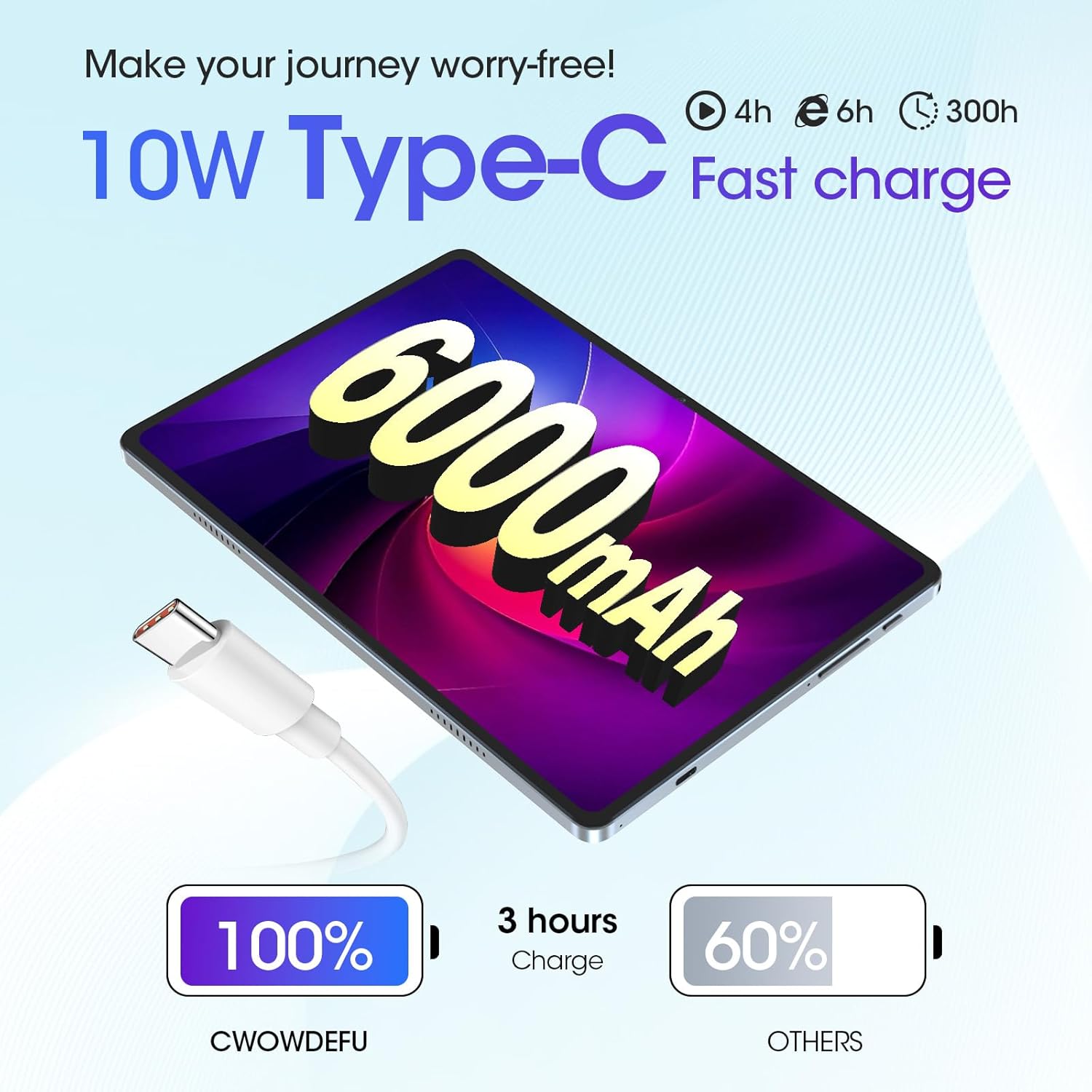
Image 3.1: The tablet features a 6000mAh battery and supports 10W Type-C fast charging.
3.2 ການໃສ່ແຜ່ນ SIM ແລະ MicroSD
Your tablet supports dual SIM cards or one SIM card with a MicroSD card for expanded storage.
- ຊອກຫາຖາດຊິມກາດ/MicroSD ຢູ່ດ້ານຂ້າງຂອງແທັບເລັດ.
- Insert the SIM-needle into the small hole next to the tray to eject it.
- Place your Nano SIM card(s) and/or MicroSD card into the designated slots on the tray. Ensure correct orientation.
- ຍູ້ຖາດກັບໄປໃສ່ແທັບເລັດຄ່ອຍໆ ຈົນກວ່າມັນຈະກົດໃສ່ບ່ອນ.

Image 3.2: The tablet's SIM and MicroSD card tray, illustrating its dual SIM and phone functionality.
3.3 ການເປີດ/ປິດ
- ເພື່ອເປີດເຄື່ອງ: Press and hold the Power button until the CWOWDEFU logo appears.
- ປິດເຄື່ອງ: Press and hold the Power button until the power options appear, then select "Power off."
- ເພື່ອເລີ່ມຕົ້ນໃໝ່: Press and hold the Power button until the power options appear, then select "Restart."
3.4 ການຕັ້ງຄ່າຄັ້ງທໍາອິດ
ເມື່ອເປີດເຄື່ອງຄັ້ງທຳອິດ, ໃຫ້ປະຕິບັດຕາມຄຳແນະນຳໃນໜ້າຈໍເພື່ອຕັ້ງຄ່າແທັບເລັດຂອງທ່ານ:
- ເລືອກພາສາທີ່ທ່ານຕ້ອງການ.
- ເຊື່ອມຕໍ່ກັບເຄືອຂ່າຍ Wi-Fi.
- ເຂົ້າສູ່ລະບົບດ້ວຍບັນຊີ Google ຂອງທ່ານ ຫຼືສ້າງອັນໃໝ່.
- Review ແລະຍອມຮັບຂໍ້ກໍານົດແລະເງື່ອນໄຂ.
- ຕັ້ງຄ່າການລັອກໜ້າຈໍ (PIN, ຮູບແບບ, ລະຫັດຜ່ານ, ຫຼື Face ID).
4. ການດໍາເນີນງານພື້ນຖານ
4.1 ທ່າທາງໜ້າຈໍສຳຜັດ
Navigate your tablet using standard Android touchscreen gestures:
- ແຕະ: ເລືອກລາຍການ ຫຼືເປີດແອັບ.
- ແຕະຄ້າງໄວ້: ເຂົ້າເຖິງເມນູບໍລິບົດ ຫຼືຍ້າຍລາຍການ.
- ປັດ: ເລື່ອນຜ່ານໜ້າຈໍ ຫຼືລາຍການຕ່າງໆ.
- ເມື່ອເຂົ້າຕາຈົນ: ຊູມເຂົ້າ ຫຼືອອກໃນຮູບພາບ ແລະ web ໜ້າ.
4.2 ການເຊື່ອມຕໍ່
- 4G LTE: Insert a compatible SIM card to access mobile data and make calls.
- Wi-Fi: Connect to wireless networks via Settings > Network & internet > Wi-Fi. The tablet supports 2.4/5G WiFi.
- Bluetooth: ຈັບຄູ່ກັບອຸປະກອນ Bluetooth ເຊັ່ນ: ຫູຟັງ ຫຼື ລຳໂພງຜ່ານການຕັ້ງຄ່າ > ອຸປະກອນທີ່ເຊື່ອມຕໍ່ > Bluetooth.
- GPS: ນໍາໃຊ້ການບໍລິການສະຖານທີ່ສໍາລັບການນໍາທາງແລະແອັບຯທີ່ອີງໃສ່ສະຖານທີ່.
4.3 ຄຸນສົມບັດ Android 14
Your tablet runs on the latest Android 14 operating system, offering enhanced features and security.
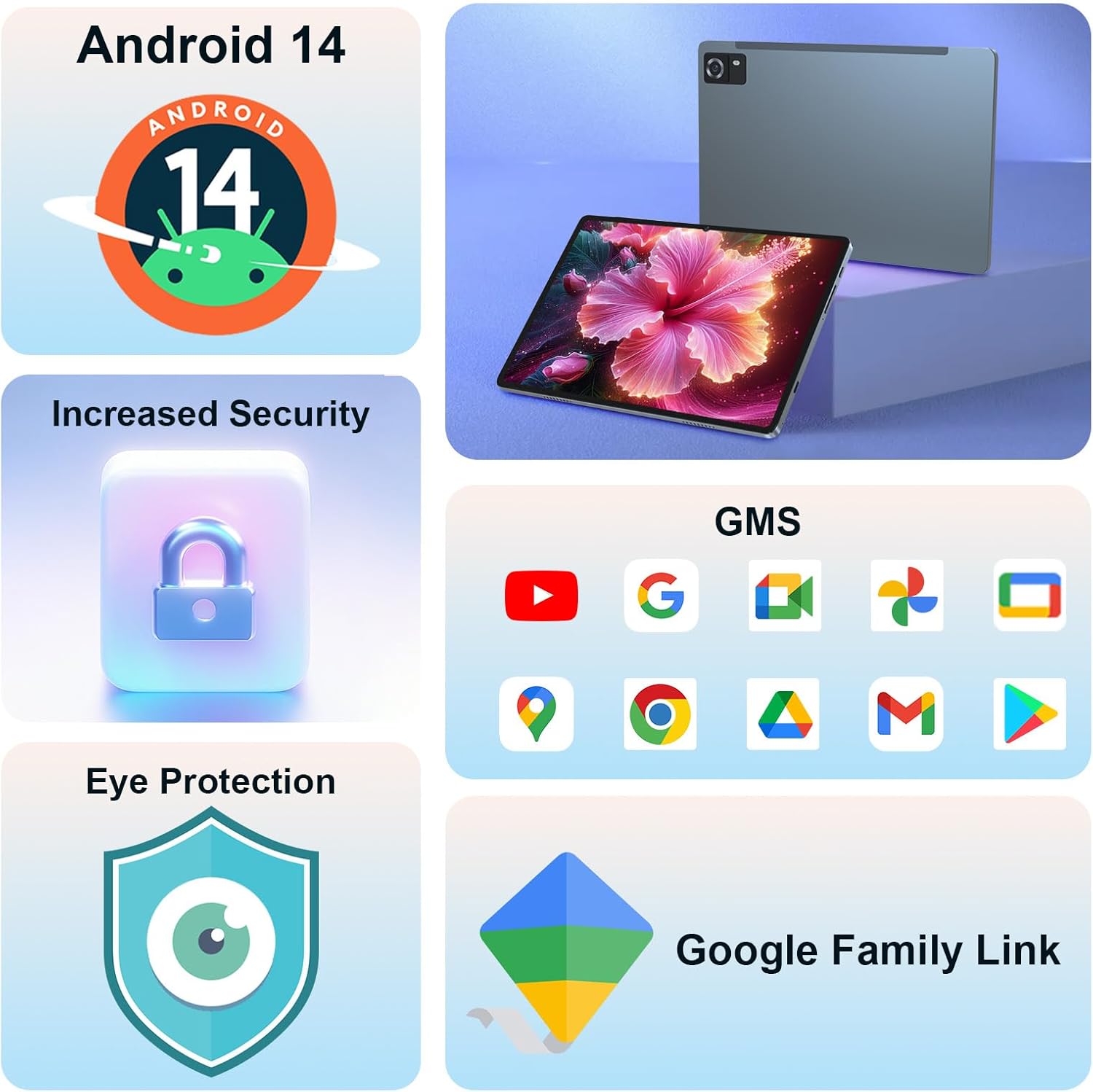
Image 4.1: Android 14 provides increased security, GMS certification for Google services, eye protection features, and Google Family Link for parental controls.
- GMS ຮັບຮອງ: Access to all Google Mobile Services, including Google Play Store, Gmail, Maps, and YouTube.
- ຄວາມປອດໄພເພີ່ມຂຶ້ນ: Benefit from the latest Android security updates and privacy controls.
- Google Family Link: Manage your children's app usage, screen time, and device settings if used as a kid's tablet.
- ໜ້າຈໍແຍກ: Use two apps simultaneously for improved multitasking.
4.4 Display and Multimedia
The 10.1-inch Incell screen offers a high resolution for clear visuals.

Image 4.2: The 2K screen (1920*1200) provides a detailed and realistic picture, ideal for multimedia consumption.
- 2K Screen (1920x1200): Enjoy sharp and vibrant images and videos.
- Widevine L1 ສະຫນັບສະຫນູນ: Stream high-definition content from supported platforms.
- ລຳ ໂພງຄູ່: Experience enhanced audio for movies and music.
4.5 Camera and Face ID
The tablet is equipped with a 13MP rear camera and supports Face ID for convenient unlocking.

Image 4.3: The tablet features a 13MP camera and Face ID for secure and quick access.
5. ການບໍາລຸງຮັກສາແລະການດູແລ
ການດູແລທີ່ເຫມາະສົມເຮັດໃຫ້ແນ່ໃຈວ່າການຍາວນານແລະການປະຕິບັດທີ່ດີທີ່ສຸດຂອງເມັດຂອງທ່ານ.
- ທໍາຄວາມສະອາດ: ໃຊ້ຜ້າທີ່ອ່ອນໆ, ບໍ່ມີສານດ່າງເພື່ອເຮັດຄວາມສະອາດຫນ້າຈໍແລະຮ່າງກາຍ. ຫຼີກເວັ້ນການສານເຄມີທີ່ຮຸນແຮງ.
- ການເພີ່ມປະສິດທິພາບຫມໍ້ໄຟ: To maximize battery life, avoid extreme temperatures, use the provided charger, and manage background app usage.
- ອັບເດດຊອບແວ: Regularly check for and install system updates to ensure security and performance improvements. Go to Settings > System > System update.
- ການຈັດການການເກັບຮັກສາ: ລ້າງບໍ່ຈໍາເປັນເປັນໄລຍະ files and apps to maintain optimal performance. The tablet has 256GB ROM, expandable up to 1TB with a MicroSD card.

Image 5.1: The tablet features 16GB RAM (8GB physical + 8GB virtual) and 256GB ROM, expandable to 1TB, powered by an Octa-core processor.
6. ການແກ້ໄຂບັນຫາ
ພາກສ່ວນນີ້ແກ້ໄຂບັນຫາທົ່ວໄປທີ່ທ່ານອາດຈະພົບກັບແທັບເລັດຂອງທ່ານ.
| ສະບັບ | ການແກ້ໄຂທີ່ເປັນໄປໄດ້ |
|---|---|
| Tablet is slow or freezes | Close unused apps, clear cache, restart the tablet. Ensure sufficient storage space. |
| ແບັດເຕີຣີໝົດໄວ | Reduce screen brightness, disable unused features (Wi-Fi, Bluetooth, GPS), close background apps. Check for app updates. |
| Cannot connect to Wi-Fi/4G LTE | Ensure Wi-Fi/mobile data is enabled. Restart router/tablet. Check SIM card insertion. Verify network settings. |
| ແອັບຂັດຂ້ອງ ຫຼື ບໍ່ຕອບສະໜອງ | Clear app cache/data (Settings > Apps), update the app, or uninstall and reinstall. |
| ອຸປະກອນຮ້ອນເກີນໄປ | Avoid using the tablet in direct sunlight or poorly ventilated areas. Close resource-intensive applications. |
7. ຂໍ້ມູນຈໍາເພາະ
Detailed technical specifications for the CWOWDEFU P16 Android Tablet.

ຮູບພາບ 7.1: ຫຼາຍກວ່າview of the tablet's core specifications and features.
| ຄຸນສົມບັດ | ຂໍ້ມູນຈໍາເພາະ |
|---|---|
| ຊື່ຕົວແບບ | P16 |
| ລະບົບປະຕິບັດການ | Android 14 |
| ຂະໜາດໜ້າຈໍ | 10.1 ນິ້ວ |
| ຄວາມລະອຽດໜ້າຈໍ | 1920 x 1200 Pixels (2K Incell) |
| ໂຮງງານຜະລິດ | Unisoc T616 ແປດແກນ (2 GHz) |
| RAM | 16 GB (8GB ທາງກາຍະພາບ + 8GB virtual) |
| ບ່ອນຈັດເກັບຂໍ້ມູນພາຍໃນ (ROM) | 256 GB |
| ການເກັບຮັກສາທີ່ຂະຫຍາຍໄດ້ | Up to 1 TB via MicroSD card |
| ປະເພດໄຮ້ສາຍ | 802.11g (Wi-Fi 2.4/5G) |
| ການເຊື່ອມຕໍ່ໂທລະສັບມືຖື | 4G LTE (Dual SIM dual standby) |
| ແບັດເຕີຣີ | 6000 mAh Lithium Polymer |
| ກຳລັງສາກໄຟ | ສາກໄວ 10W ປະເພດ-C |
| ກ້ອງຫຼັງ | 13 MP |
| ຄຸນນະສົມບັດຄວາມປອດໄພ | Face ID |
| ນ້ໍາຫນັກລາຍການ | 1.79 ປອນ |
| ຂະໜາດສິນຄ້າ | 9.5 x 0.3 x 6.3 ນິ້ວ |
8. ການຮັບປະກັນແລະການສະຫນັບສະຫນູນ
CWOWDEFU products come with a 14-day no-questions-asked return policy and a 1-year warranty.
For any questions or assistance with your CWOWDEFU P16 Android Tablet, please contact our customer support team. We are available 24/7 to assist you.
- ບໍລິການລູກຄ້າ: Refer to the contact information provided in your product packaging or visit the official CWOWDEFU webເວັບໄຊ.
- ຊັບພະຍາກອນອອນໄລນ໌: Check the CWOWDEFU brand store on Amazon for FAQs and additional product information: CWOWDEFU Store


