ແນະນຳ
This manual provides detailed instructions for the operation and maintenance of your WIITHINK WTB-795S Portable Cassette Player Recorder. This device combines classic audio playback with modern features, including AM/FM/SW radio, Bluetooth connectivity, USB/SD card playback, and MP3 conversion capabilities. Please read this manual thoroughly before using the product to ensure proper function and longevity.
ຂໍ້ມູນຄວາມປອດໄພ
- ຫ້າມບໍ່ໃຫ້ອຸປະກອນຖືກຝົນ ຫຼື ຄວາມຊຸ່ມຊື້ນເພື່ອປ້ອງກັນໄຟ ຫຼື ໄຟຟ້າຊັອດ.
- ຫ້າມເປີດຄasing. ອ້າງເຖິງການບໍລິການກັບບຸກຄະລາກອນທີ່ມີຄຸນວຸດທິເທົ່ານັ້ນ.
- ຫຼີກເວັ້ນການວາງເຄື່ອງໄວ້ໃກ້ກັບແຫຼ່ງຄວາມຮ້ອນ ຫຼືຢູ່ໃນແສງແດດໂດຍກົງ.
- ຮັບປະກັນການລະບາຍອາກາດທີ່ເຫມາະສົມ; ຫ້າມປິດປະຕູລະບາຍອາກາດ.
- ໃຊ້ພຽງແຕ່ອະແດບເຕີພະລັງງານຫຼືຫມໍ້ໄຟທີ່ລະບຸ.
- ຮັກສາໃຫ້ໄກຈາກເດັກນ້ອຍ.
ເນື້ອໃນຊຸດ
ກວດສອບວ່າລາຍການທັງຫມົດແມ່ນມີຢູ່ໃນຊຸດ:
- WIITHINK WTB-795S Portable Cassette Player Recorder
- ສາຍໄຟຟ້າ AC
- ຄູ່ມືຜູ້ໃຊ້ (ເອກະສານນີ້)
ສິນຄ້າເກີນview
The WIITHINK WTB-795S is a versatile audio device designed for both classic and modern listening experiences. It features a cassette player and recorder, AM/FM/SW radio, Bluetooth connectivity, and USB/SD card playback with MP3 conversion capabilities.

ຮູບພາບ: ທາງຫນ້າ view of the WIITHINK WTB-795S Portable Cassette Player Recorder, showing the cassette deck, radio tuner, and speakers.
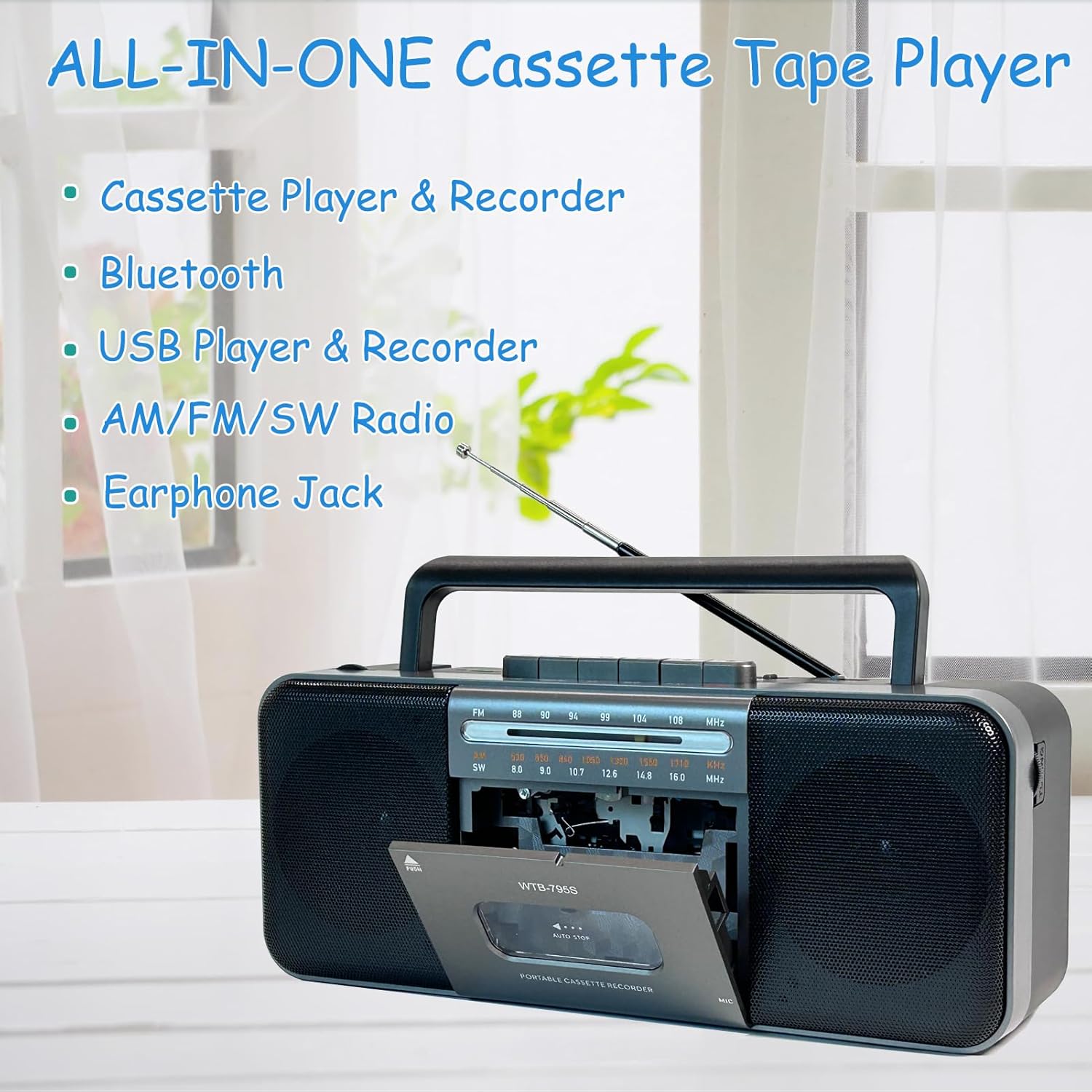
Image: Diagram highlighting the all-in-one features of the WTB-795S, including Cassette Player & Recorder, Bluetooth, USB Player & Recorder, AM/FM/SW Radio, and Earphone Jack.
ຄຸນນະສົມບັດທີ່ສໍາຄັນ:
- ເຄື່ອງຫຼິ້ນ ແລະ ເຄື່ອງບັນທຶກສຽງເທບ: Play and record audio to cassette tapes.
- AM/FM/SW Radio: Built-in tuner for receiving various radio bands.
- ການເຊື່ອມຕໍ່ Bluetooth: ການຖ່າຍທອດສຽງແບບໄຮ້ສາຍຈາກອຸປະກອນທີ່ເຂົ້າກັນໄດ້.
- USB/SD Card Playback & Recording: ຫຼິ້ນສຽງ files from USB drives and SD cards, and record to them.
- MP3 Converter: Convert cassette audio to MP3 format on USB/SD.
- ໄມໂຄຣໂຟນໃນຕົວ: For direct voice recording.
- 10W Dual Speakers: Provides clear and powerful stereo sound (radio is mono).
- ຫູຟັງຫູຟັງ: ສໍາລັບການຟັງສ່ວນຕົວ.
- AC/DC Powered: Operates with AC power cable or batteries for portability.
ຕັ້ງຄ່າ
ການເປີດອຸປະກອນ:
The WTB-795S can be powered by either AC electricity or batteries.
ໄຟຟ້າ AC:
- ໃຫ້ແນ່ໃຈວ່າເຄື່ອງຖືກປິດ.
- Connect the supplied AC power cable to the AC input jack on the back of the unit.
- Plug the other end of the AC power cable into a standard wall outlet.
ພະລັງງານຫມໍ້ໄຟ:
For portable use, the unit requires 4 x D-size batteries (not included) or 2 x 18650 button-top rechargeable batteries (not included).

ຮູບພາບ: ດ້ານຫລັງ view of the WTB-795S showing the battery compartments for 4 D-size batteries and 2 18650 button-top rechargeable batteries, along with the AC power input. Note: Only button-top 18650 batteries are compatible.
- ເປີດຝາປິດຊ່ອງໃສ່ຫມໍ້ໄຟຢູ່ດ້ານຫຼັງຂອງໜ່ວຍ.
- Insert 4 D-size batteries or 2 18650 button-top rechargeable batteries, observing the correct polarity (+/-) as indicated inside the compartment.
- ປິດຝາປິດຊ່ອງໃສ່ຫມໍ້ໄຟຢ່າງປອດໄພ.
- ໝາຍເຫດ: The 18650 battery compartment only accommodates button-top battery models. Flat-top battery models cannot be used.
ເສົາອາກາດ:
Extend the telescopic antenna for optimal FM and SW radio reception. For AM reception, rotate the unit for best signal.
ຄໍາແນະນໍາການດໍາເນີນງານ
1. Cassette Playback and Recording

Image: A person holding a cassette tape, with the WTB-795S in the foreground showing the open cassette deck, illustrating its cassette playback and recording function.
ການຫຼິ້ນເທບຄາເຊັດ:
- ກົດ STOP/EJECT ປຸ່ມເພື່ອເປີດປະຕູ cassette.
- ໃສ່ເທບເທບທີ່ມີຂອບເປີດຫັນໄປທາງເທິງ.
- ປິດປະຕູ cassette.
- ກົດ ຫຼິ້ນ ປຸ່ມເພື່ອເລີ່ມຕົ້ນການຫຼິ້ນ
- ປັບ ປະລິມານ knob to your desired level.
- ໃຊ້ ກ້າວໄປໜ້າໄວ (FF) or ຖອຍຫຼັງ (REW) ປຸ່ມເພື່ອນໍາທາງ tape ໄດ້.
- ກົດ STOP/EJECT ເພື່ອຢຸດການຫຼິ້ນ.
ການບັນທຶກສຽງໃສ່ເທບ:
You can record from the built-in microphone, radio, or external sources (via Bluetooth/USB/SD).
- ໃສ່ tape cassette ເປົ່າຫຼືບັນທຶກໄດ້.
- Select the desired source (e.g., Radio, Bluetooth, USB/SD).
- ກົດ ບັນທຶກ ປຸ່ມ (ປົກກະຕິແລ້ວສີແດງ) ພ້ອມກັນກັບ ຫຼິ້ນ button. The recording will begin.
- For microphone recording, ensure the microphone is unobstructed.
- ກົດ STOP/EJECT ເພື່ອຢຸດການບັນທຶກ.
2. Radio Operation (AM/FM/SW)

Image: An elderly man smiling while listening to the WTB-795S, which has its telescopic antenna extended, demonstrating its radio function.
- ຕັ້ງຄ່າປ່ຽນການເຮັດວຽກກັບ ວິທະຍຸ.
- Select the desired band: AM, FM, ຫຼື SW using the band selector switch.
- Extend the telescopic antenna for FM and SW reception. Rotate the unit for optimal AM reception.
- ໝຸນ Tuning ປຸ່ມເພື່ອຊອກຫາສະຖານີທີ່ທ່ານຕ້ອງການ.
- ປັບ ປະລິມານ ລູກບິດ.
3. ແບບ Bluetooth

Image: A hand holding a smartphone displaying a music app, with the WTB-795S on a table in the background, indicating Bluetooth connectivity.
- ຕັ້ງຄ່າປ່ຽນການເຮັດວຽກກັບ Bluetooth. The unit will enter pairing mode, indicated by an audible prompt or flashing indicator.
- On your Bluetooth-enabled device (smartphone, tablet, etc.), search for available devices.
- Select "WTB-795S" from the list to pair.
- Once paired, you can stream audio from your device to the WTB-795S.
- Adjust volume on both the unit and your connected device.
4. USB/SD Card Playback and Recording

Image: The WTB-795S with a red USB flash drive inserted into its USB port, demonstrating its USB playback and recording capabilities.
Playing from USB/SD:
- ສຽບ USB flash drive ເຂົ້າໄປໃນຜອດ USB ຫຼື SD card ເຂົ້າໄປໃນຊ່ອງ SD card.
- ຕັ້ງຄ່າປ່ຽນການເຮັດວຽກກັບ USB/SD.
- ເຄື່ອງຈະກວດຫາ ແລະ ເລີ່ມຫຼິ້ນສຽງທີ່ເຂົ້າກັນໄດ້ໂດຍອັດຕະໂນມັດ files (ຮູບແບບ MP3).
- Use the playback control buttons (Play/Pause, Next, Previous) to manage your audio.
- ໝາຍເຫດ: Compatible with FAT32 file systems only. NTFS is not supported.
Recording to USB/SD (MP3 Conversion):
You can convert audio from cassette tapes to MP3 format on a USB drive or SD card.
- Insert a USB flash drive or SD card.
- Insert the cassette tape you wish to convert.
- ກົດ ຫຼິ້ນ ປຸ່ມຢູ່ເທິງແຜ່ນເທບຄາເຊັດ.
- ກົດ ບັນທຶກ button (often labeled 'USB/SD Record' or similar, refer to unit markings) to start converting the cassette audio to MP3 on the inserted USB/SD media.
- ກົດ ຢຸດ to end the conversion.
5. ຫູຟັງ Jack

Image: A woman wearing headphones and listening to the WTB-795S, illustrating the use of the earphone jack for private listening.
Plug standard 3.5mm headphones into the earphone jack for private listening. The main speakers will be muted when headphones are connected.
ບໍາລຸງຮັກສາ
ທໍາຄວາມສະອາດຫນ່ວຍບໍລິການ:
- ເຊັດດ້ານນອກດ້ວຍຜ້າອ່ອນ, ແຫ້ງ.
- ຢ່າໃຊ້ເຄື່ອງເຮັດຄວາມສະອາດຂັດຫຼືສານລະລາຍ.
- For the cassette head and pinch roller, use a cotton swab lightly dampened with isopropyl alcohol. Clean gently to remove tape residue.
Cassette Tape Care:
- Store tapes away from direct sunlight and extreme temperatures.
- Avoid touching the tape surface.
- Periodically fast forward and rewind tapes to prevent sticking.
ການແກ້ໄຂບັນຫາ
| ບັນຫາ | ສາເຫດທີ່ເປັນໄປໄດ້ | ການແກ້ໄຂ |
|---|---|---|
| ບໍ່ມີພະລັງງານ | ສາຍ AC ບໍ່ເຊື່ອມຕໍ່; ແບັດເຕີຣີໝົດ ຫຼືໃສ່ບໍ່ຖືກຕ້ອງ. | Check AC cable connection; Replace or correctly insert batteries. |
| ບໍ່ມີສຽງ | ລະດັບສຽງຕໍ່າເກີນໄປ; ເຊື່ອມຕໍ່ຫູຟັງແລ້ວ; ເລືອກໂໝດບໍ່ຖືກຕ້ອງ. | Increase volume; Disconnect headphones; Select correct function mode. |
| ການຮັບວິທະຍຸທີ່ບໍ່ດີ | ເສົາອາກາດບໍ່ໄດ້ຂະຫຍາຍ; ສັນຍານອ່ອນ. | Extend telescopic antenna; Rotate unit for better signal. |
| Cassette playback distorted/slow | Tape head dirty; Tape worn out; Batteries low. | Clean tape head; Try a different tape; Replace batteries. |
| USB/SD ບໍ່ຫຼິ້ນ | ບໍ່ຖືກຕ້ອງ file format; Incompatible file system (NTFS); Media not inserted correctly. | ຮັບປະກັນ files are MP3; Format media to FAT32; Reinsert USB/SD card. |
| Bluetooth ບໍ່ເຊື່ອມຕໍ່ | Unit not in pairing mode; Device too far; Bluetooth off on source device. | Ensure unit is in Bluetooth mode; Bring devices closer; Enable Bluetooth on source device. |
ຂໍ້ມູນຈໍາເພາະ
| ຄຸນສົມບັດ | ລາຍລະອຽດ |
|---|---|
| ຕົວແບບ | WTB-795S |
| ຂະໜາດສິນຄ້າ (L x W x H) | 11 x 5 x 2 ນິ້ວ (27.9 x 12.7 x 5.1 cm) |
| ນ້ໍາຫນັກລາຍການ | 3.41 ປອນ (1.55 ກິໂລ) |
| ເຕັກໂນໂລຊີການເຊື່ອມຕໍ່ | Bluetooth, USB |
| ປະເພດລຳໂພງ | Stereo (2 x 5W) |
| ແຫຼ່ງພະລັງງານ | AC Power (included adapter) or DC Battery (4 x D-size or 2 x 18650 button-top, not included) |
| ຄວາມຖີ່ວິທະຍຸ | AM: 530-1710kHz, FM: 88-108MHz, SW: 8.0-16.0MHz |
| ຄວາມເຂົ້າກັນໄດ້ຂອງ USB/SD | FAT32 file system, MP3 format |
ການຮັບປະກັນແລະການສະຫນັບສະຫນູນ
WIITHINK is committed to customer satisfaction. This product comes with an 18-month replacement policy and lifetime technical support.
ຕິດຕໍ່ສະຫນັບສະຫນູນ:
For any inquiries or issues, please contact WIITHINK customer support through your purchase platform (e.g., Amazon Buyer-Seller Message) or refer to the contact information provided with your product packaging.
ແຜນການປົກປ້ອງທາງເລືອກ:
ແຜນການປົກປ້ອງແບບຂະຫຍາຍອາດມີໃຫ້ຊື້ແຍກຕ່າງຫາກ:
- ແຜນການປົກປ້ອງ 2 ປີ
- ແຜນການປົກປ້ອງ 3 ປີ
- Complete Protect (ແຜນການລາຍເດືອນທີ່ກວມເອົາການຊື້ທີ່ມີສິດ)
Please refer to the specific terms and conditions of these plans at the time of purchase.


