1. ບົດແນະນຳ
ຂອບໃຈສໍາລັບການຊື້asing the 5 Core PLB 8X2 2MIC Bluetooth Party Speaker. This portable PA system is designed to deliver powerful audio with versatile connectivity options, including Bluetooth, AUX, USB, and SD card. It features dynamic disco lights and comes with two wireless microphones for karaoke and public address. Please read this manual thoroughly before operating the device to ensure proper use and to maximize its performance.
2. ຄໍາແນະນໍາຄວາມປອດໄພ
- Do not expose the speaker to rain or moisture to prevent fire or electric shock.
- ຫ້າມເປີດລຳໂພງ ຄasing. ບໍ່ມີສ່ວນທີ່ຜູ້ໃຊ້ບໍລິການພາຍໃນ. ອ້າງອີງການບໍລິການທັງໝົດໃຫ້ກັບບຸກຄະລາກອນທີ່ມີຄຸນວຸດທິ.
- ວາງລຳໂພງໄວ້ເທິງພື້ນຜິວທີ່ໝັ້ນຄົງ ແລະ ຮາບພຽງເພື່ອປ້ອງກັນບໍ່ໃຫ້ມັນຕົກ.
- ເກັບຮັກສາລຳໂພງໃຫ້ຫ່າງຈາກແຫຼ່ງຄວາມຮ້ອນເຊັ່ນ: ເຄື່ອງເຮັດຄວາມຮ້ອນ, ເຄື່ອງບັນທຶກຄວາມຮ້ອນ, ເຕົາໄຟ, ຫຼືອຸປະກອນອື່ນໆ (ລວມທັງ amplifiers) ທີ່ຜະລິດຄວາມຮ້ອນ.
- ໃຊ້ພຽງແຕ່ໄຟລ໌ແນບ/ອຸປະກອນເສີມທີ່ລະບຸໂດຍຜູ້ຜະລິດ.
- ຖອດປລັກລຳໂພງອອກໃນລະຫວ່າງມີພະຍຸຟ້າຜ່າ ຫຼື ເມື່ອບໍ່ໄດ້ໃຊ້ເປັນເວລາດົນ.
- ຮັບປະກັນການລະບາຍອາກາດທີ່ເຫມາະສົມ. ຫ້າມປິດຊ່ອງລະບາຍອາກາດໃດໆ.
3. ເນື້ອໃນຊຸດ
Carefully unpack your 5 Core PLB 8X2 2MIC speaker and ensure all items listed below are present and in good condition:
- 1x 5 Core PLB 8X2 2MIC Bluetooth Party Speaker
- ໄມໂຄຣໂຟນໄຮ້ສາຍ 2x
- 1x ການຄວບຄຸມໄລຍະໄກ
- 1x Power Adapter/Charger
- 1x ຄູ່ມືຜູ້ໃຊ້
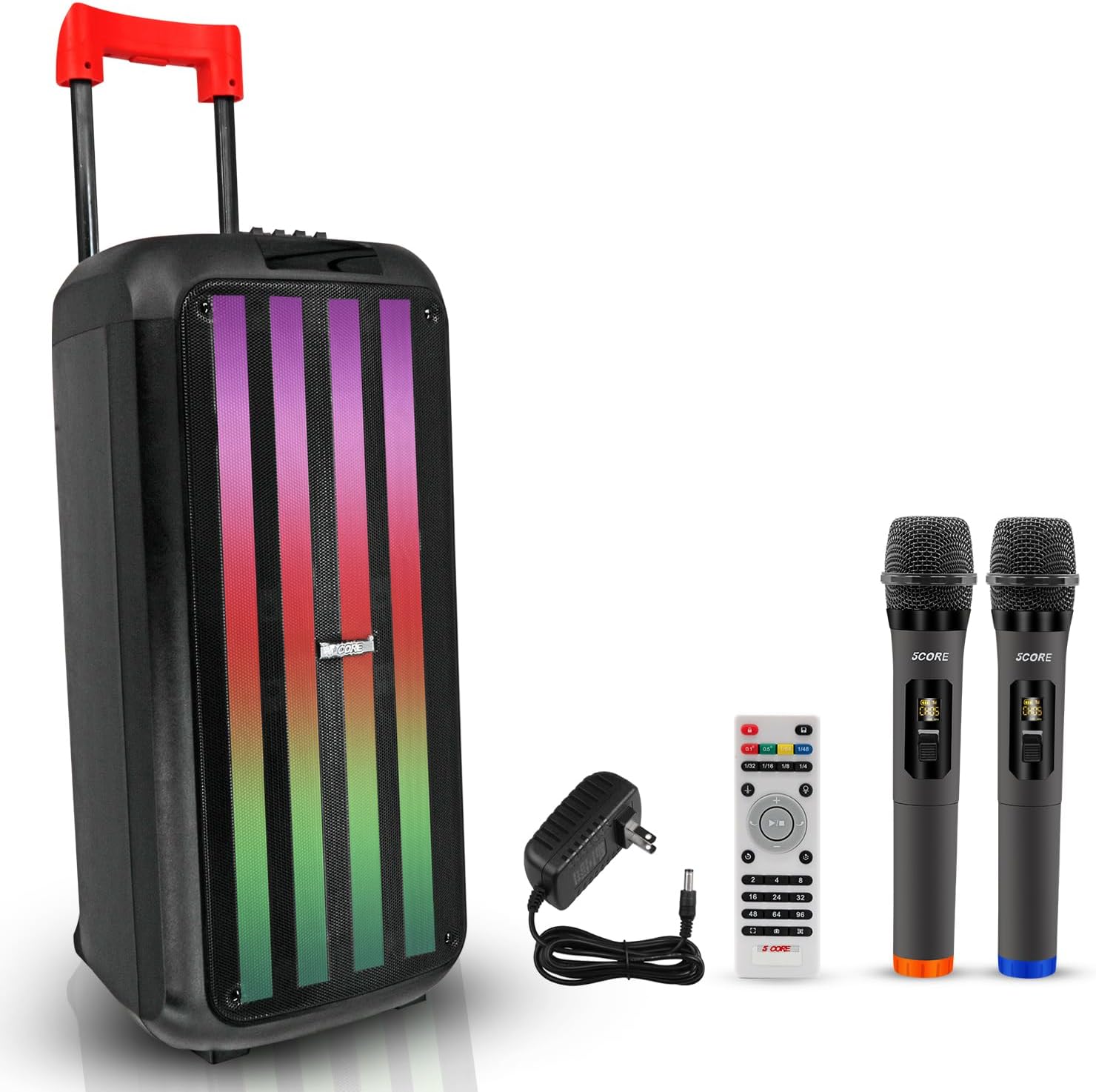
Image 3.1: The 5 Core PLB 8X2 2MIC Bluetooth Party Speaker shown with its included accessories: two wireless microphones, a remote control, and a power adapter.
4. ຜະລິດຕະພັນເກີນview
The 5 Core PLB 8X2 2MIC is a powerful and portable audio system designed for various events. It features a robust 400W peak power output, delivering clear sound with deep bass through its two 8-inch speakers. The speaker includes built-in dynamic LED disco lights to enhance the atmosphere. For ease of transport, it is equipped with a retractable handle and built-in wheels. Multiple connectivity options ensure versatile audio playback.

ຮູບພາບ 4.1: ລາຍລະອຽດ view of the speaker's control panel, highlighting various inputs and adjustment knobs for volume, equalizer, and microphone controls.

ຮູບພາບ 4.2: ມີການລະເບີດ view illustrating the two 8-inch woofers, emphasizing the two-way audio crossover system for wide sound transmission.
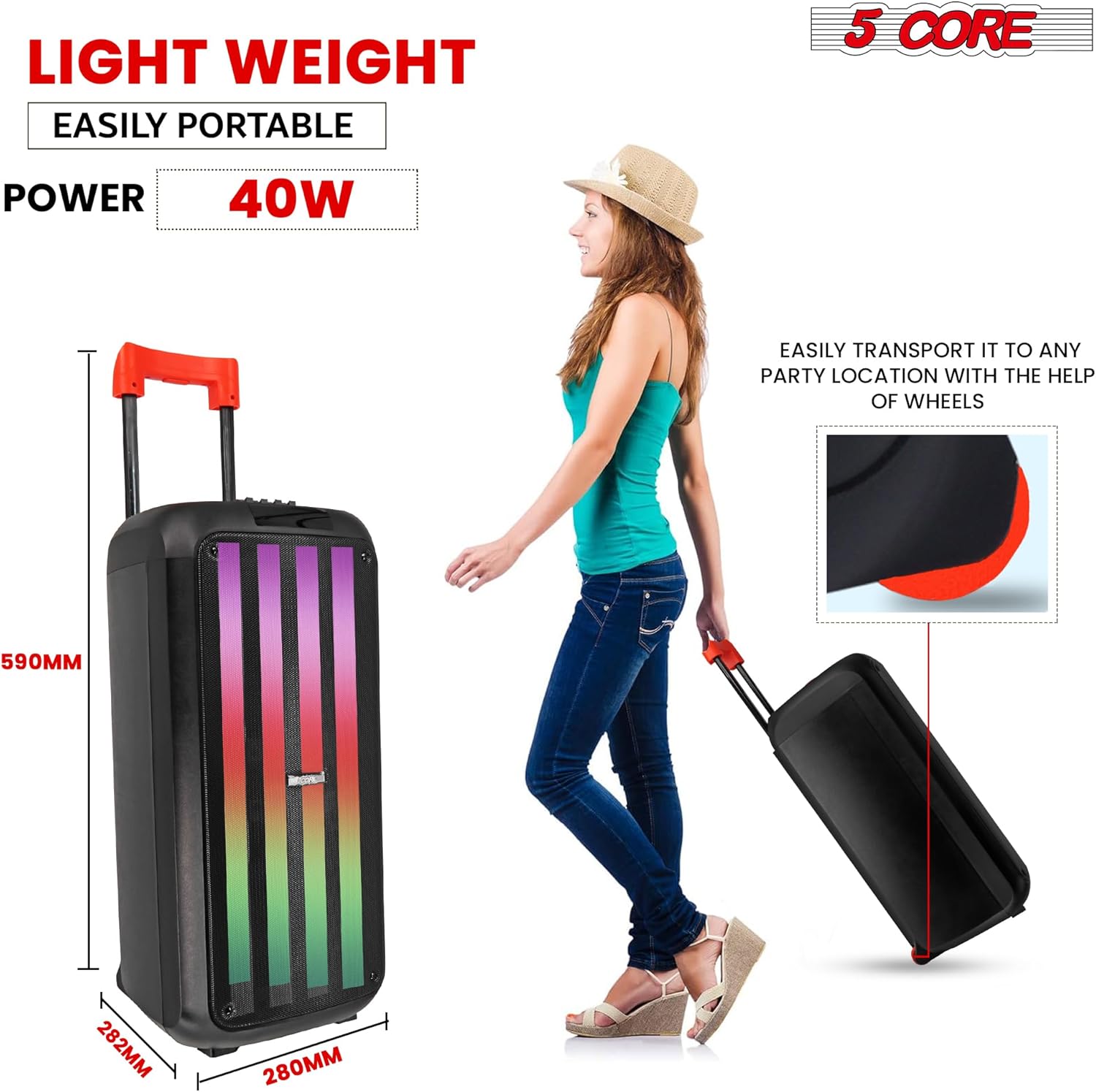
Image 4.3: The speaker being transported using its retractable handle and built-in wheels, demonstrating its portability.
5. ຕັ້ງຄ່າ
5.1 ກຳລັງສາກລຳໂພງ
- Locate the DC 9V IN port on the speaker's control panel.
- Connect the provided power adapter to the DC 9V IN port.
- ສຽບອະແດບເຕີໄຟເຂົ້າໄປໃນປລັກໄຟຟ້າມາດຕະຖານ.
- The charging indicator light will illuminate. Allow approximately 4 hours for a full charge.
- ເມື່ອສາກໄຟເຕັມແລ້ວ, ໃຫ້ຖອດອະແດບເຕີໄຟອອກ.
5.2 ການເປີດ/ປິດ
- ເພື່ອເປີດລຳໂພງ, ໃຫ້ກົດຄ້າງໄວ້ ພະລັງງານ ປຸ່ມເທິງແຜງຄວບຄຸມ.
- To power off the speaker, press and hold the ພະລັງງານ ປຸ່ມອີກເທື່ອຫນຶ່ງ.
5.3 ການເຊື່ອມຕໍ່ໄມໂຄຣໂຟນໄຮ້ສາຍ
- ກວດໃຫ້ແນ່ໃຈວ່າໄດ້ເປີດລຳໂພງແລ້ວ.
- ໃສ່ແບັດເຕີລີສົດໃສ່ແຕ່ລະໄມໂຄຣໂຟນໄຮ້ສາຍ.
- ເປີດໄມໂຄຣໂຟນໂດຍໃຊ້ສະວິດເປີດ/ປິດຂອງພວກມັນ.
- The microphones should automatically connect to the speaker. If not, refer to the troubleshooting section.
- ປັບລະດັບສຽງໄມໂຄຣໂຟນໂດຍໃຊ້ປຸ່ມ M.Volume knob on the speaker's control panel.
6. ຄໍາແນະນໍາການດໍາເນີນງານ
6.1 ການຈັບຄູ່ Bluetooth
- Power on the speaker. The speaker will automatically enter Bluetooth pairing mode, indicated by a flashing Bluetooth icon on the digital display.
- ໃນອຸປະກອນມືຖືຂອງທ່ານ, ເປີດໃຊ້ Bluetooth ແລະຊອກຫາອຸປະກອນທີ່ມີຢູ່.
- Select "5 CORE PLB 8X2 2MIC" from the list of devices.
- Once paired, the speaker will emit a confirmation tone, and the Bluetooth icon will stop flashing.
- ດຽວນີ້ທ່ານສາມາດຫຼິ້ນສຽງຈາກອຸປະກອນຂອງທ່ານຜ່ານລຳໂພງໄດ້.
6.2 AUX Input
- ເຊື່ອມຕໍ່ປາຍດ້ານໜຶ່ງຂອງສາຍສຽງ 3.5 ມມ (ບໍ່ລວມ) ເຂົ້າກັບ AUX input port on the speaker.
- ເຊື່ອມຕໍ່ປາຍອີກດ້ານໜຶ່ງຂອງສາຍເຂົ້າກັບຜົນຜະລິດສຽງຂອງອຸປະກອນພາຍນອກຂອງທ່ານ (ເຊັ່ນ: ໂທລະສັບສະຫຼາດ, ເຄື່ອງຫຼິ້ນ MP3).
- ກົດ ໂໝດ button on the speaker or remote control until "AUX" is displayed.
- ຫຼິ້ນສຽງຈາກອຸປະກອນພາຍນອກຂອງທ່ານ.
6.3 ການຫຼິ້ນບັດ USB/SD
- ໃສ່ USB flash drive ເຂົ້າໄປໃນ USB ພອດ ຫຼື ບັດ SD ເຂົ້າໄປໃນ TF (SD card) slot.
- ລຳໂພງຈະກວດພົບອຸປະກອນເກັບຂໍ້ມູນໂດຍອັດຕະໂນມັດ ແລະເລີ່ມຫຼິ້ນສຽງທີ່ເຂົ້າກັນໄດ້ fileຖ້າບໍ່, ໃຫ້ກົດປຸ່ມ ໂໝດ button to switch to USB or SD mode.
- ໃຊ້ ກ່ອນ/ຕໍ່ໄປ ປຸ່ມເພື່ອນໍາທາງຕິດຕາມແລະ ຫຼິ້ນ/ຢຸດຊົ່ວຄາວ ປຸ່ມສຳລັບຄວບຄຸມການຫຼິ້ນຄືນ.
6.4 ຟັງຊັນຄາຣາໂອເກະ
With the two wireless microphones, you can enjoy karaoke or use the speaker for public address.
- Ensure microphones are connected as described in Section 5.3.
- Adjust the microphone volume (M.Volume) and echo effect (M.ECHO) using the dedicated knobs on the control panel.
- Adjust the main music volume (ປະລິມານ) to balance with the microphone audio.
ການຄວບຄຸມໄຟ LED 6.5 ໜ່ວຍ
The speaker features dynamic LED disco lights.
- ກົດ ຮູບແບບ LED button on the control panel to cycle through different light patterns or to turn the lights off.
6.6 ການປັບຄວາມສະເໝີພາບ
Fine-tune the audio output using the built-in equalizer.
- ໃຊ້ ຄວບຄຸມ ແລະ ເບສ sliders on the control panel to adjust the high and low frequencies of the audio.
Video 6.1: An official product video demonstrating the features and operation of the 5 Core Bluetooth DJ Speaker, including its sound output, connectivity options, and portability.
7. ບໍາລຸງຮັກສາ
- ທໍາຄວາມສະອາດ: ໃຊ້ຜ້າປຽກແຫ້ງເພື່ອເຮັດຄວາມສະອາດດ້ານນອກຂອງລຳໂພງ. ຢ່າໃຊ້ເຄື່ອງເຮັດຄວາມສະອາດຂອງແຫຼວຫຼືວັດສະດຸຂັດ.
- ການເກັບຮັກສາ: ເມື່ອບໍ່ໄດ້ໃຊ້ເປັນເວລາດົນ, ໃຫ້ເກັບຮັກສາລຳໂພງໄວ້ໃນບ່ອນເຢັນ, ແຫ້ງ, ຫ່າງຈາກແສງແດດໂດຍກົງ ແລະ ອຸນຫະພູມທີ່ຮ້າຍກາດ.
- ການດູແລຫມໍ້ໄຟ: To prolong battery life, avoid fully discharging the battery frequently. Charge the speaker regularly, even if not in active use.
8. ການແກ້ໄຂບັນຫາ
If you encounter any issues with your 5 Core PLB 8X2 2MIC speaker, please refer to the following common problems and solutions:
| ບັນຫາ | ສາເຫດທີ່ເປັນໄປໄດ້ | ການແກ້ໄຂ |
|---|---|---|
| ລຳໂພງບໍ່ເປີດ. | ແບັດເຕີຣີຕໍ່າ ຫຼື ບໍ່ມີພະລັງງານ. | Charge the speaker using the provided power adapter. Ensure the power adapter is securely connected to both the speaker and a working power outlet. |
| ລຳໂພງບໍ່ສາມາດສາກໄຟໄດ້. | Faulty power adapter or charging port. | Ensure the power adapter is functioning correctly. Try a different power outlet. If the issue persists, contact customer support. |
| ບໍ່ມີສຽງຈາກ ລຳ ໂພງ. | ລະດັບສຽງຕໍ່າເກີນໄປ, ໂໝດການປ້ອນຂໍ້ມູນບໍ່ຖືກຕ້ອງ, ຫຼື ແຫຼ່ງສຽງຖືກຕັດການເຊື່ອມຕໍ່. | Increase the speaker's ປະລິມານ. Ensure the correct input mode (Bluetooth, AUX, USB, SD) is selected. Verify the audio source is playing and connected properly. |
| ການເຊື່ອມຕໍ່ Bluetooth ລົ້ມເຫລວ. | ລຳໂພງບໍ່ຢູ່ໃນໂໝດຈັບຄູ່, ອຸປະກອນໄກເກີນໄປ, ຫຼືລົບກວນ. | Ensure the speaker is in Bluetooth pairing mode. Move your device closer to the speaker. Disconnect other Bluetooth devices from your source device. Try restarting both the speaker and your device. |
| ໄມໂຄຣໂຟນບໍ່ເຮັດວຽກ. | Microphone batteries low/dead, microphone not powered on, or volume too low. | Replace microphone batteries. Ensure microphones are switched on. Increase the M.Volume knob on the speaker. |
9. ຂໍ້ມູນຈໍາເພາະ
| ຄຸນສົມບັດ | ລາຍລະອຽດ |
|---|---|
| ໝາຍເລກຕົວແບບ | PLB 8X2 2MIC |
| ຜົນຜະລິດພະລັງງານ | ສູງສຸດ 400W, 40W RMS |
| ຂະໜາດຫົວໜ່ວຍລຳໂພງ | Double 8-inch Bass |
| ການເຊື່ອມຕໍ່ | Bluetooth, USB, SD Card, AUX, MIC Input |
| ລຸ້ນ Bluetooth | 5.0 |
| ແບັດເຕີຣີ | 7.4V 3600mAh |
| ເວລາຫຼິ້ນ | 5-8 ຊົ່ວໂມງ (ຂຶ້ນກັບການນໍາໃຊ້) |
| ເວລາສາກໄຟ | ປະມານ 4 ຊົ່ວໂມງ |
| ການຕອບສະໜອງຄວາມຖີ່ | 50Hz-17KHz |
| ວັດສະດຸ | Acrylonitrile Butadiene Styrene (ABS) |
| ຂະໜາດ | 280 x 282 x 590 ມມ (ປະມານ 11 x 11.1 x 23.2 ນິ້ວ) |
| ນ້ໍາຫນັກລາຍການ | 18.65 ປອນ |
10. ການຮັບປະກັນແລະການສະຫນັບສະຫນູນ
5 Core Inc. products are designed for reliability and performance. For warranty information, please refer to the warranty card included with your purchase or visit the official 5 Core website. If you require technical assistance or have questions not covered in this manual, please contact 5 Core customer support through their official channels.


