1. ບົດແນະນຳ
Thank you for choosing the Mesqool CR1025 Clock Radio. This device combines an alarm clock, Bluetooth speaker, FM radio, night light, and phone charger into one compact unit. This manual provides detailed instructions for setup, operation, and maintenance to ensure optimal performance and user experience.

Figure 1: Mesqool CR1025 Clock Radio
2. ຜະລິດຕະພັນເກີນview
2.1 ລັກສະນະທີ່ສໍາຄັນ
- ການອອກແບບ Multifunctional: Alarm Clock, Bluetooth Speaker, FM Radio, Night Light, and Phone Charger.
- Bluetooth 5.0: For stable and quick wireless audio streaming.
- ວິທະຍຸ FM: 87.5MHz-108.0MHz frequency range with 20 preset stations.
- ຄວາມສະຫວ່າງທີ່ສາມາດປັບໄດ້: 5 levels for the LED display.
- ລະດັບສຽງທີ່ສາມາດປັບໄດ້: 16 levels (45dB to 116dB).
- ເຄື່ອງຈັບເວລານອນ: Allows automatic shutdown of audio playback.
- ຟັງຊັນ Snooze: 9-minute delay for alarms.
- ແບັດ ສຳ ຮອງ: Retains time and alarm settings during power outages.
- ພອດສາກໄຟ USB ຄູ່: Type-C and USB-A for device charging.
- ຮູບແບບເວລາ: 12-hour and 24-hour display options.
- ເວລາປະຢັດແສງກາງເວັນ (DST): Quick adjustment feature.

ຮູບທີ 2: ການທໍາງານຂອງ 5-in-1
2.2 ເນື້ອໃນຊຸດ
- Mesqool CR1025 Clock Radio
- Power Adapter
- ສາຍ USB
- CR2032 Lithium Battery (pre-installed or separate for backup)
- ຄູ່ມືຜູ້ໃຊ້ (ເອກະສານນີ້)

ຮູບທີ 3: ເນື້ອໃນຊຸດ
3. ການຄວບຄຸມແລະການສະແດງ
Familiarize yourself with the buttons and ports on your Mesqool CR1025 Clock Radio.
3.1 ການຄວບຄຸມແຜງເທິງ
- Sleep Timer Knob: Rotate to set sleep timer duration. Press to confirm.
- ປຸ່ມປຸກ: Press to set or activate/deactivate alarms.
- Time/12/24 Button: Press to set time. Hold to switch between 12/24-hour format.
- Dimmer/DST Button: Press to adjust display brightness. Hold to activate/deactivate Daylight Saving Time.
- ປຸ່ມ SNOOZE/Light: Press to snooze alarm or turn night light on/off.
- Preset/Pair Button: Press to cycle through FM presets. Hold to enter Bluetooth pairing mode.
- Play/Mode Button: Press to play/pause in Bluetooth mode. Hold to switch between FM/Bluetooth modes.
- Power/Scan Knob: Rotate to adjust volume. Press to power on/off. Hold to auto-scan FM stations.
3.2 ພອດແຜງດ້ານຫຼັງ
- DC ໃນ: ພອດປ້ອນພະລັງງານ.
- ຜົນໄດ້ຮັບ USB-A: ສໍາລັບການສາກໄຟອຸປະກອນພາຍນອກ.
- Type-C Output: ສໍາລັບການສາກໄຟອຸປະກອນພາຍນອກ.
4. ຕັ້ງຄ່າ
4.1 ການເຊື່ອມຕໍ່ພະລັງງານ
- Connect the power adapter to the DC IN port on the back of the clock radio.
- ສຽບອະແດບເຕີໄຟເຂົ້າໄປໃນເຕົ້າສຽບຝາມາດຕະຖານ. ຈໍສະແດງຜົນຈະສະຫວ່າງຂຶ້ນ.

ຮູບທີ 4: ການເຊື່ອມຕໍ່ພະລັງງານ
4.2 ແບັດເຕີຣີສຳຮອງ
The CR2032 battery provides backup for time and alarm settings during a power outage. The display will not show time, and alarms will not sound until power is restored.
- Ensure the battery insulator tab is removed if the battery was pre-installed.
- If replacing, open the battery compartment on the bottom and insert a new CR2032 battery with the correct polarity.
4.3 ການ ກຳ ນົດເວລາ
- ກົດຄ້າງໄວ້ Time/12/24 ກົດປຸ່ມຈົນກ່ວາຕົວເລກຊົ່ວໂມງກະພິບ.
- ໝຸນ ພະລັງງານ/ສະແກນ ປຸ່ມປັບໂມງ.
- ກົດ Time/12/24 ກົດປຸ່ມອີກຄັ້ງເພື່ອຢືນຢັນຊົ່ວໂມງ, ແລະຕົວເລກນາທີຈະກະພິບ.
- ໝຸນ ພະລັງງານ/ສະແກນ knob to adjust the minutes.
- ກົດ Time/12/24 button to save the time setting.
4.4 ຮູບແບບ 12/24 ຊົ່ວໂມງ
ເພື່ອສະຫຼັບລະຫວ່າງຮູບແບບເວລາ 12 ຊົ່ວໂມງ ແລະ 24 ຊົ່ວໂມງ, ໃຫ້ກົດປຸ່ມ Time/12/24 button briefly while the time is displayed.

Figure 5: 12H/24H and DST Display
4.5 ເວລາປະຢັດແສງ (DST)
To activate or deactivate DST, press and hold the Dimmer/DST button. The 'DST' indicator will appear or disappear on the display.
5. ຄໍາແນະນໍາການດໍາເນີນງານ
5.1 ການຕັ້ງໂມງປຸກ
- ກົດຄ້າງໄວ້ ປຸກ ກົດປຸ່ມຈົນກ່ວາຕົວເລກຊົ່ວໂມງປຸກກະພິບ.
- ໝຸນ ພະລັງງານ/ສະແກນ knob to adjust the alarm hour.
- ກົດ ປຸກ ກົດປຸ່ມອີກຄັ້ງເພື່ອຢືນຢັນຊົ່ວໂມງ, ແລະຕົວເລກນາທີຈະກະພິບ.
- ໝຸນ ພະລັງງານ/ສະແກນ knob to adjust the alarm minutes.
- ກົດ ປຸກ ປຸ່ມເພື່ອຊ່ວຍປະຢັດເວລາປຸກ.
- ເພື່ອເປີດໃຊ້ງານ/ປິດການແຈ້ງເຕືອນ, ໃຫ້ກົດປຸ່ມ ປຸກ ກົດປຸ່ມເປັນເວລາສັ້ນໆ. ໄອຄອນສັນຍານເຕືອນຈະປາກົດ/ຫາຍໄປໃນໜ້າຈໍສະແດງຜົນ.
5.2 Snooze ຟັງຊັນ
ເມື່ອສຽງສັນຍານເຕືອນ, ກົດປຸ່ມ ແສງ SNOOZE / LIGHT button to activate the 9-minute snooze function. The alarm will sound again after 9 minutes. This can be repeated up to 9 times. To stop the alarm completely, press the ປຸກ ປຸ່ມ.

ຮູບທີ 6: ຟັງຊັນ Snooze
5.3 ການດໍາເນີນງານວິທະຍຸ FM
- ກົດ Play/Mode ເພື່ອປ່ຽນໄປໃຊ້ໂໝດວິທະຍຸ FM.
- ສະແກນອັດຕະໂນມັດ: ກົດຄ້າງໄວ້ ພະລັງງານ/ສະແກນ knob to automatically scan and save available FM stations (up to 20 presets).
- ຄູ່ມືການປບັຄູ່ມື: Briefly rotate the ພະລັງງານ/ສະແກນ ປຸ່ມເພື່ອປັບຄວາມຖີ່.
- ເລືອກ Presets: ກົດ Preset/Pair ເພື່ອໝຸນວຽນຜ່ານສະຖານີທີ່ບັນທຶກໄວ້.
- ການປັບລະດັບສຽງ: ໝຸນ ພະລັງງານ/ສະແກນ knob to adjust the volume (16 levels).

Figure 7: FM Radio Features
5.4 ການດໍາເນີນງານລໍາໂພງ Bluetooth
- ກົດ Play/Mode button to switch to Bluetooth mode. The 'BT' icon will flash on the display.
- On your mobile device, enable Bluetooth and search for 'CR1025'.
- Select 'CR1025' to pair. Once connected, the 'BT' icon will stop flashing.
- ຫຼິ້ນສຽງຈາກອຸປະກອນຂອງທ່ານ. ໃຊ້ Play/Mode ປຸ່ມເພື່ອຫຼິ້ນ / ຢຸດຊົ່ວຄາວ.
- ການປັບລະດັບສຽງ: ໝຸນ ພະລັງງານ/ສະແກນ ປຸ່ມປັບລະດັບສຽງ.

ຮູບທີ 8: ການເຊື່ອມຕໍ່ Bluetooth 5.0
5.5 Night Light Operation
ກົດ ແສງ SNOOZE / LIGHT button to turn the night light on or off. The night light provides a soft, warm glow.

Figure 9: Warm Night Light
5.6 ການປັບຄວາມສະຫວ່າງຂອງຈໍສະແດງຜົນ
ກົດ Dimmer/DST button repeatedly to cycle through 5 levels of display brightness, from off to brightest.
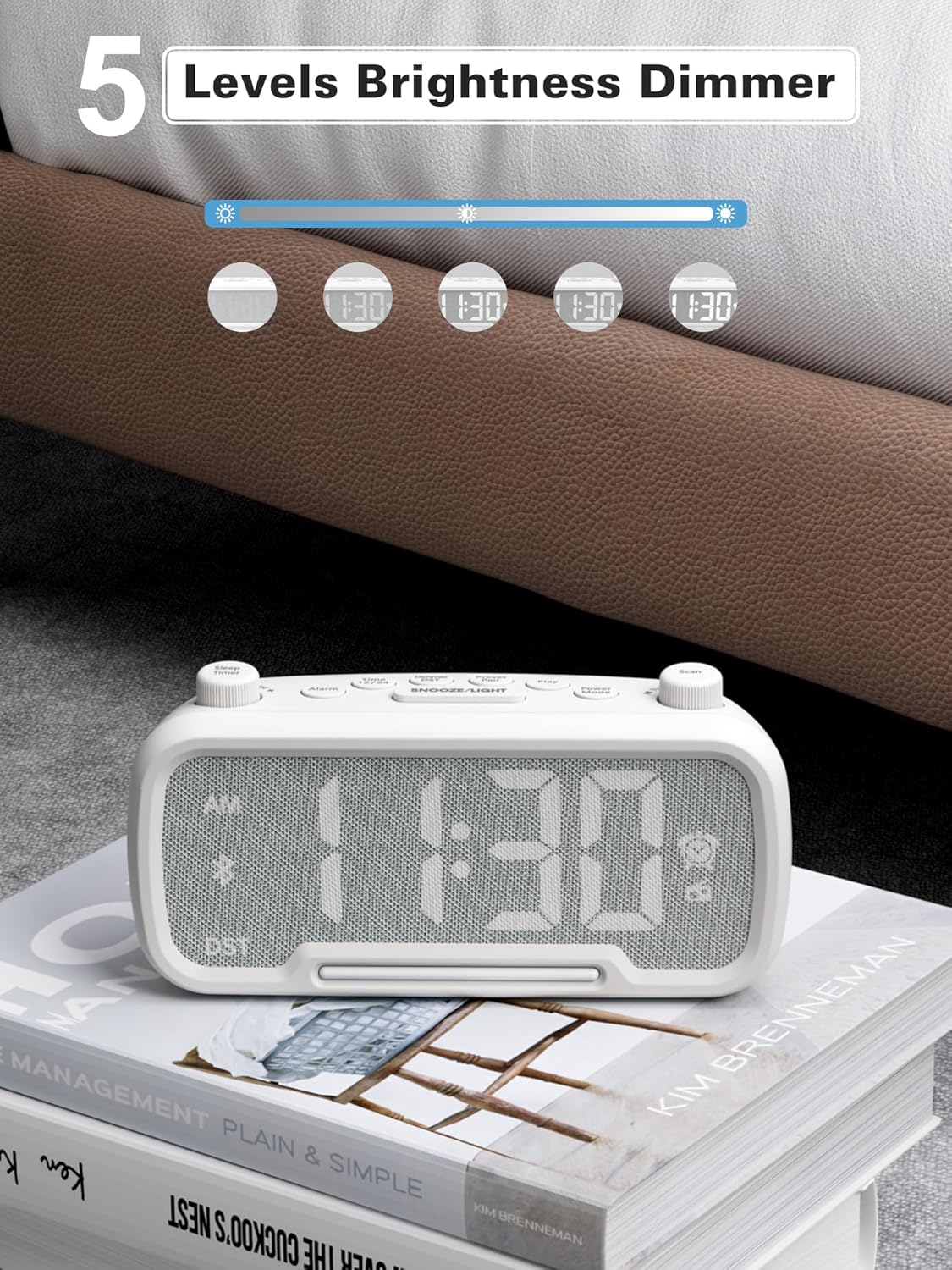
Figure 10: 5 Levels Brightness Dimmer
5.7 ຈັບເວລານອນ
The sleep timer allows you to set a duration after which the radio or Bluetooth audio will automatically turn off.
- While playing FM radio or Bluetooth audio, rotate the ຈັບເວລານອນ knob to select the desired sleep duration (e.g., 15, 30, 60, 90 minutes).
- The display will show the remaining sleep time. The audio will turn off automatically when the timer expires.
5.8 ການສາກໂທລະສັບ
The clock radio features two USB charging ports (Type-C and USB-A) for convenient charging of your mobile devices.
- Connect your device's charging cable to either the USB-A or Type-C port on the back of the clock radio.
- ເຊື່ອມຕໍ່ປາຍອີກດ້ານໜຶ່ງຂອງສາຍເຂົ້າກັບອຸປະກອນມືຖືຂອງທ່ານ. ການສາກໄຟຈະເລີ່ມຕົ້ນໂດຍອັດຕະໂນມັດ.

Figure 11: Dual USB Charging Ports
6. ບໍາລຸງຮັກສາ
- ເຮັດຄວາມສະອາດເຄື່ອງດ້ວຍຜ້າອ່ອນ, ແຫ້ງ. ຢ່າໃຊ້ເຄື່ອງເຮັດຄວາມສະອາດຂັດຫຼືສານລະລາຍ.
- ເກັບຮັກສາອຸປະກອນໃຫ້ຫ່າງຈາກແສງແດດໂດຍກົງ, ແຫຼ່ງຄວາມຮ້ອນ ແລະ ຄວາມຊຸ່ມ.
- ຮັບປະກັນການລະບາຍອາກາດທີ່ເຫມາະສົມຮອບຫນ່ວຍ.
- ຖ້າບໍ່ໄດ້ໃຊ້ເຄື່ອງເປັນເວລາດົນ, ໃຫ້ຖອດປລັກອອກຈາກປລັກໄຟ.
7. ການແກ້ໄຂບັນຫາ
| ບັນຫາ | ສາເຫດທີ່ເປັນໄປໄດ້ | ການແກ້ໄຂ |
|---|---|---|
| ບໍ່ມີໄຟ / ຈໍສະແດງຜົນປິດ | ອະແດັບເຕີໄຟບໍ່ໄດ້ເຊື່ອມຕໍ່ ຫຼື ມີບັນຫາ. | Ensure power adapter is securely plugged into the unit and wall outlet. Check outlet functionality. |
| ໂມງປຸກບໍ່ມີສຽງ | ປຸກບໍ່ໄດ້ເປີດໃຊ້ງານ ຫຼືຕັ້ງບໍ່ຖືກຕ້ອງ. | Verify alarm time is set and the alarm icon is visible on the display. Check alarm volume. |
| ການຮັບວິທະຍຸ FM ບໍ່ດີ | ສັນຍານອ່ອນຫຼືການແຊກແຊງ. | Adjust the unit's position. Try auto-scanning again. |
| Bluetooth ບໍ່ໄດ້ຈັບຄູ່ | ອຸປະກອນບໍ່ໄດ້ຢູ່ໃນໂໝດຈັບຄູ່ ຫຼື ຢູ່ໄກເກີນໄປ. | Ensure the clock radio is in Bluetooth mode (BT icon flashing). Move device closer. Forget device on phone and re-pair. |
| ການສາກໄຟ USB ບໍ່ເຮັດວຽກ | Cable faulty or device incompatible. | Try a different USB cable. Ensure the clock radio is powered on. |
8. ຂໍ້ມູນຈໍາເພາະ
- ຕົວແບບ: CR1025
- ການປ້ອນຂໍ້ມູນພະລັງງານ: AC 100-240V, 50/60Hz
- ແບັດ ສຳ ຮອງ: 1 x CR2032 (ລວມ)
- ຄວາມຖີ່ FM: 87.5 - 108.0 MHz
- ລຸ້ນ Bluetooth: 5.0
- USB Output: USB-A, Type-C (Charging only)
- ຄວາມສະຫວ່າງຂອງຈໍສະແດງຜົນ: 5 ລະດັບ
- ລະດັບສຽງ: 16 levels (45dB - 116dB)
- ຂະໜາດ: 5.9 x 3.81 x 8.4 ຊມ (2.32 x 1.5 x 3.31 ນິ້ວ)
- ນ້ຳໜັກ: 216 ກຣາມ (0.48 ປອນ)
ຮູບທີ 12: ຂະໜາດຜະລິດຕະພັນ
9. ການຮັບປະກັນແລະການສະຫນັບສະຫນູນ
Mesqool products are designed and manufactured to the highest quality standards. For warranty information, technical support, or customer service inquiries, please refer to the contact information provided on the product packaging or visit the official Mesqool webເວັບໄຊ.
Webເວັບໄຊ: Mesqool Official Store


