1. ບົດແນະນຳ
Welcome to the user manual for your new ECHO Rainbow Pro S Smartwatch. This elegant and functional smartwatch is designed to enhance your daily life with integrated AI assistance, Bluetooth calling, comprehensive health sensors, and various sports modes. It comes with two interchangeable straps for maximum flexibility and is IP68 waterproof for worry-free use. This manual will guide you through the setup, operation, maintenance, and troubleshooting of your device.
2. ສິ່ງທີ່ຢູ່ໃນກ່ອງ
ກະລຸນາກວດສອບເນື້ອໃນຂອງຊຸດເພື່ອໃຫ້ແນ່ໃຈວ່າລາຍການທັງຫມົດມີຢູ່:
- ECHO Rainbow Pro S Smartwatch (Rose Gold)
- Silicone Strap (Rose Gold)
- Nylon Strap (Bordeaux)
- ສາຍສາກໄຟແມ່ເຫລັກ
- ຄູ່ມືຜູ້ໃຊ້ (ເອກະສານນີ້)
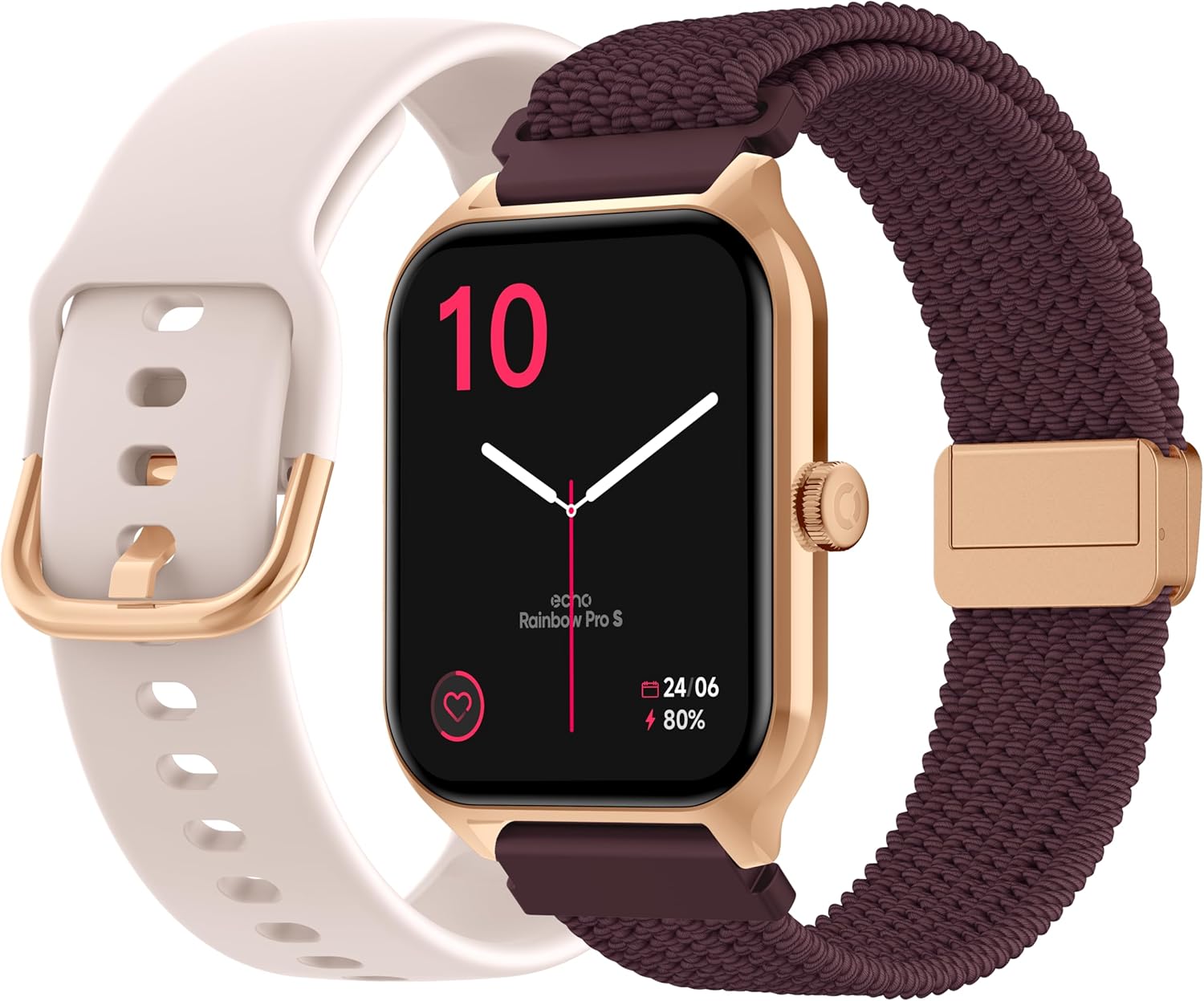
Image: The ECHO Rainbow Pro S Smartwatch, showcasing its rose gold finish, accompanied by both the rose gold silicone strap and the bordeaux nylon strap, along with the magnetic charging cable.
3. ຕັ້ງຄ່າ
3.1 ການສາກອຸປະກອນ
Before first use, fully charge your smartwatch. Connect the magnetic charging cable to the charging points on the back of the watch and plug the USB end into a standard USB power adapter (not included) or a computer's USB port. A full charge takes approximately 2.5 hours.
3.2 ການຕິດຕັ້ງແອັບ Da Fit
The ECHO Rainbow Pro S Smartwatch works with the Da Fit application. Download the Da Fit app from the Apple App Store (for iOS devices) or Google Play Store (for Android devices).
- Scan the QR code in the watch's manual or on the watch screen (if available) or search for "Da Fit" in your app store.
- ຕິດຕັ້ງແອັບພລິເຄຊັນໃນໂທລະສັບສະຫຼາດຂອງທ່ານ.
3.3 ການຈັບຄູ່ກັບໂທລະສັບສະຫຼາດຂອງທ່ານ
To unlock the full potential of your smartwatch, pair it with the Da Fit app:
- ໃຫ້ແນ່ໃຈວ່າ Bluetooth ຖືກເປີດໃຊ້ຢູ່ໃນໂທລະສັບສະຫຼາດຂອງທ່ານ.
- ເປີດແອັບ Da Fit.
- Follow the on-screen instructions to add a new device. The app will search for your ECHO Rainbow Pro S.
- Select your watch from the list of found devices. Confirm the pairing request on both your phone and the watch.
- ເມື່ອຈັບຄູ່ແລ້ວ, ໂມງຂອງທ່ານຈະຊິ້ງຂໍ້ມູນກັບແອັບ.

Image: The ECHO Rainbow Pro S Smartwatch, showing the watch body, both the silicone and nylon straps, and the magnetic charging cable, illustrating the components for setup.
4. ປະຕິບັດການ Smartwatch ຂອງທ່ານ
4.1 ການນໍາທາງໃນການໂຕ້ຕອບ
The ECHO Rainbow Pro S features an intuitive 1.96-inch touchscreen. Swipe left, right, up, or down to access different functions and menus. The side button typically serves as a power button or a return-to-home screen button.
4.2 ການຕິດຕາມສຸຂະພາບ
Your smartwatch is equipped with advanced sensors to track your well-being:
- ອັດຕາການເຕັ້ນຫົວໃຈ: ຕິດຕາມອັດຕາການເຕັ້ນຫົວໃຈຂອງທ່ານຢ່າງຕໍ່ເນື່ອງຕະຫຼອດມື້.
- ອົກຊີໃນເລືອດ (SpO2): ວັດແທກຄວາມອີ່ມຕົວຂອງອົກຊີເຈນໃນເລືອດຂອງທ່ານ.
- ຄວາມດັນເລືອດ: ໃຫ້ການຄາດຄະເນຄວາມດັນເລືອດຂອງທ່ານ.
- ການຕິດຕາມການນອນ: ວິເຄາະຮູບແບບການນອນຂອງທ່ານ, ລວມທັງການນອນຫຼັບເລິກ ແລະ ນອນຫຼັບເບົາtages.
ຂໍ້ມູນສຸຂະພາບທັງໝົດສາມາດ viewed in detail within the Da Fit app, allowing you to track trends and progress over time.

ຮູບພາບ: ດ້ານຫລັງ view of the ECHO Rainbow Pro S Smartwatch, highlighting the optical sensors used for heart rate, SpO2, and blood pressure monitoring.

Image: The ECHO Rainbow Pro S Smartwatch screen showing various health metrics, including heart rate (BPM), SpO2 percentage, and activity data, demonstrating its health tracking capabilities.
4.3 ລັກສະນະການສື່ສານ
ເຊື່ອມຕໍ່ໂດຍກົງຈາກຂໍ້ມືຂອງທ່ານ:
- ໂທ Bluetooth: ໂທອອກ ແລະ ຮັບສາຍໂດຍກົງຈາກໂມງຂອງທ່ານເມື່ອເຊື່ອມຕໍ່ກັບໂທລະສັບສະຫຼາດຂອງທ່ານ.
- ການແຈ້ງເຕືອນ: ຮັບການແຈ້ງເຕືອນສຳລັບການໂທ, ຂໍ້ຄວາມ ແລະ ການແຈ້ງເຕືອນແອັບຈາກໂທລະສັບສະຫຼາດທີ່ທ່ານຈັບຄູ່ໄວ້.

Image: The ECHO Rainbow Pro S Smartwatch displaying incoming call and message notifications, illustrating its communication features when paired with a smartphone.
4.4 AI Assistant
The ECHO Rainbow Pro S integrates an AI assistant for convenient voice commands and information retrieval. Simply activate the AI feature on your watch and speak your query or command.

Image: The ECHO Rainbow Pro S Smartwatch screen showing the AI assistant interface, ready to receive voice commands or queries.
4.5 Sports Modes & Coaching
With over 100 sports modes and integrated training programs, your smartwatch is an ideal companion for your fitness journey. Select your activity from the watch's menu to track performance metrics such as calories burned, distance, and duration. The Da Fit app provides personalized tracking and allows you to follow your course using your smartphone's GPS.

Image: The ECHO Rainbow Pro S Smartwatch displaying various sports modes and training exercises, with accompanying smartphone app screenshots showing detailed workout plans and GPS tracking.
4.6 ການປັບແຕ່ງ
ປັບແຕ່ງປະສົບການໂມງອັດສະລິຍະຂອງທ່ານໃຫ້ເປັນສ່ວນຕົວ:
- ເບິ່ງ ໜ້າ: Choose from over 100 downloadable watch faces via the Da Fit app to match your style.
- ສາຍແອວປ່ຽນໄດ້: Easily swap between the included silicone and nylon straps to suit your activity or outfit.
Image: The ECHO Rainbow Pro S Smartwatch, showcasing its rose gold finish, accompanied by both the rose gold silicone strap and the bordeaux nylon strap, highlighting the interchangeable design.
5. ບໍາລຸງຮັກສາ
5.1 ການທໍາຄວາມສະອາດ
To keep your smartwatch in optimal condition, clean it regularly. Wipe the screen and body with a soft, lint-free cloth. For stubborn smudges, slightly dampen ຜ້າທີ່ມີນ້ໍາ. ຫຼີກເວັ້ນການນໍາໃຊ້ສານເຄມີທີ່ຮຸນແຮງຫຼືວັດສະດຸຂັດ.
5.2 ກັນນ້ຳ (IP68)
The ECHO Rainbow Pro S is IP68 rated, meaning it is resistant to water up to 1 meter deep for 30 minutes. This makes it suitable for daily activities like hand washing, rain, or accidental splashes. However, it is not recommended for swimming, diving, or high-pressure water activities. Avoid exposing the watch to hot water, steam, or corrosive liquids.
5.3 ອາຍຸແບັດເຕີຣີ
The smartwatch offers up to 5 days of battery life with typical usage. To optimize battery performance:
- ຫຼຸດຄວາມສະຫວ່າງໜ້າຈໍ.
- ປິດການນຳໃຊ້ການຕິດຕາມອັດຕາການເຕັ້ນຫົວໃຈຢ່າງຕໍ່ເນື່ອງ ຖ້າບໍ່ຈຳເປັນ.
- ຈຳກັດຈຳນວນການແຈ້ງເຕືອນຂອງແອັບ.
6. ການແກ້ໄຂບັນຫາ
If you encounter any issues with your ECHO Rainbow Pro S Smartwatch, please refer to the following common problems and solutions:
| ບັນຫາ | ການແກ້ໄຂ |
|---|---|
| ໂມງບໍ່ເປີດ | ກວດໃຫ້ແນ່ໃຈວ່າໂມງຖືກສາກເຕັມແລ້ວ. ເຊື່ອມຕໍ່ມັນກັບສາຍສາກແມ່ເຫຼັກ ແລະແຫຼ່ງພະລັງງານເປັນເວລາຢ່າງໜ້ອຍ 30 ນາທີ. |
| ບໍ່ສາມາດຈັບຄູ່ກັບສະມາດໂຟນໄດ້ | 1. ໃຫ້ແນ່ໃຈວ່າ Bluetooth ຖືກເປີດໃຊ້ງານຢູ່ໃນໂທລະສັບຂອງທ່ານແລ້ວ. 2. ໃຫ້ແນ່ໃຈວ່າໂມງຢູ່ພາຍໃນຂອບເຂດຂອງໂທລະສັບຂອງທ່ານ. 3. ຣີສະຕາດທັງໂມງ ແລະ ໂທລະສັບຂອງທ່ານ. 4. Clear Bluetooth cache on your phone (Android) or forget the device and re-pair (iOS/Android). 5. Ensure the Da Fit app has necessary permissions. |
| ການອ່ານສຸຂະພາບບໍ່ຖືກຕ້ອງ | 1. Ensure the watch is worn snugly on your wrist, not too tight or too loose. 2. Clean the sensors on the back of the watch. 3. Avoid excessive movement during measurements. 4. Note that these readings are for reference and not for medical diagnosis. |
| ບໍ່ໄດ້ຮັບການແຈ້ງເຕືອນ | 1. Ensure the watch is paired and connected to your phone. 2. Check notification settings in the Da Fit app and on your phone (e.g., app permissions, DND mode). 3. Make sure the Da Fit app is running in the background. |
| ອາຍຸແບັດເຕີຣີສັ້ນ | 1. ຫຼຸດຄວາມສະຫວ່າງຂອງໜ້າຈໍ. 2. Disable continuous heart rate monitoring if not needed. 3. Limit background app refresh for the Da Fit app. 4. Ensure no apps are constantly running on the watch. |
7. ຂໍ້ມູນຈໍາເພາະ
| ຄຸນສົມບັດ | ລາຍລະອຽດ |
|---|---|
| ຍີ່ຫໍ້ | ແອັກໂກ້ |
| ຕົວແບບ | Rainbow Pro S |
| ໝາຍເລກຕົວແບບ | bd279646-58a1-4a95-ab0c-0847dc2ca4e6 |
| ສີ | Rose Gold |
| ຂະໜາດໜ້າຈໍ | 1.96 ນິ້ວ |
| ປະເພດການສະແດງ | OLED or LED |
| ການເຊື່ອມຕໍ່ | Bluetooth |
| ອຸປະກອນທີ່ເຂົ້າກັນໄດ້ | ໂທລະສັບສະຫຼາດ, ແທັບເລັດ |
| ອົງປະກອບຫມໍ້ໄຟ | lithium-polymer |
| ອາຍຸແບັດເຕີຣີ (ປົກກະຕິ) | 5 ມື້ |
| ເວລາສາກໄຟ | 2.5 ຊົ່ວໂມງ |
| ການຕໍ່ຕ້ານນ້ໍາ | IP68 (ເຖິງ 1 ແມັດເປັນເວລາ 30 ນາທີ) |
| GPS | ບໍ່ມີ GPS |
| ຮູບຮ່າງ | ຮອບ |
| ຄວາມເຂົ້າກັນໄດ້ຂອງ App | Da Fit |
| ປະເທດຕົ້ນກໍາເນີດ | ຈີນ |
8. ການຮັບປະກັນແລະການສະຫນັບສະຫນູນ
8.1 ການຮັບປະກັນຜະລິດຕະພັນ
Your ECHO Rainbow Pro S Smartwatch is covered by a standard manufacturer's warranty against defects in materials and workmanship. The specific duration and terms of the warranty may vary based on your region and point of purchase. Please refer to your purchase documentation or contact your retailer for detailed warranty information.
8.2 ສະຫນັບສະຫນູນລູກຄ້າ
For technical assistance, troubleshooting beyond this manual, or warranty claims, please contact the retailer or manufacturer directly. Have your product model number (bd279646-58a1-4a95-ab0c-0847dc2ca4e6) and proof of purchase ready when contacting support.


