1. ບົດແນະນຳ
ຂອບໃຈສໍາລັບການຊື້asing the LONPOO Portable CD Player Boombox, model ZXG-608B. This device offers versatile audio playback options including CD, Bluetooth 5.3, FM radio, USB, and AUX input, along with a microphone port for added functionality. Its compact design and rechargeable battery make it suitable for various environments.
This manual provides essential information for safe operation, setup, and maintenance of your boombox. Please read it thoroughly before use and retain it for future reference.

Image 1.1: The LONPOO ZXG-608B Portable CD Boombox highlighting its multiple playback options: Bluetooth, CD, FM Radio, USB, MIC Port, and AUX-IN.
2. ຂໍ້ມູນຄວາມປອດໄພ
- ແຫຼ່ງພະລັງງານ: Use only the provided AC power cable or the internal rechargeable battery. Ensure the voltage ກົງກັບຄວາມຕ້ອງການຂອງອຸປະກອນ.
- ນ້ໍາແລະຄວາມຊຸ່ມ: Do not expose the device to rain, moisture, or immerse it in water. Avoid placing objects filled with liquids, such as vases, on the device.
- ຄວາມຮ້ອນ: ເກັບຮັກສາອຸປະກອນໃຫ້ຫ່າງຈາກແຫຼ່ງຄວາມຮ້ອນ ເຊັ່ນ: ໝໍ້ນ້ຳ, ເຄື່ອງບັນທຶກຄວາມຮ້ອນ, ເຕົາໄຟ ຫຼື ເຄື່ອງໃຊ້ໄຟຟ້າທີ່ຜະລິດຄວາມຮ້ອນອື່ນໆ.
- ການລະບາຍອາກາດ: ຮັບປະກັນການລະບາຍອາກາດທີ່ເຫມາະສົມ. ຫ້າມປິດຊ່ອງລະບາຍອາກາດໃດໆ.
- ທໍາຄວາມສະອາດ: Unplug the device from the power outlet before cleaning. Use a dry, soft cloth. Do not use liquid cleaners or aerosol cleaners.
- ການບໍລິການ: ຢ່າພະຍາຍາມບໍລິການຜະລິດຕະພັນນີ້ດ້ວຍຕົນເອງ. ອ້າງເຖິງການບໍລິການທັງtoົດໃຫ້ກັບພະນັກງານບໍລິການທີ່ມີຄຸນວຸດທິ.
- CD Handling: Handle CDs by their edges. Avoid touching the data side. Keep CDs clean and free from scratches.
- ຄວາມປອດໄພຫມໍ້ໄຟ: ຫ້າມຖອດປະກອບ, ບີບ ຫຼື ປ່ອຍໃຫ້ແບັດເຕີຣີທີ່ຕິດຕັ້ງໃນຕົວຢູ່ໃນອຸນຫະພູມສູງເກີນໄປ. ກຳຈັດແບັດເຕີຣີຕາມລະບຽບຂອງທ້ອງຖິ່ນ.
3. ເນື້ອໃນຊຸດ
ກວດສອບວ່າລາຍການທັງຫມົດແມ່ນມີຢູ່ໃນຊຸດ:
- 1x LONPOO Portable CD Player Boombox (Model ZXG-608B)
- 1x ສາຍໄຟ AC
- 1x Remote Control (ບໍ່ລວມຫມໍ້ໄຟ)
- 1x ຄູ່ມືຜູ້ໃຊ້ (ເອກະສານນີ້)

Image 3.1: Contents of the package, including the boombox, remote control, AC power cable, and user manual. The image also shows the product dimensions: 20 cm (7.8 inches) height, 23 cm (9 inches) width, and 15 cm (5.9 inches) depth, with a weight of 4.4 lbs.
4. ຜະລິດຕະພັນເກີນview
ຄຸ້ນເຄີຍກັບອົງປະກອບຫຼັກ ແລະ ການຄວບຄຸມຂອງ boombox ຂອງທ່ານ.
4.1 ການຄວບຄຸມແຜງໜ້າປັດ ແລະ ຈໍສະແດງຜົນ

ຮູບພາບ 4.1: ດ້ານຫນ້າ view of the boombox and its remote control. The front panel features a large LCD display, STANDBY button, MODE button, previous/next track buttons, a large volume knob, EQ button, and USB port.
- ຈໍ LCD: Shows track number, time, mode, and other status indicators.
- ປຸ່ມສະແຕນບາຍ: ເປີດ ຫຼື ປິດເຄື່ອງ.
- ປຸ່ມ MODE: Switches between CD, Bluetooth, FM Radio, USB, and AUX modes.
- Previous/Next Buttons (|<>|): Navigates tracks/stations.
- Play/Pause/Scan Button (▶/SCAN): Plays/pauses media or scans FM radio stations.
- ປຸ່ມຢຸດ (■): ຢຸດການຫຼິ້ນ.
- ປຸ່ມລະດັບສຽງ: ປັບລະດັບສຽງອອກ.
- ປຸ່ມ EQ: Cycles through equalizer presets (Flat, Rock, Pop, Classic, Jazz).
- ພອດ USB: ສຳລັບການຫຼິ້ນສຽງດິຈິຕອນ files ຈາກ USB flash drive.
- ຫູຟັງ Jack: ສໍາລັບການຟັງສ່ວນຕົວ.
4.2 ການເຊື່ອມຕໍ່ແຜງດ້ານຫລັງ
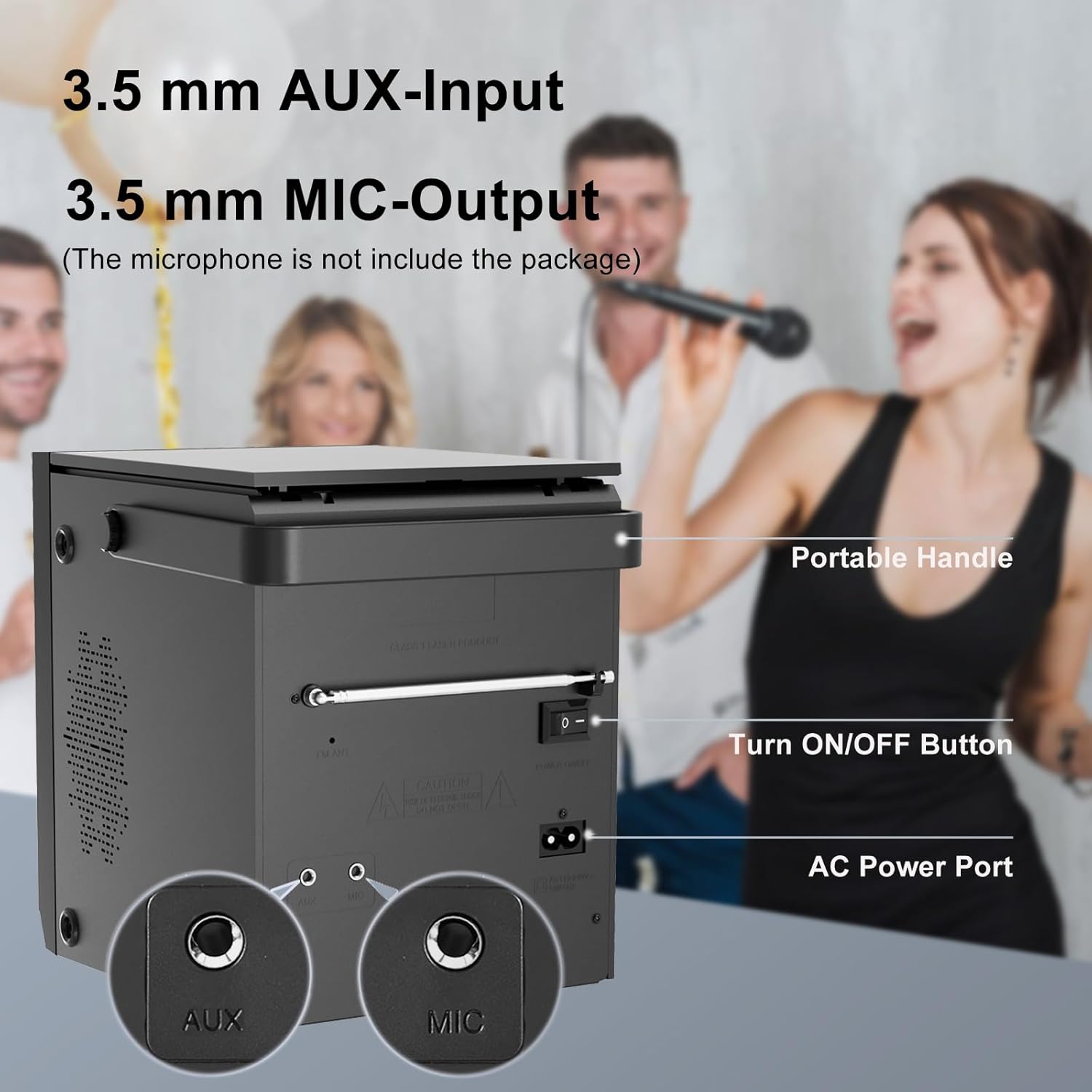
Image 4.2: Rear panel of the boombox, detailing the 3.5 mm AUX-Input, 3.5 mm MIC-Output, the main ON/OFF button, and the AC Power Port. A portable handle is also visible at the top.
- AUX Input (3.5mm): ເຊື່ອມຕໍ່ອຸປະກອນສຽງພາຍນອກ.
- MIC Output (3.5mm): Connect a microphone for karaoke or voice input.
- ປຸ່ມເປີດ/ປິດ: ສະຫຼັບພະລັງງານຕົ້ນຕໍສໍາລັບຫນ່ວຍບໍລິການ.
- ພອດໄຟ AC: Connect the AC power cable for power and charging.
- ເສົາອາກາດ FM: ຂະຫຍາຍອອກເພື່ອການຮັບວິທະຍຸ FM ທີ່ດີຂຶ້ນ.
4.3 Top-Loading CD Compartment

Image 4.3: The top-loading CD compartment shown open with a CD inside. Icons illustrate playback options: Play in order, Single cycle, Repeat all, and Random play.
The CD compartment is located on the top of the unit. Gently lift the lid to access it.
4.4 ການຄວບຄຸມໄລຍະໄກ
The included remote control allows for convenient operation from a distance. (Batteries not included. Requires 2x AAA batteries, typically.)
5. ຕັ້ງຄ່າ
5.1 ການເຊື່ອມຕໍ່ພະລັງງານ
- ໄຟຟ້າ AC: Connect the supplied AC power cable to the AC Power Port on the rear of the boombox and then to a standard wall outlet.
- ແບັດເຕີຣີທີ່ສາມາດສາກໄດ້: The boombox has a built-in 2000 mAh rechargeable battery, providing over 5 hours of continuous use at medium volume. The battery charges automatically when connected to AC power.

Image 5.1: The boombox powered by its internal rechargeable battery, capable of providing approximately 5 hours of playback.
5.2 ການເປີດເຄື່ອງເບື້ອງຕົ້ນ
- Ensure the main ON/OFF switch on the rear panel is in the "ON" position.
- ກົດ ມາດຕະຖານ button on the front panel or the remote control to turn on the unit.
- The LCD display will illuminate.
6. ຄໍາແນະນໍາການດໍາເນີນງານ
6.1 ການຫຼິ້ນ CD
- ກົດ ໂໝດ button until "CD" mode is selected on the display.
- Open the CD compartment lid on top of the unit.
- Place a CD with the label side facing up. Gently close the lid.
- The boombox will read the CD, and playback should start automatically. If not, press the ▶/SCAN ປຸ່ມ.
- ໃຊ້ |<>| ປຸ່ມເພື່ອຂ້າມເພງ.
- ກົດ ▶/SCAN ປຸ່ມເພື່ອຢຸດຊົ່ວຄາວ / ສືບຕໍ່ການຫຼິ້ນຄືນ.
- ກົດ ■ ຢຸດ ປຸ່ມເພື່ອຢຸດການຫລີ້ນການຫລີ້ນ.
- ກົດ ເຮັດຊ້ຳ button on the remote control to cycle through repeat modes (Single, All, Random).
6.2 ແບບບູທູດ
ໝາຍເຫດ: This device supports Bluetooth connection for audio input from external devices but does not support Bluetooth earphones.
- ກົດ ໂໝດ button until "BT" or "Bluetooth" is displayed. The unit will enter pairing mode, indicated by a flashing Bluetooth icon or "PAIR".
- ໃນອຸປະກອນທີ່ເປີດໃຊ້ Bluetooth ຂອງທ່ານ (ເຊັ່ນ: ໂທລະສັບສະຫຼາດ, ແທັບເລັດ), ເປີດໃຊ້ Bluetooth ແລະຄົ້ນຫາອຸປະກອນທີ່ມີຢູ່.
- Select "LONPOO ZXG-608B" (or similar name) from the list.
- Once paired, the boombox will emit a confirmation sound, and the Bluetooth indicator will stop flashing.
- ດຽວນີ້ທ່ານສາມາດຫຼິ້ນສຽງຈາກອຸປະກອນທີ່ເຊື່ອມຕໍ່ຂອງທ່ານຜ່ານ boombox ໄດ້ແລ້ວ.

Image 6.1: Illustrates the process of pairing a smartphone with the boombox via Bluetooth for wireless audio streaming.
ວິທະຍຸ 6.3 FM
- Extend the FM antenna on the rear panel for optimal reception.
- ກົດ ໂໝດ ກົດປຸ່ມຈົນກ່ວາ "FM" ໂຫມດຖືກເລືອກ.
- ກົດຄ້າງໄວ້ ▶/SCAN ປຸ່ມເພື່ອສະແກນອັດຕະໂນມັດ ແລະບັນທຶກສະຖານີ FM ທີ່ມີຢູ່.
- ໃຊ້ |<>| ປຸ່ມເພື່ອນຳທາງລະຫວ່າງສະຖານີທີ່ບັນທຶກໄວ້.
6.4 ການຫຼິ້ນ USB
- ສຽບ USB flash drive ເຂົ້າໄປໃນພອດ USB ໃນແຖບດ້ານຫນ້າ.
- ກົດ ໂໝດ button until "USB" mode is selected.
- ເຄື່ອງຈະກວດຫາ ແລະ ເລີ່ມຫຼິ້ນສຽງທີ່ເຂົ້າກັນໄດ້ໂດຍອັດຕະໂນມັດ files (ເຊັ່ນ: MP3).
- ໃຊ້ |<>| ປຸ່ມເພື່ອຂ້າມເພງ.
- ກົດ ▶/SCAN ປຸ່ມເພື່ອຢຸດຊົ່ວຄາວ / ສືບຕໍ່ການຫຼິ້ນຄືນ.
- ກົດ ■ ຢຸດ ປຸ່ມເພື່ອຢຸດການຫລີ້ນການຫລີ້ນ.
6.5 AUX Input
- Connect an external audio device (e.g., MP3 player, smartphone) to the AUX Input port on the rear panel using a 3.5mm audio cable (not included).
- ກົດ ໂໝດ button until "AUX" mode is selected.
- ຄວບຄຸມການຫຼິ້ນ ແລະລະດັບສຽງຈາກອຸປະກອນພາຍນອກທີ່ເຊື່ອມຕໍ່ຂອງທ່ານ.

Image 6.2: Demonstrates connecting external devices like a smartphone via AUX input and using the USB port for playback.
6.6 ການປ້ອນຂໍ້ມູນໄມໂຄຣໂຟນ
- Connect a microphone (not included) to the MIC Output port on the rear panel.
- Adjust the volume using the main volume knob. The microphone input will mix with the currently playing audio source.

Image 6.3: Shows the boombox being used with a microphone, illustrating its karaoke function.
6.7 ການຕັ້ງຄ່າ Equalizer (EQ)
ກົດ EQ button on the front panel or remote control to cycle through preset equalizer modes:
- ຮາບພຽງ
- ຫີນ
- ປັອບ
- ຄລາສິກ
- ແຈສ

Image 6.4: Highlights the 20W stereo sound output and lists the available 3 repeat modes (Single, All, Random) and 5 EQ modes (Flat, Rock, Pop, Classic, Jazz).
7. ບໍາລຸງຮັກສາ
- ທໍາຄວາມສະອາດ: ເຊັດດ້ານນອກຂອງເຄື່ອງດ້ວຍຜ້າອ່ອນ, ແຫ້ງ. ຢ່າໃຊ້ເຄື່ອງເຮັດຄວາມສະອາດຂັດຫຼືສານລະລາຍ.
- CD Lens Care: ຖ້າຫາກວ່າບັນຫາການຫຼິ້ນ CD ເກີດຂຶ້ນ, ໃຫ້ນໍາໃຊ້ແຜ່ນ CD ທີ່ມີຢູ່ທາງດ້ານການຄ້າ.
- ຄວາມທົນທານຂອງແບັດເຕີຣີ: ເພື່ອຍືດອາຍຸການໃຊ້ງານຂອງແບັດເຕີຣີ, ໃຫ້ຫຼີກລ່ຽງການສາກແບັດເຕີຣີໃຫ້ໝົດເລື້ອຍໆ. ໃຫ້ສາກອຸປະກອນເປັນປະຈຳ, ເຖິງແມ່ນວ່າຈະບໍ່ໄດ້ໃຊ້ງານເປັນເວລາດົນກໍຕາມ.
- ການເກັບຮັກສາ: When storing the unit for a long time, ensure it is powered off and disconnected from the AC supply. Store in a cool, dry place.
8. ການແກ້ໄຂບັນຫາ
| ບັນຫາ | ສາເຫດທີ່ເປັນໄປໄດ້ | ການແກ້ໄຂ |
|---|---|---|
| ບໍ່ມີພະລັງງານ | AC cable not connected; Main power switch off; Battery depleted. | Check AC connection; Ensure rear ON/OFF switch is ON; Charge the battery. |
| CD ບໍ່ສາມາດຫຼິ້ນໄດ້ / ມີຂໍ້ຜິດພາດ "ບໍ່ມີແຜ່ນ" | CD inserted incorrectly; CD is dirty or scratched; CD lens is dirty; Incompatible CD format. | Reinsert CD label side up; Clean CD; Use a CD lens cleaner; Ensure CD is audio CD format. |
| Bluetooth ບໍ່ໄດ້ຈັບຄູ່ | Boombox not in BT mode; Device too far; Bluetooth already connected to another device. | Select BT mode; Move device closer; Disconnect from other devices and try again. |
| ການຮັບວິທະຍຸ FM ບໍ່ດີ | ເສົາອາກາດບໍ່ໄດ້ຂະຫຍາຍ; ສັນຍານອ່ອນ. | Fully extend the FM antenna; Reposition the unit for better signal. |
| ບັນຫາການຫຼິ້ນ USB | ໄດຣຟ໌ USB ບໍ່ໄດ້ສຽບຢ່າງຖືກຕ້ອງ; ເຂົ້າກັນບໍ່ໄດ້ file ຟໍແມັດ; ໄດຣຟ໌ USB ເສຍຫາຍ. | ໃສ່ໄດຣຟ໌ USB ຄືນໃໝ່; ໃຫ້ແນ່ໃຈວ່າ files are MP3 or compatible; Try a different USB drive. |
| ບໍ່ມີສຽງຈາກ AUX | AUX cable not connected; Incorrect mode selected; Volume too low on external device. | Check AUX cable connection; Select AUX mode; Increase volume on external device. |
9. ຂໍ້ມູນຈໍາເພາະ
- ຕົວແບບ: ZXG-608B
- ຍີ່ຫໍ້: ລອນໂພ
- ຂະໜາດສິນຄ້າ (L x W x H): 4.72 x 7.09 x 5.91 ນິ້ວ (12 x 18 x 15 cm)
- ນ້ໍາຫນັກລາຍການ: 5.63 ປອນ (2.55 ກິໂລ)
- ລຳໂພງ Output: 20W RMS (10W x 2)
- ການເຊື່ອມຕໍ່: Bluetooth 5.3, USB, AUX Input (3.5mm), MIC Port (3.5mm)
- ແຫຼ່ງພະລັງງານ: AC Power (Corded Electric) / Built-in Rechargeable Battery
- ຄວາມອາດສາມາດຫມໍ້ໄຟ: 2000 mAh
- Playback Time (Battery): >5 hours (at medium volume)
- ສື່ມວນຊົນສະຫນັບສະຫນູນ: Audio CD, CD-R/RW, USB (MP3)
- ເຄື່ອງຮັບສັນຍານວິທະຍຸ: FM
- ໂໝດ EQ: Flat, Rock, Pop, Classic, Jazz
- ອຸປະກອນເສີມລວມ: AC Power Cable, Remote Control, User Manual
10. ການຮັບປະກັນແລະການສະຫນັບສະຫນູນ
LONPOO products are designed for reliability and performance. For warranty information, please refer to the warranty card included with your purchase or contact LONPOO customer support.
If you encounter any issues or have questions regarding your LONPOO Portable CD Player Boombox, please contact our customer support team for assistance. Contact details can typically be found on the official LONPOO webສະຖານທີ່ຫຼືຢູ່ໃນການຫຸ້ມຫໍ່ຜະລິດຕະພັນ.


