1. ບົດແນະນຳ
Thank you for choosing the OFFNOVA Hat Heat Press Machine. This manual provides essential information for the safe and efficient operation, maintenance, and troubleshooting of your new heat press. Designed for both sublimation and HTV iron-on projects, this machine offers precise temperature and time control, ensuring consistent and professional results for various cap styles.
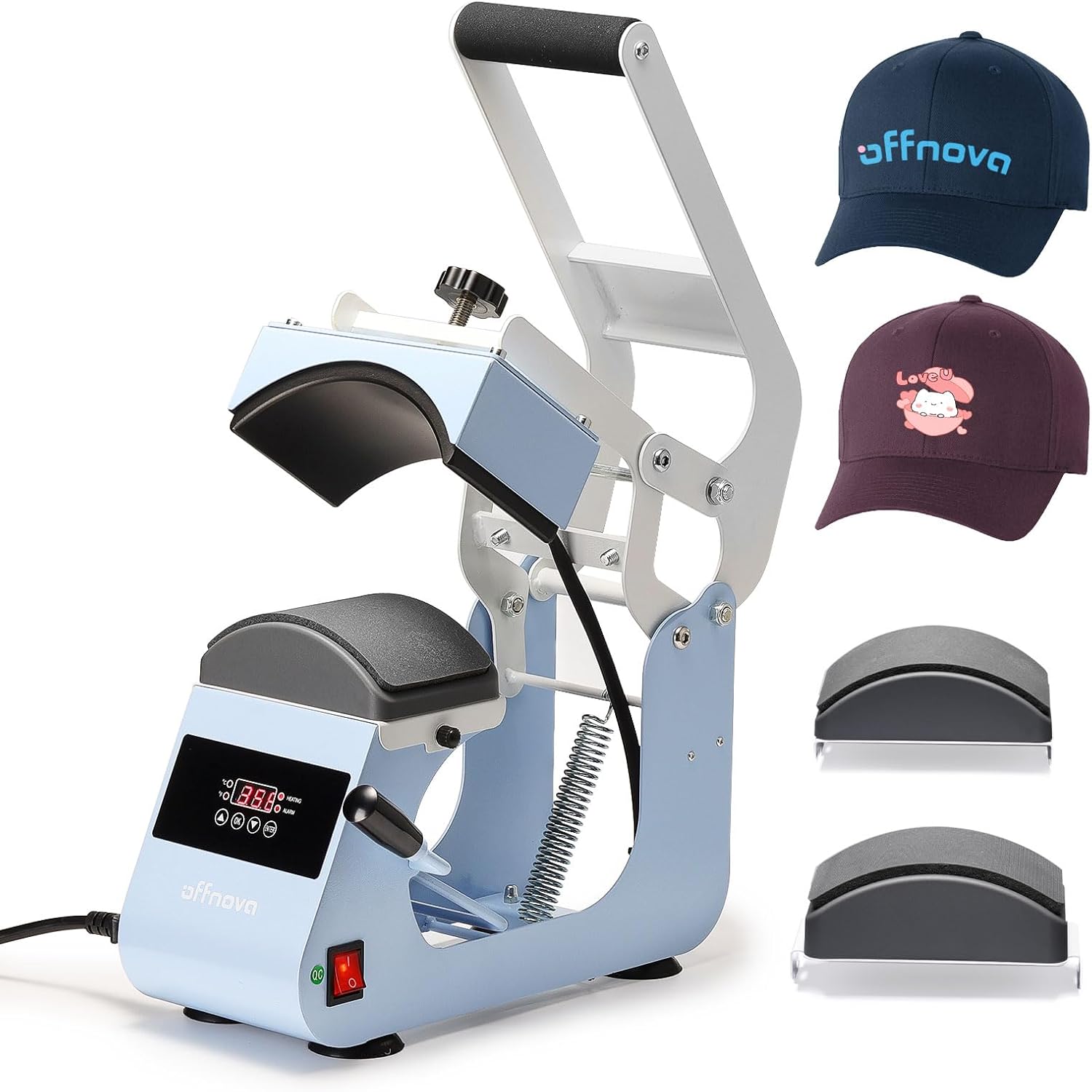
Figure 1.1: OFFNOVA Hat Heat Press Machine (Handle-Blue) with example hats.
ຄຸນນະສົມບັດທີ່ສໍາຄັນ:
- Rapid & Even Heating: One-piece cast aluminum heating plate with Teflon coating for uniform heat distribution up to 400°F (204°C).
- Easy & Stable Operation: Ergonomic handle and four-bar linkage system, combined with anti-slip silicone suction cups for stability.
- Dual Cap Platens: Includes 2 interchangeable hat bases with different curvatures to fit 99% of cap styles, plus a built-in hat stretcher.
- ການຄວບຄຸມຄວາມດັນທີ່ສາມາດປັບໄດ້: Easy-to-turn pressure knob for fine-tuning pressing force.
- Smart Auto Countdown: Automatic timing initiation upon handle pull-down and audible alert upon completion.
2. ອົງປະກອບ ແລະ ການຕັ້ງຄ່າ
2.1 ການຫຸ້ມຫໍ່ແລະການກວດກາ
Carefully remove all components from the packaging. Inspect the machine for any signs of damage during transit. Retain the original packaging for future storage or shipping.
2.2 ການກໍານົດອົງປະກອບ
Familiarize yourself with the main parts of your heat press machine:
- Heating Platen (Upper)
- Lower Platen (Interchangeable)
- Control Panel (Digital Display, Temp/Time Buttons)
- ປຸ່ມປັບຄວາມດັນ
- ມືປະຕິບັດການ
- ສະວິດໄຟ
- ຊ່ອງສຽບສາຍໄຟ
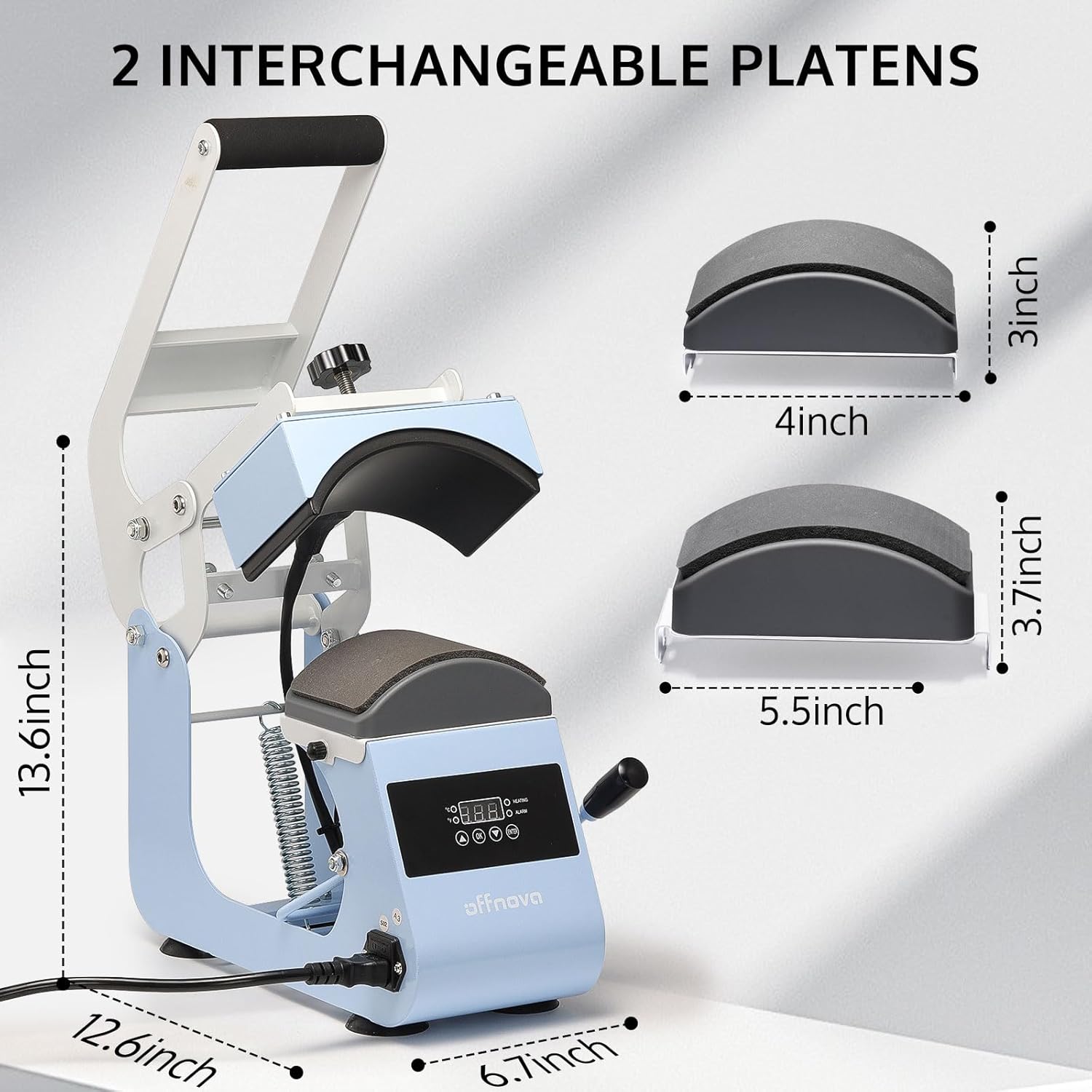
Figure 2.1: Machine dimensions and interchangeable platens (4x3 inch and 5.5x3.7 inch).
2.3 ການຕິດຕັ້ງເບື້ອງຕົ້ນ
- Place the heat press on a stable, heat-resistant surface. Ensure adequate ventilation around the machine.
- Connect the power cord to the machine's power inlet and then to a grounded electrical outlet (AC110V/60Hz).
- ໃຫ້ແນ່ໃຈວ່າສະວິດໄຟຢູ່ໃນຕໍາແຫນ່ງປິດກ່ອນທີ່ຈະສຽບ.
- Select and install the appropriate lower platen for your cap size. The machine comes with two interchangeable platens to accommodate various cap styles.
3. ຄໍາແນະນໍາການດໍາເນີນງານ
3.1 ກະດານຄວບຄຸມຫຼາຍກວ່າview

Figure 3.1: Digital Control Panel for Temperature and Time.
- ຈໍດິຈິຕອນ: Shows current temperature and set time.
- ການຄວບຄຸມອຸນຫະພູມ: ສາມາດປັບໄດ້ຈາກ 0-400°F (0-204°C).
- ການຄວບຄຸມເວລາ: ສາມາດປັບໄດ້ຕັ້ງແຕ່ 0-999 ວິນາທີ.
- ພະລັງງານ: 500W.
- ສະບັບtage: AC110V/60Hz.
- Time Up Alarm: Alerts when the set time is complete.
- ນັບຖອຍຫຼັງອັດຕະໂນມັດ: Initiates automatically when the handle is pressed down.
3.2 ການປັບຄວາມດັນ
The pressure adjustment knob, located on top of the heating platen, allows you to fine-tune the pressing force. Turn clockwise to increase pressure and counter-clockwise to decrease pressure. Adjust based on the thickness of the cap and transfer material for optimal results.
3.3 Step-by-Step Operation
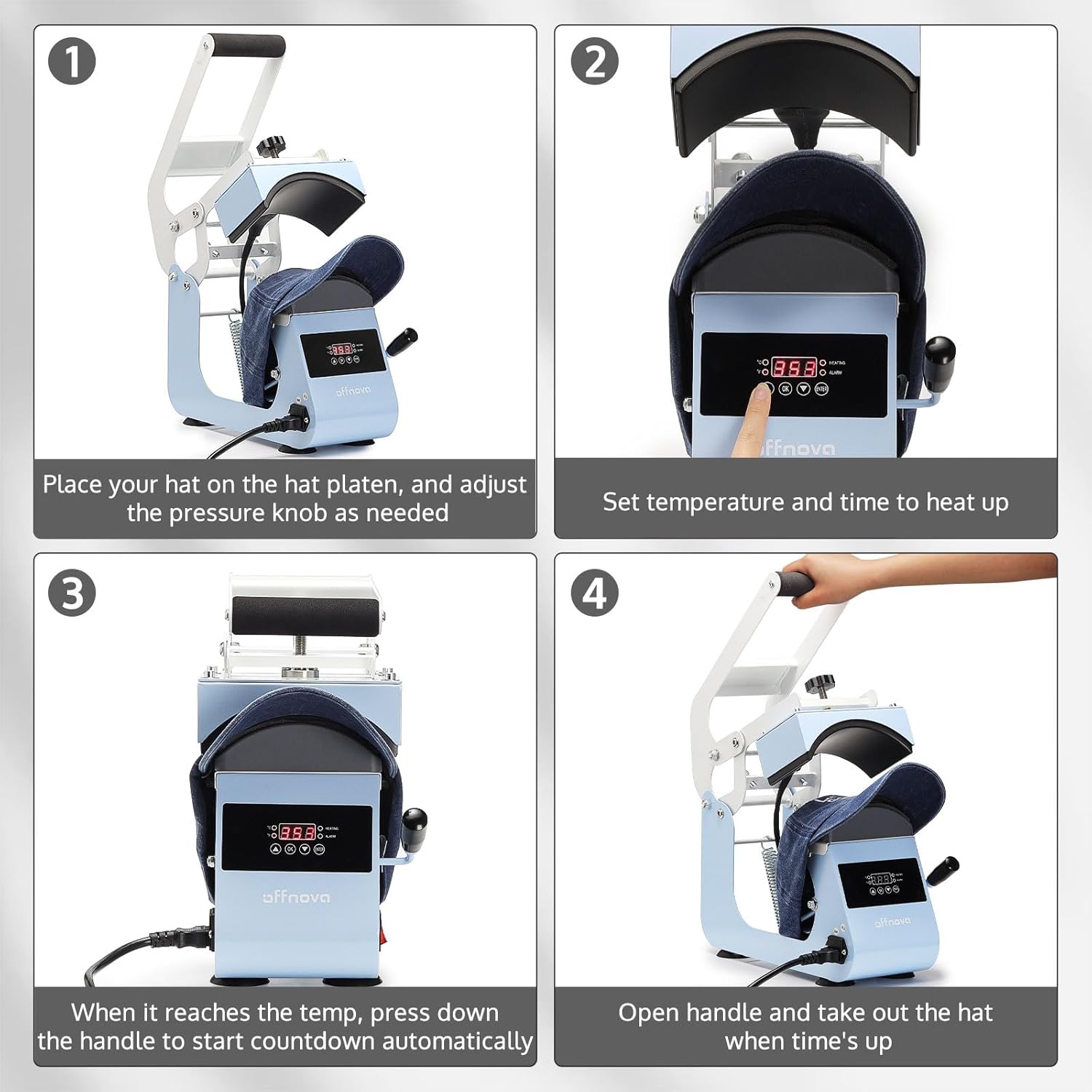
Figure 3.2: Four-step operation guide.
- Prepare the Hat: Place your hat on the lower platen. Adjust the pressure knob as needed to ensure a snug fit and even contact.
- ຕັ້ງຄ່າອຸນຫະພູມ ແລະເວລາ: Turn on the power switch. Use the control panel to set your desired temperature and time according to your transfer material's specifications. The machine will begin to heat up.
- Initiate Pressing: Once the machine reaches the set temperature, place your transfer design on the hat. Pull the operating handle down firmly to engage the heating platen. The automatic countdown will begin.
- ການໂອນຍ້າຍສຳເລັດແລ້ວ: When the set time expires, an alarm will sound. Release the handle and carefully remove the hat. Allow the transfer to cool if required by the material's instructions.

Figure 3.3: Machine in use, demonstrating versatile application.
4. ບໍາລຸງຮັກສາ
4.1 ການທໍາຄວາມສະອາດ
- Always unplug the machine and allow it to cool completely before cleaning.
- Wipe the Teflon-coated heating platen with a soft, damp cloth. Do not use abrasive cleaners or harsh chemicals, as they can damage the coating.
- Clean the lower platen and exterior surfaces with a damp ຜ້າ.
- Ensure no liquids enter the control panel or electrical components.
4.2 ການເກັບຮັກສາ
Store the heat press in a dry, dust-free environment. If possible, use the original packaging for protection. Keep out of reach of children.
5. ການແກ້ໄຂບັນຫາ
ພາກສ່ວນນີ້ແກ້ໄຂບັນຫາທົ່ວໄປທີ່ທ່ານອາດຈະພົບ. ສໍາລັບບັນຫາທີ່ບໍ່ມີຢູ່ໃນລາຍການ, ກະລຸນາຕິດຕໍ່ຝ່າຍຊ່ວຍເຫຼືອລູກຄ້າ.
| ບັນຫາ | ສາເຫດທີ່ເປັນໄປໄດ້ | ການແກ້ໄຂ |
|---|---|---|
| ເຄື່ອງບໍ່ເປີດ. | Power cord not connected; Power switch off; Outlet issue. | Ensure power cord is securely plugged in. Turn power switch ON. Test outlet with another device. |
| ອຸນຫະພູມບໍ່ຮອດຄ່າທີ່ກຳນົດໄວ້. | ການຕັ້ງຄ່າອຸນຫະພູມບໍ່ຖືກຕ້ອງ; ບັນຫາອົງປະກອບຄວາມຮ້ອນ. | Verify temperature setting. Allow sufficient time for preheating. If issue persists, contact support. |
| Uneven heat transfer or poor adhesion. | Uneven pressure; Incorrect temperature/time; Material not suitable. | Adjust pressure knob for even contact. Verify temperature and time settings for your material. Ensure material is compatible with heat pressing. |
| Automatic countdown not starting. | Handle not fully pressed down. | Ensure the operating handle is fully depressed to activate the sensor for the automatic countdown. |
6. ຂໍ້ມູນຈໍາເພາະ
| ຄຸນສົມບັດ | ລາຍລະອຽດ |
|---|---|
| ໝາຍເລກຕົວແບບ | HPM-H0 |
| ຍີ່ຫໍ້ | OFFNOVA |
| ລະດັບອຸນຫະພູມສູງສຸດ | 400°F (204°C) |
| ພະລັງງານ | 500W |
| ສະບັບtage | AC110V/60Hz |
| ຂະໜາດສິນຄ້າ | 12.6"L x 6.7"W x 13.6"H |
| ນ້ໍາຫນັກລາຍການ | 15.57 ປອນ |
| ວັດສະດຸ | ອາລູມີນຽມ |
| ການນໍາໃຊ້ທີ່ແນະນໍາ | ໝວກ, ໝວກ |
7. ຂໍ້ມູນການຮັບປະກັນ
The OFFNOVA Hat Heat Press Machine (Model HPM-H0) comes with a ຮັບປະກັນ 1 ປີ ຈາກວັນທີ່ຊື້. ການຮັບປະກັນນີ້ກວມເອົາຄວາມບົກຜ່ອງດ້ານການຜະລິດແລະການເຮັດວຽກຜິດປົກກະຕິພາຍໃຕ້ການນໍາໃຊ້ປົກກະຕິ. ກະລຸນາຮັກສາຫຼັກຖານການຊື້ຂອງທ່ານສໍາລັບການຮຽກຮ້ອງການຮັບປະກັນ.
For detailed warranty terms and conditions, please refer to the warranty card included with your product or visit the official OFFNOVA webເວັບໄຊ.
8. ການຊ່ວຍເຫຼືອລູກຄ້າ
If you have any questions, require technical assistance, or need to report an issue with your OFFNOVA Hat Heat Press Machine, please contact our customer support team.
Please have your model number (HPM-H0) and purchase information ready when contacting support to expedite assistance.
For more information and resources, you may visit the OFFNOVA Store on Amazon.


