ແນະນຳ
The BOYA BY-V4D is a professional-grade 4-channel wireless lavalier microphone system designed for iPhone and iPad with a Lightning interface. It offers omnidirectional sound pickup, intelligent noise cancellation, and an extended battery life, making it ideal for video recording, interviews, vlogging, and live streaming. This manual provides comprehensive instructions for setting up, operating, and maintaining your BY-V4D microphone system.
ແມ່ນຫຍັງຢູ່ໃນກ່ອງ
- 4x BY-V4D-TX Transmitters
- 1x BY-V4D-RXU Receiver
- 4x Foam Windscreen
- 1x BY-V4D-Case Charging Case
- 1x ສາຍ USB-A ຫາ USB-C
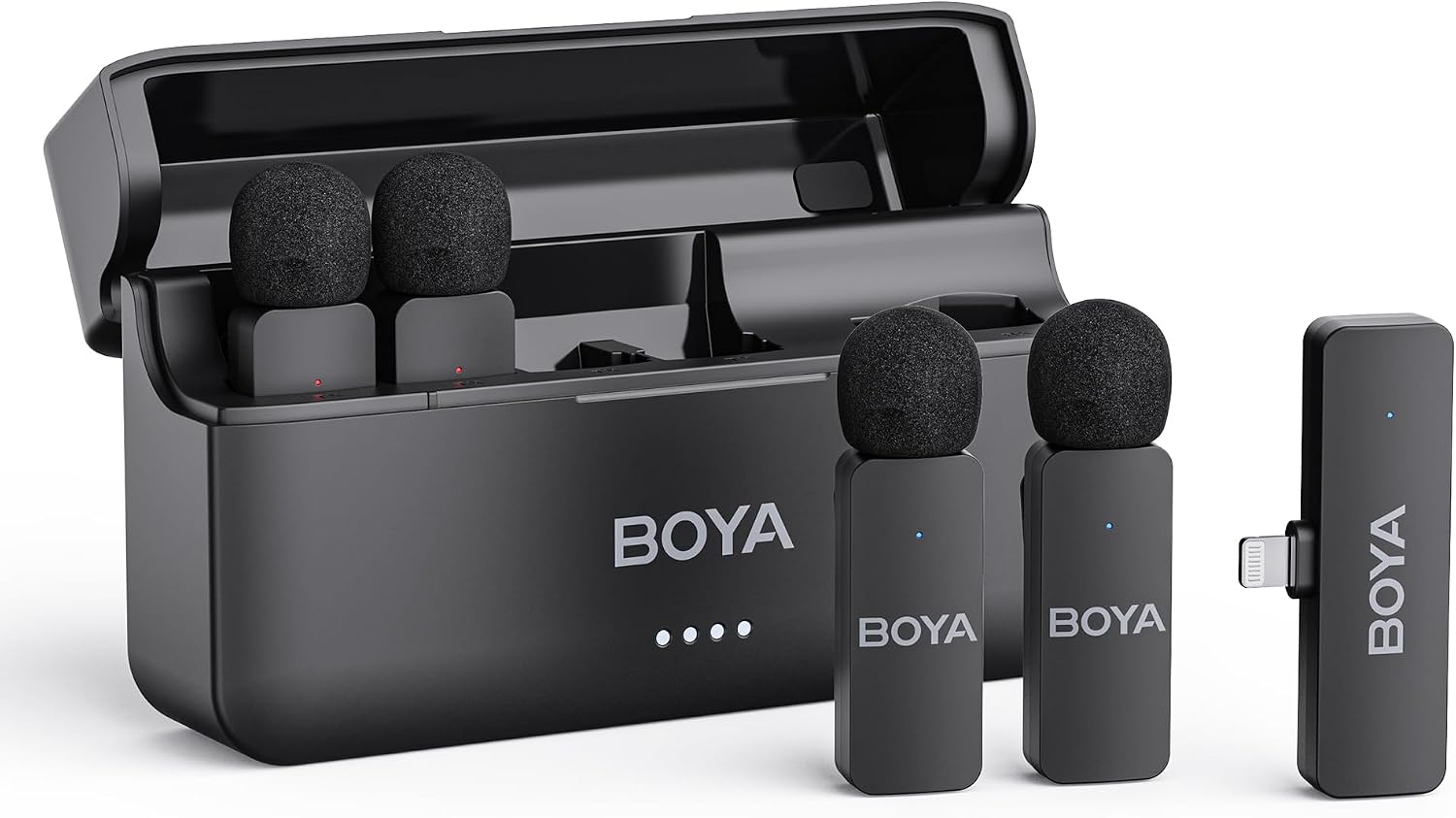
Figure 1: All components included in the BOYA BY-V4D Wireless Lavalier Microphone kit.
ຕັ້ງຄ່າ
The BY-V4D system is designed for plug-and-play convenience. Follow these steps for initial setup:
- ການສາກໄຟເບື້ອງຕົ້ນ: Before first use, ensure all transmitters and the charging case are fully charged. Place the transmitters into the charging case. Connect the charging case to a power source using the provided USB-A to USB-C cable. The indicator lights on the case will show charging status.
- ເອົາຮູບເງົາປ້ອງກັນອອກ: For optimal charging and connection, ensure any small protective plastic films covering the charging contacts on the bottom of the transmitters are removed.
- ເຊື່ອມຕໍ່ຜູ້ຮັບ: Plug the BY-V4D-RXU receiver directly into the Lightning port of your iPhone or iPad. The receiver is MFi certified, ensuring seamless compatibility.
- ການຈັບຄູ່ອັດຕະໂນມັດ: Once the transmitters are removed from the charging case and the receiver is plugged into your device, they will automatically pair. A steady blue light on the transmitters indicates a successful connection.

Figure 2: The BY-V4D receiver seamlessly connects to compatible Apple devices via the Lightning port.
Video 1: Official BOYA overview of the BY-V4 Series, demonstrating setup and key features.
ປະຕິບັດການ
Utilize the features of your BY-V4D microphone system for optimal audio capture:
- Attaching Microphones: Each transmitter features a 360° rotatable clip for easy attachment to clothing, ensuring hands-free recording.
- Intelligent Noise Cancellation: The transmitters are equipped with a one-click noise cancellation feature. Press the dedicated button on the transmitter to activate or deactivate noise reduction, minimizing background noise for clear audio.

Figure 3: Activate noise cancellation with a single click on the transmitter for enhanced audio clarity.
- Omnidirectional Sound Pickup: The microphones capture audio from all directions, ensuring no sound source is missed, providing comprehensive coverage for your recordings.
- Multi-channel Wireless System: The BY-V4D supports up to four simultaneous audio tracks, allowing you to record multiple speakers or sound sources efficiently.
- Play without Unplugging: The receiver features exclusive audio analysis technology, allowing you to play audio directly through your phone's built-in speaker without needing to unplug the receiver. This is convenient for reviewing recordings immediately.

Figure 4: The system offers a stable audio signal transmission range of up to 650 feet (200 meters).
ບໍາລຸງຮັກສາ
Proper maintenance ensures the longevity and performance of your BY-V4D system:
- ຊີວິດຫມໍ້ໄຟ: Each wireless clip-on microphone provides up to 6 hours of working time on a full charge. The compact charging case can fully charge the entire set twice, extending the total battery life to 18 hours.
- ການສາກໄຟ: Always return transmitters to the charging case when not in use to keep them charged. Recharge the case via its USB-C port as needed.

Figure 5: The charging case provides multiple recharges for extended usage throughout the day.
ການແກ້ໄຂບັນຫາ
- Microphones Not Charging: If a transmitter is not charging, ensure that any small, clear protective plastic film covering the gold charging contacts on the bottom of the transmitter has been completely removed.
- ບັນຫາການເຊື່ອມຕໍ່: Ensure the receiver is firmly plugged into your device's Lightning port. Verify that the transmitters are powered on (indicated by a steady blue light). If issues persist, try restarting your recording device.
- Audio Distortion/Hiss: While the noise cancellation feature is effective, in extremely noisy environments, some background noise may still be present. Ensure the foam windscreen is properly attached to minimize wind noise and plosives.
ຂໍ້ມູນຈໍາເພາະ
| ຍີ່ຫໍ້ | BOYA |
| ໝາຍເລກຕົວແບບ | BY-V4D |
| ເຕັກໂນໂລຊີການເຊື່ອມຕໍ່ | ໄຮ້ສາຍ 2.4GHz |
| ປະເພດຕົວເຊື່ອມຕໍ່ | ຟ້າຜ່າ |
| ຮູບແບບຂົ້ວໂລກ | ອ້ອມຮອບ |
| ຈໍານວນຊ່ອງ | 4 |
| ອັດຕາສ່ວນສັນຍານເຖິງສຽງດັງ | 80 dB |
| ຊ່ວງຄວາມຖີ່ | 20Hz-20kHz |
| ຂະໜາດລາຍການ L x W x H | 6.1 x 2.2 x 3.4 ນິ້ວ |
| ນ້ໍາຫນັກລາຍການ | 10.2 ອອນ |
ການຮັບປະກັນແລະການສະຫນັບສະຫນູນ
Your BOYA BY-V4D Wireless Lavalier Microphone is designed for reliable performance. For any technical assistance or warranty inquiries, please refer to the official BOYA website or contact their customer support directly. Extended protection plans may also be available for purchase.


