1. ບົດແນະນຳ
Thank you for choosing the LONPOO LP42M Active Bookshelf Speakers. These speakers are designed to deliver high-quality audio with versatile connectivity options, suitable for various home audio setups. This manual provides essential information for safe and efficient use of your new speakers.
2. ຂໍ້ມູນຄວາມປອດໄພ
ກະລຸນາອ່ານຄໍາແນະນໍາດ້ານຄວາມປອດໄພທັງໝົດຢ່າງລະອຽດກ່ອນທີ່ຈະໃຊ້ຜະລິດຕະພັນ. ຮັກສາຄູ່ມືນີ້ໄວ້ສໍາລັບການອ້າງອີງໃນອະນາຄົດ.
- ແຫຼ່ງພະລັງງານ: ໃຊ້ພຽງແຕ່ອະແດບເຕີໄຟຟ້າທີ່ສະໜອງໃຫ້ເທົ່ານັ້ນ. ໃຫ້ແນ່ໃຈວ່າລະດັບສຽງtage ກົງກັບການສະຫນອງພະລັງງານໃນທ້ອງຖິ່ນຂອງທ່ານ.
- ການລະບາຍອາກາດ: Do not block any ventilation openings. Maintain adequate space around the speakers for proper airflow.
- ນ້ໍາແລະຄວາມຊຸ່ມ: Do not expose the speakers to water, rain, or moisture. Avoid placing liquid-filled objects on or near the speakers.
- ຄວາມຮ້ອນ: Keep the speakers away from heat sources such as radiators, heat registers, stoves, or other heat-producing appliances.
- ທໍາຄວາມສະອາດ: Unplug the speakers from the power outlet before cleaning. Use a soft, dry cloth. Do not use liquid cleaners or aerosol cleaners.
- ການບໍລິການ: ຢ່າພະຍາຍາມບໍລິການຜະລິດຕະພັນນີ້ດ້ວຍຕົນເອງ. ອ້າງເຖິງການບໍລິການທັງtoົດໃຫ້ກັບພະນັກງານບໍລິການທີ່ມີຄຸນວຸດທິ.
3. ເນື້ອໃນຊຸດ
ກວດສອບວ່າລາຍການທັງຫມົດແມ່ນມີຢູ່ໃນຊຸດ:
- LONPOO LP42M Active Bookshelf Speaker Pair (1 powered speaker, 1 passive speaker)
- ການຄວບຄຸມໄລຍະໄກ x 1
- Speaker Wire (6.56ft / 2m) x 1
- Optical Cable (4.92ft / 1.5m) x 1
- AC Power Cord (3.94ft / 1.2m) x 1

4. ຜະລິດຕະພັນເກີນview
The LONPOO LP42M speakers feature a classic wooden design with advanced audio components and multiple connectivity options.
4.1 Front Panel (Powered Speaker)
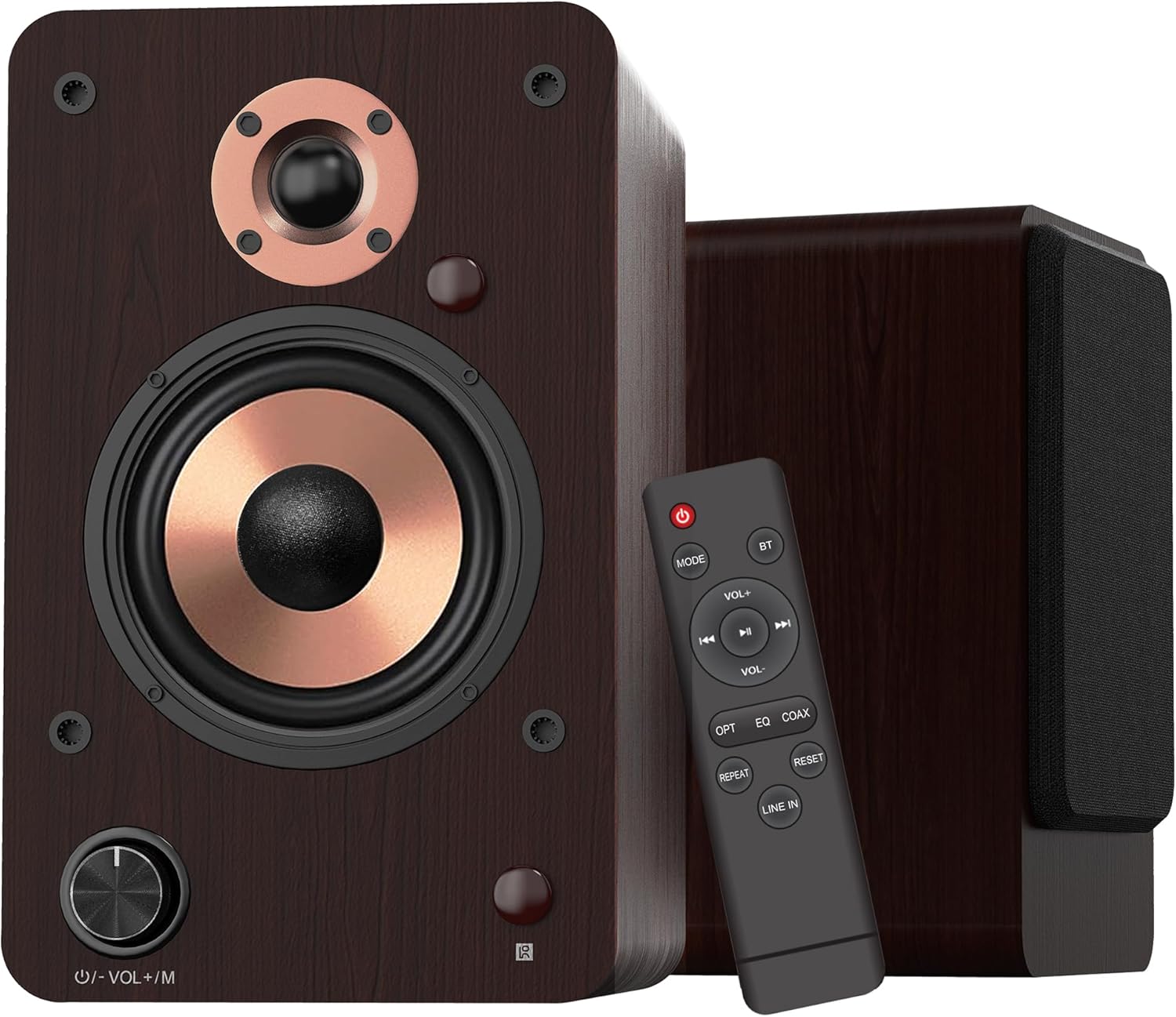
- Volume/Mode Knob: Rotate to adjust volume. Press to cycle through input modes.
- ຕົວຊີ້ວັດ LED: Displays the current input mode (Red: Standby, Blue: Bluetooth, Green: Optical, Purple: Coaxial/USB, Yellow: AUX, Light Blue: Line-in).
4.2 ອົງປະກອບຂອງລໍາໂພງ

- 1-inch Silk Dome Tweeter: Delivers crisp and clear high frequencies.
- 4-inch Aluminum Cone Woofer: Provides rich and powerful bass.
- 12mm MDF Wood Cabinet: Ensures solid construction and minimizes resonance for improved audio clarity.
4.3 Rear Panel (Powered Speaker)

- TREBLE Button: ປັບຜົນຜະລິດຄວາມຖີ່ສູງ.
- ປຸ່ມ BASS: ປັບຜົນຜະລິດຄວາມຖີ່ຕ່ຳ.
- ສະຫວິດໄຟຟ້າ: Turns the speaker system on or off.
- AC PORT: ເຊື່ອມຕໍ່ກັບສາຍໄຟ AC.
- ເວົ້າອອກມາ: Connects to the passive speaker using the provided speaker wire.
- LINE IN (RCA L/R): For connecting devices with RCA audio output (e.g., turntables, CD players).
- AUX ໃນ: ສຳລັບເຊື່ອມຕໍ່ອຸປະກອນທີ່ມີຜົນຜະລິດສຽງ 3.5 ມມ.
- ທາງເລືອກ: For connecting devices with optical audio output (e.g., TVs, game consoles).
- COAXIAL: ສຳລັບເຊື່ອມຕໍ່ອຸປະກອນທີ່ມີຜົນຜະລິດສຽງ coaxial.
- ວັດສະດຸປ້ອນ USB: For connecting USB flash drives for audio playback or connecting to a PC.
5. ຕັ້ງຄ່າ
5.1 ການຫຸ້ມຫໍ່
ເອົາສ່ວນປະກອບທັງຫມົດອອກຈາກການຫຸ້ມຫໍ່ຢ່າງລະມັດລະວັງ. ຮັກສາການຫຸ້ມຫໍ່ສໍາລັບການຂົນສົ່ງຫຼືການເກັບຮັກສາໃນອະນາຄົດ.
5.2 ການວາງລຳໂພງ
For optimal sound quality, place the speakers on a stable surface, such as a bookshelf or speaker stands. Position them along a wall or near a corner of the room to enhance bass response. Ensure the speakers are equidistant from your listening position for a balanced stereo image.
5.3 ການເຊື່ອມຕໍ່ລໍາໂພງ
Connect the powered speaker to the passive speaker using the provided speaker wire. Ensure the red wire connects to the red terminal and the white/black wire connects to the black terminal on both speakers.

5.4 ການເຊື່ອມຕໍ່ກັບແຫຼ່ງສຽງ
The LP42M speakers offer multiple input options:
- Bluetooth: For wireless connection to smartphones, tablets, or other Bluetooth-enabled devices.
- USB: Connect a USB flash drive for direct audio playback or connect to a PC using a USB cable.
- Optical: Use the optical cable to connect to TVs, game consoles, or other digital audio sources.
- Coaxial: Use a coaxial cable to connect to compatible digital audio sources.
- RCA (Line In): Use RCA cables to connect to devices like turntables, CD players, or DVD players.
- AUX-in: Use a 3.5mm audio cable to connect to devices with a headphone jack.


5.5 ການເຊື່ອມຕໍ່ພະລັງງານ
Connect the AC power cord to the AC port on the rear of the powered speaker, then plug the other end into a wall outlet.
6. ຄໍາແນະນໍາການດໍາເນີນງານ
6.1 ເປີດ/ປິດ
ພິກ ພະລັງງານ switch on the rear panel of the powered speaker to the 'ON' position to turn on the speakers. Flip it to 'OFF' to power down.
6.2 ການຄັດເລືອກການປ້ອນຂໍ້ມູນ
ກົດ Volume/Mode Knob on the front of the powered speaker or the 'MODE' button on the remote control to cycle through the available input modes: Bluetooth, Optical, Coaxial, RCA (Line In), USB, and AUX-in. The LED indicator will change color to reflect the selected mode.

6.3 ການຄວບຄຸມປະລິມານ
ໝຸນ Volume/Mode Knob on the front of the powered speaker clockwise to increase volume and counter-clockwise to decrease volume. Alternatively, use the 'VOL+' and 'VOL-' buttons on the remote control.
6.4 ການຄວບຄຸມສຽງ
ໃຊ້ ຄວບຄຸມ ແລະ ເບສ knobs on the rear panel of the powered speaker to adjust the high and low frequencies to your preference.

6.5 ການຈັບຄູ່ Bluetooth
- Switch the speaker to Bluetooth mode (blue LED indicator).
- On your device (smartphone, tablet), enable Bluetooth and search for 'LP42M'.
- Select 'LP42M' to pair. Once connected, the blue LED will remain solid.
6.6 ການຫຼິ້ນ USB
ໃສ່ແຟລດໄດຣຟ໌ USB ທີ່ມີສຽງ MP3/WMA files into the USB port. The speaker will automatically switch to USB mode and begin playback. Use the remote control for playback functions (play/pause, next/previous track).
6.7 ຫນ້າທີ່ຄວບຄຸມໄລຍະໄກ

- ປຸ່ມເປີດປິດ: Turns the speakers on/off (standby).
- ແບບ: Cycles through input modes.
- BT: ປ່ຽນໄປໃຊ້ໂໝດ Bluetooth ໂດຍກົງ.
- VOL+/VOL-: ປັບລະດັບສຽງ.
- Play/Pause, Next/Previous: Controls audio playback (USB/Bluetooth).
- OPT: Directly switches to Optical mode.
- EQ: Cycles through sound equalization presets.
- COAX: Directly switches to Coaxial mode.
- ເຮັດຊ້ຳ: Repeats current track or playlist (USB).
- ຣີເຊັດ: ຣີເຊັດການຕັ້ງຄ່າ.
- ເຂົ້າໃນ: Directly switches to Line In (RCA) mode.
7. ບໍາລຸງຮັກສາ
ການບຳລຸງຮັກສາທີ່ເໝາະສົມຮັບປະກັນອາຍຸການໃຊ້ງານ ແລະ ປະສິດທິພາບຂອງລຳໂພງຂອງທ່ານ.
- ທໍາຄວາມສະອາດ: Use a soft, dry, lint-free cloth to clean the speaker cabinets. Do not use abrasive cleaners, waxes, or solvents.
- ຂີ້ຝຸ່ນ: ເຊັດຝຸ່ນໃສ່ຕະແກງລຳໂພງ ແລະ ໜ້າຜິວເປັນປະຈຳເພື່ອປ້ອງກັນການສະສົມຂອງຝຸ່ນ.
- ສະພາບແວດລ້ອມ: ຫຼີກເວັ້ນການວາງລໍາໂພງຢູ່ໃນແສງແດດໂດຍກົງ, ຢູ່ໃກ້ກັບແຫຼ່ງຄວາມຮ້ອນ, ຫຼືຢູ່ໃນບ່ອນທີ່ມີຄວາມຊຸ່ມຊື່ນສູງ.
8. ການແກ້ໄຂບັນຫາ
ຖ້າຫາກທ່ານພົບບັນຫາ, ເບິ່ງບັນຫາທົ່ວໄປດັ່ງຕໍ່ໄປນີ້ແລະການແກ້ໄຂ:
| ບັນຫາ | ສາເຫດທີ່ເປັນໄປໄດ້ | ການແກ້ໄຂ |
|---|---|---|
| ບໍ່ມີສຽງ | Power not connected; incorrect input mode; volume too low; cables loose. | Ensure power is on; select correct input mode; increase volume; check all cable connections. |
| Bluetooth ບໍ່ເຊື່ອມຕໍ່ | Speaker not in Bluetooth mode; device too far; already paired with another device. | Switch speaker to Bluetooth mode; ensure device is within 10m range; disconnect from other devices and try pairing again. |
| ສຽງບິດເບືອນ | Volume too high; poor source quality; loose cable connection. | Reduce volume on speaker and source; try a different audio source; check cable connections. |
| ການຄວບຄຸມໄລຍະໄກບໍ່ເຮັດວຽກ | Batteries dead; obstruction between remote and speaker; remote not pointed at sensor. | Replace batteries; remove obstructions; ensure remote is pointed at the speaker's sensor. |
9. ຂໍ້ມູນຈໍາເພາະ
| ຄຸນສົມບັດ | ຂໍ້ມູນຈໍາເພາະ |
|---|---|
| ປະເພດລຳໂພງ | ລຳໂພງຊັ້ນວາງປຶ້ມທີ່ໃຊ້ວຽກ |
| ພະລັງງານຜົນຜະລິດ | 100W (50W x 2) |
| Woofer ເສັ້ນຜ່າສູນກາງ | 4 inches (Aluminum Cone) |
| Tweeter ເສັ້ນຜ່າສູນກາງ | 1 inch (Silk Dome) |
| ການຕອບສະໜອງຄວາມຖີ່ | 40Hz-20kHz |
| impedance | 4 ໂອມ |
| ອັດຕາສ່ວນສັນຍານຫາສຽງລົບກວນ (S/N) | 80dB |
| ການເຊື່ອມຕໍ່ | Bluetooth 5.3, Optical, Coaxial, RCA (Line In), USB, AUX-in (3.5mm) |
| ຊ່ວງ Bluetooth | ສູງເຖິງ 10 ແມັດ (33 ຟຸດ) |
| ວິທີການຄວບຄຸມ | ຣີໂໝດຄວບຄຸມ, ປຸ່ມຄວບຄຸມໃນລຳໂພງ |
| ວັດສະດຸຕູ້ | 12mm MDF Wood |
| ຂະ ໜາດ (ແຕ່ລະລໍາໂພງ) | 9.84" (H) x 7.07" (W) x 6.1" (L) / 25cm (H) x 18cm (W) x 15.5cm (L) |
| ນ້ຳໜັກ (ຄູ່) | 5.05 ກິໂລ (11.13 ປອນ) |
| ສີ | ສີນ້ຳຕານ |
10. ວິດີໂອຜະລິດຕະພັນຢ່າງເປັນທາງການ
Watch these official videos for additional setup and feature demonstrations:
LONPOO Premium Bookshelf Speakers LP-42M
ວີດີໂອ: ຢ່າງເປັນທາງການview of the LONPOO LP-42M Premium Bookshelf Speakers, showcasing their design and key features.
Active Bookshelf Speaker 100W
Video: A short demonstration highlighting the active features and 100W power output of the bookshelf speakers.
11. ການຮັບປະກັນແລະການສະຫນັບສະຫນູນ
The LONPOO LP42M speakers come with a Limited Warranty. Please refer to the warranty card included in your package for detailed terms and conditions.
For technical support, troubleshooting assistance, or warranty claims, please contact LONPOO customer service through the official webເວັບໄຊຫຼືຮ້ານຂາຍຍ່ອຍຂອງທ່ານ.


