1. ບົດແນະນຳ
This manual provides essential information for the installation, operation, and maintenance of your ZOTAC GAMING GeForce RTX 4070 Ti SUPER SOLID OC 16GB graphics card. Please read this manual thoroughly before installation to ensure proper functionality and to prevent damage.

Image 1.1: ZOTAC GAMING GeForce RTX 4070 Ti SUPER SOLID OC 16GB Graphics Card and its retail packaging.
2. ເນື້ອໃນຊຸດ
ກວດສອບວ່າລາຍການທັງຫມົດແມ່ນມີຢູ່ໃນຊຸດ:
- ZOTAC GAMING GeForce RTX 4070 Ti SUPER SOLID OC 16GB Graphics Card
- GPU ຮອງຮັບ Stand
- ຄູ່ມືຜູ້ໃຊ້ (ເອກະສານນີ້)
- Power Adapter Cable (if applicable, check your specific model)
3. ຄວາມຕ້ອງການລະບົບ
- PCI Express-compliant ເມນບອດທີ່ມີຊ່ອງກາຟິກ dual-width x16
- Minimum 750W power supply with three available 8-pin PCIe power connectors (or equivalent 12VHPWR connector)
- ໜ່ວຍຄວາມຈຳລະບົບຢ່າງໜ້ອຍ 16GB
- Microsoft Windows 10/11 64-bit or Linux 64-bit operating system
- Internet connection for driver installation
4. ຄູ່ມືການຕິດຕັ້ງ
4.1. ການກະກຽມ
- ປິດຄອມພິວເຕີຂອງທ່ານແລະຕັດການເຊື່ອມຕໍ່ສາຍໄຟ.
- ເປີດກໍລະນີຄອມພິວເຕີຂອງທ່ານ.
- ຕໍ່ດິນເພື່ອປ່ອຍໄຟຟ້າສະຖິດອອກມາ.
4.2. ການຕິດຕັ້ງກາດກຣາບຟິກ
- ຊອກຫາຊ່ອງ PCI Express x16 ທີ່ມີຢູ່ໃນເມນບອດຂອງທ່ານ.
- Remove the necessary expansion slot covers from your computer case.
- Carefully insert the graphics card into the PCIe x16 slot until it is fully seated. Ensure the retention clip locks into place.
- ຮັບປະກັນບັດກາຟິກກັບກໍລະນີດ້ວຍສະກູ.
- Connect the required power cables from your power supply to the graphics card. This model typically requires three 8-pin PCIe power connectors or a single 12VHPWR connector. Ensure all connections are secure.
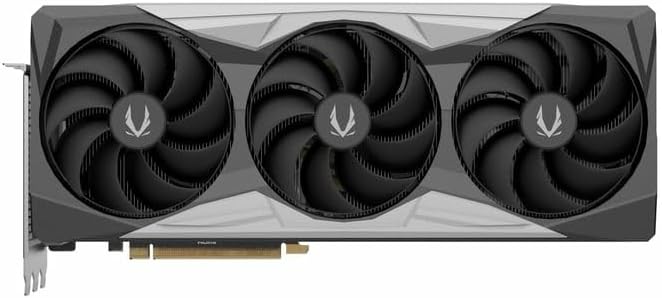
ຮູບພາບ 4.1: ດ້ານຫນ້າ view of the graphics card, showing the triple fan design.
4.3. Installing the GPU Support Stand
The included GPU support stand helps prevent sag and provides additional stability for the graphics card. Follow the instructions provided with the stand for proper installation within your PC case.
4.4. Closing the Case and Connecting Peripherals
- ປິດກໍລະນີຄອມພິວເຕີຂອງທ່ານ.
- Connect your monitor(s) to the display outputs on the graphics card (DisplayPort or HDMI).
- Reconnect the power cable and other peripherals to your computer.

ຮູບພາບ 4.2: ດ້ານຫລັງ view of the graphics card, showing three DisplayPort outputs and one HDMI output.
5. ຄໍາແນະນໍາການດໍາເນີນງານ
5.1. ການຕິດຕັ້ງໄດເວີ
- ເປີດຄອມພິວເຕີຂອງທ່ານ.
- Once the operating system loads, download the latest graphics drivers from the official NVIDIA webເວັບໄຊ (www.nvidia.com/drivers) or the ZOTAC webເວັບໄຊ (www.zotac.com/support).
- ປະຕິບັດຕາມຄໍາແນະນໍາໃນຫນ້າຈໍເພື່ອສໍາເລັດການຕິດຕັ້ງໄດເວີ. ການປິດເປີດລະບົບອາດຈະຕ້ອງການ.
5.2. Software Utilities
ZOTAC provides utilities such as FireStorm for monitoring and adjusting graphics card settings, including fan speed control (Active Fan Control, FREEZE Fan Stop) and performance profiles. These can be downloaded from the ZOTAC webເວັບໄຊ.
6. ບໍາລຸງຮັກສາ
- ການກຳຈັດຂີ້ຝຸ່ນ: Periodically clean dust from the graphics card fans and heatsink using compressed air. Ensure the computer is powered off and unplugged before cleaning.
- ອັບເດດໄດເວີ: Keep your graphics drivers updated to ensure optimal performance and compatibility.
- ການຕິດຕາມອຸນຫະພູມ: Use monitoring software to keep track of the graphics card's temperature during operation. Excessive temperatures can indicate poor airflow or dust buildup.

ຮູບພາບ 6.1: ມຸມ view of the graphics card, highlighting its robust cooling solution.
7. ການແກ້ໄຂບັນຫາ
- ບໍ່ມີການສະແດງຜົນອອກ:
- ກວດໃຫ້ແນ່ໃຈວ່າສາຍຂອງຈໍພາບຖືກເຊື່ອມຕໍ່ຢ່າງປອດໄພກັບບັດກາຟິກ ແລະ ຈໍພາບ.
- ກວດສອບວ່າບັດກາຟິກໄດ້ນັ່ງຢູ່ໃນຊ່ອງ PCIe ຢ່າງເຕັມທີ່.
- Check that all power cables are properly connected to the graphics card.
- ທົດສອບດ້ວຍຈໍພາບ ຫຼື ສາຍໄຟອື່ນຖ້າເປັນໄປໄດ້.
- ຄວາມບໍ່ໝັ້ນຄົງຂອງລະບົບ ຫຼື ການຂັດຂ້ອງ:
- Ensure graphics drivers are correctly installed and up to date.
- Check for adequate power supply capacity.
- ຕິດຕາມອຸນຫະພູມເພື່ອປ້ອງກັນຄວາມຮ້ອນເກີນ.
- Verify system memory (RAM) stability.
- Fan Noise or Malfunction:
- ເຮັດຄວາມສະອາດຂີ້ຝຸ່ນຈາກພັດລົມແລະເຄື່ອງເຮັດຄວາມຮ້ອນ.
- ໃຫ້ແນ່ໃຈວ່າບໍ່ມີສາຍໄຟໃດໆກີດຂວາງການໝຸນຂອງພັດລົມ.
- Use ZOTAC FireStorm utility to check fan speed settings.
8. ຂໍ້ມູນຈໍາເພາະ
| ຄຸນສົມບັດ | ລາຍລະອຽດ |
|---|---|
| ໝາຍເລກຕົວແບບ | ZT-D40730R-10P |
| ໜ່ວຍປະມວນຜົນກຣາຟິກ | NVIDIA GeForce RTX 4070 Ti SUPER |
| ຫນ່ວຍຄວາມຈໍາວິດີໂອ | 16GB GDDR6X |
| ການໂຕ້ຕອບຄວາມຈໍາ | 256-ບິດ |
| ໂມງຄວາມຊົງຈໍາ | 21000 MHz (ມີປະສິດທິພາບ) |
| ໂມງເຄື່ອງຈັກ | ຄວາມໄວ: 2640 MHz |
| ສະແດງຜົນອອກ | 3 x DisplayPort 1.4a, 1 x HDMI 2.1a |
| ສະຫນັບສະຫນູນ HDCP | ແມ່ນແລ້ວ |
| ຄວາມລະອຽດສູງສຸດດິຈິຕອນ | Up to 4K (7680x4320 @60Hz) |
| PCI Express | PCI Express 4.0 x16 |
| ການສະຫນອງພະລັງງານທີ່ແນະນໍາ | 750W |
| ຕົວເຊື່ອມຕໍ່ພະລັງງານ | 1 x 12VHPWR (or 3 x 8-pin PCIe via adapter) |
| ຂະໜາດ (LxWxH) | 16.73 x 11.54 x 3.94 ນິ້ວ (ປະມານ) |
| ນ້ຳໜັກ | 2.2 ປອນ (ປະມານ) |
| ລະບົບເຮັດຄວາມເຢັນ | IceStorm 2.0 Advanced Cooling, Triple 100mm Fans, FREEZE Fan Stop, Active Fan Control |
| ຄຸນສົມບັດ | NVIDIA DLSS 3.5, Ray Tracing, Metal Backplate, GPU Support Stand |
9. ການຮັບປະກັນແລະການສະຫນັບສະຫນູນ
For detailed warranty information, please refer to the warranty card included with your product or visit the official ZOTAC website's support section. ZOTAC provides technical support and resources for their products.
- ສະຫນັບສະຫນູນ ZOTAC Webເວັບໄຊ: www.zotac.com/support
- ການລົງທະບຽນຜະລິດຕະພັນ: Register your product on the ZOTAC website to activate your warranty and receive product updates.


