ແນະນຳ
The MAXSafes 10005NV Drawer Safe provides secure and quick access storage for your valuables and firearms. It features advanced finger vein recognition technology, a programmable electronic keypad, and a manual key override. Designed for discreet placement, this safe offers robust protection with its heavy-duty construction and convenient features like internal LED lighting and emergency power options.

ຮູບພາບ: ຫຼາຍກວ່າview of MAXSafes 10005NV Drawer Safe with key features labeled.
ການຕິດຕັ້ງແລະການຕິດຕັ້ງ
ອົງປະກອບລວມ
- 1 x MAXSafes 10005NV Biometric Safe
- 1 x ຄູ່ມືຜູ້ໃຊ້
- 2 x ປຸ່ມ Override
- Mounting Hardware (screws, mounting bracket)
ການຕິດຕັ້ງຫມໍ້ໄຟ
- Open the safe using the override key (see 'Manual Key Override' in Operation section).
- Locate the battery compartment inside the safe.
- ເອົາຝາປິດຫມໍ້ໄຟອອກ.
- ໃສ່ແບັດເຕີຣີອາກາລີນ 9V ໃໝ່, ຮັບປະກັນວ່າຂົ້ວຖືກຕ້ອງ.
- ປ່ຽນຝາປິດຫມໍ້ໄຟ.
ການຕິດຕັ້ງທີ່ປອດໄພ
The safe can be installed under a desk, inside a cabinet, or on a nightstand using the provided mounting bracket and hardware. Ensure the mounting surface is sturdy enough to support the safe's weight (approximately 14.3 lbs).
- Position the mounting bracket in your desired location.
- Mark the drilling points through the pre-drilled holes on the bracket.
- ເຈາະຮູທົດລອງຖ້າຈໍາເປັນ.
- ຍຶດຍຶດຍຶດຕິດດ້ວຍສະກູທີ່ໃຫ້ມາ.
- Slide the safe onto the mounted bracket until it locks securely into place.
Video: Instructions on how to install the MAXSafes drawer safe.
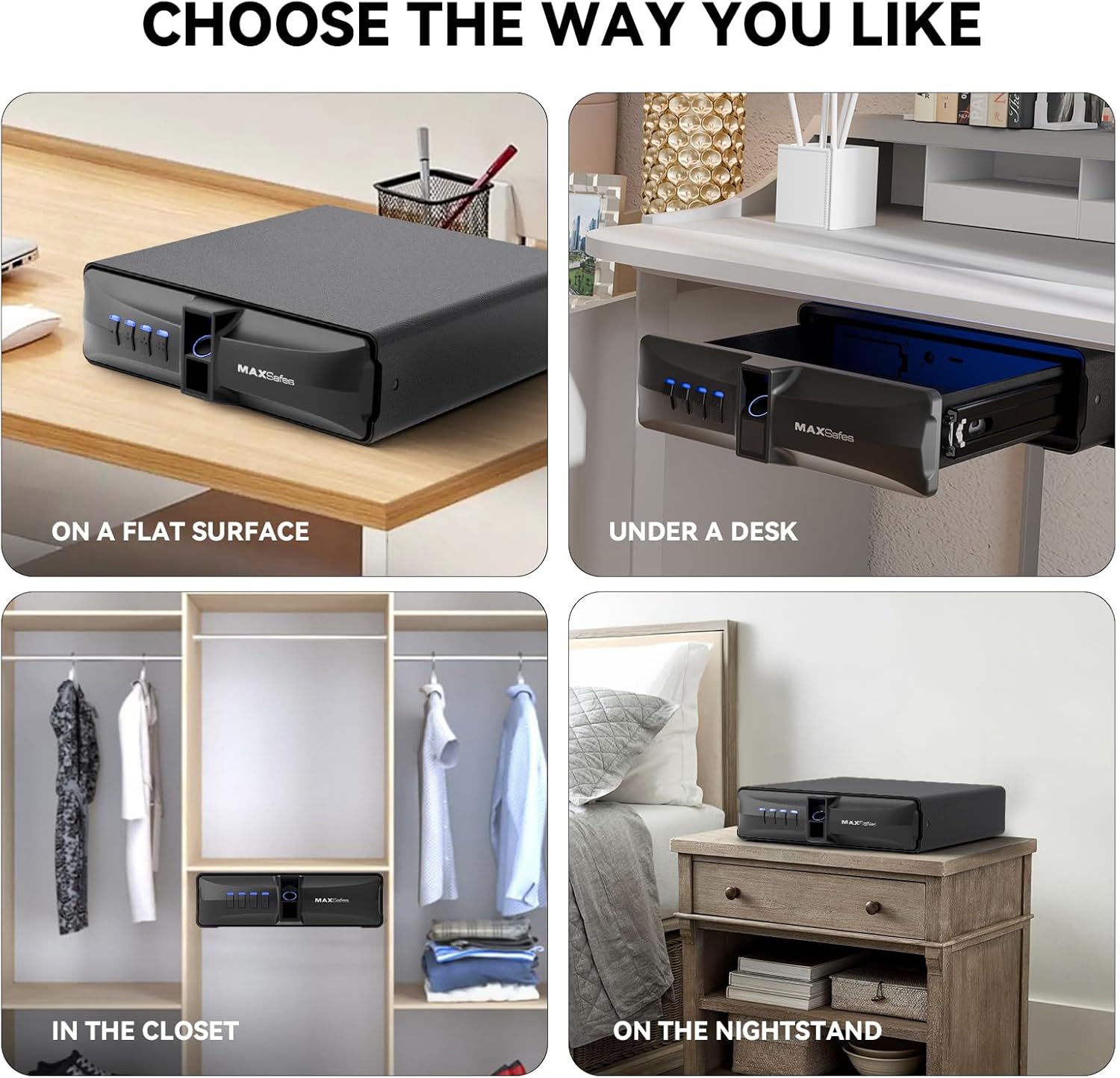
Image: Various installation options for the MAXSafes 10005NV Drawer Safe.
ການດໍາເນີນງານ
ການປົດລັອກທີ່ປອດໄພ
The MAXSafes 10005NV offers three methods for unlocking:
- Finger Vein Recognition: Place a registered finger on the scanner. The safe will unlock in approximately 0.3 seconds.
- ລະຫັດ PIN: Enter your programmed 4-8 digit PIN code on the backlit digital keypad.
- Manual Key Override: In case of battery failure or forgotten codes, use one of the provided override keys to manually open the safe. The keyhole is located on the side of the safe.
Video: Demonstration of how to use the MAXSafes drawer safe, including unlocking methods.

Image: Three unlocking methods: Manual Key, Password Quick Access, and Finger Vein Recognition Quick Access.
Programming Finger Vein IDs
The safe can store up to 50 unique finger vein patterns.
- ເປີດຕູ້ນິລະໄພ.
- Locate the program button inside the safe (under a rubber cover).
- Press the program button. The indicator lights will flash.
- Place the finger you wish to register on the finger vein scanner.
- Lift and place the same finger on the scanner two more times (total of three scans).
- The indicator lights will confirm successful registration.
- Repeat for additional finger vein IDs.
ການຂຽນໂປຣແກຣມລະຫັດ PIN
Only one PIN code can be stored at a time. Programming a new code will overwrite the previous one.
- ເປີດຕູ້ນິລະໄພ.
- Locate the program button inside the safe.
- Press the program button. The indicator lights will flash.
- ໃສ່ລະຫັດ PIN 4-8 ຕົວເລກທີ່ທ່ານຕ້ອງການໃນແປ້ນພິມ.
- Press the program button again to confirm.
- Re-enter the same 4-8 digit PIN code to verify.
- The indicator lights will confirm successful programming.
Erasing All Finger Vein IDs
- ເປີດຕູ້ນິລະໄພ.
- Locate the program button inside the safe.
- Press and hold the program button for 5 seconds.
- While still holding the program button, press the '4' key on the keypad.
- All registered finger vein IDs will be erased.
ໂໝດປຸກ
If three incorrect finger vein scans or PIN code entries are made consecutively, the safe's alarm will activate, and a 2-minute lockout period will begin. During this time, the safe cannot be opened using biometric or PIN methods. To end the lockout, enter a correct passcode, use a registered finger vein ID (if available), or remove and reinsert the 9V battery.
ບໍາລຸງຮັກສາ
ການປ່ຽນແບັດ
The safe requires one 9V alkaline battery. Replace the battery when the low battery indicator lights up or if the safe fails to respond. Always keep spare override keys in a secure location outside the safe.
ພະລັງງານສຸກເສີນ
In case the 9V battery is completely depleted, the safe features a Type-C emergency power outlet. Connect a Type-C cable to an external power source (e.g., power bank) to temporarily power the safe and gain access. This allows you to replace the internal 9V battery.

Image: Battery compartment design for easy 9V battery replacement.

Image: Type-C emergency outlet for temporary power when the battery is low.
ທໍາຄວາມສະອາດ
ເຊັດດ້ານນອກຂອງຕູ້ນິລະໄພດ້ວຍຜ້າອ່ອນ, ງamp cloth. Do not use abrasive cleaners or solvents. Keep the finger vein scanner clean and dry for optimal performance.
ການແກ້ໄຂບັນຫາ
- Safe does not open with finger vein: Ensure your finger is clean and dry. Try repositioning your finger on the scanner. If multiple attempts fail, use the PIN code or manual key.
- Safe does not open with PIN code: Double-check the entered code. Ensure the keypad is responsive. If the alarm is active, wait for the lockout period to end or use the manual key.
- No power/Safe unresponsive: Replace the 9V battery. If the battery is completely dead, use the Type-C emergency power outlet to temporarily power the safe and then replace the internal battery.
- ສຽງເຕືອນດັງເລື້ອຍໆ: Review recent access attempts. Ensure no unauthorized attempts are being made.
If you encounter persistent issues not covered here, please contact MAXSafes customer support for assistance.
ຂໍ້ມູນຈໍາເພາະ
| ຍີ່ຫໍ້ | MAX ປອດໄພ |
| ໝາຍເລກຕົວແບບ | 10005NV |
| ຂະໜາດສິນຄ້າ | 11.8"D x 10.63"W x 3.11"H |
| ປະເພດລັອກ | Biometric (Finger Vein), Electronic Combination Lock, Key |
| ສີ | ດຳ |
| ວັດສະດຸ | ເຫຼັກໂລຫະປະສົມ |
| ຄຸນນະສົມບັດພິເສດ | Alarm System, Anti-Theft, Biometric Fingerprint, Internal LED Light, Type-C Emergency Power |
| ປະເພດການຕິດຕັ້ງ | ພາຍໃຕ້ Counter Mount |
| ນ້ໍາຫນັກລາຍການ | 14.33 ປອນ |
| ຕ້ອງໃຊ້ແບັດເຕີຣີ? | Yes (1 x 9V Alkaline Battery) |
| UPC | 762736659784 |
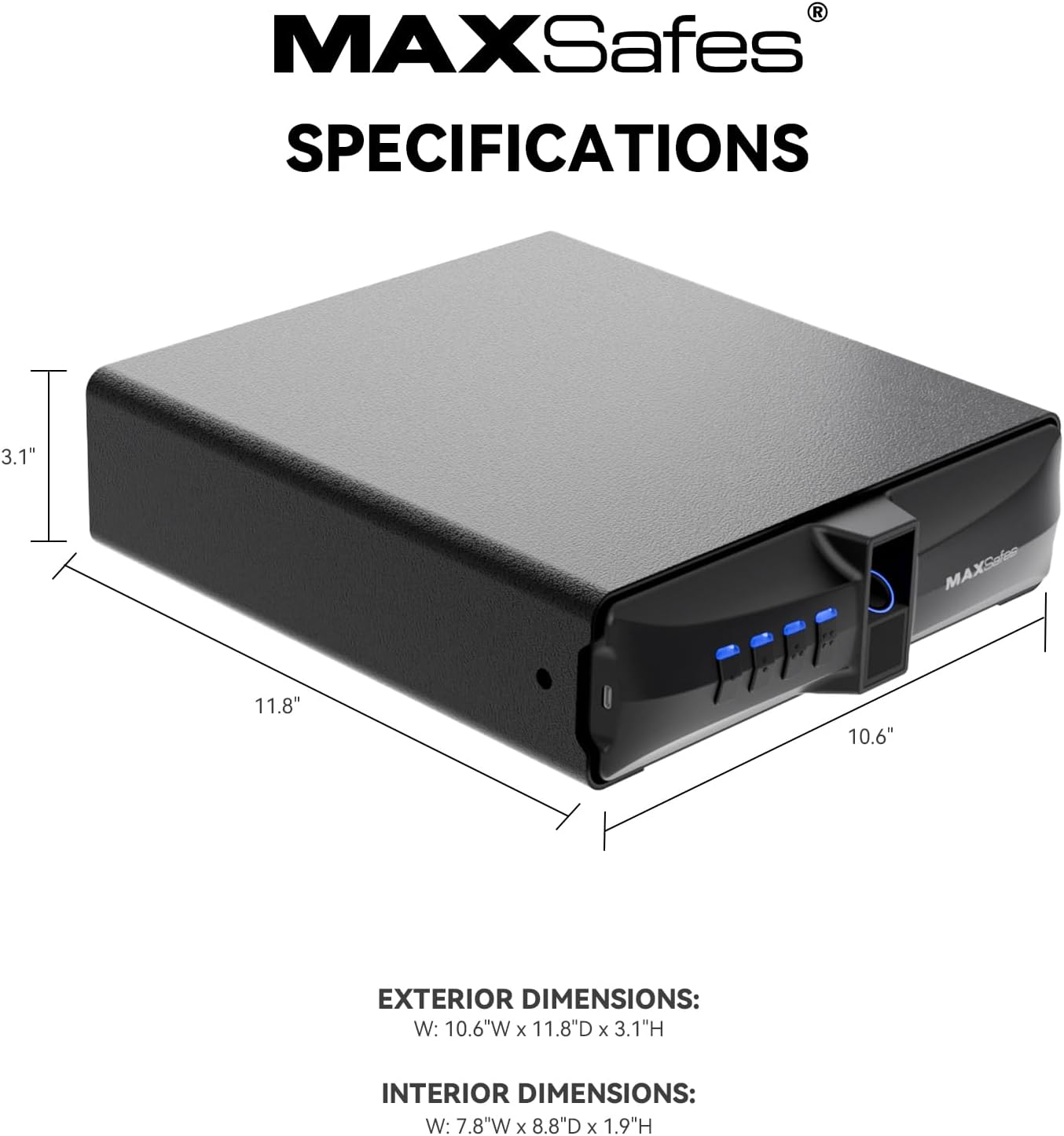
Image: Exterior and interior dimensions of the safe.
ການຮັບປະກັນແລະການສະຫນັບສະຫນູນ
For warranty information or technical support, please refer to the contact details provided with your product packaging or visit the official MAXSafes webເວັບໄຊ. ຮັກສາໃບຮັບເງິນການຊື້ຂອງທ່ານໄວ້ເປັນຫຼັກຖານການຊື້ສໍາລັບການຮຽກຮ້ອງການຮັບປະກັນໃດໆ.


