1. ບົດແນະນຳ
This manual provides essential information for the safe and efficient operation of your Pretul DESI-36P2 3.6V Cordless Screwdriver. Please read it thoroughly before first use and keep it for future reference. This compact cordless screwdriver is designed for light-duty fastening tasks, featuring a two-position handle and an integrated LED work light.

ຮູບທີ 1: Pretul DESI-36P2 Cordless Screwdriver. This image shows the screwdriver in its straight configuration, highlighting its compact design and yellow and black color scheme.
2. ຂໍ້ມູນຄວາມປອດໄພ
ສັງເກດເບິ່ງຄວາມລະມັດລະວັງດ້ານຄວາມປອດໄພຂັ້ນພື້ນຖານສະເໝີເມື່ອໃຊ້ເຄື່ອງມືໄຟຟ້າເພື່ອຫຼຸດຜ່ອນຄວາມສ່ຽງຕໍ່ການເກີດອັກຄີໄພ, ໄຟຟ້າຊອດ ແລະ ການບາດເຈັບສ່ວນບຸກຄົນ.
- ຄວາມປອດໄພໃນພື້ນທີ່ເຮັດວຽກ: ຮັກສາພື້ນທີ່ບ່ອນເຮັດວຽກຂອງເຈົ້າໃຫ້ສະອາດ ແລະ ມີແສງສະຫວ່າງດີ. ພື້ນທີ່ວຸ້ນວາຍ ຫຼືບ່ອນມືດພາໃຫ້ເກີດອຸປະຕິເຫດ.
- ຄວາມປອດໄພທາງໄຟຟ້າ: ຫ້າມບໍ່ໃຫ້ເຄື່ອງໃຊ້ໄຟຟ້າຖືກຝົນ ຫຼືສະພາບທີ່ປຽກ. ນ້ໍາເຂົ້າໄປໃນເຄື່ອງມືໄຟຟ້າຈະເພີ່ມຄວາມສ່ຽງຕໍ່ການຊ໊ອກໄຟຟ້າ.
- ຄວາມປອດໄພສ່ວນຕົວ: ຕື່ນຕົວ, ສັງເກດເບິ່ງສິ່ງທີ່ເຈົ້າກໍາລັງເຮັດ, ແລະໃຊ້ຄວາມຮູ້ສຶກທົ່ວໄປໃນເວລາທີ່ໃຊ້ເຄື່ອງມືພະລັງງານ. ຢ່າໃຊ້ເຄື່ອງໃຊ້ໄຟຟ້າໃນຂະນະທີ່ເຈົ້າອິດເມື່ອຍຫຼືຢູ່ພາຍໃຕ້ອິດທິພົນຂອງຢາເສບຕິດ, ເຫຼົ້າ, ຫຼືຢາ.
- ການນໍາໃຊ້ແລະການດູແລເຄື່ອງມື: ຢ່າບັງຄັບເຄື່ອງມືພະລັງງານ. ໃຊ້ເຄື່ອງມືພະລັງງານທີ່ຖືກຕ້ອງສໍາລັບຄໍາຮ້ອງສະຫມັກຂອງທ່ານ. ມັນຈະເຮັດວຽກໄດ້ດີກວ່າແລະປອດໄພກວ່າໃນອັດຕາທີ່ມັນຖືກອອກແບບມາ.
- ການດູແລຫມໍ້ໄຟ: ເຕີມເງິນດ້ວຍເຄື່ອງສາກທີ່ລະບຸໂດຍຜູ້ຜະລິດເທົ່ານັ້ນ. ເຄື່ອງສາກທີ່ເໝາະສົມກັບແບັດເຕີລີຊະນິດໜຶ່ງອາດຈະເຮັດໃຫ້ເກີດຄວາມສ່ຽງໄຟໄໝ້ເມື່ອໃຊ້ກັບແບັດເຕີລີອື່ນ.
3. ອົງປະກອບ ແລະຄຸນສົມບັດຂອງຜະລິດຕະພັນ
Familiarize yourself with the parts of your Pretul DESI-36P2 cordless screwdriver.
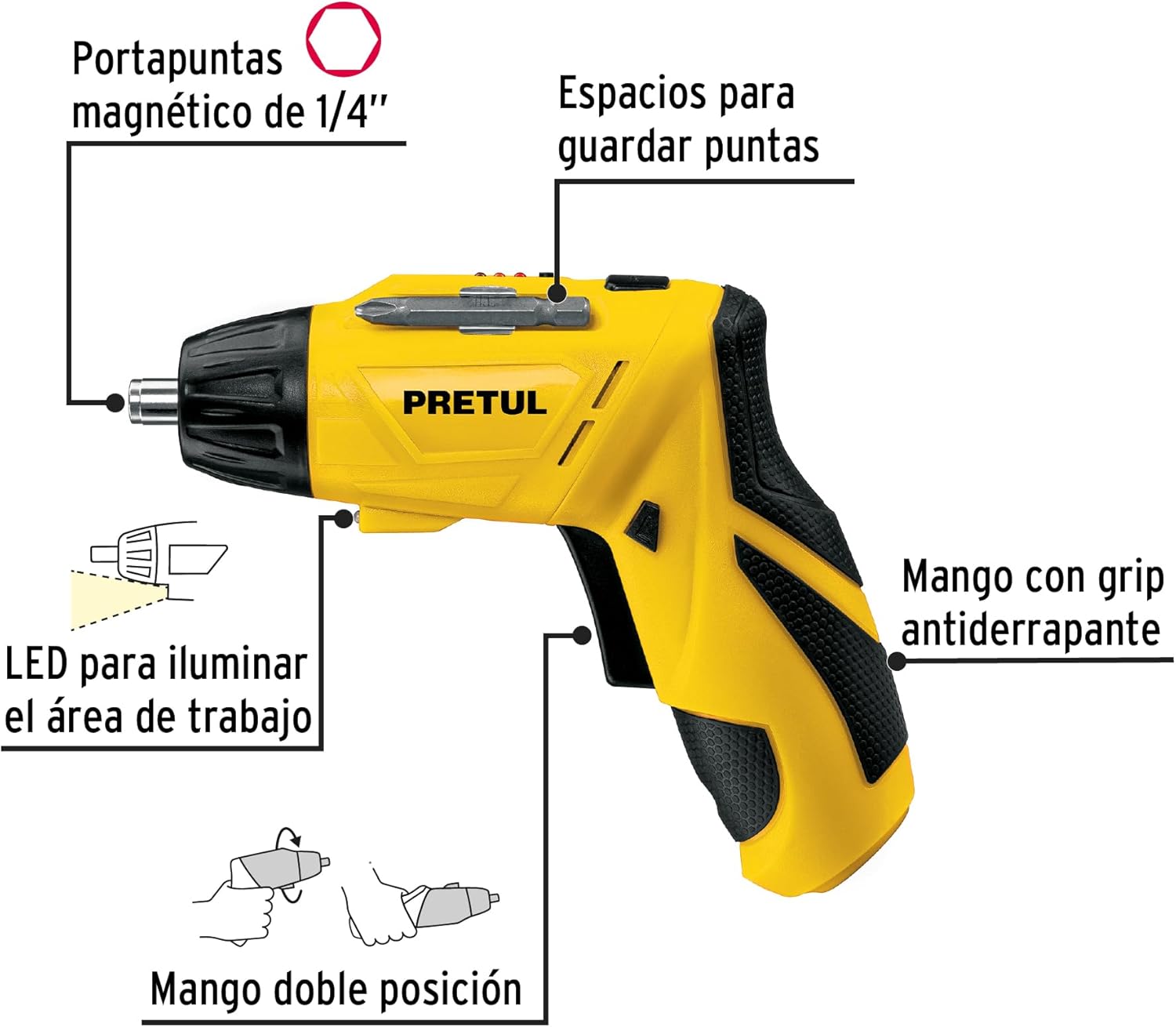
ຮູບທີ 2: Key features of the Pretul DESI-36P2. This diagram illustrates the magnetic 1/4" bit holder, bit storage slots, anti-slip grip handle, LED work light, and the two-position handle mechanism.
- Magnetic 1/4" Hex Bit Holder: Securely holds screwdriver bits for quick changes.
- Bit Storage Slots: Conveniently located on the tool for storing extra bits.
- Anti-slip Grip Handle: ໃຫ້ການຈັດການທີ່ສະດວກສະບາຍ ແລະ ປອດໄພໃນລະຫວ່າງການປະຕິບັດງານ.
- ໄຟ LED ເຮັດວຽກ: Illuminates the work area for improved visibility in dimly lit spaces.
- Two-Position Handle: Allows the screwdriver to be used in a straight or pistol-grip configuration for versatility and access in tight spaces.
- ສະຫຼັບໄປໜ້າ/ປີ້ນ: Controls the direction of rotation for tightening and loosening screws.
- ປຸ່ມເປີດປິດ: Activates the screwdriver.
4. ຕັ້ງຄ່າ
4.1 ການສາກໄຟເບື້ອງຕົ້ນ
Before first use, fully charge the screwdriver's internal battery. Connect the charger to a standard electrical outlet and then to the charging port on the screwdriver. The charging indicator (if present) will show the charging status. Disconnect the charger once the battery is fully charged.
4.2 Attaching Screwdriver Bits
- Select the appropriate 1/4" hex screwdriver bit for your task.
- Insert the bit firmly into the magnetic bit holder at the front of the screwdriver until it is securely seated.
- To remove a bit, simply pull it out from the holder.
4.3 ການປັບຕຳແໜ່ງດ້າມຈັບ
The screwdriver features a two-position handle for enhanced versatility:
- ມືປືນ: Standard configuration for most tasks.
- ຈັບກົງ: For reaching into confined spaces. To change the handle position, firmly grasp the handle and the body of the screwdriver, then pivot the handle until it locks into the desired position.
5. ຄໍາແນະນໍາການດໍາເນີນງານ
5.1 ການເປີດ/ປິດ
Press and hold the power button to activate the screwdriver. Release the button to stop operation. The LED work light will activate when the power button is pressed.
5.2 Selecting Rotation Direction
Use the forward/reverse switch, typically located near the trigger, to select the desired rotation direction:
- Push the switch to the left for forward rotation (tightening screws).
- Push the switch to the right for reverse rotation (loosening screws).
- Ensure the switch is in the center position to lock the tool and prevent accidental activation.
5.3 fastening screws
- Ensure the correct bit is installed and the rotation direction is set to forward.
- Place the bit onto the screw head, applying gentle pressure.
- Press the power button to start driving the screw. Release the button once the screw is fully seated or the desired torque is reached.
5.4 ການພວນ screws
- Ensure the correct bit is installed and the rotation direction is set to reverse.
- Place the bit onto the screw head, applying gentle pressure.
- Press the power button to start loosening the screw. Release the button once the screw is free.
6. ບໍາລຸງຮັກສາ
ການບໍາລຸງຮັກສາເປັນປົກກະຕິຮັບປະກັນການປະຕິບັດທີ່ດີທີ່ສຸດແລະຍືດອາຍຸຂອງເຄື່ອງມືຂອງທ່ານ.
- ທໍາຄວາມສະອາດ: ຮັກສາຊ່ອງລະບາຍອາກາດຂອງເຄື່ອງມືໃຫ້ຊັດເຈນ ແລະບໍ່ມີສິ່ງເສດເຫຼືອ. ໃຊ້ອ່ອນ, ງamp ຜ້າເພື່ອເຮັດຄວາມສະອາດພາຍນອກ. ຢ່າໃຊ້ສານເຄມີທີ່ຮຸນແຮງຫຼືເຄື່ອງເຮັດຄວາມສະອາດຂັດ.
- Bit Holder: Periodically inspect the bit holder for wear or damage. Clean any accumulated dust or metal shavings.
- ການເກັບຮັກສາຫມໍ້ໄຟ: Store the screwdriver in a cool, dry place away from direct sunlight and extreme temperatures. For long-term storage, ensure the battery is partially charged (around 50%).
- ການກວດກາ: Regularly check for loose screws, damaged cords (if applicable), or any other conditions that may affect safe operation.
7. ການແກ້ໄຂບັນຫາ
ຖ້າທ່ານພົບບັນຫາກັບ screwdriver ຂອງທ່ານ, ອ້າງອີງເຖິງບັນຫາທົ່ວໄປຕໍ່ໄປນີ້ແລະວິທີແກ້ໄຂ:
| ບັນຫາ | ສາເຫດທີ່ເປັນໄປໄດ້ | ການແກ້ໄຂ |
|---|---|---|
| Screwdriver ບໍ່ເປີດ. | ແບັດເຕີຣີໝົດແລ້ວ. | ໄລ່ແບັດເຕີຣີໃຫ້ເຕັມ. |
| Screwdriver ຂາດພະລັງງານ. | ແບັດເຕີຣີເຫຼືອໜ້ອຍ. | ສາກແບັດເຕີຣີຄືນໃໝ່. |
| ບິດຈາກຫົວສະກູ. | ຂະໜາດບິດບໍ່ຖືກຕ້ອງ ຫຼືບິດບ້ຽວ. | Use the correct bit size; replace worn bits. |
| Handle does not lock into position. | Not fully pivoted. | Ensure the handle is fully pivoted until it clicks into place. |
ຖ້າບັນຫາຍັງຄົງຢູ່ຫຼັງຈາກພະຍາຍາມແກ້ໄຂເຫຼົ່ານີ້, ໃຫ້ຕິດຕໍ່ຝ່າຍຊ່ວຍເຫຼືອລູກຄ້າ.
8. ຂໍ້ມູນຈໍາເພາະ
Technical specifications for the Pretul DESI-36P2 Cordless Screwdriver.

ຮູບທີ 3: Dimensions of the Pretul DESI-36P2. This image shows the screwdriver with measurements indicating a length of 17.5 cm and a height of 13 cm.
| ຄຸນສົມບັດ | ຂໍ້ມູນຈໍາເພາະ |
|---|---|
| ໝາຍເລກຕົວແບບ | DESI-36P2 (26402) |
| ຍີ່ຫໍ້ | Pretul |
| ແຫຼ່ງພະລັງງານ | ແບັດເຕີຣີ |
| ຫມໍ້ໄຟ Voltage | 3.6 ໂວນ |
| ຄວາມໄວ | 230 RPM |
| ແຮງບິດ | 3E+1 Pound-inches (approximately 30 in-lbs) |
| ຜູ້ຖື Bit | 1/4" Hex Magnetic |
| ວັດສະດຸ | ພາດສະຕິກ, ໂລຫະ |
| ຂະ ໜາດ (L x H) | 17.5 cm x 13 cm (approximate, based on image) |
| ນ້ຳໜັກ | 530 g (0.53 ກິໂລ) |
| ອົງປະກອບລວມ | 5 Phillips bits 1" (PH1, PH2, PH3), Charger, 2 Phillips bits 2" (PH1, PH2), 1/4" Magnetic extension |
9. ການຮັບປະກັນແລະການສະຫນັບສະຫນູນ
The Pretul DESI-36P2 Cordless Screwdriver comes with a ຮັບປະກັນ 1 ປີ ຈາກວັນທີ່ຊື້. ກະລຸນາຮັກສາຫຼັກຖານການຊື້ຂອງທ່ານສໍາລັບການຮຽກຮ້ອງການຮັບປະກັນ.

ຮູບທີ 4: Product packaging showing the included components and a "1 year warranty" seal.
For technical support, service, or warranty inquiries, please contact Pretul customer service through their official channels or the retailer where the product was purchased.


