1. ບົດແນະນຳ
This manual provides comprehensive instructions for the setup, operation, maintenance, and troubleshooting of your SUAAT S10 Android 14 Tablet. Please read this manual carefully before using your device to ensure proper functionality and to maximize your user experience.
2. ເນື້ອໃນຊຸດ
Verify that all items listed below are included in your package. If any items are missing or damaged, please contact SUAAT customer support.
- ເມັດ SUAAT S10
- ກໍລະນີເມັດ
- ແປ້ນພິມ Bluetooth
- ຫນູ
- Type-C ກັບອະແດບເຕີ USB
- ສາຍຂໍ້ມູນ Type-C
- European Standard Charger
- ອະແດັບເຕີ OTG
- ປ້ອງກັນຫນ້າຈໍ
- ຄູ່ມືແນະ ນຳ (ເອກະສານນີ້)

ຮູບທີ 2.1: ເນື້ອໃນຊຸດລວມ
3. ຜະລິດຕະພັນເກີນview
The SUAAT S10 tablet features a 10.1-inch IPS display, an Octa-Core processor, and runs on Android 14. It is designed for versatile use, from entertainment to productivity.
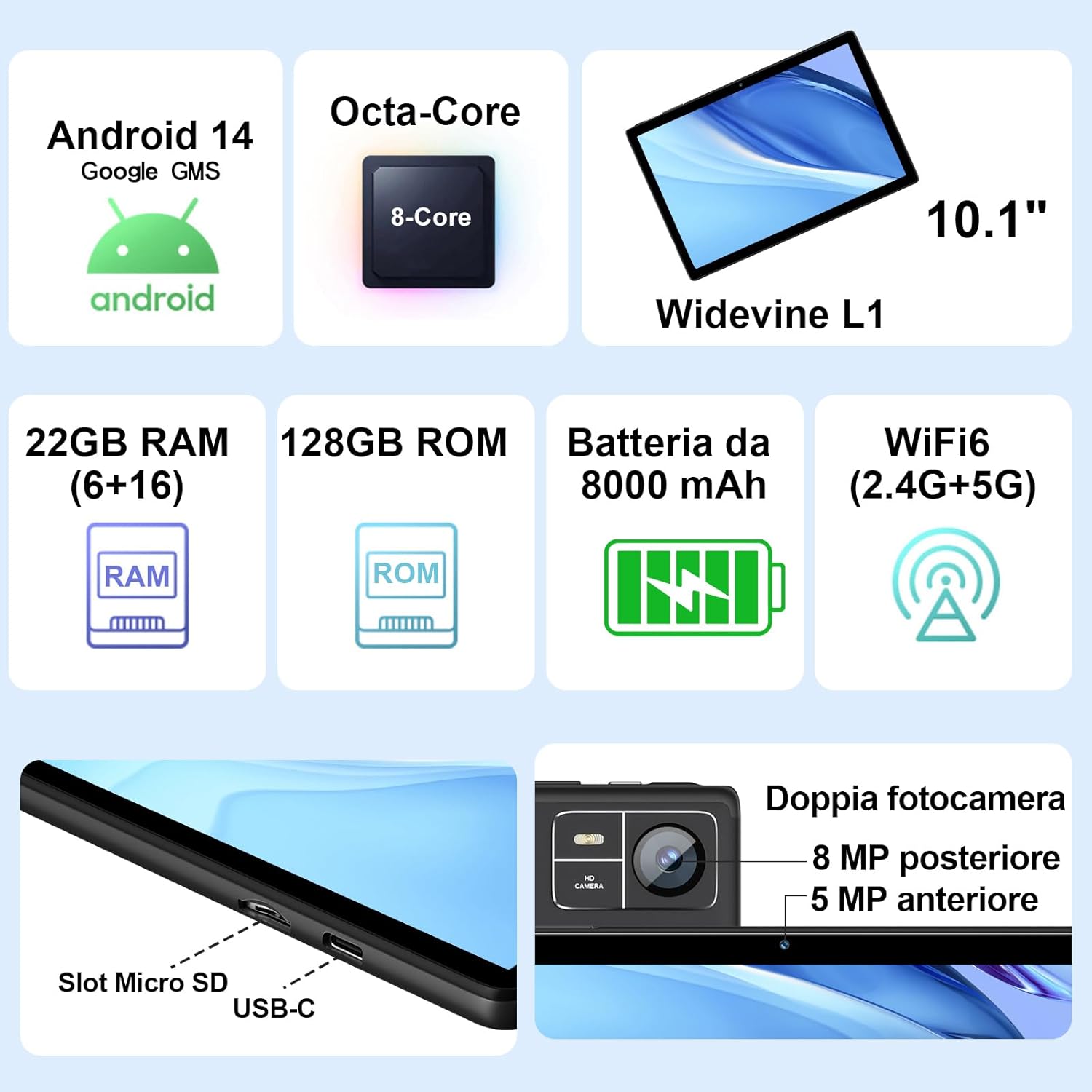
Figure 3.1: Key Features and Ports
3.1 ລັກສະນະທາງກາຍະພາບ
- ຈໍສະແດງຜົນ: 10.1-inch IPS screen (1280 x 800 resolution)
- ກ້ອງຖ່າຍຮູບ: 5 MP Front Camera, 8 MP Rear Camera
- ພອດ: USB Type-C, MicroSD Card Slot
- ປຸ່ມ: Power Button, Volume Up/Down
4. ຕັ້ງຄ່າ
4.1 ການສາກໄຟເບື້ອງຕົ້ນ
Before first use, fully charge your tablet using the provided Type-C data cable and European standard charger. The battery indicator on the screen will show charging status.
4.2 ເປີດ/ປິດ
- ເພື່ອເປີດເຄື່ອງ: Press and hold the Power button until the SUAAT logo appears.
- ປິດເຄື່ອງ: ກົດປຸ່ມເປີດປິດຄ້າງໄວ້ຈົນກວ່າຕົວເລືອກພະລັງງານຈະປາກົດ, ຈາກນັ້ນເລືອກ "ປິດເຄື່ອງ".
- ເພື່ອເລີ່ມຕົ້ນໃໝ່: ກົດປຸ່ມເປີດປິດຄ້າງໄວ້ຈົນກວ່າຕົວເລືອກພະລັງງານຈະປາກົດ, ຈາກນັ້ນເລືອກ "ຣີສະຕາດ".
4.3 ຕົວຊ່ວຍສ້າງການຕິດຕັ້ງເບື້ອງຕົ້ນ
ເມື່ອເປີດເຄື່ອງທຳອິດ, ແທັບເລັດຈະແນະນຳທ່ານຜ່ານຂັ້ນຕອນການຕັ້ງຄ່າເບື້ອງຕົ້ນ:
- ເລືອກພາສາທີ່ທ່ານຕ້ອງການ.
- ເຊື່ອມຕໍ່ກັບເຄືອຂ່າຍ Wi-Fi.
- ເຂົ້າສູ່ລະບົບດ້ວຍບັນຊີ Google ຂອງທ່ານ ຫຼືສ້າງອັນໃໝ່. ອັນນີ້ເປັນສິ່ງຈໍາເປັນເພື່ອເຂົ້າເຖິງ Google Play Store ແລະບໍລິການອື່ນໆຂອງ Google.
- ຕັ້ງຄ່າການລັອກໜ້າຈໍ (PIN, ຮູບແບບ, ຫຼືລະຫັດຜ່ານ).
- Review and accept Google services terms.
4.4 ການໃສ່ບັດ MicroSD
The tablet supports MicroSD cards up to 1TB for expanded storage.
- ຊອກຫາຊ່ອງສຽບກາດ MicroSD ຢູ່ດ້ານຂ້າງຂອງແທັບເລັດ.
- Gently insert the MicroSD card into the slot until it clicks into place. Ensure the card is oriented correctly.
- ເພື່ອເອົາອອກ, ຄ່ອຍໆຍູ້ບັດເຂົ້າຈົນກ່ວາມັນອອກມາ.
4.5 ອຸປະກອນເສີມເຊື່ອມຕໍ່ (ແປ້ນພິມ ແລະ ເມົາສ໌)
The included Bluetooth keyboard and mouse can be easily paired with your tablet.
- ໄປທີ່ ການຕັ້ງຄ່າ > ອຸປະກອນທີ່ເຊື່ອມຕໍ່ > Bluetooth ໃນແທັບເລັດຂອງທ່ານ.
- Turn on the Bluetooth keyboard and mouse. Put them into pairing mode (refer to their individual manuals if needed).
- On the tablet, tap "Pair new device" and select the keyboard or mouse from the list of available devices.
- ປະຕິບັດຕາມການກະຕຸ້ນໃນຫນ້າຈໍໃດຫນຶ່ງເພື່ອສໍາເລັດຂະບວນການການຈັບຄູ່.

Figure 4.1: Tablet with Keyboard and Mouse
5. ປະຕິບັດການແທັບເລັດ
5.1 ຄຸນສົມບັດ Android 14
Your SUAAT S10 tablet runs on the latest Android 14 operating system, offering enhanced privacy, customizable themes, and improved performance.
- GMS ຮັບຮອງ: Pre-installed Google Play Store allows easy download of your favorite apps.
- ຄວາມເປັນສ່ວນຕົວ ແລະຄວາມປອດໄພ: Enhanced privacy controls to manage app permissions and data access.
- ການປັບແຕ່ງ: Personalize themes and app icons.
- ຄຸນນະສົມບັດການຜະລິດຕະພັນ: Supports multi-users, multi-windows, and split-screen functionality for efficient multitasking.
- ການຄວບຄຸມຂອງພໍ່ແມ່: Tools to manage content and screen time for children.
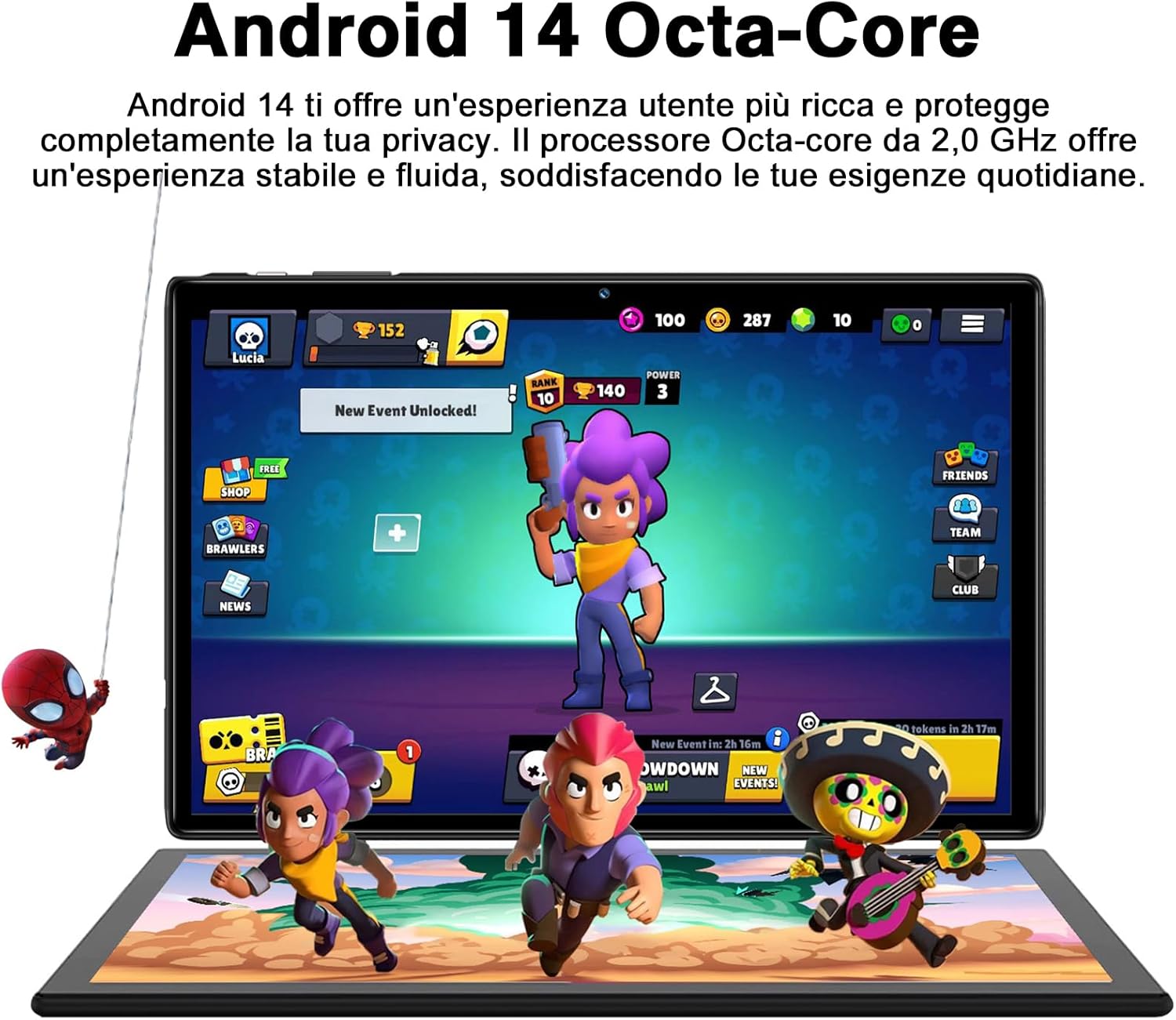
Figure 5.1: Android 14 Interface with Gaming Example
5.2 ຄຸນສົມບັດການສະແດງ
The 10.1-inch IPS display provides clear visuals and rich colors.
- ເຕັກໂນໂລຊີ IPS: ສະເໜີໃຫ້ກວ້າງ viewໃນມຸມແລະການສືບພັນສີທີ່ຖືກຕ້ອງ.
- WideVine L1 Support: Enables high-definition video streaming (up to 1280p) from platforms like YouTube and Netflix.

Figure 5.2: Displaying Apps on the IPS Screen
5.3 ການໃຊ້ກ້ອງຖ່າຍຮູບ
The tablet is equipped with a 5 MP front camera and an 8 MP rear camera for photos and video calls.
- ເປີດແອັບກ້ອງຖ່າຍຮູບຈາກໜ້າຈໍຫຼັກ ຫຼືລິ້ນຊັກແອັບ.
- ສະຫຼັບລະຫວ່າງກ້ອງໜ້າ ແລະກ້ອງຫຼັງໂດຍໃຊ້ໄອຄອນກ້ອງຖ່າຍຮູບ.
- ແຕະປຸ່ມຊັດເຕີເພື່ອຖ່າຍຮູບ ຫຼືເລີ່ມ/ຢຸດການບັນທຶກວິດີໂອ.
- Explore various camera modes and editing options within the app.
5.4 ການເຊື່ອມຕໍ່
- Wi-Fi: Supports 2.4GHz and 5GHz Wi-Fi for fast and stable internet connection. Access Wi-Fi settings via ການຕັ້ງຄ່າ > ເຄືອຂ່າຍ ແລະອິນເຕີເນັດ > ອິນເຕີເນັດ.
- Bluetooth 5.0: Connect to Bluetooth headphones, speakers, printers, and other devices. Manage connections via ການຕັ້ງຄ່າ > ອຸປະກອນທີ່ເຊື່ອມຕໍ່ > Bluetooth.
- OTG (On-The-Go): Use the included OTG adapter to connect USB flash drives, external hard drives, or other USB peripherals.
- GPS: GPS ປະສົມປະສານສໍາລັບການນໍາທາງແລະການບໍລິການທີ່ອີງໃສ່ສະຖານທີ່.
- ວິທະຍຸ FM: Built-in FM receiver for listening to radio broadcasts.
5.5 ຄຸນສົມບັດການເຂົ້າເຖິງ
The tablet includes features to assist users with different needs:
- ເລືອກເພື່ອເວົ້າ: ເມື່ອເປີດໃຊ້ງານ (ການຕັ້ງຄ່າ > ການເຂົ້າເຖິງ > ເລືອກເພື່ອເວົ້າ), you can tap text on the screen, and the tablet will read it aloud.
- TalkBack: Provides spoken feedback for all actions and screen elements, allowing navigation without visual input. Supports Braille displays via Bluetooth. Enable via ການຕັ້ງຄ່າ > ການເຂົ້າເຖິງ > TalkBack.
5.6 File ໂອນ
ທ່ານສາມາດໂອນໄດ້ຢ່າງງ່າຍດາຍ files between your tablet and other devices like computers or mobile phones.
- ຜ່ານ USB: Connect the tablet to a computer using the Type-C data cable. On the tablet, select "File transfer" from the USB connection options in the notification panel.
- ຜ່ານ Bluetooth: Pair with another Bluetooth-enabled device and use the file sharing option.
6. ບໍາລຸງຮັກສາ
6.1 ການທໍາຄວາມສະອາດ
ເພື່ອເຮັດຄວາມສະອາດແທັບເລັດຂອງທ່ານ, ໃຫ້ໃຊ້ຜ້າທີ່ອ່ອນໆ, ບໍ່ມີເສັ້ນດ່າງ. ສໍາລັບ smudges stubborn, ເລັກນ້ອຍ dampໃສ່ຜ້າດ້ວຍນ້ໍາຫຼືເຄື່ອງເຮັດຄວາມສະອາດຫນ້າຈໍ. ຫຼີກເວັ້ນການນໍາໃຊ້ສານເຄມີທີ່ຮຸນແຮງຫຼືວັດສະດຸຂັດ.
6.2 ການດູແລຫມໍ້ໄຟ
The 8000mAh battery provides extended usage. To prolong battery life:
- ຫຼີກເວັ້ນອຸນຫະພູມທີ່ຮຸນແຮງ.
- ຢ່າປ່ອຍໃຫ້ຫມໍ້ໄຟຫມົດໄປເລື້ອຍໆ.
- ໃຊ້ສາຍສາກ ແລະສາຍສາກຕົ້ນສະບັບ.
- ປິດແອັບທີ່ບໍ່ໄດ້ໃຊ້ເຮັດວຽກຢູ່ໃນພື້ນຫຼັງ.
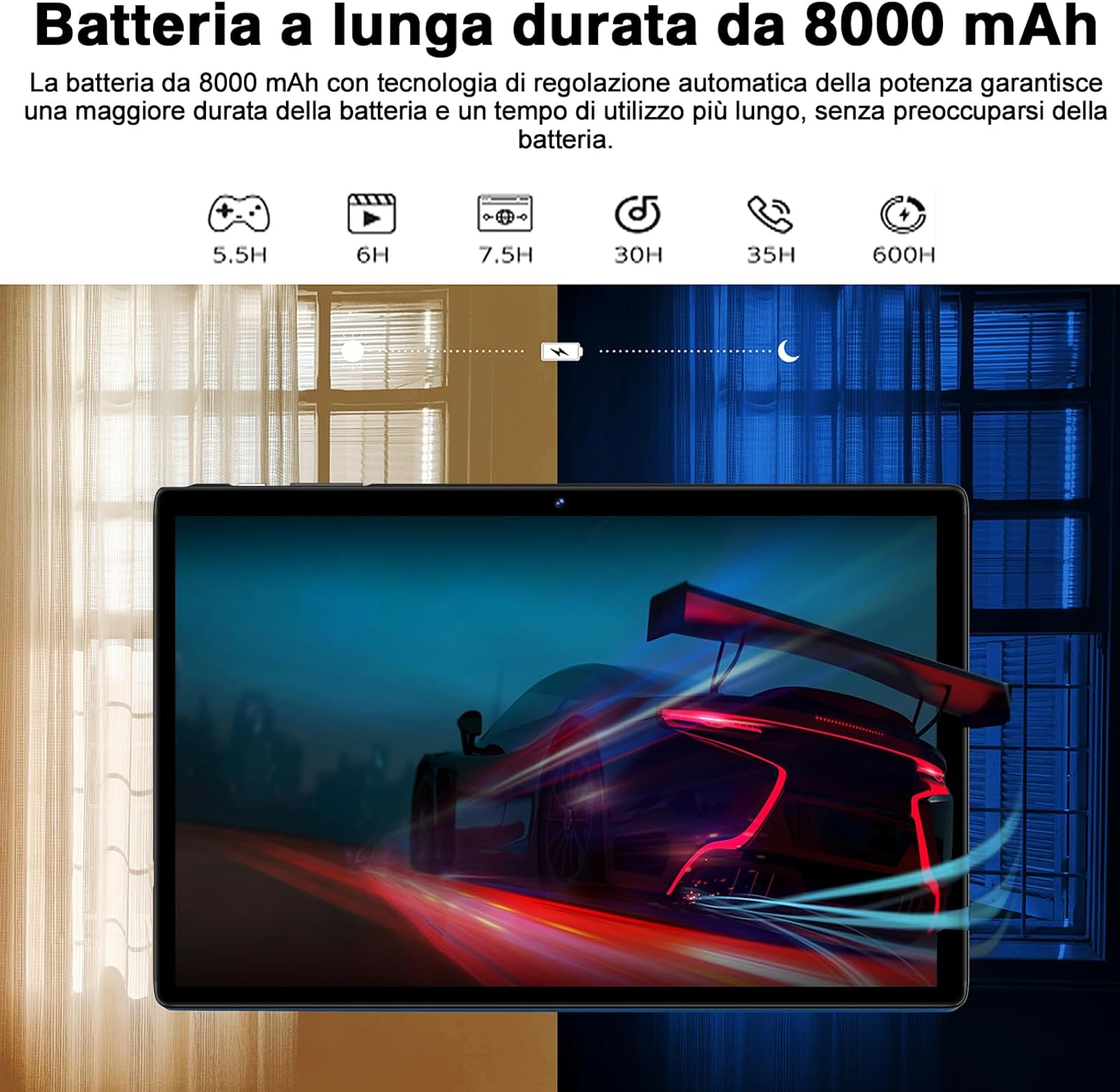
Figure 6.1: 8000mAh Battery Life Overview
6.3 ການປັບປຸງຊອບແວ
ກວດສອບການອັບເດດລະບົບເປັນປະຈຳເພື່ອຮັບປະກັນປະສິດທິພາບ ແລະ ຄວາມປອດໄພທີ່ດີທີ່ສຸດ. ໄປທີ່ ການຕັ້ງຄ່າ > ລະບົບ > ອັບເດດລະບົບ.
7. ການແກ້ໄຂບັນຫາ
| ບັນຫາ | ສາເຫດ / ການແກ້ໄຂທີ່ເປັນໄປໄດ້ |
|---|---|
| ແທັບເລັດບໍ່ເປີດ. | Battery might be depleted. Connect the charger and try again after a few minutes. If it still doesn't turn on, press and hold the power button for 10-15 seconds to force a restart. |
| ບັນຫາການເຊື່ອມຕໍ່ Wi-Fi. | Ensure Wi-Fi is enabled. Restart your router and the tablet. Forget the network and reconnect. Check if other devices can connect to the same Wi-Fi. |
| ແອັບກຳລັງຂັດຂ້ອງ ຫຼືຄ້າງ. | Close background apps. Clear the app's cache (Settings > Apps > [App Name] > Storage & cache > Clear cache). Update the app to the latest version. Restart the tablet. |
| ການປະຕິບັດຊ້າ. | ປິດແອັບທີ່ບໍ່ໄດ້ໃຊ້. ລຶບລ້າງແຄສ ແລະ ຊົ່ວຄາວ files. Uninstall unnecessary apps. Ensure sufficient storage space. Restart the tablet regularly. |
| ອຸປະກອນ Bluetooth ບໍ່ໄດ້ຈັບຄູ່. | Ensure Bluetooth is enabled on both devices. Put the accessory in pairing mode. Make sure devices are within range. Restart both devices. |
8. ຂໍ້ມູນຈໍາເພາະ
| ຄຸນສົມບັດ | ລາຍລະອຽດ |
|---|---|
| ຍີ່ຫໍ້ | ຊູແອດ |
| ຕົວແບບ | S10 |
| ລະບົບປະຕິບັດການ | Android 14 |
| ໂຮງງານຜະລິດ | Octa-Core, 2.0 GHz (Unisoc) |
| RAM | 22 GB (6GB physical + 16GB expansion) |
| ບ່ອນຈັດເກັບຂໍ້ມູນພາຍໃນ (ROM) | 128 GB |
| ການເກັບຮັກສາທີ່ຂະຫຍາຍໄດ້ | Up to 1 TB via MicroSD card |
| ຄວາມອາດສາມາດຫມໍ້ໄຟ | 8000 mAh |
| ປະເພດການສະແດງ | IPS |
| ຂະໜາດໜ້າຈໍ | 10.1 ນິ້ວ |
| ຄວາມລະອຽດການສະແດງ | 1280 x 800 ພິກເຊລ |
| ກ້ອງໜ້າ | 5 MP |
| ກ້ອງຫຼັງ | 8 MP |
| Wi-Fi | 2.4 GHz + 5 GHz (802.11ax) |
| Bluetooth | Bluetooth 5.0 |
| ການໂຕ້ຕອບ | Type-C, MicroSD Card Slot |
| ຄຸນນະສົມບັດພິເສດ | GMS Certified, WideVine L1, OTG, FM Receiver, GPS |
| ຂະໜາດ (L x W x H) | 24.31 x 0.99 x 16.1 cm |
| ນ້ຳໜັກ | 480 ກຣາມ |
9. ການຮັບປະກັນແລະການສະຫນັບສະຫນູນ
9.1 ຂໍ້ມູນການຮັບປະກັນ
SUAAT offers a 2-year European standard warranty for each tablet PC. This warranty covers manufacturing defects and ensures your product functions as intended under normal use.
9.2 ສະຫນັບສະຫນູນລູກຄ້າ
SUAAT has over 15 years of experience in tablet manufacturing and sales, backed by a professional technical support and assistance team. We are committed to providing excellent pre-sales advice and after-sales service, including product technical support.
If you require any assistance or have questions, please do not hesitate to contact us. We aim to respond within 24 hours and provide satisfactory service.
For support, please refer to the contact information provided on the product packaging or SUAAT's official webເວັບໄຊ.
10. ຂໍ້ມູນຄວາມປອດໄພທີ່ສໍາຄັນ
- ຢ່າໃຫ້ແທັບເລັດຖືກອຸນຫະພູມສູງ, ແສງແດດໂດຍກົງ ຫຼື ຄວາມຊຸ່ມຊື່ນສູງ.
- ຫຼີກລ່ຽງການຕົກ ຫຼື ເຮັດໃຫ້ແທັບເລັດໄດ້ຮັບຜົນກະທົບຢ່າງຮຸນແຮງ.
- Do not attempt to disassemble or repair the tablet yourself. This will void the warranty.
- Use only original or certified compatible chargers and accessories.
- ເກັບຮັກສາຢາເມັດໃຫ້ຫ່າງຈາກນໍ້າ ແລະ ຂອງແຫຼວອື່ນໆ.
- ກຳຈັດແທັບເລັດ ແລະ ແບັດເຕີຣີຂອງມັນຢ່າງມີຄວາມຮັບຜິດຊອບຕາມລະບຽບການຂອງທ້ອງຖິ່ນ.


