1. ບົດແນະນຳ
This manual provides essential information for the proper use and care of your SUAAT S3 10-inch Android 14 Tablet. Please read this manual thoroughly before operating the device to ensure optimal performance and longevity. Keep this manual for future reference.
2. ເນື້ອໃນຊຸດ
ກວດສອບວ່າລາຍການທັງຫມົດທີ່ລະບຸໄວ້ຂ້າງລຸ່ມນີ້ແມ່ນລວມຢູ່ໃນຊຸດຂອງທ່ານ. ຖ້າລາຍການໃດຂາດຫາຍໄປຫຼືເສຍຫາຍ, ກະລຸນາຕິດຕໍ່ຝ່າຍຊ່ວຍເຫຼືອລູກຄ້າ.
- ເມັດ SUAAT S3
- ກໍລະນີເມັດ
- ຮູບເງົາປ້ອງກັນຫນ້າຈໍ
- ແປ້ນພິມ
- ຫນູ
- Type-C to USB Adapter (OTG)
- ສາຍ Type-C
- European Standard Charger
- SIM Ejector Pin
- ຄູ່ມືຜູ້ໃຊ້

ຮູບພາບ 2.1: All items included in the SUAAT S3 Tablet package.
3. ຜະລິດຕະພັນເກີນview
The SUAAT S3 tablet features a sleek design with a 10-inch display and a robust set of accessories to enhance your user experience.

ຮູບພາບ 3.1: SUAAT S3 Tablet and its accessories.
ຄຸນນະສົມບັດທີ່ສໍາຄັນ:
- ລະບົບປະຕິບັດການ: Android 14
- ໜ່ວຍປະມວນຜົນ: Octa-core 1.8 GHz (A523)
- RAM: 20GB (6GB ທາງກາຍະພາບ + ຂະຫຍາຍ 14GB)
- ROM: 128GB
- ຈໍສະແດງຜົນ: ໜ້າຈໍ IPS ຂະໜາດ 10.1 ນິ້ວ, ຄວາມລະອຽດ 1280 x 800 ພິກເຊວ
- ການເຊື່ອມຕໍ່: Dual-band WiFi (2.4G/5G), Bluetooth 5.0
- ແບັດເຕີຣີ: 6000 mAh
- ການຢັ້ງຢືນ: GMS Certified, Widevine L1
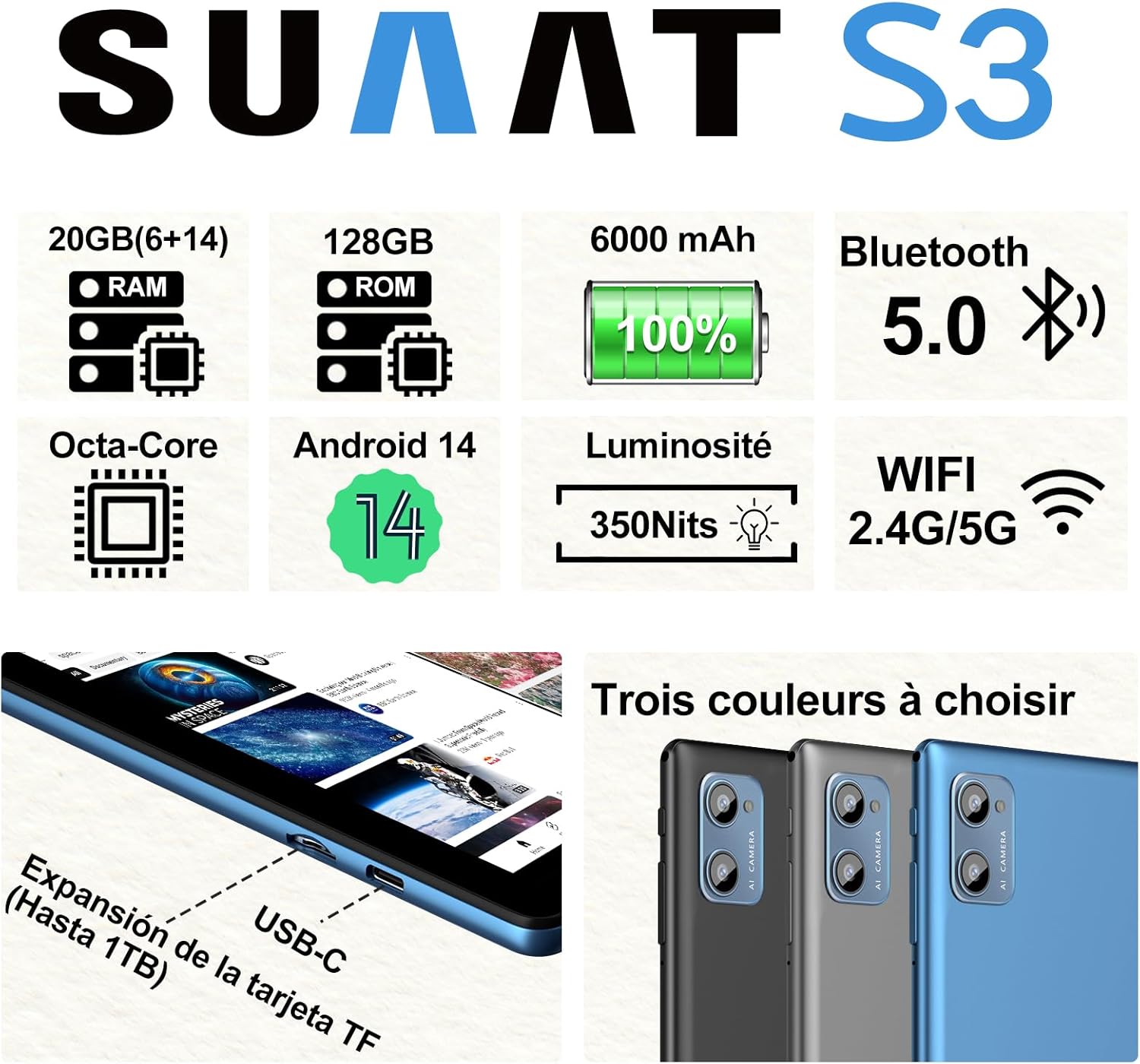
ຮູບພາບ 3.2: SUAAT S3 Tablet key specifications.
4. ການຕິດຕັ້ງເບື້ອງຕົ້ນ
4.1 ການສາກແທັບເລັດ
Before first use, fully charge the tablet using the provided Type-C cable and European standard charger. The charging port is located on the side of the tablet.

ຮູບພາບ 4.1: Tablet charging via USB-C.
4.2 ການເປີດ/ປິດ
- ເພື່ອເປີດເຄື່ອງ: ກົດປຸ່ມເປີດປິດຄ້າງໄວ້ຈົນກ່ວາ ໜ້າ ຈໍຈະແຈ້ງຂຶ້ນ.
- ປິດເຄື່ອງ: ກົດປຸ່ມເປີດປິດຄ້າງໄວ້, ຈາກນັ້ນເລືອກ 'ປິດເຄື່ອງ' ຈາກຕົວເລືອກໃນໜ້າຈໍ.
- ເພື່ອເລີ່ມຕົ້ນໃໝ່: ກົດປຸ່ມເປີດປິດຄ້າງໄວ້, ຈາກນັ້ນເລືອກ 'ຣີສະຕາດ' ຈາກຕົວເລືອກຕ່າງໆ.
4.3 ການຕັ້ງຄ່າເບື້ອງຕົ້ນ
Upon first power-on, follow the on-screen prompts to set up your tablet. This includes selecting your language, connecting to a Wi-Fi network, setting up your Google account, and configuring security options.
5. ຄໍາແນະນໍາການດໍາເນີນງານ
5.1 ຄຸນສົມບັດ Android 14
Your SUAAT S3 tablet runs on Android 14, offering enhanced privacy, customization, and productivity features:
- ການຄວບຄຸມຂອງພໍ່ແມ່: Manage screen time, app access, and content filters for children.
- Multi-Account Mode: ສ້າງຜູ້ໃຊ້ pro ແຍກຕ່າງຫາກfiles for different users, each with their own apps, settings, and data.
- ໂໝດແຍກໜ້າຈໍ: Use two applications simultaneously by dividing the screen.
- Custom Themes: Personalize your tablet's appearance with various themes and wallpapers.
- ບັນດາ: Add calendar, weather, and other widgets to your home screen for quick information access.

ຮູບພາບ 5.1: Tablet in split-screen mode.
5.2 ການນໍາທາງພື້ນຖານ
- ໜ້າຈໍຫຼັກ: ປັດຊ້າຍ ຫຼືຂວາເພື່ອນຳທາງລະຫວ່າງໜ້າຈໍຫຼັກ.
- App Drawer: ປັດຂຶ້ນຈາກລຸ່ມສຸດຂອງໜ້າຈໍເພື່ອເຂົ້າເຖິງທຸກແອັບພລິເຄຊັນທີ່ຕິດຕັ້ງແລ້ວ.
- ການແຈ້ງເຕືອນ ແລະການຕັ້ງຄ່າດ່ວນ: ປັດລົງຈາກເທິງສຸດຂອງໜ້າຈໍໄປທີ່ view ການແຈ້ງເຕືອນ ແລະເຂົ້າເຖິງປຸ່ມສະຫຼັບການຕັ້ງຄ່າດ່ວນ.
- ແອັບຫຼ້າສຸດ: Tap the square navigation button (or swipe up and hold from the bottom if using gesture navigation) to see recently opened applications.
6. ການເຊື່ອມຕໍ່
6.1 ການເຊື່ອມຕໍ່ Wi-Fi
The tablet supports dual-band Wi-Fi (2.4G and 5G) for faster and more stable internet connectivity.
- ໄປທີ່ ການຕັ້ງຄ່າ > ເຄືອຂ່າຍ ແລະອິນເຕີເນັດ > Wi-Fi.
- ສະຫຼັບ Wi-Fi On.
- ເລືອກເຄືອຂ່າຍທີ່ທ່ານຕ້ອງການຈາກບັນຊີລາຍຊື່ແລະໃສ່ລະຫັດຜ່ານຖ້າຕ້ອງການ.
6.2 ອຸປະກອນ Bluetooth
Connect Bluetooth accessories like the included keyboard and mouse, or headphones, using Bluetooth 5.0.
- ໄປທີ່ ການຕັ້ງຄ່າ > ອຸປະກອນທີ່ເຊື່ອມຕໍ່ > Bluetooth.
- ສະຫຼັບ Bluetooth On.
- ກວດໃຫ້ແນ່ໃຈວ່າອຸປະກອນ Bluetooth ຂອງທ່ານຢູ່ໃນໂໝດຈັບຄູ່.
- Select the device from the 'Available devices' list to pair.
6.3 ຊ່ອງສຽບຫູຟັງ
A 3.5mm headphone jack is provided for wired audio connections.
7. Display and Multimedia
7.1 10.1-inch IPS Display
The tablet features a 10.1-inch IPS display with a resolution of 1280 x 800 pixels, offering clear and vibrant visuals with wide viewມຸມ.

ຮູບພາບ 7.1: 10.1-inch IPS Display.
7.2 Widevine L1 Support
With Widevine L1 support, the tablet can stream high-definition content from popular streaming services, providing a clear and immersive viewປະສົບການ.
7.3 GMS Certification
The tablet is GMS (Google Mobile Services) certified, ensuring full access to the Google Play Store and all Google applications, along with robust security and privacy features.
8. ການເກັບຮັກສາແລະການປະຕິບັດ
8.1 RAM and ROM
The SUAAT S3 comes with 20GB of RAM (6GB physical + 14GB virtual expansion) and 128GB of internal storage (ROM). This ample memory allows for smooth multitasking and storage of numerous applications, videos, images, and files.

ຮູບພາບ 8.1: Tablet showcasing large memory for apps and media.
8.2 Octa-Core Processor
Equipped with an Octa-core 1.8 GHz A523 processor, the tablet delivers stable and responsive performance for everyday tasks, gaming, and multimedia consumption.
8.3 ບ່ອນເກັບຂໍ້ມູນທີ່ສາມາດຂະຫຍາຍໄດ້
The tablet supports expandable storage via a TF (microSD) card, allowing you to increase storage capacity up to 1TB for even more files ແລະສື່ມວນຊົນ.
9. ການຄຸ້ມຄອງຫມໍ້ໄຟ
9.1 ຄວາມອາດສາມາດຫມໍ້ໄຟ
The SUAAT S3 is powered by a 6000 mAh battery, providing extended usage time. Actual battery life may vary based on usage patterns and settings.
9.2 ຂໍ້ແນະນຳການສາກໄຟ
- ໃຊ້ພຽງແຕ່ສາຍສາກຕົ້ນສະບັບ ແລະສາຍທີ່ໃຫ້ມາກັບແທັບເລັດເທົ່ານັ້ນ.
- Avoid exposing the tablet to extreme temperatures during charging.
- Do not leave the tablet charging for excessively long periods after it has reached 100% to prolong battery health.
10. ບໍາລຸງຮັກສາ
10.1 ການເຮັດຄວາມສະອາດແທັບເລັດ
- ໃຊ້ຜ້າແພທີ່ອ່ອນໆ, ບໍ່ມີສານດ່າງເພື່ອເຮັດຄວາມສະອາດໜ້າຈໍ ແລະຕົວເຄື່ອງຂອງແທັບເລັດ.
- ສໍາລັບ smudges stubborn, ເລັກນ້ອຍ dampໃສ່ຜ້າດ້ວຍນ້ໍາຫຼືເຄື່ອງເຮັດຄວາມສະອາດຫນ້າຈໍ. ຫຼີກເວັ້ນການສານເຄມີທີ່ຮຸນແຮງ.
- ກວດໃຫ້ແນ່ໃຈວ່າແທັບເລັດຖືກປິດ ແລະຖອດປລັກອອກກ່ອນທຳຄວາມສະອາດ.
10.2 ການເກັບຮັກສາ
When not in use for extended periods, store the tablet in a cool, dry place. Avoid direct sunlight and extreme temperatures.
10.3 ການປັບປຸງຊອບແວ
ກວດສອບ ແລະຕິດຕັ້ງການອັບເດດຊອບແວເປັນປະຈຳເພື່ອຮັບປະກັນວ່າແທັບເລັດຂອງທ່ານມີຄຸນສົມບັດຫຼ້າສຸດ, ແຜ່ນປ້ອງກັນຄວາມປອດໄພ ແລະການປັບປຸງປະສິດທິພາບ. ໄປທີ່ ການຕັ້ງຄ່າ > ລະບົບ > ອັບເດດລະບົບ.
11. ການແກ້ໄຂບັນຫາ
If you encounter issues with your SUAAT S3 tablet, refer to the following common solutions:
| ບັນຫາ | ການແກ້ໄຂທີ່ເປັນໄປໄດ້ |
|---|---|
| ແທັບເລັດບໍ່ເປີດ | ໃຫ້ແນ່ໃຈວ່າໄດ້ສາກໄຟແລ້ວ. ເຊື່ອມຕໍ່ສາຍສາກແລ້ວລໍຖ້າສອງສາມນາທີກ່ອນທີ່ຈະພະຍາຍາມເປີດເຄື່ອງອີກຄັ້ງ. |
| ໜ້າຈໍບໍ່ຕອບສະໜອງ | Restart the tablet. If the issue persists, perform a factory reset (data will be lost). |
| ບໍ່ສາມາດເຊື່ອມຕໍ່ກັບ Wi-Fi ໄດ້ | Check if Wi-Fi is enabled in settings. Restart your router. Ensure you are entering the correct password. |
| ອຸປະກອນ Bluetooth ບໍ່ໄດ້ຈັບຄູ່ | Ensure Bluetooth is enabled on both devices and the accessory is in pairing mode. Try restarting both devices. |
| ແອັບຂັດຂ້ອງ ຫຼືຊ້າ | Close background apps. Clear app cache (Settings > Apps > [App Name] > Storage > Clear cache). Ensure sufficient storage space. |
| ແບັດເຕີຣີໝົດໄວ | Reduce screen brightness. Disable unused features like Wi-Fi or Bluetooth. Close background apps. Check for power-intensive apps. |
If these solutions do not resolve the issue, please contact SUAAT customer support.
12. ຂໍ້ມູນຈໍາເພາະ
| ຄຸນສົມບັດ | ລາຍລະອຽດ |
|---|---|
| ຍີ່ຫໍ້ | ຊູແອດ |
| ໝາຍເລກຕົວແບບ | S3 |
| ລະບົບປະຕິບັດການ | Android 14 |
| ໂຮງງານຜະລິດ | A523 Octa-core 1.8 GHz |
| RAM | 20 GB (6GB installed) |
| ບ່ອນຈັດເກັບຂໍ້ມູນ (ROM) | 128 GB |
| ການເກັບຮັກສາທີ່ຂະຫຍາຍໄດ້ | ສູງສຸດ 1 TB ຜ່ານບັດ TF |
| ຂະໜາດໜ້າຈໍ | 10.1 ນິ້ວ |
| ຄວາມລະອຽດໜ້າຈໍ | 1280 x 800 ພິກເຊລ |
| ການເຊື່ອມຕໍ່ໄຮ້ສາຍ | Wi-Fi (802.11n, 2.4G/5G Dual-band) |
| Bluetooth | Bluetooth 5.0 |
| ປະເພດຕົວເຊື່ອມຕໍ່ | USB-C |
| Jack ຫູຟັງ | 3.5ມມ |
| ຄວາມອາດສາມາດຫມໍ້ໄຟ | 6000 mAh |
| ຂະໜາດ (L x W x H) | 17 x 12 x 0.8 cm |
| ນ້ຳໜັກ | 1.28 ກິໂລກຣາມ |
| ລວມອຸປະກອນເສີມ | Keyboard, Mouse, Protective Case, Screen Protector |
13. ການຮັບປະກັນແລະການສະຫນັບສະຫນູນ
SUAAT provides professional technical support and customer service for your S3 tablet. If you require assistance, have questions, or encounter any issues not covered in this manual, please contact our customer support team. Refer to your purchase documentation for specific warranty terms and contact information.


