ແນະນຳ
This manual provides essential information for setting up, operating, maintaining, and troubleshooting your HP Elite Mini 800 G9 Desktop Computer. This compact and powerful mini PC is designed for business environments, offering high performance in a small form factor.
The HP Elite Mini 800 G9 features an Intel Core i5-12500T processor, 16 GB DDR5 RAM, and a 256 GB SSD, running on Windows 11 Pro. Its small size allows for flexible deployment options, including mounting behind a monitor or discreet placement on a desk.
ແມ່ນຫຍັງຢູ່ໃນກ່ອງ
ກວດສອບວ່າລາຍການທັງຫມົດແມ່ນມີຢູ່ໃນການຫຸ້ມຫໍ່:
- HP Elite Mini 800 G9 Desktop PC
- ອະແດບເຕີ AC
- ແປ້ນພິມ
- ຫນູ
ຕັ້ງຄ່າ
ປະຕິບັດຕາມຂັ້ນຕອນເຫຼົ່ານີ້ເພື່ອຕັ້ງຄ່າຄອມພິວເຕີຕັ້ງໂຕະ HP Elite Mini 800 G9 ຂອງທ່ານ:
1. ການຫຸ້ມຫໍ່ແລະການຈັດວາງ
Carefully remove the mini PC and all accessories from the packaging. Place the mini PC on a stable, flat surface with adequate ventilation. Ensure no vents are obstructed.
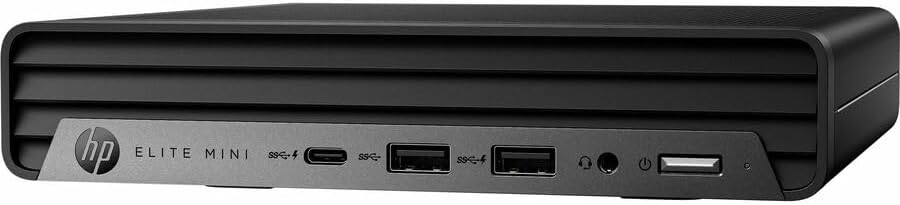
ຮູບພາບ: ທາງຫນ້າ view of the HP Elite Mini 800 G9 Desktop PC, highlighting the accessible front ports including USB-C, USB-A, and a headphone jack.
2. ເຊື່ອມຕໍ່ອຸປະກອນເສີມ
- ຕິດຕາມກວດກາ: Connect your monitor to one of the available video output ports (e.g., DisplayPort, HDMI) on the rear of the mini PC.
- ເຊື່ອມຕໍ່ແປ້ນພິມ ແລະເມົາສ໌: Plug the included keyboard and mouse into the USB ports on the mini PC.
- ເຊື່ອມຕໍ່ເຄືອຂ່າຍ (ທາງເລືອກ): For a wired internet connection, connect an Ethernet cable from your router or network switch to the Ethernet port on the mini PC. Wireless connectivity (Wi-Fi 6) is also available.
- ເຊື່ອມຕໍ່ພະລັງງານ: Connect the AC adapter to the power input port on the mini PC, then plug the power cord into a wall outlet.
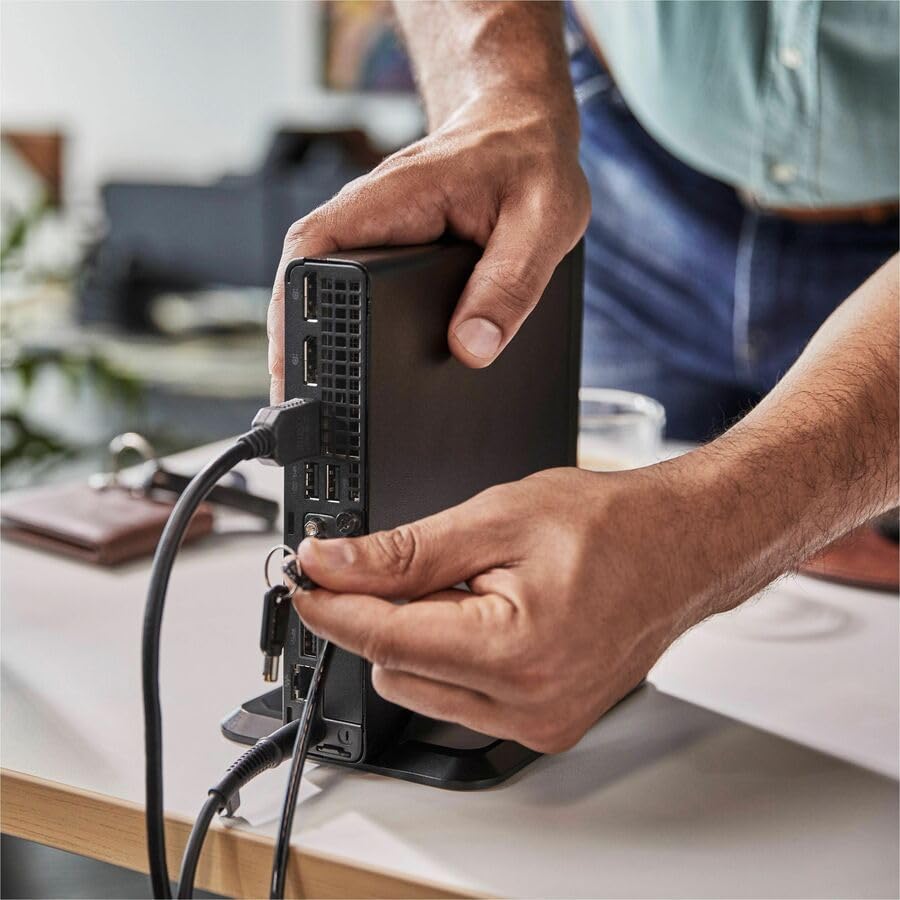
Image: A user connecting various cables, including power and display, to the rear ports of the HP Elite Mini 800 G9. This illustrates the typical connection process for peripherals.
ຄໍາແນະນໍາການດໍາເນີນງານ
Once your HP Elite Mini 800 G9 is set up, follow these steps for basic operation:
1. ເປີດເຄື່ອງ
Press the power button located on the front of the mini PC. The power indicator light will illuminate, and the system will begin to boot up. The operating system (Windows 11 Pro) will load automatically.
2. ການຕັ້ງຄ່າເບື້ອງຕົ້ນ (ການໃຊ້ຄັ້ງທຳອິດ)
Upon first boot, you will be guided through the Windows 11 Pro setup process. This includes selecting your region, language, accepting terms, and setting up a user account. Follow the on-screen prompts to complete this process.
3. ການປິດເຄື່ອງ
To properly shut down the computer, click the ເລີ່ມ ປຸ່ມໃນ Windows, ຈາກນັ້ນເລືອກ ພະລັງງານ > ປິດລົງ. Avoid powering off the system by holding the power button, as this can lead to data loss or system corruption.

Image: A professional working at a desk, demonstrating the compact integration of the HP Elite Mini 800 G9, which is mounted discreetly behind a monitor.
ບໍາລຸງຮັກສາ
Regular maintenance helps ensure the longevity and optimal performance of your HP Elite Mini 800 G9 Desktop Computer.
1. ການປັບປຸງຊອບແວ
ປັບປຸງລະບົບປະຕິບັດການ ແລະໄດເວີຂອງທ່ານ. Windows Update ຈັດການການອັບເດດ OS ໂດຍອັດຕະໂນມັດ. ສໍາລັບການອັບເດດໄດເວີ, ໃຫ້ເຂົ້າໄປທີ່ການຊ່ວຍເຫຼືອຂອງ HP ຢ່າງເປັນທາງການ webເວັບໄຊສໍາລັບຮູບແບບຂອງທ່ານ.
2. ທໍາຄວາມສະອາດ
- ພາຍນອກ: ໃຊ້ຜ້າແພທີ່ອ່ອນໆ ທີ່ບໍ່ມີເສັ້ນດ່າງ dampened with water or a mild cleaning solution to clean the exterior surfaces.
- ຮູ: Periodically use compressed air to clear dust from the ventilation grilles to prevent overheating. Ensure the system is powered off before cleaning vents.
3. ຂໍ້ມູນສຳຮອງ
Regularly back up important data to an external drive or cloud storage to prevent data loss in case of hardware failure or other issues.
ການແກ້ໄຂບັນຫາ
ພາກສ່ວນນີ້ແກ້ໄຂບັນຫາທົ່ວໄປທີ່ທ່ານອາດຈະພົບກັບ HP Elite Mini 800 G9 ຂອງທ່ານ.
ບໍ່ມີພະລັງງານ
- Ensure the AC adapter is securely connected to both the mini PC and a working power outlet.
- ກວດສອບວ່າປລັກສຽບໄຟເຮັດວຽກໄດ້ໂດຍການສຽບໃສ່ອຸປະກອນອື່ນ.
- ກວດສອບປຸ່ມເປີດປິດວ່າມີຄວາມເສຍຫາຍ ຫຼື ສິ່ງກີດຂວາງຫຼືບໍ່.
ບໍ່ມີຈໍສະແດງຜົນໃນຈໍສະແດງຜົນ
- Confirm the monitor is powered on and correctly connected to the mini PC's video output port.
- ໃຫ້ແນ່ໃຈວ່າເລືອກແຫຼ່ງປ້ອນທີ່ຖືກຕ້ອງຢູ່ໃນຈໍພາບຂອງທ່ານ.
- Try connecting the mini PC to a different monitor or using a different video cable if available.
ປະສິດທິພາບຊ້າ
- ປິດແອັບພລິເຄຊັນທີ່ບໍ່ຈໍາເປັນທີ່ເຮັດວຽກຢູ່ໃນພື້ນຫຼັງ.
- ກວດເບິ່ງ ແລະຕິດຕັ້ງການອັບເດດ Windows ຫຼືການອັບເດດໄດເວີທີ່ຍັງຄ້າງຢູ່.
- ດໍາເນີນການທໍາຄວາມສະອາດແຜ່ນແລະ defragmentation (ສໍາລັບ HDDs, ໂດຍທົ່ວໄປບໍ່ຈໍາເປັນສໍາລັບ SSDs).
- ສະແກນຫາ malware ຫຼືໄວຣັສໂດຍໃຊ້ຊອບແວຕ້ານໄວຣັສທີ່ມີຊື່ສຽງ.
ຂໍ້ມູນຈໍາເພາະ
Detailed technical specifications for the HP Elite Mini 800 G9 Desktop Computer:
| ຄຸນສົມບັດ | ລາຍລະອຽດ |
|---|---|
| ໝາຍເລກຕົວແບບ | AS1F8AT#ABA |
| ໂຮງງານຜະລິດ | Intel Core i5-12500T (12th Gen, Hexa-core, 2 GHz) |
| RAM | RAM 16 GB DDR5 |
| ການເກັບຮັກສາ | SSD 256 GB |
| ຮູບພາບ | Intel UHD Graphics 770 (ປະສົມປະສານ) |
| ລະບົບປະຕິບັດການ | Windows 11 Pro |
| ການເຊື່ອມຕໍ່ໄຮ້ສາຍ | Wi-Fi 6 (802.11ax), Bluetooth |
| ຂະໜາດ (LxWxH) | 6.9 x 7 x 1.4 ນິ້ວ |
| ນ້ຳໜັກ | 3.13 ປອນ |
| ທ່າເຮືອ (ທາງຫນ້າ) | USB-C, USB-A, Headphone/Microphone Combo |
| ພອດ (ດ້ານຫຼັງ) | Multiple USB-A, Video Outputs (e.g., DisplayPort, HDMI), Ethernet, Power Input |
ການຮັບປະກັນແລະການສະຫນັບສະຫນູນ
Your HP Elite Mini 800 G9 Desktop Computer comes with a standard manufacturer's warranty. For specific warranty terms and conditions, please refer to the documentation included with your product or visit the official HP support webເວັບໄຊ.
ສຳລັບການຊ່ວຍເຫຼືອດ້ານເຕັກນິກ, ການດາວໂຫຼດໄດຣເວີ, ຫຼື ການຊ່ວຍເຫຼືອເພີ່ມເຕີມ, ກະລຸນາເຂົ້າໄປທີ່ຝ່າຍຊ່ວຍເຫຼືອຂອງ HP webເວັບໄຊ: