1. ບົດແນະນຳ
The boAt Nirvana Space TWS Earbuds are designed to provide an immersive audio experience with advanced features. This manual provides detailed instructions for setup, operation, and maintenance to ensure optimal performance and longevity of your earbuds.

Image: boAt Nirvana Space TWS Earbuds (Pink Punch) and their charging case.
2. ເນື້ອໃນຊຸດ
- boAt Nirvana Space Truly Wireless In-Ear Earbuds
- ກ່ອງສາກ
- ສາຍສາກ USB
- ຄູ່ມືຜູ້ໃຊ້
- Additional Eartips
3. ການສາກຫູຟັງ ແລະ ເຄສ
Before first use, fully charge the earbuds and charging case. Connect the provided USB cable to the charging port on the case and a power source. The LED indicator on the case will show charging status. A full charge takes approximately 1.5 hours.
The earbuds feature ASAP Charge technology. A quick 15-minute charge provides up to 240 minutes (4 hours) of audio playback.

Image: Charging the boAt Nirvana Space earbuds case via USB-C.

Image: Illustration of ASAP Charge feature, highlighting 15 minutes of charge for 4 hours of playtime.
4. ການຈັບຄູ່ແລະການເຊື່ອມຕໍ່
4.1 ການຈັບຄູ່ເບື້ອງຕົ້ນ
- ເປີດກ່ອງສາກໄຟ. ຫູຟັງເອຍບັດຈະເຂົ້າສູ່ໂໝດຈັບຄູ່ໂດຍອັດຕະໂນມັດ.
- ໃນອຸປະກອນຂອງທ່ານ (ໂທລະສັບສະຫຼາດ, ແທັບເລັດ, ແລັບທັອບ), ເປີດໃຊ້ Bluetooth.
- ຊອກຫາ 'Nirvana Space' in the list of available Bluetooth devices and select it to connect.
- Once connected, you will hear an audio prompt, and the LED indicator on the earbuds will change.
4.2 ການເຊື່ອມຕໍ່ຫຼາຍຈຸດ
The Nirvana Space earbuds support multipoint connection, allowing you to connect to two devices simultaneously. This enables seamless switching between devices, for example, watching a video on your tablet and answering a call on your phone without re-pairing.

Image: Multipoint Connectivity, showing earbuds connected to both a tablet and a smartphone.
4.3 Google Fast Pair
For Android devices, Google Fast Pair allows for quick and effortless connection. Simply open the charging case near your Android device, and a pop-up notification will appear for instant pairing.
5. ຄໍາແນະນໍາການດໍາເນີນງານ
5.1 ແຕະການຄວບຄຸມ
The earbuds feature intuitive touch controls for managing music, calls, and features. Refer to the boAt Hearables App for customizable touch functions.
5.2 ການກວດຫາໃນຫູ
The earbuds automatically detect when they are in your ears. Music playback will pause when an earbud is removed and resume when re-inserted, providing a seamless listening experience.

Image: Instant In-Ear Detection feature, showing automatic play/pause functionality.
6. ຄຸນສົມບັດສຽງ
6.1 360 Spatial Audio
Experience an immersive soundscape with boAt 360 Spatial Audio. This feature creates a cinematic effect, enveloping you with sound from all directions, enhancing your movie and music experience.

Image: boAt 360 Spatial Audio feature banner.
6.2 Active Noise Cancellation (ANC)
The Nirvana Space earbuds offer up to 32dB Active Noise Cancellation, effectively reducing ambient sounds. This allows you to focus on your audio content without distractions from your surroundings.

Image: Active Noise Cancellation feature banner, highlighting 32dB noise reduction.
6.3 10mm Diamond-Like Carbon (DLC) Drivers
Equipped with 10mm Diamond-Like Carbon (DLC) drivers, these earbuds deliver crisp sound with outstanding balance and tonality, providing a rich audio experience with deep bass.
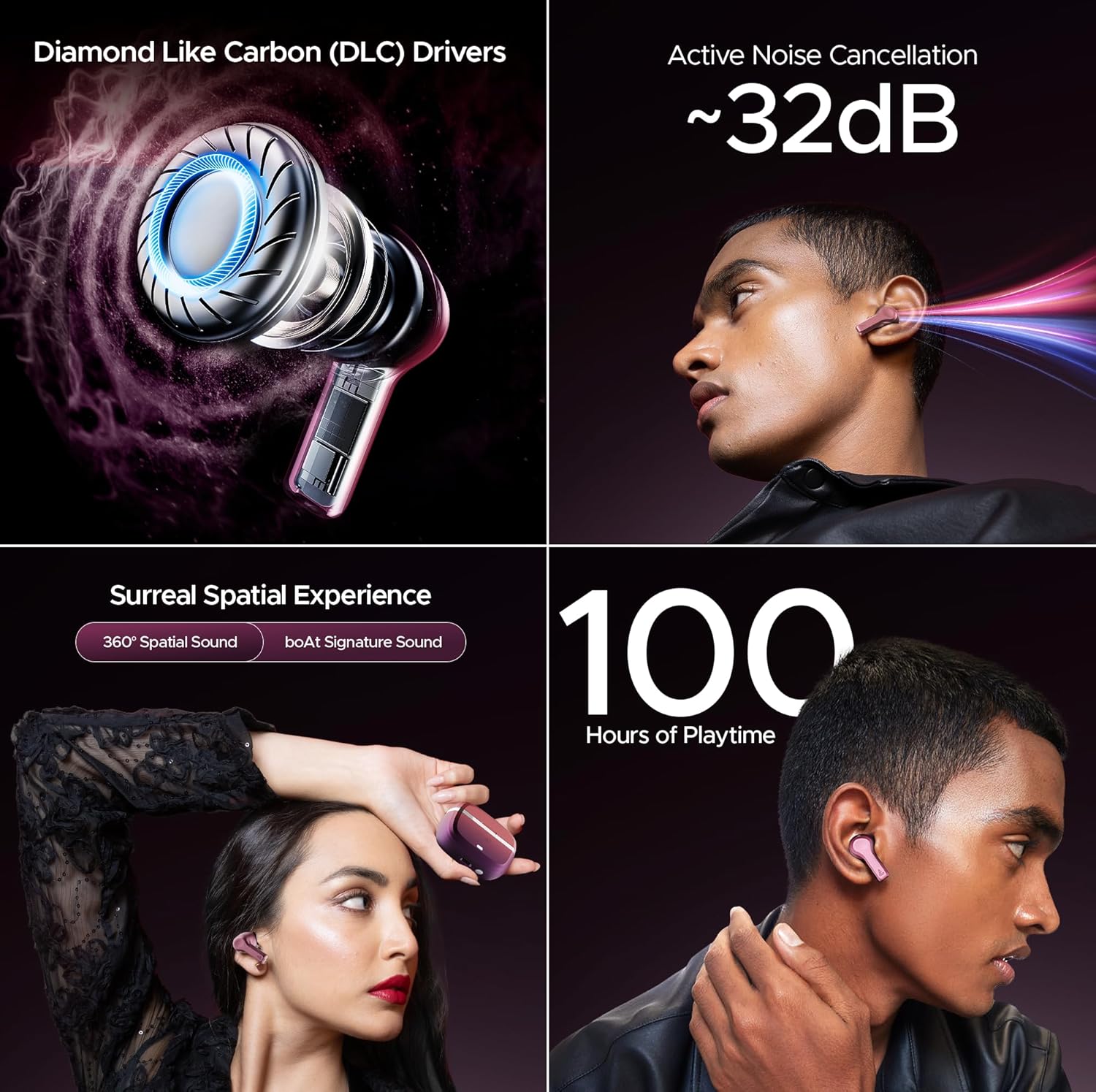
ຮູບພາບ: ຫຼາຍກວ່າview of key audio features including DLC Drivers, ANC, Spatial Audio, and battery life.
ສຽງລາຍເຊັນ 6.4 boAt
Enjoy the signature boAt sound profile, optimized for a powerful and dynamic listening experience across various genres.
6.5 BEAST Mode
Activate BEAST Mode for ultra-low latency (60ms), ideal for gaming and video streaming, ensuring synchronized audio and visuals.
6.6 ໂໝດແວດລ້ອມອ້ອມຂ້າງ
When you need to be aware of your surroundings, switch to Ambient Mode. This feature allows external sounds to pass through, keeping you connected to your environment without removing the earbuds.
7. ຄຸນນະພາບການໂທ
The Nirvana Space earbuds are equipped with 4 microphones and AI-ENx Technology. This technology enhances call clarity by isolating your voice and reducing background noise, ensuring clear conversations even in noisy environments.

Image: Quad Mics with AI-ENx Technology for enhanced call clarity.
8. ແອັບ boAt Hearables
Download the boAt Hearables App to unlock the full potential of your Nirvana Space earbuds. The app allows for customization of touch controls, sound personalization with boAt Adaptive EQ, and access to various features and settings.

Image: boAt Hearables App interface for customizing settings and features. Download the app via this link: https://l.ead.me/bdAX6k
9. ຊີວິດຫມໍ້ໄຟ
The boAt Nirvana Space earbuds offer an impressive 100 hours of total playback time with the charging case. This extended battery life ensures long listening sessions without frequent recharging.

Image: 100 Hours of Playtime feature banner.
10. ບໍາລຸງຮັກສາ
To maintain the performance and longevity of your earbuds:
- ຮັກສາຫູຟັງຫູຟັງ ແລະກ່ອງສາກໃຫ້ສະອາດ ແລະແຫ້ງ.
- Avoid exposing them to extreme temperatures or direct sunlight.
- Use a soft, dry cloth for cleaning. Do not use abrasive cleaners.
- Store in the charging case when not in use to protect them from dust and damage.
11. ການແກ້ໄຂບັນຫາ
11.1 ຫູຟັງບໍ່ຈັບຄູ່
- ກວດໃຫ້ແນ່ໃຈວ່າໄດ້ສາກຫູຟັງທັງສອງອັນແລ້ວ.
- ໃສ່ຫູຟັງເອຍບັດກັບຄືນໃນກ່ອງ, ປິດຝາ, ລໍຖ້າສອງສາມວິນາທີ, ຈາກນັ້ນເປີດອີກຄັ້ງເພື່ອເຂົ້າສູ່ໂໝດຈັບຄູ່ຄືນໃໝ່.
- Forget 'Nirvana Space' from your device's Bluetooth settings and attempt to pair again.
11.2 ຫູຟັງໜຶ່ງໜ່ວຍບໍ່ເຮັດວຽກ
- ກວດເບິ່ງວ່າຫູຟັງທັງສອງຖືກສາກຫຼືບໍ່.
- ລອງຣີເຊັດຫູຟັງຫູຟັງ (ເບິ່ງຄູ່ມືຜູ້ໃຊ້ສະບັບເຕັມສຳລັບຄຳແນະນຳການຣີເຊັດສະເພາະ).
11.3 ຄຸນນະພາບການໂທບໍ່ດີ
- ໃຫ້ແນ່ໃຈວ່າຫູຟັງເອຍບັດຢູ່ໃນຫູຂອງທ່ານຢ່າງຖືກຕ້ອງ.
- Check for any obstructions around the microphone areas.
- If in a very noisy environment, try moving to a quieter location.
12. ຂໍ້ມູນຈໍາເພາະ
| ຄຸນສົມບັດ | ຂໍ້ມູນຈໍາເພາະ |
|---|---|
| ຊື່ຕົວແບບ | Nirvana Space |
| ການຄວບຄຸມສິ່ງລົບກວນ | Active Noise Cancellation (~32dB) |
| ເຕັກໂນໂລຊີການເຊື່ອມຕໍ່ | ໄຮ້ສາຍ (Bluetooth v5.3) |
| ຊ່ວງ Bluetooth | 10 ແມັດ |
| ຊີວິດຫມໍ້ໄຟ | 100 ຊົ່ວໂມງ (ມີກ່ອງສາກ) |
| ເວລາສາກໄຟ | 1.5 ຊົ່ວໂມງ |
| ປະເພດໄດເວີສຽງ | Dynamic Driver (10mm DLC) |
| ໄມໂຄຣໂຟນ | ໄມໂຄຣໂຟນ 4 ໂຕ ພ້ອມເທັກໂນໂລຢີ AI-ENx |
| ລະດັບຄວາມຕ້ານທານນ້ໍາ | ກັນນ້ຳ |
| ວິທີການຄວບຄຸມ | ແອັບ / ສຳຜັດ |
| ນ້ໍາຫນັກລາຍການ | 140 ກຣາມ |
13. ການຮັບປະກັນແລະການສະຫນັບສະຫນູນ
Your boAt Nirvana Space TWS Earbuds come with a manufacturer's warranty. For detailed warranty information, service requests, or technical support, please visit the official boAt webເວັບໄຊ ຫຼືຕິດຕໍ່ບໍລິການລູກຄ້າຂອງເຂົາເຈົ້າ. ຮັກສາໃບຮັບເງິນການຊື້ຂອງທ່ານສໍາລັບການຮ້ອງຂໍການຮັບປະກັນ.
Visit the official boAt Store: ຮ້ານ boAt ໃນ Amazon


