1. ບົດແນະນຳ
The LiNKFOR 4 Channel Stereo Audio Mixer is a compact and versatile device designed to combine up to four stereo audio signals into a single output. This passive mixer requires no external power supply, making it highly portable and easy to integrate into various audio setups. It features individual volume controls for each input channel and a master output volume control, along with mono/stereo switching capabilities, ensuring precise audio management for instruments, media players, computers, and more.

This image displays the LiNKFOR 4 Channel Stereo Audio Mixer from an angled top-down perspective, showcasing its compact metal shell, four input jacks, output jack, power indicator, and five rotary volume knobs (four for input levels and one for master output). The LiNKFOR logo is prominently displayed on the top surface.
2. ເນື້ອໃນຊຸດ
Please verify that all items listed below are included in your package. If any items are missing or damaged, please contact LiNKFOR customer support.
- 1x LiNKFOR Audio Mixer
- 1x 3.5mm to 6.35mm Adapter
- ສາຍສຽງຂະ ໜາດ 1 ມມ
- 1x ຕົວແປງໄຟ
- 1x Power Adapter Cable (USB Type-C)
- 1x ຄູ່ມືຜູ້ໃຊ້

This image displays all components included in the product package: the LiNKFOR audio mixer, a 3.5mm to 6.35mm adapter, a 3.5mm audio cable, a power adapter, a USB Type-C power cable, and the user manual. These items are neatly arranged on a dark surface.
3. ຄຸນສົມບັດ
The LiNKFOR 4 Channel Stereo Audio Mixer offers a range of features designed for optimal audio control:
- 4-Channel Stereo Audio Mixing: Capable of mixing four stereo audio signals from various sources such as instruments, CD players, tape players, computers, mobile phones, and tablets, outputting to speakers or headphones.
- RCA Input and Output: Equipped with 4-channel RCA (L&R) inputs and 1-channel RCA (L&R) output for convenient connectivity.
- Independent Volume Controls: Each of the four input channels features its own independent volume control knob, allowing for precise adjustment of individual audio levels.
- Master Output Volume Control: A dedicated knob for controlling the overall output volume.
- Mono/Stereo Switching: A switch allows users to toggle between mono and stereo output modes, providing flexibility for different audio requirements.
- Passive Operation: No external power supply is required for basic audio mixing functionality, ensuring plug-and-play convenience.
- ທີ່ຢູ່ອາໄສໂລຫະທົນທານ: Constructed with a robust metal shell for enhanced durability and sturdiness.
- ປະສິດທິພາບສຽງລົບກວນຕໍ່າສຸດ: Engineered to provide excellent sound quality with minimal noise, even at maximum output levels.

This diagram shows the top view of the LiNKFOR mixer with labels for INPUT 1-4, OUTPUT, and DC 5V. Arrows indicate common input sources like laptops, phones, keyboards, and electric guitars, and output destinations such as headphones, mixers, and sound cards. Below the mixer, text highlights the "Independent volume control" pointing to the four input level knobs.

ຮູບພາບນີ້ສະຫນອງການໃກ້ຊິດ view of the LiNKFOR mixer, specifically highlighting the mono/stereo switch located near the input channels. It also shows 6.35mm (1/4 inch) TRS input and output cables connected, with labels indicating "TS INPUT" and "TRS OUTPUT" to clarify connection types.
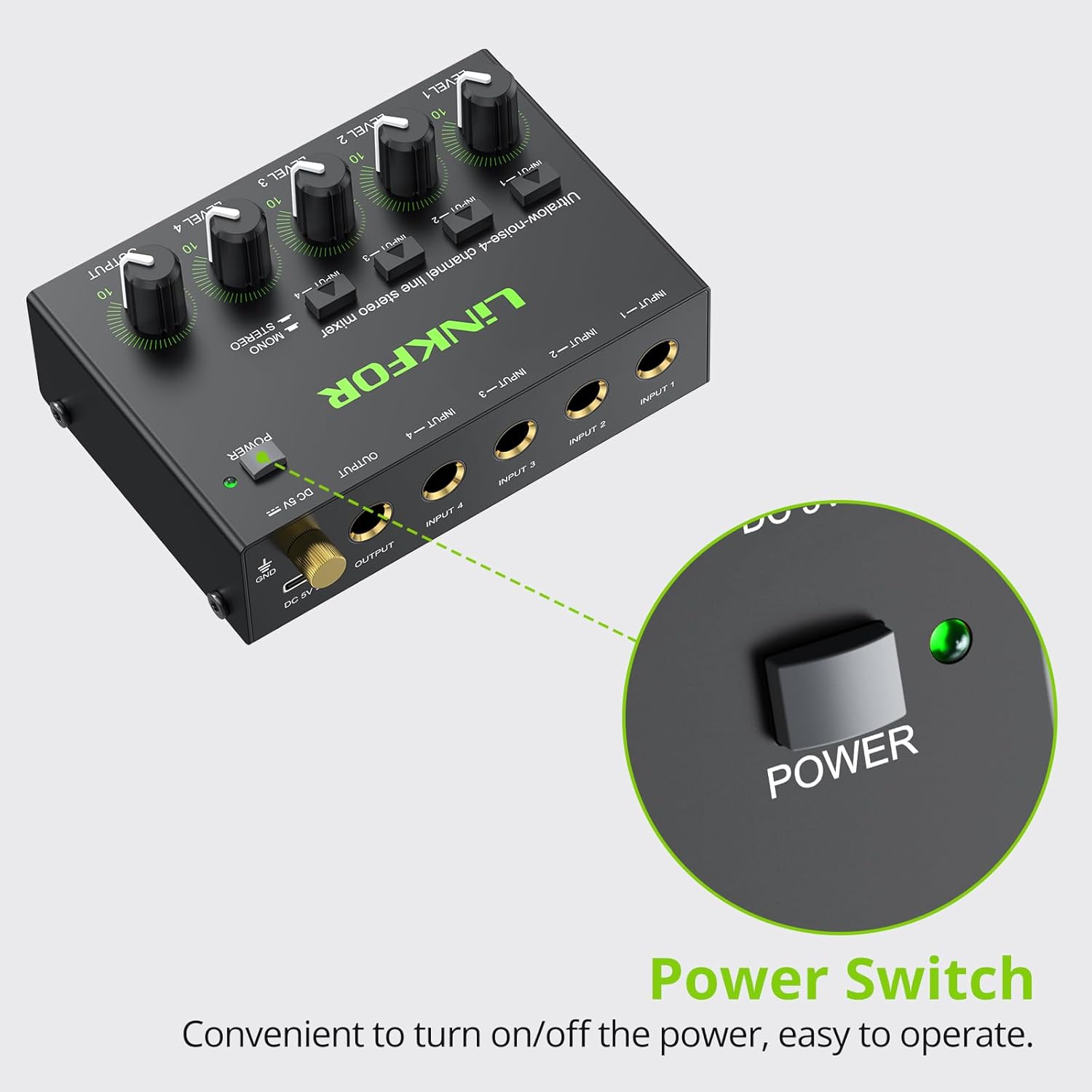
This image focuses on the power switch and its green LED indicator on the LiNKFOR mixer. The text below emphasizes that it is "Convenient to turn on/off the power, easy to operate."
4. ຂໍ້ມູນຈໍາເພາະ
Below are the technical specifications for the LiNKFOR 4 Channel Stereo Audio Mixer:
| ຂໍ້ມູນຈໍາເພາະ | ມູນຄ່າ |
|---|---|
| ໝາຍເລກຕົວແບບ | 6.35mm 4 |
| ຈໍານວນຊ່ອງ | 4 |
| ເຕັກໂນໂລຊີການເຊື່ອມຕໍ່ | ຜູ້ຊ່ວຍ |
| ແຫຼ່ງພະລັງງານ | ໄຟຟ້າມີສາຍ (USB 5V) |
| ນ້ໍາຫນັກລາຍການ | 8.5 ອອນສ໌ (240 ກຣາມ) |
| ຂະໜາດແພັກເກັດ | 7.52 x 6.34 x 2.52 ນິ້ວ |
| ປະເທດຕົ້ນກໍາເນີດ | ຈີນ |

This image provides a top-down angled view of the LiNKFOR mixer with its dimensions clearly labeled: 108mm/4.25in (length), 47mm/1.85in (width), and 84mm/3.30in (height). This visual aid helps in understanding the compact size of the device.
5. ຄູ່ມືການຕິດຕັ້ງ
Follow these steps to set up your LiNKFOR 4 Channel Stereo Audio Mixer:
- ການເຊື່ອມຕໍ່ພະລັງງານ: Connect the provided USB Type-C power cable to the DC 5V input port on the mixer. Connect the other end of the USB cable to the power adapter, and then plug the adapter into a standard electrical outlet. While the mixer can function passively for basic mixing, connecting power ensures optimal performance and signal integrity, especially with lower impedance sources.
- ການເຊື່ອມຕໍ່ຂາເຂົ້າ: Identify your audio sources (e.g., laptop, phone, keyboard, electric guitar, CD player). Use appropriate 6.35mm (1/4 inch) TRS or TS cables to connect each source to the INPUT 1, INPUT 2, INPUT 3, and INPUT 4 jacks on the mixer. Ensure secure connections for each channel you intend to use.
- ການເຊື່ອມຕໍ່ຂາອອກ: Connect your output device (e.g., headphones, powered speakers, amplifier, sound card) to the OUTPUT jack on the mixer using a 6.35mm (1/4 inch) TRS cable.
- ການຕັ້ງຄ່າລະດັບສຽງເບື້ອງຕົ້ນ: Before powering on or playing audio, set all LEVEL 1-4 knobs and the main OUTPUT knob to their minimum positions (fully counter-clockwise) to prevent sudden loud sounds.
- ເປີດ: Press the POWER switch on the mixer. The green LED indicator will illuminate, confirming the unit is powered on.

This image shows the LiNKFOR mixer connected to a USB Type-C power cable. The text indicates that the mixer is powered by USB 5V and illustrates common power sources such as a USB charging plug, USB charging socket, and a power bank.
6. ຄໍາແນະນໍາການດໍາເນີນງານ
Once the mixer is set up, follow these instructions for operation:
- ການປັບລະດັບການປ້ອນຂໍ້ມູນ: Gradually increase the LEVEL knob for each active input channel (LEVEL 1-4) until the desired volume is achieved for that specific source.
- Master Output Volume: Once individual input levels are set, slowly turn the main OUTPUT knob clockwise to increase the overall volume of the mixed audio. Adjust this knob to control the final volume sent to your speakers or headphones.
- Mono/Stereo Switching: Use the MONO/STEREO switch to select your preferred output mode. In stereo mode, the left and right channels of each input are preserved. In mono mode, all input signals are summed to a single mono signal, which is then sent to both left and right output channels.
- ການຕິດຕາມສຽງ: Listen to the mixed audio through your connected headphones or speakers. Make fine adjustments to individual input levels and the master output level as needed to achieve a balanced and clear sound.

This image shows a person playing an acoustic guitar while wearing headphones, with the LiNKFOR mixer connected to both the guitar and a laptop. This illustrates a practical application of the mixer for combining audio sources for personal monitoring or recording.
ວິດີໂອສາທິດການປະຕິບັດ
This video provides a visual guide to the LiNKFOR 4 Channel Audio Mixer, demonstrating its package contents, specific power switch, separate control for input levels, stereo/mono switching, output volume control, and ultra-low noise performance during use with a microphone and laptop for karaoke.
7. ການແກ້ໄຂບັນຫາ
If you encounter issues with your LiNKFOR 4 Channel Stereo Audio Mixer, please refer to the following common troubleshooting steps:
- ບໍ່ມີສຽງອອກ:
- Ensure the mixer is powered on (if using the power adapter) and the green LED is illuminated.
- Check all cable connections (inputs and output) to ensure they are securely plugged in.
- Verify that the volume knobs for both individual input channels and the main OUTPUT are turned up sufficiently.
- Confirm that your audio sources are playing and their output volumes are not muted or too low.
- Check your output device (speakers, headphones) to ensure they are powered on, connected correctly, and their volume is adjusted.
- ສຽງບິດເບືອນ ຫຼື ບໍ່ຊັດເຈນ:
- Reduce the input level of the source causing distortion.
- Lower the main OUTPUT volume.
- Ensure that the cables used are in good condition and are appropriate for audio signals (e.g., not damaged, correct type).
- Check if the mono/stereo switch is set correctly for your audio source and desired output.
- ສຽງດັງ ຫຼື ສຽງດັງ:
- This can often be caused by a ground loop. Try connecting the mixer and all connected devices to the same power strip or outlet.
- Ensure all cables are fully inserted and not loose.
- If using the power adapter, try a different power outlet.
- ຊ່ອງໜຶ່ງບໍ່ເຮັດວຽກ:
- Check the cable for that specific input channel. Try swapping it with a known working cable.
- Ensure the input source is active and sending a signal.
- Verify the individual LEVEL knob for that channel is turned up.
8. ບໍາລຸງຮັກສາ
To ensure the longevity and optimal performance of your LiNKFOR 4 Channel Stereo Audio Mixer, follow these maintenance guidelines:
- ທໍາຄວາມສະອາດ: Use a soft, dry cloth to wipe down the exterior of the mixer. For stubborn dirt, a slightly damp cloth can be used, but ensure no moisture enters the device. Avoid using harsh chemicals, solvents, or abrasive cleaners.
- ການເກັບຮັກສາ: When not in use for extended periods, store the mixer in a cool, dry place away from direct sunlight, extreme temperatures, and high humidity.
- ການຈັດການ: Handle the mixer with care. Avoid dropping it or subjecting it to strong impacts, as this can damage internal components.
- ການຄຸ້ມຄອງສາຍໄຟ: Keep cables organized and untangled to prevent damage to the cables and the mixer's ports. Avoid bending cables sharply.
9. ການຮັບປະກັນແລະການສະຫນັບສະຫນູນ
LiNKFOR products are designed for reliability and performance. For any warranty-related inquiries or technical support, please contact LiNKFOR customer service through their official website or the platform where you purchased the product. Please have your product model number (6.35mm 4) and purchase information ready when contacting support.
For more information and product updates, visit the official LiNKFOR store: LiNKFOR Store on Amazon


