1. ບົດແນະນຳ
The FLEXISPOT E6 Pro Oval Dual Motor Standing Desk Frame (Model E8) is designed to provide a versatile and ergonomic workspace. This height-adjustable electric desk frame features a robust 3-stage oval leg system and powerful dual motors, allowing for smooth and quiet transitions between sitting and standing positions. The intuitive LED control panel includes memory presets and a convenient USB charging port, enhancing user experience and productivity. This manual provides essential information for the safe assembly, operation, and maintenance of your desk frame.

Figure 1: FLEXISPOT E6 Pro Oval Dual Motor Standing Desk Frame (Black)
2. ຂໍ້ມູນຄວາມປອດໄພ
ເພື່ອຮັບປະກັນການດຳເນີນງານທີ່ປອດໄພ ແລະ ປ້ອງກັນຄວາມເສຍຫາຍ, ກະລຸນາປະຕິບັດຕາມຄຳແນະນຳຕໍ່ໄປນີ້:
- Ensure the desk is securely assembled according to the provided instructions.
- Do not exceed the maximum weight capacity of 330 lbs (150 kg) to prevent tipping or instability.
- Keep hands and objects clear of moving parts during height adjustments.
- ຫຼີກເວັ້ນການວາງຂອງແຫຼວໂດຍກົງໃສ່ກະດານຄວບຄຸມຫຼືຢູ່ໃກ້ກັບອົງປະກອບໄຟຟ້າ.
- Regularly inspect all connections and fasteners to ensure they are tight and secure.
- The desk is equipped with an anti-collision system. However, always exercise caution when adjusting height to prevent accidental contact with objects or persons.
3. ສະພາ
The FLEXISPOT E6 Pro desk frame is designed for straightforward assembly. Please follow the detailed instructions provided in the separate user manual included with your product. Ensure all components are present before beginning assembly.
3.1 ອົງປະກອບຫຼັກ
- ຍົກເສົາ (ຂາ)
- ຕີນ
- ຂ້າມ
- ກ່ອງຄວບຄຸມ
- Handset (Control Panel)
- Power Adapter
- ຮາດແວຕິດຕັ້ງ
3.2 ສະພາແຫ່ງview
Typically, assembly involves attaching the feet to the lifting columns, connecting the crossbeam, mounting the control box and handset, and finally securing your chosen desktop (sold separately) to the frame. All necessary tools are usually included. Refer to the specific step-by-step diagrams in your product manual for precise instructions.

ຮູບທີ 2: ລະເບີດ view of the FLEXISPOT E6 Pro desk frame components.
4. ຄໍາແນະນໍາການດໍາເນີນງານ
4.1 ການປັບຄວາມສູງ
The E6 Pro features a 3-stage oval leg system, offering a broad height adjustment range from 23.6 inches to 48.8 inches. This allows users of various heights, from children to tall adults, to find their optimal ergonomic position.
- ຍົກໂຕະ: ກົດຄ້າງໄວ້ ລູກສອນຂຶ້ນ ປຸ່ມເທິງແຜງຄວບຄຸມ.
- ໂຕະຕ່ຳ: ກົດຄ້າງໄວ້ ລູກສອນລົງ ປຸ່ມເທິງແຜງຄວບຄຸມ.
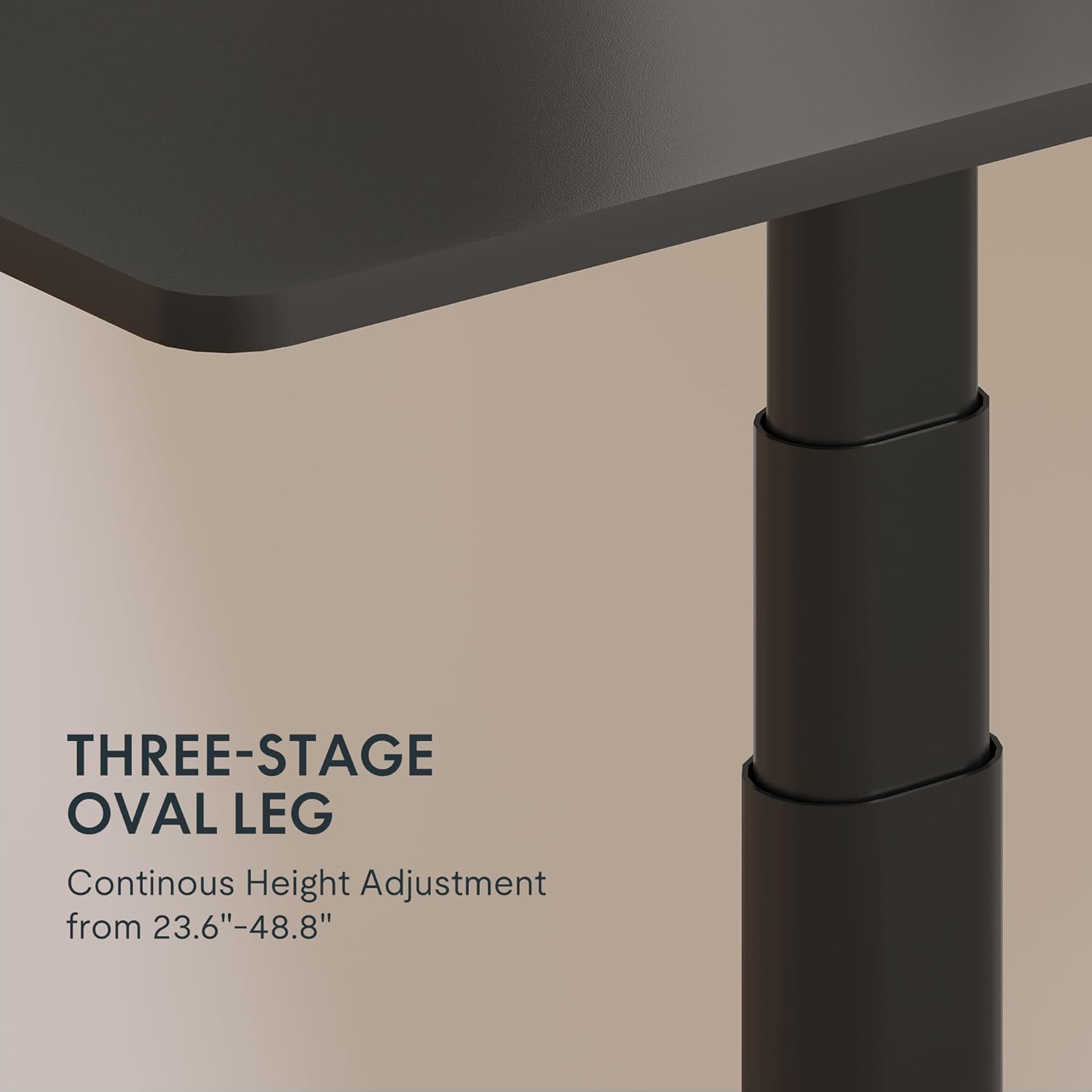
Figure 3: Close-up of the 3-stage oval leg mechanism.
4.2 LED Control Panel with Memory Presets and USB Port
The intuitive LED control panel allows for easy height adjustments and includes programmable memory presets for your preferred sitting and standing heights. It also features a convenient USB port for charging devices.
- ການຕັ້ງຄ່າຄວາມຈຳລ່ວງໜ້າ: ປັບໂຕະໃຫ້ໄດ້ຄວາມສູງຕາມທີ່ທ່ານຕ້ອງການໂດຍໃຊ້ລູກສອນຂຶ້ນ/ລົງ. ກົດປຸ່ມ 'ມ' button, then press one of the numbered preset buttons ('1', '2', '3', ຫຼື '4') ເພື່ອບັນທຶກຄວາມສູງໃນປະຈຸບັນ.
- ການລະນຶກເຖິງຄ່າທີ່ຕັ້ງໄວ້ລ່ວງໜ້າຂອງໜ່ວຍຄວາມຈຳ: ກົດປຸ່ມທີ່ຕັ້ງຄ່າໄວ້ລ່ວງໜ້າໃດໜຶ່ງທີ່ມີຕົວເລກ ('1', '2', '3', ຫຼື '4') ເພື່ອຍ້າຍໂຕະອັດຕະໂນມັດໄປສູ່ຄວາມສູງທີ່ບັນທຶກໄວ້.
- ພອດສາກໄຟ USB: Use the integrated USB port to conveniently charge your electronic devices.
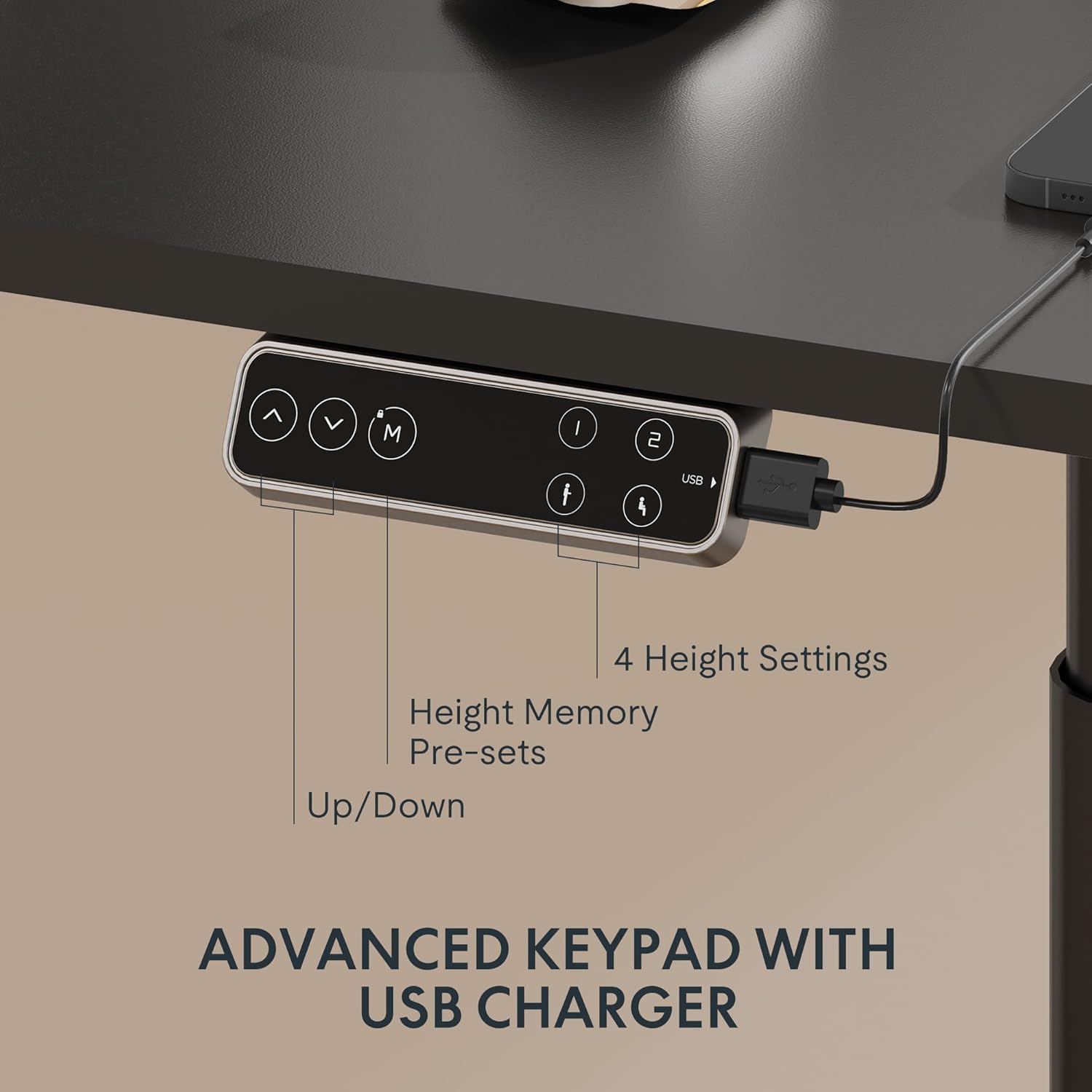
Figure 4: LED Control Panel with memory presets and USB port.
4.3 Dual Motor System
The E6 Pro is equipped with quiet dual motors that operate at less than 45dB, ensuring minimal disturbance in your workspace. These powerful motors can handle up to 330 lbs (150 kg) of weight, providing stable and reliable performance.
4.4 ລະບົບຕ້ານການຊົນກັນ
For enhanced safety, the desk features an anti-collision system. If the desk encounters an obstruction during height adjustment, it will automatically stop and reverse slightly to prevent damage or injury. This system is designed to protect both the desk and its surroundings.
5. ຂໍ້ມູນຈໍາເພາະ
| ຄຸນສົມບັດ | ລາຍລະອຽດ |
|---|---|
| ຍີ່ຫໍ້ | FLEXISPOT |
| ໝາຍເລກຕົວແບບ | E8 |
| ການອອກແບບໂຕະ | ຂອບໂຕະຕັ້ງໂຕະ |
| ຂາ Stages | 3 ສtages Oval Leg |
| ຊ່ວງການປັບຄວາມສູງ | 23.6" ຫາ 48.8" |
| ປະເພດມໍເຕີ | ມໍເຕີຄູ່ |
| ຄວາມອາດສາມາດນ້ໍາຫນັກ | ສູງສຸດ 330 lbs (150 kg) |
| ລະດັບສຽງ | ຫນ້ອຍກວ່າ 45dB |
| ກະດານຄວບຄຸມ | LED with 4 Memory Presets & USB Port |
| ຄຸນນະສົມບັດພິເສດ | ລະບົບຕ້ານການຊົນ |
| ວັດສະດຸພື້ນຖານ | ໂລຫະ |
| ສີ | ຂອບສີດຳ |
| ສະພາແຫ່ງທີ່ຕ້ອງການ | ແມ່ນແລ້ວ |
6. ບໍາລຸງຮັກສາ
To ensure the longevity and optimal performance of your FLEXISPOT E6 Pro desk frame, regular maintenance is recommended:
- ທໍາຄວາມສະອາດ: ເຊັດກອບໂຕະດ້ວຍຜ້າອ່ອນໆ, ເຊັດໃຫ້ແຫ້ງ.amp ຜ້າ. ຫຼີກເວັ້ນການນໍາໃຊ້ສານເຄມີທີ່ຮຸນແຮງຫຼືເຄື່ອງເຮັດຄວາມສະອາດຂັດທີ່ອາດຈະທໍາລາຍການສໍາເລັດຮູບ.
- ການຄຸ້ມຄອງສາຍໄຟ: ກວດສອບ ແລະ ຈັດລະບຽບສາຍໄຟເປັນໄລຍະເພື່ອປ້ອງກັນການພັນກັນ ຫຼື ຄວາມເສຍຫາຍ, ໂດຍສະເພາະໃນລະຫວ່າງການປັບຄວາມສູງ.
- ກວດສອບການຕິດຕັ້ງ: Every few months, inspect all screws and bolts to ensure they are tight. Re-tighten if necessary.
- ການແຜ່ກະຈາຍນ້ໍາຫນັກ: Distribute weight evenly across the desktop to prevent undue stress on the frame and motors.
7. ການແກ້ໄຂບັນຫາ
If you encounter any issues with your desk frame, please refer to the following common troubleshooting steps:
- ໂຕະບໍ່ຍ້າຍ: Check all cable connections to ensure they are securely plugged into the control box and power outlet. Verify the power adapter is functioning.
- ການເຄື່ອນໄຫວບໍ່ສະເຫມີພາບ: Ensure the desk is not overloaded and that weight is evenly distributed. Perform a reset procedure (refer to your specific user manual for reset instructions).
- ລະຫັດຂໍ້ຜິດພາດໃນການສະແດງຜົນ: Consult your user manual for a list of error codes and their corresponding solutions.
- ລະບົບຕ້ານການຊົນກັນມັກຈະເຮັດວຽກເລື້ອຍໆ: Ensure there are no obstructions in the desk's path during movement.
If the problem persists after attempting these steps, please contact FLEXISPOT customer support for further assistance.
8. ການຮັບປະກັນແລະການສະ ໜັບ ສະ ໜູນ
FLEXISPOT provides a comprehensive warranty for your peace of mind:
- ການຄຸ້ມຄອງ 5 ປີ: ໃຊ້ກັບໂຄງໂຕະ ແລະ ມໍເຕີ.
- ການຄຸ້ມຄອງ 2 ປີ: ໃຊ້ກັບແຜງຄວບຄຸມ ແລະ ເຄື່ອງເອເລັກໂຕຣນິກ.
For warranty claims, technical support, or any questions regarding your FLEXISPOT E6 Pro desk frame, please visit the official FLEXISPOT webເວັບໄຊ ຫຼືຕິດຕໍ່ບໍລິການລູກຄ້າຂອງເຂົາເຈົ້າໂດຍກົງ. ຮັກສາໃບຮັບເງິນການຊື້ຂອງທ່ານໄວ້ເປັນຫຼັກຖານການຊື້.
9. ວິດີໂອຜະລິດຕະພັນ
9.1 Why Choose FLEXISPOT E6
Video 1: This official FLEXISPOT video highlights the key features and benefits of the E6 series, including its robust construction and smooth operation.
9.2 Welcome to FLEXISPOT'S Mega Factory
Video 2: An inside look at the FLEXISPOT manufacturing facility, showcasing the precision and quality control involved in producing their products.


