1. ຜະລິດຕະພັນເກີນview
The LiNKFOR 6-Channel Audio Mixer is an ultra-compact device designed to combine up to six line-level signal sources into a single output channel. It is suitable for connecting various electronic instruments and audio equipment such as microphones, guitars, basses, keyboards, and phones, making it ideal for small clubs, bars, or personal stage setups. This mixer features individual volume controls for each input and the main output, along with mono/stereo switching capabilities. Its robust all-metal shell ensures durability and reduces electromagnetic interference for a purer sound experience.

Figure 1: LiNKFOR 6-Channel Audio Mixer, showcasinການອອກແບບທີ່ກະທັດຮັດ ແລະ ຮູບແບບການຄວບຄຸມ.
2. ຂໍ້ມູນຄວາມປອດໄພ
- ຮັບປະກັນການສະຫນອງພະລັງງານ voltage ກົງກັບຄວາມຕ້ອງການຂອງອຸປະກອນ (5V DC).
- ຢ່າປ່ອຍໃຫ້ອຸປະກອນຖືກນໍ້າ, ຄວາມຊຸ່ມຊື່ນ, ຫຼືອຸນຫະພູມທີ່ຮຸນແຮງ.
- Avoid disassembling or modifying the device, as this may void the warranty and cause damage.
- ຮັກສາອຸປະກອນໃຫ້ຫ່າງຈາກສະຫນາມແມ່ເຫຼັກທີ່ເຂັ້ມແຂງ.
- Use only the provided or recommended power adapter and cables.
3. ເນື້ອໃນຊຸດ

ຮູບທີ 2: ເນື້ອໃນລວມຢູ່ໃນຊຸດຜະລິດຕະພັນ.
ກວດສອບວ່າລາຍການທັງຫມົດແມ່ນມີຢູ່ໃນຊຸດຂອງທ່ານ:
- LiNKFOR 6-Channel Audio Mixer (Model 6-IN-1-OUT)
- ການສະຫນອງພະລັງງານ 5V
- USB Type-C Power Cable with Magnetic Ring
- ສາຍສຽງ 6.35 ມມ
- ຄູ່ມືຜູ້ໃຊ້
4. ຄຸນລັກສະນະຂອງຜະລິດຕະພັນ
- ການອອກແບບຂະໜາດກະທັດຮັດ: Mixes up to 6 line signal sources into 1 channel for headphones or speakers.
- ຄວາມເຂົ້າກັນໄດ້ອະເນກປະສົງ: Suitable for microphones, guitars, basses, keyboards, phones, and other stage ອຸປະກອນ.
- ການຄວບຄຸມເອກະລາດ: Each input and the main output feature independent volume control.
- Stereo/Mono Switching: Supports switching between stereo and mono modes with a single key.
- ປະສິດທິພາບສຽງລົບກວນຕໍ່າສຸດ: Designed for impressive audio experience without interference.
- ການສະຫນອງພະລັງງານທີ່ຫມັ້ນຄົງ: Certified 5V power supply and power cable with magnetic ring ensure stable performance.
- Specific Power Switch: Easy to operate on/off switch, eliminating frequent unplugging.
- ການກໍ່ສ້າງທົນທານ: All-metal shell reduces electromagnetic interference and provides a purer sound. Non-slip pads prevent movement during use.
ວິດີໂອ 1: ຫຼາຍກວ່າview of a 6-channel stereo audio mixer, highlighting its inputs and controls. This video demonstrates the compact design, 6.35mm input interfaces, independent volume adjustments, and mono/stereo switching capabilities.
5. ຕັ້ງຄ່າ
Follow these steps to set up your LiNKFOR 6-Channel Audio Mixer:
- ການເຊື່ອມຕໍ່ພະລັງງານ: Connect the provided USB Type-C power cable to the mixer's 5V DC input port. Plug the other end into a compatible 5V USB power source (e.g., wall adapter, computer USB port, power bank).
- ເປີດ: Press the power switch located on the mixer. The power indicator light will illuminate.
- ການເຊື່ອມຕໍ່ຂາເຂົ້າ: Connect your audio sources (microphones, instruments, phones, etc.) to the INPUT 1-6 jacks using 6.35mm TRS/TS cables.
- ການເຊື່ອມຕໍ່ຂາອອກ: ເຊື່ອມຕໍ່ຫູຟັງຂອງທ່ານ ຫຼື amplifier to the OUTPUT jack using a 6.35mm TRS/TS cable.
- ການປັບລະດັບສຽງເບື້ອງຕົ້ນ: Set all LEVEL knobs (1-6) and the main OUTPUT knob to their minimum position before playing any audio to avoid sudden loud sounds.

Figure 3: Connecting the Type-C power supply.
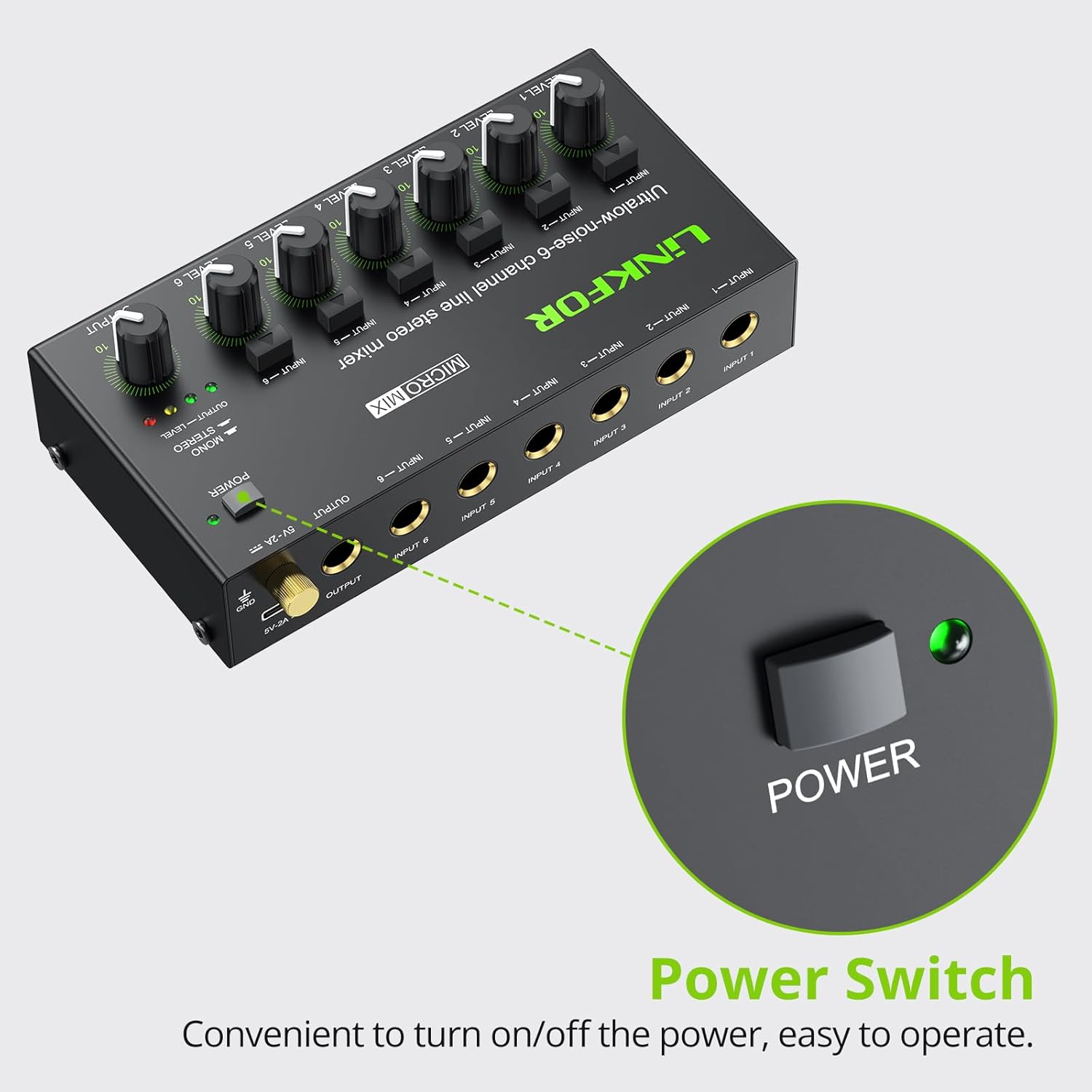
Figure 4: Power switch location.
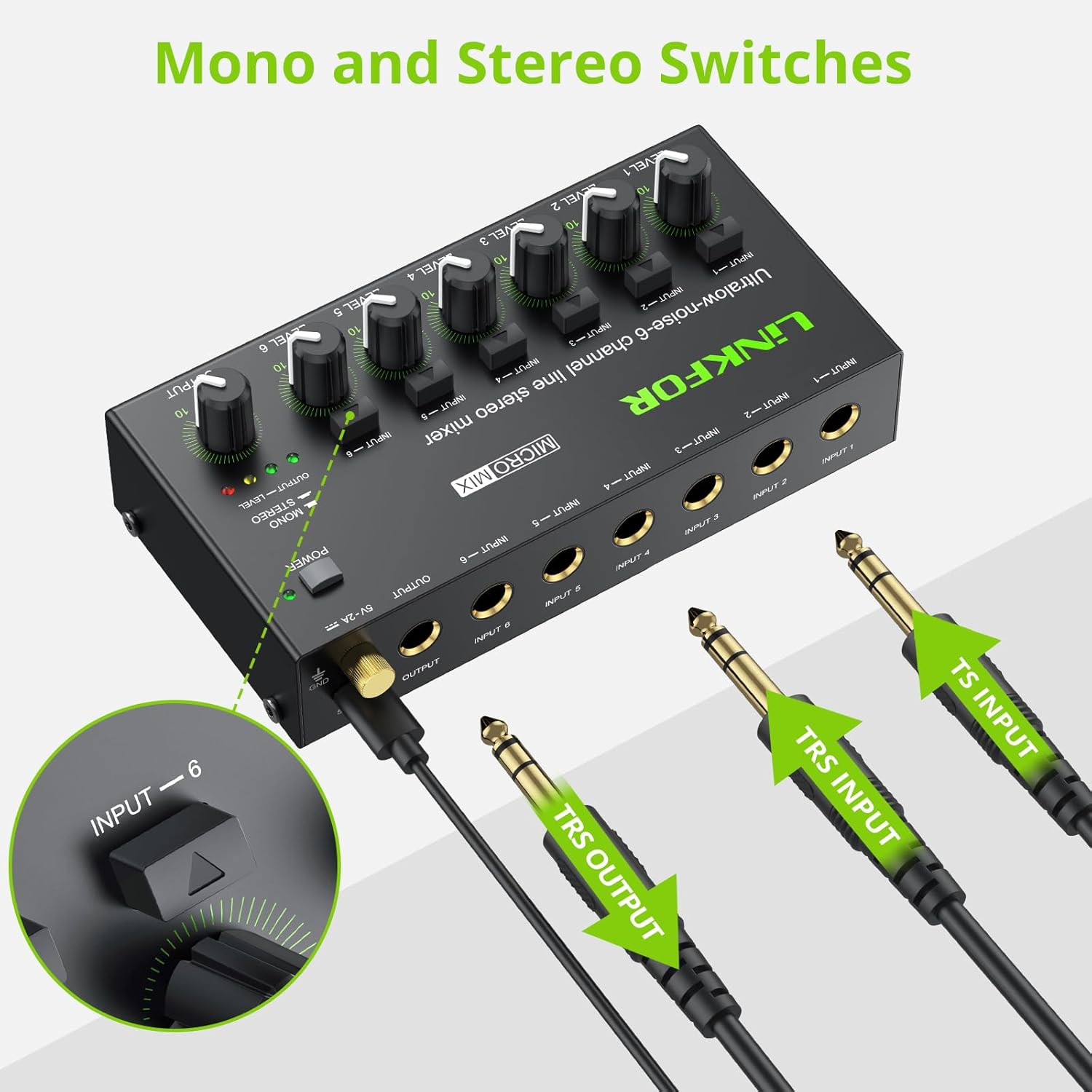
Figure 5: Input and output interfaces.

Figure 6: Connection diagram for inputs and outputs.
6. ຄໍາແນະນໍາການດໍາເນີນງານ
Once your mixer is set up, follow these instructions for operation:
- ການປັບລະດັບການປ້ອນຂໍ້ມູນ: Gradually turn up the LEVEL knob for each active input channel (LEVEL 1-6) until the desired volume is achieved for that specific source.
- ປັບລະດັບຜົນຜະລິດ: Slowly increase the main OUTPUT knob to control the overall volume of the mixed audio sent to your headphones or amplifier. Monitor the OUTPUT LEVEL indicator lights (green, yellow, red) to prevent clipping (red light indicates signal is too high).
- Mono/Stereo Switching: Each input channel has a dedicated button to switch between mono and stereo modes. Press the button above the respective input to toggle between modes as needed for your audio source.
- Mixing Multiple Sources: Adjust the individual LEVEL knobs for each input to create a balanced mix of all connected audio sources.
Video 2: Official LiNKFOR video demonstrating the 6-Channel Audio Mixer's features. This video highlights the specific power switch, separate volume controls for each channel, stereo/mono switching, and ultra-low noise performance during operation.

ຮູບທີ 7: ຕົວຢ່າງample of mixer in use with guitar and laptop.
7. ບໍາລຸງຮັກສາ
- ທໍາຄວາມສະອາດ: ໃຊ້ຜ້າອ່ອນໆແຫ້ງເພື່ອທຳຄວາມສະອາດດ້ານນອກຂອງເຄື່ອງປະສົມ. ຢ່າໃຊ້ນ້ຳຢາທຳຄວາມສະອາດ ຫຼື ຕົວລະລາຍ.
- ການເກັບຮັກສາ: ເກັບຮັກສາອຸປະກອນໄວ້ໃນບ່ອນທີ່ເຢັນ, ແຫ້ງ, ຫ່າງຈາກແສງແດດໂດຍກົງ ແລະອຸນຫະພູມທີ່ຮຸນແຮງເມື່ອບໍ່ໄດ້ໃຊ້.
- ການດູແລສາຍໄຟ: Ensure all cables are connected securely and are not bent or kinked excessively to prevent damage.
8. ການແກ້ໄຂບັນຫາ
| ບັນຫາ | ສາເຫດທີ່ເປັນໄປໄດ້ | ການແກ້ໄຂ |
|---|---|---|
| ບໍ່ມີສຽງອອກ | Power not connected or turned on; Volume knobs too low; Incorrect cable connections. | Check power supply and switch; Increase LEVEL and OUTPUT knobs; Verify all audio cables are correctly and securely connected. |
| ສຽງບິດເບືອນ | Volume levels too high (clipping); Faulty cables or audio sources. | Reduce LEVEL and/or OUTPUT knobs until red indicator light disappears; Test with different cables or audio sources. |
| Hissing/Buzzing noise | Ground loop interference; Poor quality cables; Nearby electronic interference. | Ensure proper grounding; Use high-quality shielded cables; Move the mixer away from other electronic devices. |
| ຊ່ອງໜຶ່ງບໍ່ເຮັດວຽກ | Faulty input cable or source; Input level too low. | Test the input with a different cable and source; Increase the specific channel's LEVEL knob. |
9. ຂໍ້ມູນຈໍາເພາະ

ຮູບທີ 8: ຂະໜາດຜະລິດຕະພັນ.
| ຄຸນສົມບັດ | ລາຍລະອຽດ |
|---|---|
| ຍີ່ຫໍ້ | LinkFOR |
| ໝາຍເລກຕົວແບບ | 6-IN-1-OUT |
| ຈໍານວນຊ່ອງ | 6 |
| ເຕັກໂນໂລຊີການເຊື່ອມຕໍ່ | 6.35ມມ |
| ແຫຼ່ງພະລັງງານ | ໄຟຟ້າສາຍ |
| ສະບັບtage | 5 ໂວນ |
| ຂະໜາດສິນຄ້າ | 1.26"D x 2.95"W x 1.26"H (32mm D x 75mm W x 32mm H) |
| ນ້ໍາຫນັກລາຍການ | 8.5 ອອນສ໌ (240 ກຣາມ) |
10. ການຮັບປະກັນແລະການສະຫນັບສະຫນູນ
For warranty information and technical support, please refer to the documentation included with your purchase or visit the official LiNKFOR webເວັບໄຊ. ເງື່ອນໄຂການຮັບປະກັນສະເພາະອາດຈະແຕກຕ່າງກັນໄປຕາມພາກພື້ນ ແລະຮ້ານຂາຍຍ່ອຍ.


