ຂໍ້ມູນຄວາມປອດໄພທີ່ສໍາຄັນ
Please read all safety instructions carefully before using this product. Failure to follow these instructions may result in injury or damage.
- ຢ່າເປີດຫູຟັງຫູຟັງ ຫຼືກ່ອງສາກໃສ່ກັບອຸນຫະພູມທີ່ຮຸນແຮງ, ແສງແດດໂດຍກົງ ຫຼືໄຟ.
- Avoid using the product in environments with high humidity or water, beyond its IP7 waterproof rating.
- ຫ້າມຖອດປະກອບ, ສ້ອມແປງ, ຫຼືດັດແປງຜະລິດຕະພັນ. ນີ້ຈະເປັນການຍົກເລີກການຮັບປະກັນ.
- ຮັກສາຜະລິດຕະພັນໃຫ້ໄກຈາກເດັກນ້ອຍ ແລະສັດລ້ຽງ.
- Use only the provided charging cable or a certified standard charger (5V/1A; 5V/2A) to charge the case.
- ຫຼີກເວັ້ນການຟັງໃນລະດັບສຽງສູງສໍາລັບໄລຍະເວລາທີ່ຂະຫຍາຍອອກໄປເພື່ອປ້ອງກັນຄວາມເສຍຫາຍຂອງການໄດ້ຍິນ.
ເນື້ອໃນຊຸດ
ກວດສອບວ່າລາຍການທັງຫມົດແມ່ນມີຢູ່ໃນຊຸດຂອງທ່ານ:
- 2x Bluetooth Earbuds (Left and Right)
- ກະເປົCharາສາກໄຟພົກພາ 1x
- 1x ສາຍສາກ Type-C
- 1x ຄູ່ມືຜູ້ໃຊ້
ສິນຄ້າເກີນview
Familiarize yourself with the components of your Cillso H97 Wireless Earbuds.
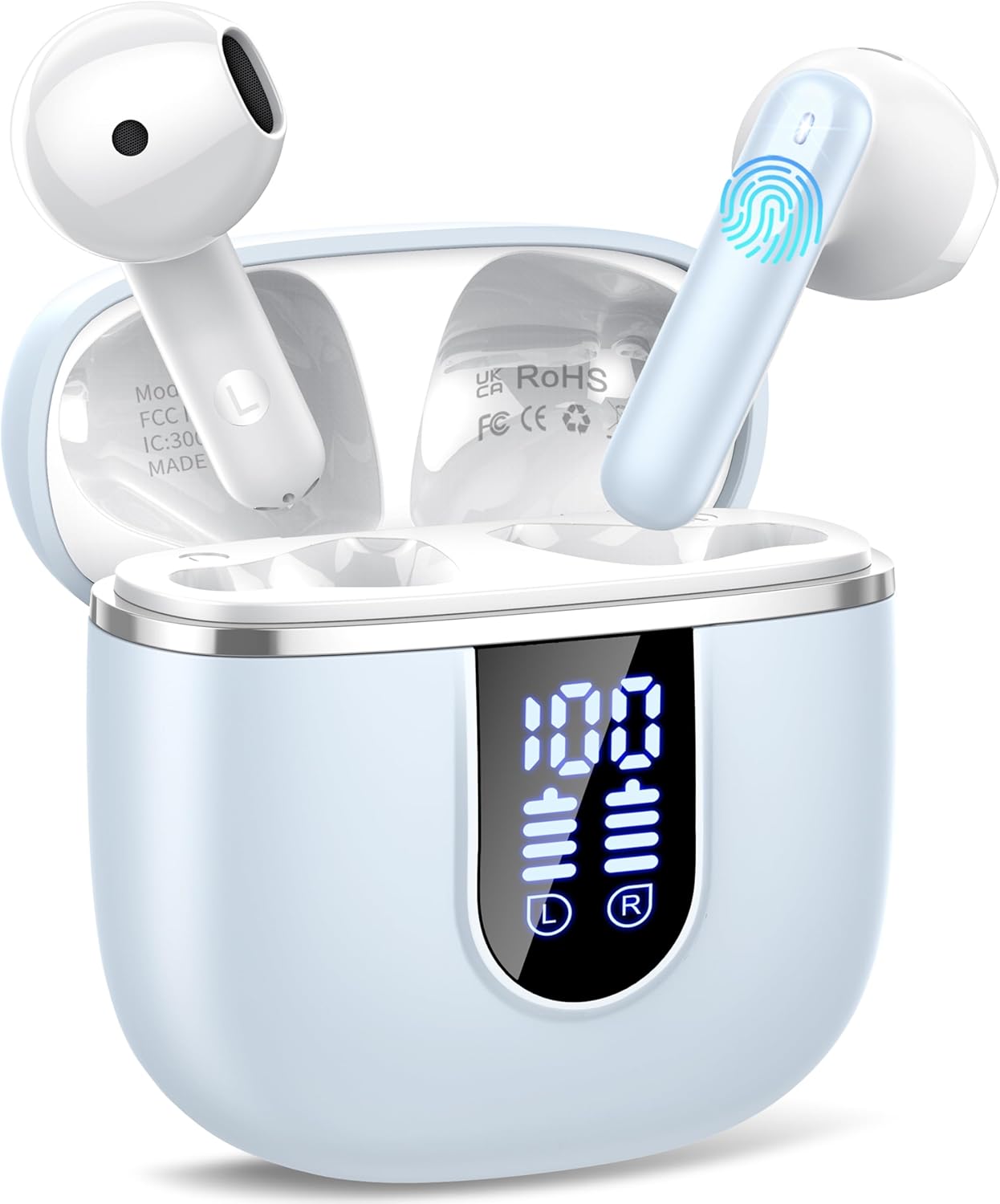
Image: The Cillso H97 Wireless Earbuds are shown inside their open charging case. The case features a dual LED display indicating battery percentages for the case and individual earbuds. The earbuds are white with a sleek design, and the charging case is a light azure color.
The image above displays the earbuds within their charging case. Key features include the dual LED display on the charging case, which shows the battery status for both the case and each earbud. The earbuds themselves are designed for in-ear comfort and feature touch control areas.
ຕັ້ງຄ່າ
1. ການສາກຫູຟັງ ແລະ ເຄສ
ກ່ອນທີ່ຈະໃຊ້ຄັ້ງທຳອິດ, ໃຫ້ສາກຫູຟັງຫູຟັງ ແລະ ກ່ອງສາກໃຫ້ເຕັມ.
- Connect the provided Type-C charging cable to the charging port on the case and to a standard USB power adapter (5V/1A or 5V/2A).
- The dual LED display on the charging case will show the charging progress. A full charge for the case takes approximately 1.5 hours.
- Place the earbuds into the charging case. They will automatically begin charging. The LED display will indicate their charging status.
- The earbuds provide up to 8 hours of playback on a single charge, and the charging case provides an additional 32 hours of playtime.
2. ການຈັບຄູ່ກັບອຸປະກອນຂອງທ່ານ
The H97 earbuds utilize Bluetooth 5.4 for a stable and efficient connection.
- ການຈັບຄູ່ເບື້ອງຕົ້ນ:
- ກວດໃຫ້ແນ່ໃຈວ່າ Bluetooth ຂອງອຸປະກອນຂອງທ່ານເປີດຢູ່.
- ເປີດຝາຂອງກໍລະນີສາກໄຟ. ຫູຟັງເອຍບັດຈະເປີດເຄື່ອງອັດຕະໂນມັດ ແລະເຂົ້າສູ່ໂໝດຈັບຄູ່.
- On your device, search for Bluetooth devices and select "H97" from the list.
- ເມື່ອເຊື່ອມຕໍ່ແລ້ວ, ທ່ານຈະໄດ້ຍິນການເຕືອນຢືນຢັນ, ແລະຫູຟັງເອຍບັດຈະພ້ອມໃຫ້ໃຊ້.
- ເຊື່ອມຕໍ່ຄືນໃໝ່ອັດຕະໂນມັດ: After the initial pairing, the earbuds will automatically connect to the last paired device when the charging case lid is opened.
- ແບບ Earbud ດຽວ: Either earbud can be used independently. Simply take one out of the case, and it will connect.
ຄໍາແນະນໍາການດໍາເນີນງານ
1. ໃສ່ຫູຟັງ
The H97 earbuds are designed for an ergonomic and secure fit.

Image: A diagram illustrating the correct angle and position for wearing the earbud in the ear canal for optimal comfort and sound.
- ສຽບຫູຟັງແຕ່ລະອັນໃສ່ຊ່ອງຫູຂອງເຈົ້າຄ່ອຍໆ.
- Adjust the earbud until it feels snug and comfortable. A proper fit ensures optimal sound quality and noise isolation.
- Each earbud weighs only 3.5 grams, providing lightweight comfort for extended wear.
2. ແຕະການຄວບຄຸມ
The earbuds feature sensitive touch sensors for easy control of various functions:
| ການປະຕິບັດ | ຟັງຊັນ |
|---|---|
| ແຕະເທື່ອດຽວ (ຊ້າຍ/ຂວາ) | ຫຼິ້ນ/ຢຸດເພງ, ຮັບສາຍ/ວາງສາຍ |
| ແຕະສອງເທື່ອ (ຊ້າຍ) | ເພງກ່ອນໜ້າ |
| ແຕະສອງເທື່ອ (ຂວາ) | ເພງຕໍ່ໄປ |
| ແຕະສາມເທື່ອ (ຊ້າຍ) | ປະລິມານລົງ |
| ແຕະສາມເທື່ອ (ຂວາ) | ປະລິມານຂຶ້ນ |
| ກົດຄ້າງໄວ້ (2 ວິນາທີ) | ປະຕິເສດການໂທ, ເປີດໃຊ້ຜູ້ຊ່ວຍສຽງ |
3. ເປີດ/ປິດ
- ເປີດ: Open the charging case lid, or long-press the touch area on both earbuds for 3 seconds if they are outside the case and off.
- ປິດພະລັງງານ: Place the earbuds back into the charging case and close the lid. Alternatively, long-press the touch area on both earbuds for 5 seconds.
4. ເຮັດ ແລະ ຮັບສາຍ
The H97 earbuds are equipped with 4 ENC (Environmental Noise Cancelling) microphones to ensure clear call quality.
- ຮັບສາຍ: ແຕະເທື່ອດຽວທັງຫູຟັງ.
- ສິ້ນສຸດການໂທ: ແຕະເທື່ອດຽວໃສ່ຫູຟັງຫູຟັງໃນລະຫວ່າງການໂທ.
- ປະຕິເສດການໂທ: ກົດໃສ່ຫູຟັງອັນໃດອັນໜຶ່ງຄ້າງໄວ້ 2 ວິນາທີ.
5. ເຄື່ອງຫຼີ້ນສຽງ
Experience immersive HiFi stereo sound with deep bass, delivered by 14.2mm diaphragm drivers and AAC/SBC audio encoding.
- ຫຼິ້ນ/ຢຸດ: ແຕະເທື່ອດຽວທັງຫູຟັງ.
- ເພງຕໍ່ໄປ: ແຕະສອງເທື່ອໃສ່ຫູຟັງເບື້ອງຂວາ.
- ເພງກ່ອນໜ້າ: ແຕະສອງເທື່ອໃສ່ຫູຟັງທາງຊ້າຍ.
ບໍາລຸງຮັກສາ
Proper care will extend the lifespan of your earbuds.
- ທໍາຄວາມສະອາດ: ໃຊ້ຜ້າແພທີ່ອ່ອນ, ແຫ້ງ, ບໍ່ມີເສັ້ນດ່າງເພື່ອທຳຄວາມສະອາດຫູຟັງຫູຟັງ ແລະ ກ່ອງສາກ. ຢ່າໃຊ້ສານເຄມີທີ່ຮຸນແຮງຫຼືວັດສະດຸຂັດ.
- ການເກັບຮັກສາ: ເມື່ອບໍ່ໄດ້ໃຊ້, ໃຫ້ເກັບຫູຟັງເອຍບັດໃສ່ໃນກະເປົ໋າສາກໄຟເພື່ອປົກປ້ອງພວກມັນ ແລະ ສືບຕໍ່ສາກໄຟ. ເກັບຮັກສາໄວ້ໃນບ່ອນທີ່ເຢັນ, ແຫ້ງ.
- ຄວາມຕ້ານທານນ້ໍາ: The earbuds feature IP7 nano-coating technology, protecting them from daily splashes, sweat, and rain. Do not submerge them in water or expose them to strong jets of water. Ensure they are dry before placing them back in the charging case.
ການແກ້ໄຂບັນຫາ
ຖ້າຫາກທ່ານພົບບັນຫາໃດຫນຶ່ງ, ເບິ່ງບັນຫາທົ່ວໄປດັ່ງຕໍ່ໄປນີ້ແລະການແກ້ໄຂ:
| ບັນຫາ | ການແກ້ໄຂທີ່ເປັນໄປໄດ້ |
|---|---|
| ຫູຟັງບໍ່ຈັບຄູ່ກັບອຸປະກອນ |
|
| ຫູຟັງຫູຟັງອັນດຽວເຮັດວຽກໄດ້ |
|
| ກ່ອງສາກບໍ່ສາກ |
|
| ຄຸນນະພາບສຽງບໍ່ດີ ຫຼື ການເຊື່ອມຕໍ່ບໍ່ຕໍ່ເນື່ອງ |
|
ຂໍ້ມູນຈໍາເພາະ
Key technical details of the Cillso H97 Wireless Earbuds:
- ຕົວແບບ: H97
- ລຸ້ນ Bluetooth: 5.4
- ການເຂົ້າລະຫັດສຽງ: AAC / SBC
- ຂະໜາດຄົນຂັບ: 14.2mm Diaphragm Driver
- ເວລາຫຼິ້ນຫູຟັງ: ສູງສຸດ 8 ຊົ່ວໂມງ (ສາກດຽວ)
- ເວລາຫຼິ້ນທັງໝົດ (ພ້ອມກ່ອງສາກໄຟ): ສູງສຸດ 40 ຊົ່ວໂມງ
- ເວລາສາກໄຟ (ກໍລະນີ): Approximately 1.5 hours (Type-C)
- ການປະເມີນກັນນ້ໍາ: IP7
- ນ້ຳໜັກຫູຟັງ: 3.5 ກຣາມ (ແຕ່ລະອັນ)
- ນ້ຳໜັກກ່ອງສາກ: 32 ກຣາມ
- ຂະໜາດຜະລິດຕະພັນ: 0.79 x 0.79 x 0.79 inches (earbuds, approximate)
- ນ້ໍາຫນັກລາຍການ: 3.2 ອອນສ໌ (ນ້ຳໜັກລວມຂອງກ່ອງ)
- ແບັດເຕີຣີ: 2 ຫມໍ້ໄຟທີ່ຕ້ອງການ (ລວມ)
- ຄວາມເຂົ້າກັນໄດ້: Most Bluetooth devices (Android 4.4+, iOS 8.0+, Bluetooth 4.0+)
ການຮັບປະກັນແລະການສະຫນັບສະຫນູນ
Cillso products are designed for reliability and performance. This product comes with a standard manufacturer's warranty against defects in materials and workmanship.
- For warranty claims or technical support, please refer to the contact information provided with your purchase or visit the official Cillso webເວັບໄຊ.
- ກະລຸນາຮັກສາຫຼັກຖານການຊື້ຂອງທ່ານໄວ້ສໍາລັບການບໍລິການຮັບປະກັນ.


