1. ບົດແນະນຳ
The MOOKA PR1 Air Purifier is designed to improve indoor air quality by effectively removing various airborne pollutants. Featuring a multi-stage filtration system, including a washable pre-filter, PM2.5 sensor, and specialized modes for pets, this device is suitable for large rooms up to 2200 sq.ft. This manual provides essential information for the safe and efficient operation and maintenance of your air purifier.

Image 1.1: The MOOKA PR1 Air Purifier, designed for home use, shown next to a dog, illustrating its effectiveness in pet-friendly environments.
2. ຄໍາແນະນໍາຄວາມປອດໄພ
ກະລຸນາອ່ານຄໍາແນະນໍາດ້ານຄວາມປອດໄພທັງໝົດຢ່າງລະມັດລະວັງກ່ອນທີ່ຈະໃຊ້ເຄື່ອງໃຊ້ເພື່ອປ້ອງກັນການບາດເຈັບ ຫຼືຄວາມເສຍຫາຍ.
- ຖອດປລັກເຄື່ອງຟອກອາກາດທຸກເທື່ອກ່ອນທີ່ຈະເຄື່ອນຍ້າຍ, ອະນາໄມ ຫຼື ປະຕິບັດການບຳລຸງຮັກສາ.
- ຢ່າໃຊ້ເຄື່ອງໃຊ້ໄຟຟ້າໃນຂະນະທີ່ສາຍໄຟ ຫຼື ປລັກໄຟເສຍຫາຍ. ຖ້າສາຍໄຟ ຫຼື ປລັກໄຟເສຍຫາຍ, ໃຫ້ຕິດຕໍ່ຝ່າຍບໍລິການລູກຄ້າ.
- Keep the air purifier away from water or other liquids. Do not use in wet environments such as bathrooms.
- Ensure the air inlet and outlet are not blocked. Maintain at least 15 cm (6 inches) clearance from walls and furniture.
- ຫ້າມເອົານິ້ວມື ຫຼືສິ່ງຂອງຕ່າງປະເທດເຂົ້າໄປໃນຊ່ອງອາກາດ ຫຼືຮູສຽບ.
- ເຄື່ອງໃຊ້ນີ້ບໍ່ໄດ້ມີຈຸດປະສົງເພື່ອໃຊ້ໂດຍບຸກຄົນ (ລວມທັງເດັກນ້ອຍ) ທີ່ມີຄວາມສາມາດທາງຮ່າງກາຍ, ຄວາມຮູ້ສຶກ, ຫຼືຈິດໃຈທີ່ຫຼຸດລົງ, ຫຼືຂາດປະສົບການ ແລະຄວາມຮູ້, ເວັ້ນເສຍແຕ່ວ່າພວກເຂົາໄດ້ຮັບການຊີ້ນໍາ ຫຼືຄໍາແນະນໍາກ່ຽວກັບການໃຊ້ເຄື່ອງໃຊ້ໂດຍບຸກຄົນທີ່ຮັບຜິດຊອບຄວາມປອດໄພຂອງເຂົາເຈົ້າ. .
- Use only MOOKA official replacement filters.
3. ອົງປະກອບຂອງຜະລິດຕະພັນ
The MOOKA PR1 Air Purifier consists of the main unit, a multi-layer filter, and a control panel.
- ຫົວໜ່ວຍຫຼັກ: Houses the fan, motor, and air quality sensor.
- ກະດານຄວບຄຸມ: Located on the top of the unit, with touch-sensitive buttons and a digital display.
- ຊ່ອງກອງ: Located at the back/bottom for filter installation and replacement.

Image 3.1: An internal diagram of the air purifier, highlighting the high CADR, quiet operation, and extra-large fan for efficient air circulation.
4. ຕັ້ງຄ່າ
4.1 ການຫຸ້ມຫໍ່
- ເອົາເຄື່ອງຟອກອາກາດອອກຈາກເຄື່ອງຫຸ້ມຫໍ່ຂອງມັນຢ່າງລະມັດລະວັງ.
- Remove all plastic wrapping from the unit and the filter.
4.2 ການຕິດຕັ້ງຕົວກອງ
The filter comes pre-installed but is wrapped in plastic for protection during shipping. This plastic must be removed before first use.
- Turn the air purifier upside down or open the back cover (depending on model design).
- ບິດຝາປິດກອງຕາມເຂັມໂມງເພື່ອປົດລັອກ ແລະເອົາມັນອອກ.
- Take out the filter and remove the plastic bag.
- Place the filter back into the unit, ensuring it is seated correctly.
- Replace the filter cover and twist clockwise to lock it securely.
4.3 ການຈັດວາງ
For optimal performance, place the air purifier on a flat, stable surface in the room where purification is desired. Ensure there is adequate space around the unit for proper airflow.
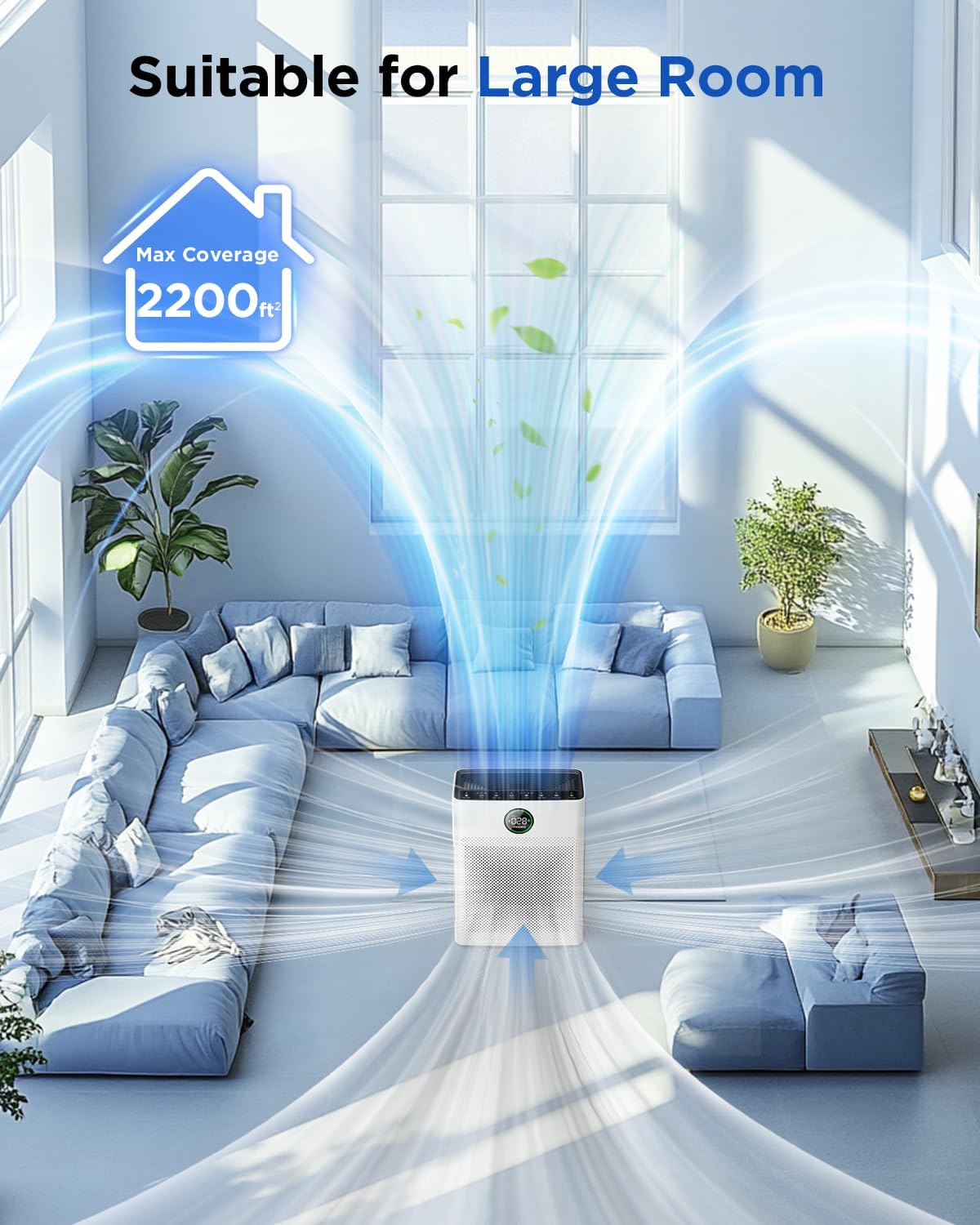
Image 4.1: The MOOKA PR1 Air Purifier positioned in a spacious living area, demonstrating its capability to purify air in large rooms up to 2200 sq.ft.
5. ຄໍາແນະນໍາການດໍາເນີນງານ
ຄຸ້ນເຄີຍກັບກະດານຄວບຄຸມແລະຫນ້າທີ່ຂອງມັນ.
5.1 ເປີດ/ປິດ
- ສຽບສາຍໄຟເຂົ້າໄປໃນບ່ອນສຽບໄຟຟ້າທີ່ເຫມາະສົມ.
- ກົດ ພະລັງງານ ປຸ່ມເພື່ອເປີດຫຼືປິດເຄື່ອງ.
5.2 Fan Speed Modes
The air purifier offers 6 adjustable fan speed modes:
- ຮູບແບບການນອນ: Operates at the lowest fan speed (26dB) for quiet operation during rest.
- I, II, III: Manual fan speed settings from low to high.
- ແບບອັດຕະໂນມັດ: ຄວາມໄວຂອງພັດລົມຈະປັບໂດຍອັດຕະໂນມັດໂດຍອີງໃສ່ຄຸນນະພາບອາກາດທີ່ກວດພົບ.
- ໂໝດສັດລ້ຽງ: Increases purification effect to capture pet hair and odors faster.
ກົດ ຄວາມໄວ ເພື່ອໝຸນວຽນຜ່ານໂໝດທີ່ມີຢູ່.

Image 5.1: The MOOKA PR1 Air Purifier with a dog, emphasizing the 'Pet Mode' feature on the control panel, designed for pet owners.
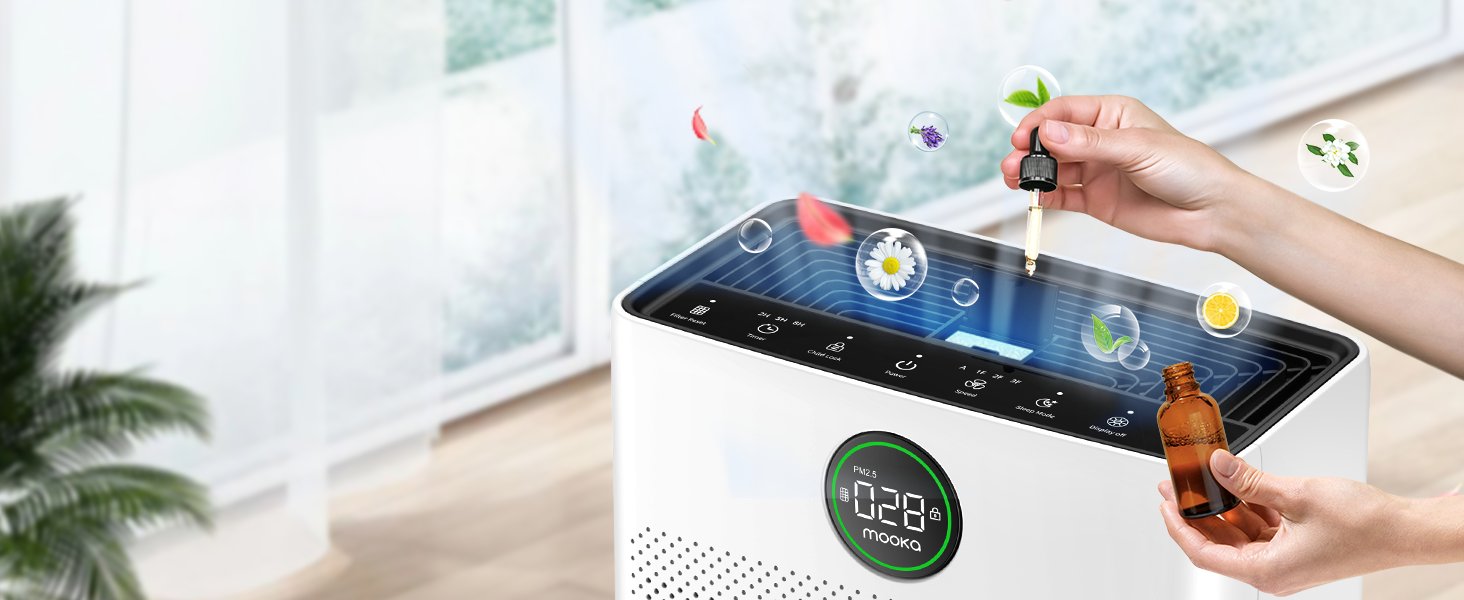
Image 5.2: The air purifier operating quietly in a bedroom at 26dB, indicating its suitability for undisturbed sleep.
5.3 Air Quality Display
The PR1 is equipped with a PM2.5 sensor that displays real-time air quality levels on the screen. The indicator light changes color to reflect air quality:
- ສີຂຽວ: Good air quality (0-75 PM2.5)
- ສີສົ້ມ: ຄຸນນະພາບອາກາດປານກາງ (76-150 PM2.5)
- ສີແດງ: Poor air quality (>150 PM2.5)
Upon powering on, the air purifier enters a preheating state, and the indicator light will flash for approximately one minute before displaying the current air quality.

Image 5.3: The air quality sensor display on the MOOKA PR1, showing PM2.5 levels and their corresponding color-coded air quality ratings.
5.4 ຟັງຊັນຈັບເວລາ
The timer allows you to set the air purifier to operate for a specific duration before automatically turning off.
- ກົດ ໂມງຈັບເວລາ button to select desired operating hours (e.g., 2H, 5H, 8H).
5.5 ລັອກເດັກ
The Child Lock feature prevents accidental changes to settings.
- ກົດຄ້າງໄວ້ ລັອກເດັກ button for 3 seconds to activate or deactivate.
5.6 Aroma Function
The air purifier includes an aroma function to diffuse essential oils.
- Locate the aroma pad compartment.
- Add a few drops of essential oil to the aroma pad. For first-time use, moisten the pad with more essential oil.
- ປິດຫ້ອງປະດັບ.

Image 5.4: A user adding essential oils to the aroma diffuser compartment of the air purifier, demonstrating the aromatherapy feature.
6. ບໍາລຸງຮັກສາ
ການບໍາລຸງຮັກສາເປັນປົກກະຕິຮັບປະກັນປະສິດທິພາບທີ່ດີທີ່ສຸດແລະຍືດອາຍຸຊີວິດຂອງເຄື່ອງຟອກອາກາດຂອງທ່ານ.
6.1 ການເຮັດຄວາມສະອາດຕົວກອງກ່ອນທີ່ສາມາດລ້າງອອກໄດ້
The pre-filter can be cleaned to maintain efficiency.
- ຖອດປລັກເຄື່ອງຟອກອາກາດ.
- Remove the pre-filter (refer to Filter Installation section).
- Rinse the pre-filter under running water to remove accumulated pet hair and dust.
- Allow the pre-filter to air dry completely in the shade before re-installing.

Image 6.1: The washable pre-filter, illustrating its ability to capture pet hair and the ease of cleaning under water.
6.2 ການທົດແທນການກັ່ນຕອງ
The air purifier has a filter replacement reminder function. The filter indicator light will illuminate when it's time to replace the filter.
- Recommended replacement frequency: Every 3-6 months for optimal purification.
- To reset the filter reminder: After replacing the filter, press and hold the ຣີເຊັດການກັ່ນຕອງ ປຸ່ມສໍາລັບ 3 ວິນາທີ.
- ຮູບແບບການກັ່ນຕອງການທົດແທນ: ຊອກຫາ B0DD3ZZ7ZV.

Image 6.2: The 'Pet Owners Choice' filter, designed to effectively filter pet dander, fluff, pollen, and absorb unwanted odors.
6.3 ການເຮັດຄວາມສະອາດເຊັນເຊີ
Regularly clean the PM2.5 sensor to maintain accurate air quality readings.
- The air quality sensor is located on the left back position of the unit.
- Gently wipe the sensor opening with a dry cotton swab or soft cloth to remove any dust accumulation.
7. ການແກ້ໄຂບັນຫາ
ພາກສ່ວນນີ້ແກ້ໄຂບັນຫາທົ່ວໄປທີ່ທ່ານອາດຈະພົບ.
7.1 Why does the screen show 005 air quality?
If the screen consistently displays '005' or an unexpectedly low reading, consider the following:
- ສະຖານທີ່ເຊັນເຊີ: The air quality sensor is located on the left back position of the unit. Ensure this area is not obstructed.
- ຄວາມສະອາດຂອງເຊັນເຊີ: Dust accumulation on the sensor can affect its accuracy. Refer to Section 6.3 for sensor cleaning instructions.
- ການທຳຄວາມຮ້ອນລ່ວງໜ້າ: After powering on, the air purifier is in a preheating state for about one minute, during which the indicator light flashes. Wait for this process to complete for accurate readings.
- ປັດໄຈສິ່ງແວດລ້ອມ: In very clean environments, a low reading is normal.
7.2 ເຄື່ອງບໍ່ເປີດ
- ກວດສອບວ່າສາຍໄຟໄດ້ຖືກສຽບເຂົ້າກັບທັງຕົວເຄື່ອງ ແລະ ປລັກໄຟຟ້າຢ່າງແໜ້ນໜາແລ້ວ.
- Ensure the electrical outlet is functioning by testing it with another appliance.
7.3 Poor Air Purification
- Check if the filter's plastic packaging has been removed.
- Ensure the filter is correctly installed and not clogged. Replace if necessary (refer to Section 6.2).
- Verify that the air inlet and outlet are not obstructed.
- Select an appropriate fan speed or Auto/Pet mode for the room size and air quality.
8. ຂໍ້ມູນຈໍາເພາະ
| ຄຸນສົມບັດ | ຂໍ້ມູນຈໍາເພາະ |
|---|---|
| ໝາຍເລກຕົວແບບ | PR1 |
| ຂະໜາດສິນຄ້າ | 12.3"D x 6.4"W x 16.3"H |
| ນ້ຳໜັກ | 8.93 ປອນ |
| ພື້ນທີ່ຄອບຄຸມພື້ນ | ເຖິງ 2200 ຕາແມັດ |
| ລະດັບສຽງລົບກວນ (ໂໝດນອນ) | 26 dB |
| ສີ | ສີຂາວ |
| ການຢັ້ງຢືນ | CARB, ETL, DOE, FCC |
| ການປ່ອຍໂອໂຊນ | ບໍ່ |
| ແສງ UV | ບໍ່ |
9. ການຮັບປະກັນແລະການສະຫນັບສະຫນູນ
MOOKA products are designed for long-term use and safety. This product is backed by authoritative certifications.
- For any questions or concerns regarding your MOOKA PR1 Air Purifier, please contact MOOKA customer support.
- Refer to your purchase documentation for specific warranty details.