ແນະນຳ
Welcome to your Amazon Echo Show 11. This manual provides essential information for setting up, operating, maintaining, and troubleshooting your device. The Echo Show 11 features a vibrant Full-HD 11-inch display, spatial audio, and integrates with Alexa+ for a personalized smart home experience.

ຮູບທີ 1: The Amazon Echo Show 11, showcasing its 11-inch display with smart home widgets and a photo slideshow. The device sits on a fabric-covered base.
ແມ່ນຫຍັງຢູ່ໃນກ່ອງ
Upon unboxing your Amazon Echo Show 11, you should find the following items:
- Echo Show 11 (2025 release) device
- ອະແດັບເຕີໄຟ (30W)
- ຄູ່ມືເລີ່ມຕົ້ນໄວ
ຕັ້ງຄ່າ
ປະຕິບັດຕາມຂັ້ນຕອນເຫຼົ່ານີ້ເພື່ອຕັ້ງຄ່າ Echo Show ຂອງທ່ານ 11:
- ເປີດ: Connect the included 30W power adapter to your Echo Show 11 and plug it into a wall outlet. The device will automatically power on.
- ການຕັ້ງຄ່າເບື້ອງຕົ້ນ: Follow the on-screen instructions to select your language, connect to a Wi-Fi network, and log in with your Amazon account. The Echo Show 11 supports Wi-Fi 6E (802.1ax) and 802.11a/b/g/n/ac networks.
- ແອັບ Alexa: For full functionality and advanced settings, download the Alexa app on your Fire OS, Android, or iOS device. The app is also accessible via a web ຕົວທ່ອງເວັບ.
- ການຕັ້ງຄ່າ Wi-Fi ແບບງ່າຍໆ: If you have other Amazon devices, Wi-Fi Simple Setup can streamline the connection process to your network.
ປະຕິບັດການອຸປະກອນ
ຈໍສະແດງຜົນແລະສຽງ
The Echo Show 11 features a 10.95-inch Full HD touchscreen with 1920 x 1200 resolution. Enjoy room-filling spatial audio with a 2.8-inch woofer and two full-range drivers for crisp vocals and a wider sound stage.
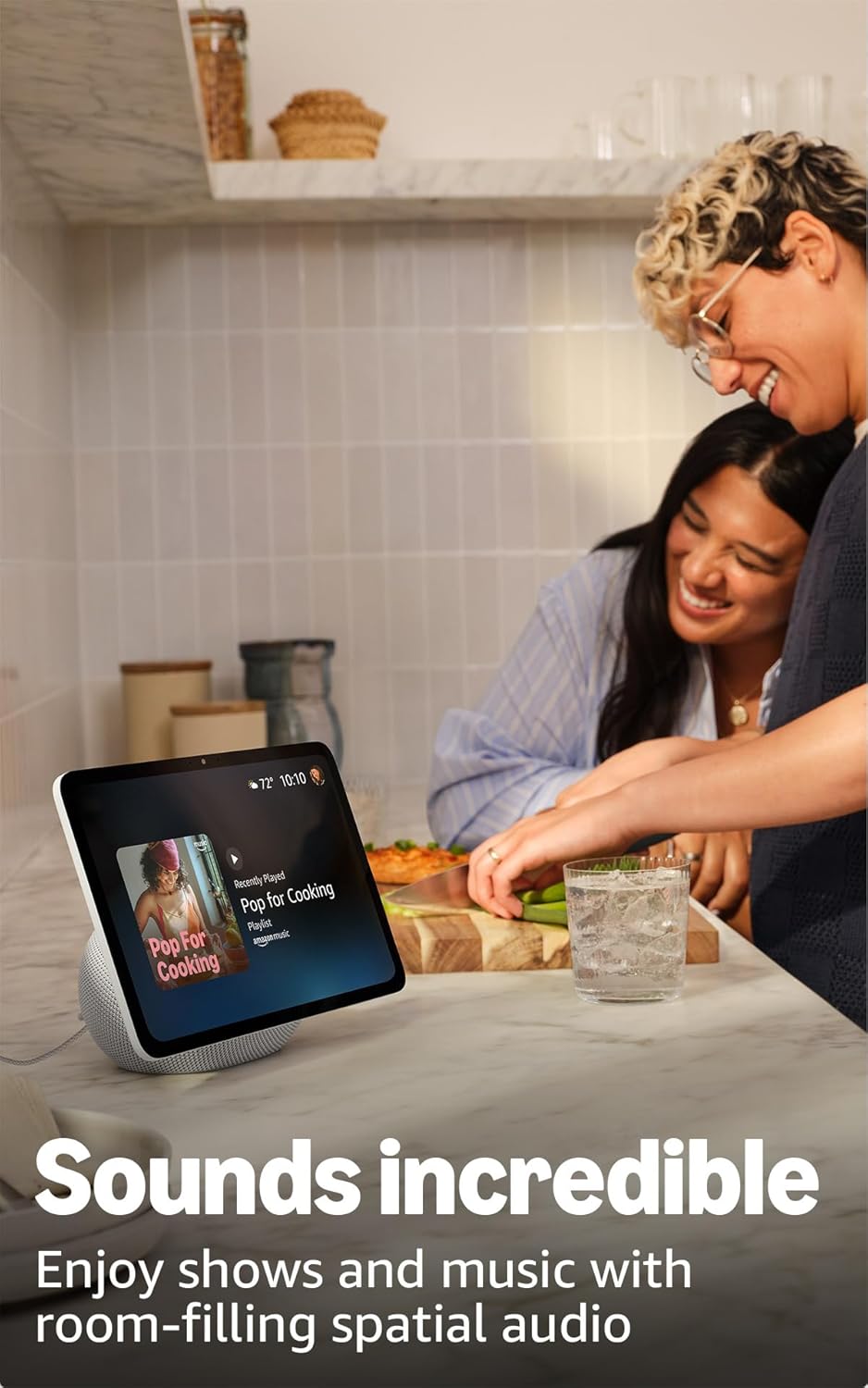
ຮູບທີ 2: The Echo Show 11 playing music, demonstrating its vibrant display and audio capabilities.
Alexa+ Early Access
Your device includes Alexa+ Early Access, offering a smarter and more proactive AI assistant. The new Alexa+ home screen provides glanceable information and personalized content, including helpful follow-ups, customized notifications, and information based on your interests.

ຮູບທີ 3: Visual representation of the new Alexa+ experience.
Everyday Assistant
Use your Echo Show 11 to manage daily tasks. The 11-inch display makes it easy to view recipes, calendars, shopping lists, and more. With Alexa+, you can find recipes, make reservations, and order groceries.
ການຄວບຄຸມເຮືອນອັດສະລິຍະ
The Echo Show 11 features a built-in smart home hub (Zigbee + Matter + Thread Border Router), allowing you to pair and control thousands of compatible devices without an additional hub. View camera feeds, manage lights, and adjust thermostats using the display or your voice. Omnisense technology enables routines via temperature, presence, or visual ID detection.

ຮູບທີ 4: The Echo Show 11 showing its smart home control interface, managing various devices.
Crystal-Clear Video Calls
Engage in video calls on the vibrant 11-inch screen. The 13 MP camera features auto-framing, 3.3x zoom, and noise reduction technology for natural conversations. Use Live View to check on your home remotely.
Photo Memories Display
When not in use, the 11-inch home screen can function as a digital photo frame. Ask Alexa+ to find specific photos or curate a personal slideshow from your Amazon Photos.
ຄຸນສົມບັດຄວາມເປັນສ່ວນຕົວ
Echo Show 11 ຖືກອອກແບບດ້ວຍການຄວບຄຸມຄວາມເປັນສ່ວນຕົວຫຼາຍຊັ້ນ:
- Microphones & Camera Enable/Disable Button: ປຸ່ມທາງກາຍະພາບອະນຸຍາດໃຫ້ທ່ານຕັດການເຊື່ອມຕໍ່ໄມໂຄຣໂຟນ ແລະກ້ອງຖ່າຍຮູບທາງອີເລັກໂທຣນິກ.
- Dedicated Camera Controls: Additional camera controls are available on the device and within the Alexa app.
- ເຕັກໂນໂລຊີ Wake Word: Alexa only begins recording and sending your requests to the cloud after detecting the wake word.
- Voice Recording Review: ທ່ານສາມາດ review ແລະລຶບການບັນທຶກສຽງຂອງທ່ານຜ່ານແອັບຯ Alexa ຫຼືການຕັ້ງຄ່າບັນຊີ Amazon ຂອງທ່ານ.

ຮູບທີ 5: The physical button on the side of the Echo Show 11 to enable or disable the microphones and camera.
ຄຸນນະສົມບັດການເຂົ້າເຖິງ
The Echo Show 11 offers various accessibility features to personalize Alexa to your abilities. Access these settings via ການຕັ້ງຄ່າ → ການເຂົ້າໃຊ້ງານ ໃນອຸປະກອນຂອງທ່ານ:
- ແຕະໃສ່ Alexa: Interact with Alexa via touch through on-screen tiles or a keyboard.
- ການຟັງແບບປັບຕົວ: ໃຫ້ເວລາຫຼາຍກວ່າທີ່ຈະເວົ້າໃຫ້ຈົບກ່ອນທີ່ Alexa ຈະຕອບ.
- ອັດຕາການເວົ້າທີ່ຕ້ອງການ: ຄວບຄຸມວ່າ Alexa ເວົ້າໄວ ຫຼືຊ້າປານໃດ.
- ຄຳບັນຍາຍ: Includes Alexa Captioning, Call Captioning, and Closed Captioning for supported content.
- ສະແດງ ແລະບອກ: ຊ່ວຍໃຫ້ຜູ້ໃຊ້ຕາບອດຫຼືພິການທາງສາຍຕາສາມາດລະບຸຜະລິດຕະພັນໂດຍການເວົ້າວ່າ "Alexa, ຂ້ອຍຖືຫຍັງ."
- ສຽງView ຕົວອ່ານໜ້າຈໍ: ໃຫ້ການໂຕ້ຕອບດ້ວຍສຽງສຳລັບຜູ້ໃຊ້ທີ່ຕາບອດ ຫຼື ມີຄວາມບົກຜ່ອງທາງສາຍຕາ.
- ຕົວຂະຫຍາຍໜ້າຈໍ: ຊູມເຂົ້າ/ອອກ ແລະເລື່ອນຮອບໜ້າຈໍ.
- ແຈ້ງເຕືອນເມື່ອຢູ່ໃກ້: ຫຼິ້ນສຽງການແຈ້ງເຕືອນເມື່ອທ່ານກວດພົບຢູ່ໃກ້ກັບອຸປະກອນ Echo ຂອງທ່ານ.
- Kindle ອ່ານດັງໆ: Alexa ສາມາດອ່ານປຶ້ມ Kindle ຂອງທ່ານດັງໆ.
- ຂໍ້ຄວາມເວລາຈິງ: Type live text during a video call.
- ຄຸນນະສົມບັດເພີ່ມເຕີມປະກອບມີ inversion ສີ, ການແກ້ໄຂສີ, ແລະຮ້ອງຂໍສຽງ.
ບໍາລຸງຮັກສາ
ການດູແລທົ່ວໄປ
To ensure the longevity and optimal performance of your Echo Show 11:
- Keep the device clean by gently wiping the screen and body with a soft, dry, lint-free cloth.
- Avoid exposing the device to extreme temperatures, direct sunlight for extended periods, or excessive moisture.
- ຢ່າໃຊ້ເຄື່ອງເຮັດຄວາມສະອາດຂັດຫຼືສານລະລາຍ.
ອັບເດດຄວາມປອດໄພຊອບແວ
Amazon regularly provides software security updates to enhance the performance and security of your Echo Show 11. Ensure your device is connected to the internet to receive these updates automatically. For more information, visit the Amazon website or manage your content and devices.
ການແກ້ໄຂບັນຫາ
If you encounter issues with your Echo Show 11, consider the following basic troubleshooting steps:
- ບໍ່ມີພະລັງງານ: ໃຫ້ແນ່ໃຈວ່າອະແດັບເຕີໄຟເຊື່ອມຕໍ່ຢ່າງປອດໄພກັບທັງອຸປະກອນ ແລະປລັກສຽບໄຟທີ່ເຮັດວຽກ.
- ບັນຫາການເຊື່ອມຕໍ່ Wi-Fi: Check your Wi-Fi router and ensure it is powered on and functioning. Try restarting your Echo Show 11 and your router. Verify your Wi-Fi password is correct.
- Alexa ບໍ່ຕອບສະໜອງ: Ensure the microphone is not muted (check the privacy button). Speak clearly and ensure you are within range of the device.
- ໜ້າຈໍບໍ່ຕອບສະໜອງ: Try restarting the device by unplugging it for a few seconds and plugging it back in.
- ບັນຫາສຽງ: Check the volume settings on the device. Ensure no external Bluetooth speakers are connected if you intend to use the internal speakers.
For more detailed troubleshooting or persistent issues, refer to the Amazon support webເວັບໄຊ ຫຼືຕິດຕໍ່ບໍລິການລູກຄ້າ.
ຂໍ້ມູນຈໍາເພາະ

ຮູບທີ 6: Size comparison between the Echo Show 11 and Echo Show 8.
| ຂະໜາດ | 10” x 5” x 7.2“ (255mm x 127mm x 182mm) |
| ນ້ຳໜັກ | 45.92 ອໍ (1302 ກຣາມ) |
| ຈໍສະແດງຜົນ | 10.95” Full HD touchscreen with 1920 x 1200 resolution |
| ກ້ອງຖ່າຍຮູບ | 13 MP ພ້ອມການວາງເຟຣມອັດຕະໂນມັດ |
| ສຽງ | ວູບເຟີ 1 x 2.8 ນິ້ວ ແລະ ໄດຣເວີລະດັບເຕັມ 2 ຕົວ |
| ການເຊື່ອມຕໍ່ Wi-Fi | Wi-Fi 6E (802.1ax) supported. Tri-band, Wi-Fi (SISO). Supports 802.11a/b/g/n/ac Wi-Fi networks. Does not support connecting to ad-hoc Wi-Fi networks. |
| ສູນບໍລິການ Smart Home | Zigbee + Matter + Thread Border Router |
| ການເຊື່ອມຕໍ່ Bluetooth | Pro ການກະຈາຍສຽງຂັ້ນສູງfile (A2DP) ແລະ Audio/Video Remote Control Profile (AVRCP) support. Bluetooth speakers requiring PIN codes are not supported. |
| ໂຮງງານຜະລິດ | AZ3 Pro ກັບ AI Accelerator |
| ເຊັນເຊີ | ເຊັນເຊີອຸນຫະພູມອາກາດລ້ອມຮອບ, ເຊັນເຊີແສງອາກາດລ້ອມຮອບ, ການກວດຈັບການມີຢູ່, ກ້ອງຖ່າຍຮູບ |
| ເຕັກໂນໂລຊີ Omnisense | Custom technology for ambient AI, enabling visual ID, proximity and presence detection, temperature sensing, and adaptive brightness and color. |
| ຄວາມຕ້ອງການລະບົບ | Echo Show 11 connects to Wi-Fi. Alexa app compatible with Fire OS, Android, iOS, and web ຕົວທ່ອງເວັບ. |
| ພາສາ | Alexa ເວົ້າພາສາອັງກິດແລະແອສປາໂຍນ |
ການຮັບປະກັນແລະການສະຫນັບສະຫນູນ
ຮັບປະກັນ
Your Amazon Echo Show 11 comes with a 1-year limited warranty and service. Optional 1-year, 2-year, and 3-year extended warranties are available for U.S. customers, sold separately. Use of the Echo Show 11 is subject to the terms found on the Amazon webເວັບໄຊ.
ການຊ່ວຍເຫຼືອລູກຄ້າ
ສໍາລັບການຊ່ວຍເຫຼືອເພີ່ມເຕີມ, ສະຫນັບສະຫນູນດ້ານວິຊາການ, ຫຼືການຮ້ອງຂໍການຮັບປະກັນ, ກະລຸນາໄປຢ້ຽມຢາມສະຫນັບສະຫນູນ Amazon ຢ່າງເປັນທາງການ website or contact Amazon customer service directly. You can also find more information and FAQs in the Alexa Privacy Hub and about Amazon Sidewalk on the Amazon webເວັບໄຊ.


